Blog · Claude plans
Claude Usage Limits Explained: 5-Hour Sessions, Weekly Limits and What to Do When You Hit One
Claude usage limits cap how much you can use Claude in a set period. Every plan has a session limit that resets every five hours, and paid plans add a weekly limit that resets at a fixed time assigned to your account. Chat, Claude Desktop, Cowork and Claude Code all draw from the same allowance. Check yours in Settings > Usage. Facts checked on Anthropic’s help center, October 2026.
Quick answer
- There are two limits. A session limit that resets every five hours (all plans) and a weekly limit that resets at a fixed day and time assigned to your account (paid plans). Max plans also have a separate weekly cap for Fable models.
- They are shared. Usage in Claude on the web, Claude Desktop, mobile, Cowork and Claude Code all counts against the same limits.
- Check where you stand in Settings > Usage, which shows progress bars for the current session and the week, with reset times. In Claude Code, run
/usage. - When you hit one, you can wait for the reset, use a free limit reset if your account has one, turn on usage credits to keep going at API rates, or upgrade, which applies straight away.
- To use less, start new chats for new topics, keep reference files in a Project, and pick a lighter model or lower effort for routine work.
Usage limits vs length limits
Two different things can stop you, and the fix is different for each.
- Usage limits control how much you can use Claude across all your conversations over time: the session and weekly allowances in this guide.
- Length limits control how long a single conversation can get. They come from the model’s context window, which on paid plans is up to 1M tokens on the newest models and 500K or 200K on others. On paid plans with code execution enabled, Claude summarises earlier messages automatically when a chat approaches the limit, so length errors are rare.
If you see “Your message will exceed the length limit for this chat”, that is a length limit: attach fewer or smaller files or start a new conversation. If you see a reset time, that is a usage limit. Source: How do usage and length limits work?, checked October 2026.
Claude usage limits by plan
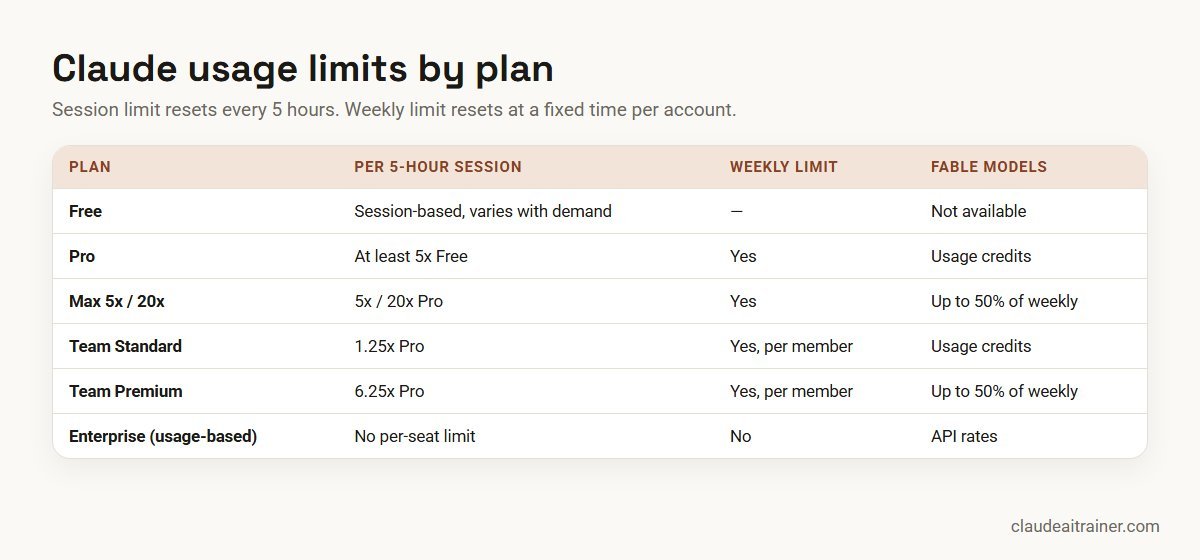
Anthropic does not publish a fixed number of messages for any plan, because a message’s cost depends on its length, attachments, model and tools. What it does publish is each plan’s allowance relative to the others:
| Plan (list price, US) | Session limit (resets every 5 hours) | Weekly limit | Fable models |
|---|---|---|---|
| Free ($0) | Session-based; varies with demand | Not described for Free | Not available |
| Pro ($20 monthly, or $17/month billed annually) | At least 5x Free per session (pricing page) | Yes, across all models | Usage credits only |
| Max 5x ($100/month) | 5x Pro per session | Yes, across all models | Up to 50% of the weekly limit |
| Max 20x ($200/month) | 20x Pro per session | Yes, across all models | Up to 50% of the weekly limit |
| Team Standard seat ($25 monthly, $20 annual) | 1.25x Pro per session | Yes, per member | Usage credits only |
| Team Premium seat ($125 monthly, $100 annual) | 6.25x Pro per session | Yes, per member | Up to 50% of the weekly limit |
| Enterprise, usage-based ($20/seat/month annual + API-rate usage) | No per-seat usage limits; spend limits set by admins | None | Billed at API rates |
Sources: What is the Pro plan?, What is the Max plan?, What is the Team plan?, What is the Enterprise plan?, Claude Fable models on your plan and claude.com/pricing, all checked October 2026. Prices are US list prices; local prices and tax treatment vary by region, and Max is billed monthly only. Some older Enterprise contracts still use Standard and Premium seats with per-seat limits until renewal.
Two points people miss. The Max Fable cap is not extra capacity: Fable use draws from the same weekly limit and uses it faster than other models. And all plans carry a caveat that Anthropic may limit usage in other ways, such as weekly and monthly caps or model and feature usage, to manage capacity.
How the 5-hour session limit works
Your session allowance resets every five hours. Settings > Usage shows how much of the current session you have used and how much time is left before it resets, so you do not have to work it out. The size of the allowance depends on your plan (see the table), and how fast you use it depends on what you ask Claude to do.
As you get close, Claude shows “Approaching session limit”, or the percentage used when that is available. When you reach it, you see “5-hour limit reached – resets [time]”.
How the weekly limit works
Paid plans also have a weekly limit that applies across all models. It resets at a fixed time each week that is assigned to your account. According to Anthropic, that day and time stay the same regardless of when you start using Claude or when your subscription began, and you get your full weekly allowance each cycle. Some third-party guides describe a rolling seven-day window; Anthropic’s own plan articles describe a fixed weekly reset, so check Settings > Usage for yours.
The weekly message reads “You’ve reached your weekly limit. It resets [day] at [time].” On Max, and on Premium seats, there is also a separate weekly limit for Fable models, shown on the same page.
What uses your limit fastest
Anthropic’s best-practices article lists the factors that affect how far your allowance goes:
- Message length and file attachment size
- Current conversation length: every reply carries the conversation so far, so a long chat costs more per message
- Tool usage, such as Research and web search; connected apps are token-intensive too
- Model choice: Opus and Fable use more than Sonnet or Haiku
- Effort level and extended thinking
- Artifact creation
- Multi-step tasks such as running code, creating files or browsing websites, which is why Cowork tasks and Claude Code sessions use more than quick questions
Long chats have a second cost. When automatic context management summarises a conversation that is nearing the context limit, that also uses more of your allowance. Starting a fresh chat is often the single best habit.
For teams
Most limit problems are habit problems
Teams that learn to use Projects, the right model and short focused chats get far more from the same plan. We run hands-on sessions where people practise this on their own work. Book a short call if that would help.
How to check your usage
- Claude on the web or Claude Desktop: open Settings > Usage. The Plan usage limits section shows the current session (with time remaining), your weekly limits with reset times, a Fable bar if your plan includes it, and usage credits if you have them on.
- Claude Code: run
/usage. Subscribers see plan usage bars, activity stats and, on Pro, Max, Team and Enterprise, a breakdown of what used the allowance (skills, subagents, plugins, MCP servers) with suggested fixes. The breakdown covers local sessions on that machine only. - Usage-based Enterprise: there are no plan limits to track, but members can see consumption in Settings > Usage and admins see spend in analytics.
Your options when you hit a limit
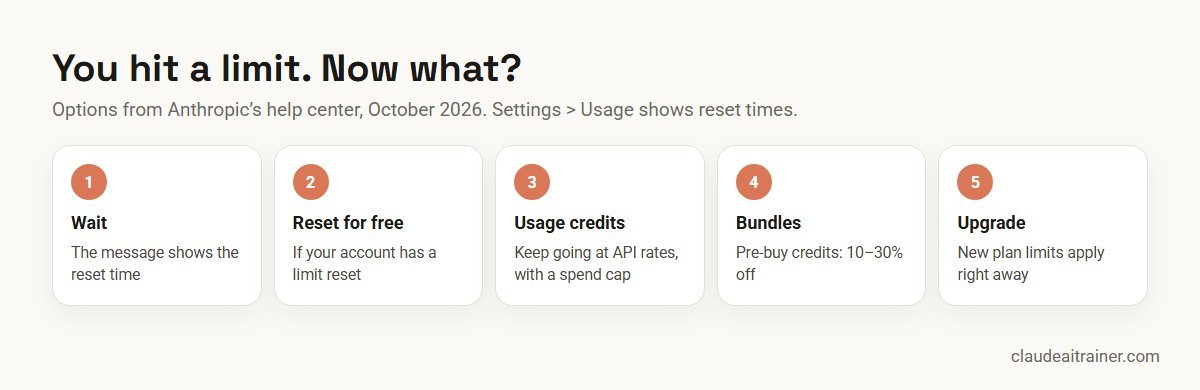
1. Wait for the reset. The message shows the exact time. Nothing else is needed, and it costs nothing.
2. Use a limit reset, if you have one. Anthropic occasionally gives eligible plans a free limit reset that sets either the session or the weekly limit back to full. Go to Settings > Usage on the web or in Claude Desktop and click Reset for free in the Resets section, then confirm. The same button appears on the limit message. It cannot be undone, unused resets expire on the date shown, and the button is not available on mobile or in Claude Code, although the reset applies there too.
3. Turn on usage credits (paid plans). Usage credits let you keep working past your included limits at standard API rates, billed separately from your subscription:
- Go to Settings > Usage and find Usage credits.
- Click Enable and add a payment method if needed.
- Click Adjust limit to set a monthly spend limit (or choose unlimited).
- Click Add funds to prepay, and optionally turn on auto-reload.
When a limit is reached with credits on, the message changes to “Now using credits” and your work continues until you hit your spend limit or the balance runs out. If you subscribed through the iOS or Android app, you can only enable credits on the web. The monthly API credits included with Max plans are separate and cannot be used for usage credits. Source: Manage usage credits for paid Claude plans, checked October 2026.
4. Buy usage bundles to pay less for credits. On Pro, Max and Team you can pre-buy credits in bundles once usage credits are enabled: Settings > Usage > Buy usage.
| Bundle value | Discount | You pay |
|---|---|---|
| $50 | 10% | $45 |
| $250 | 20% | $200 |
| $1,000 | 30% | $700 |
Individual Pro and Max subscribers can buy up to $2,000 of discounted bundles a month; Team owners up to $3,000. Usage above that is billed at standard credit rates. Source: Buy usage bundles, checked October 2026.
5. Upgrade, or switch model. If you hit limits every week, a bigger plan is usually simpler than credits; a new plan’s limits apply right away. For a Fable limit, switching to another model lets you continue inside your plan. For the general session or weekly limit, switching models does not help, because those limits apply across all models.
Ten ways to make your usage last
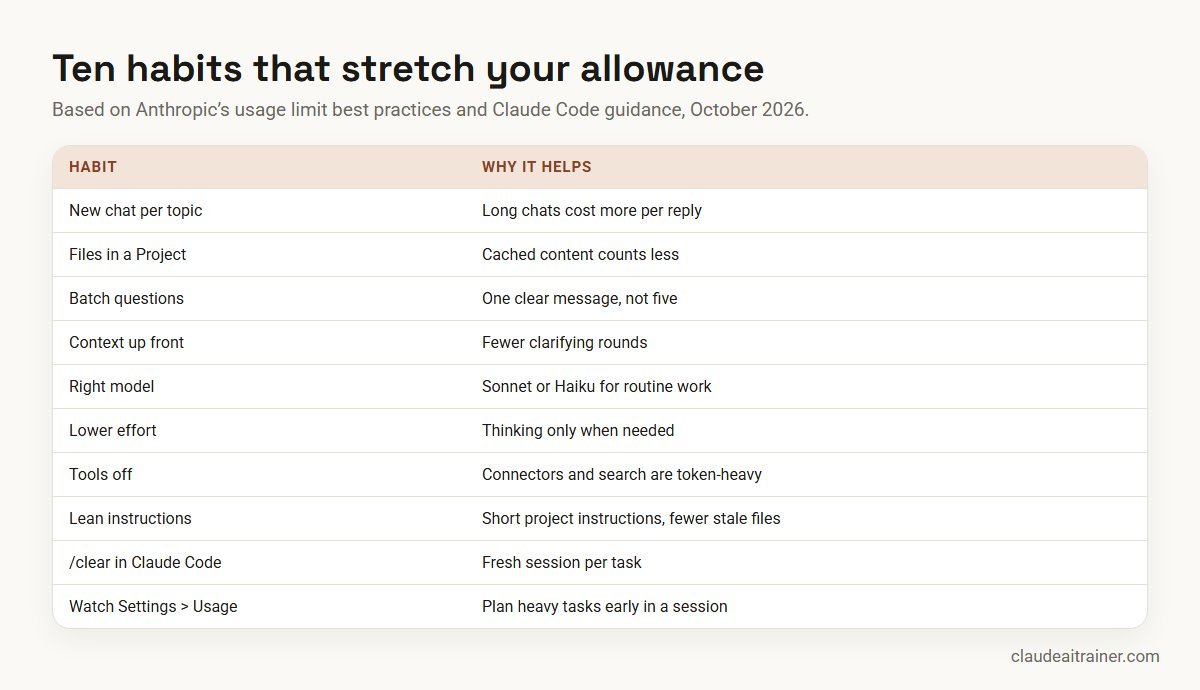
- Start a new chat for each new topic. A long conversation makes every reply more expensive.
- Put reference files in a Project. Project content is cached, and cached content counts less against your limits when you reuse it. Caches expire after inactivity, so the first message after a long break counts in full.
- Batch related questions into one well-structured message instead of five short ones.
- Give full context up front so Claude does not need clarifying rounds.
- Match the model to the job. Use Sonnet or Haiku for routine drafting and summaries, and save Opus or Fable for hard problems. Our guide to choosing the right Claude model helps.
- Lower the effort level and turn off extended thinking when you do not need deep reasoning.
- Turn off tools you are not using, and tell Claude not to search the web when current information is not needed.
- Keep project instructions short and remove project files you no longer use.
- Let memory carry context. Memory and past-chat search save you re-pasting background; see our Claude memory guide.
- Watch Settings > Usage and plan heavy work, such as long Cowork tasks, early in a fresh session.
Claude Code and usage limits
On Pro, Max, Team and Enterprise seats, Claude Code shares the same session and weekly limits as chat, including use in VS Code, Cursor and JetBrains IDEs. A few Claude Code specifics are worth knowing:
- Check your login. If an
ANTHROPIC_API_KEYenvironment variable is set, Claude Code uses that key instead of your subscription, and you are billed at API rates instead of using your plan. - Wrap-up allowance. If you hit the session limit mid-response, Claude Code may finish the step in progress and show “Usage limit reached · wrapping up”. The allowance is small; on Pro it applies up to once per weekly period. It is rolling out gradually.
- Clear between tasks.
/clearstarts fresh (your CLAUDE.md stays), and/compactsummarises a long session you need to continue. Anthropic’s guide says most “burned through my limit by lunchtime” reports come back to long, uncleared sessions, the wrong model, pasted files, a bloated CLAUDE.md or skipping a plan before big changes. - Plan with Opus, build with Sonnet.
/model opusplanuses Opus for planning and Sonnet for execution. - Keep going.
/usage-creditsopens your usage-credit settings (or, for Team and Enterprise members without billing access, sends a request to admins). Recent versions can wait for the reset and continue the interrupted task automatically.
For more on plans and cost for developers, see Claude Code pricing for teams.
Usage limits on Team and Enterprise
Limits are per person. On Team, each member has their own limits; one person hitting theirs does not affect anyone else, and allowances cannot be pooled or transferred. Seats are for one named person. Give Premium seats to the heavy users and keep everyone else on Standard.
Owners control overage. Owners and Primary Owners turn on usage credits in Organization settings > Usage and can set a monthly spend limit for the whole organisation and for individual members. On Team, owners prepay credits; on seat-based Enterprise, credits are billed monthly in arrears, spend limits can also be set by seat tier or group, and members who hit a limit see a Request usage credits link that sends a request to admins. A member who reaches their personal spend limit is paused until the month ends or the limit is raised. Small overshoots are possible because the check happens before each request.
Usage-based Enterprise works differently. The seat fee covers access only; every token in chat, Claude Code and Cowork is billed at API rates, with no per-seat limits. Cost control comes from spend limits at organisation, group or user level. Our guide to the best Claude plan for business compares the plans in detail.
Worked example: a 12-person agency on Team
An illustrative example. A content agency puts ten writers and account managers on Standard seats and its two heaviest users, a strategist who runs long research tasks and a developer who uses Claude Code all day, on Premium seats.
- Week 1: two writers hit their session limit by mid-morning. The cause is one chat per client that has run for weeks, plus brand guides re-uploaded every time.
- Fix: the team creates a Project per client with the brand guide, tone rules and past examples, and agrees one new chat per deliverable. Writers switch to Sonnet for drafts and keep Opus for pitch strategy.
- Safety net: the owner enables usage credits with a modest monthly organisation cap and a lower per-member cap, so nobody is blocked on a deadline day but spend stays predictable.
- Review: after a month the owner checks the usage-credit spend per member. One Standard user consistently spends on credits, so the owner moves that person to a Premium seat instead.
Troubleshooting
- “I hit the limit after a few messages.” Look for a very long chat, large attachments, Research or many tool calls, or Opus or Fable at high effort. Start a new chat and move files into a Project.
- “It looks like I was cut off, but credits are on.” The approaching-limit warning can still be showing when you switch to credits. Send the next message; it changes to “Now using credits”.
- “Claude Code charged API usage.” An
ANTHROPIC_API_KEYvariable is set, or you logged in with a Console account. Run/logout, unset the variable and sign in with your subscription. - “I can’t find Reset for free.” It is only on the web and Claude Desktop, and only when your account has a reset available.
- “I can’t enable usage credits.” If you subscribed through the iOS or Android app, enable them on the web. On Team and Enterprise only owners can turn them on.
- “Due to unexpected capacity constraints, Claude is unable to respond.” That is high demand, not your limit. Try again in a few minutes; status.claude.com lists real outages.
- “I can’t see Fable.” Fable needs a paid plan, a recent Claude Code version (2.1.255 or later for Fable 5.1) or the latest Claude Desktop for Cowork, and your organisation may not have enabled it.
- “Usage seems different since the new Claude experience.” Anthropic says usage may be measured slightly differently while the merged chat and Cowork experience rolls out. Check Settings > Usage.
Next step
Get more from every seat
We help teams pick seat types, set usage-credit spend limits and build working habits that stretch the allowance in chat, Cowork and Claude Code. Online or on-site.
Related reading
How we checked
We read Anthropic’s help center articles How do usage and length limits work?, Usage limit best practices, What is the Pro plan?, What is the Max plan?, What is the Team plan?, What is the Enterprise plan?, Claude Fable models on your plan, Manage usage credits (both versions), Buy usage bundles, What is a limit reset?, Troubleshoot Claude error messages and Use Claude Code with your Pro or Max plan, plus the Claude Code documentation page Manage costs effectively and the pricing page at claude.com/pricing, on 29 October 2026. Anthropic changes plans and allowances from time to time, so treat Settings > Usage as the final word for your account.
Key takeaways
- Every plan has a session limit that resets every five hours; paid plans also have a weekly limit that resets at a fixed time assigned to your account
- Chat, Claude Desktop, mobile, Cowork and Claude Code share one allowance
- Max is 5x or 20x Pro per session; Team Standard is 1.25x Pro and Premium 6.25x; usage-based Enterprise has no per-seat limits
- Long chats, big files, Research, tools, Opus or Fable and high effort use the allowance fastest
- Settings > Usage shows your bars and reset times; /usage does the same in Claude Code
- When you hit a limit: wait, use a limit reset if you have one, turn on usage credits, or upgrade
FAQ
Claude usage limits: common questions
What are Claude's usage limits?
They cap how much you can use Claude over time. Every plan has a session limit that resets every five hours, and paid plans add a weekly limit. The size depends on your plan, and chat, Desktop, mobile, Cowork and Claude Code share the same allowance (checked October 2026).
How long does Claude's usage limit last?
The session limit resets every five hours. The weekly limit resets once a week at a fixed day and time assigned to your account. The limit message and Settings, Usage both show the exact reset time.
When does Claude's weekly limit reset?
At a fixed time each week assigned to your account. Anthropic says the day and time stay the same regardless of when you start using Claude or when you subscribed. You can see it in Settings, Usage.
Why do I hit Claude usage limits so fast?
Usually because of a long conversation, large attachments, Research or other tools, multi-step tasks, or using Opus or Fable at high effort. Start new chats for new topics, keep files in a Project and use a lighter model for routine work.
Does Claude Code share usage limits with Claude chat?
Yes. On Pro, Max, Team and Enterprise seats, Claude Code, including in IDEs, uses the same session and weekly limits as Claude chat and Cowork. If you sign in with an API key instead, you pay per token with no plan limit.
How many messages can I send on Claude Pro?
Anthropic does not publish a fixed number, because it depends on message length, attachments, conversation length, model and features. The pricing page says Pro gives at least 5x the usage of Free per 5-hour session.
What are the limits on the free Claude plan?
Free has a session-based limit that resets every five hours, and the number of messages varies with demand. Free does not include Fable models or Research.
Can I get unlimited usage on Claude?
No subscription is unlimited. Paid plans can enable usage credits to keep working past the included limits at API rates, with a spend limit you choose. Usage-based Enterprise plans have no per-seat limits but bill every token.
What is the difference between Pro and Max usage?
Max 5x gives five times Pro’s per-session allowance and Max 20x gives twenty times. Both Max tiers also include Fable models up to 50% of the weekly limit, which Pro does not.
What happens when I reach my Claude usage limit?
Without usage credits, Claude stops and shows when the limit resets. With usage credits on, your requests continue at API rates and the message changes to Now using credits. You can also use a free limit reset if your account has one, or upgrade.
Do Team members share usage limits?
No. On the Team plan each member has their own limits and one person reaching theirs does not affect others. Limits cannot be transferred between members.
Can I reset my Claude usage limit?
Only if Anthropic has given your account a limit reset. If so, go to Settings, Usage on the web or Claude Desktop and click Reset for free. Otherwise wait for the reset time, enable usage credits or upgrade.
Do you help teams manage Claude usage?
Yes. Our hands-on sessions cover Projects, model choice, Claude Code habits and admin spend controls on your team’s own work. See our corporate training page or book a short call.
Trusted by
Teams we’ve trained
…and 200+ organisations, across 16+ countries.
What participants say
Real feedback from real sessions
Verified feedback collected from participants across corporate sessions — average rating 4.8/5.
“A very productive session for working professionals. A must-do.”
“The session was highly insightful and conducted in a very professional and interactive manner. Learnt about AI and excited to learn more!”
“Highly recommended! Hands-on and directly useful — from making PPTs and strategic plans to building KRAs.”
“I would recommend everyone to go through this session — it clarifies both what to expect from AI and where AI isn’t needed.”
“A nice interactive session with a lot of new insights and the power of AI. This will help me save time in routine activities.”
“A very good training session. AI can do wonders — we’ll implement it to create efficiency and save time.”
Explore more
Keep going with Claude AI training
Work with us
Help your team stop hitting limits
Tell us which plan your team is on and where people run out of usage. We will suggest a short, hands-on format, online or on-site, covering Projects, model choice, Claude Code habits and admin spend controls, and send a fixed proposal, usually within one business day.