Blog · Claude plans
Best Claude Plan for Business Teams (2026-27): Pro vs Max vs Team vs Enterprise Compared
Anthropic sells Claude to individuals and organisations on five plans, and the right one for a business is not always the most expensive. This guide compares Pro, Max, Team and Enterprise on what a manager actually has to decide: price per person, seat minimums, how much usage each seat gets, which admin and security controls come with it, and what happens to your data. Every figure comes from claude.com/pricing and the Claude help centre, checked on 23 October 2026.
The quick answer
For most businesses with between 2 and 150 people using Claude, Claude Team is the plan to start with. It is the cheapest plan with central billing, single sign-on, admin controls and a default of no model training on your content. Move to Claude Enterprise when you need SCIM provisioning, audit logs, role-based access, custom data retention or a compliance API, or when you pass 150 seats. Pro and Max are individual plans: excellent for a freelancer or a founder, but they give a company no central control.
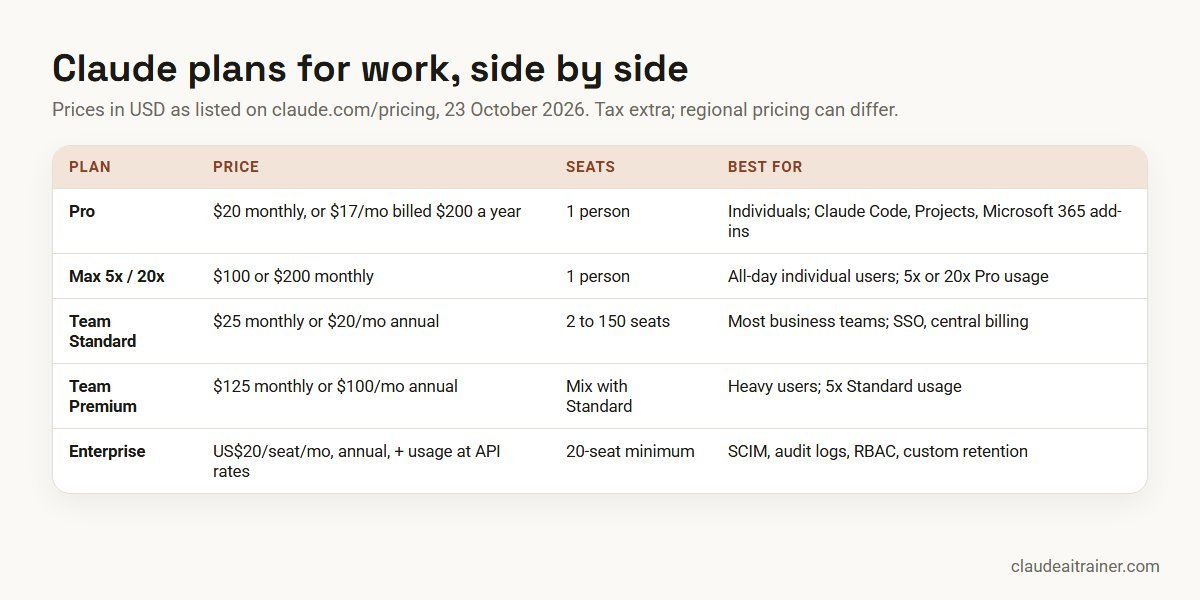
- Claude Pro: one person, $20 a month or $17 a month billed $200 a year.
- Claude Max: one heavy user, $100 (5x) or $200 (20x) a month.
- Claude Team: 2 to 150 seats; Standard $25 monthly or $20 annual per seat, Premium $125 or $100.
- Claude Enterprise: US$20 per seat per month billed annually, 20-seat minimum, plus usage at API rates.
How we checked. Every price, seat rule and feature below is taken from Anthropic’s own pages on 23 October 2026: claude.com/pricing, the help-centre articles “What is the Team plan?” and “What is the Max plan?”, and Anthropic’s announcement that Cowork and chat have become one Claude. Prices are in US dollars as Anthropic lists them and exclude tax; Anthropic notes that pricing, currency and tax handling vary by region. Plans change often, so confirm on the pricing page before you buy.
This article covers the Claude app plans: Claude on web, desktop and mobile, plus Claude Code and the add-ins that come with them. If you are budgeting for the API, read Claude API pricing explained; if you are budgeting for engineering, see our Claude Code pricing guide for teams.
Claude plans compared
| Pro | Max | Team | Enterprise | |
|---|---|---|---|---|
| Price (USD) | $20 monthly; $17/mo billed $200 yearly | From $100 monthly (5x); $200 (20x) | Standard $25 monthly or $20 annual; Premium $125 or $100 | US$20/seat/mo billed annually, plus usage at API rates |
| Seats | 1 | 1 | 2 to 150 | 20-seat minimum |
| Usage | At least 5x Free per 5-hour session | 5x or 20x Pro | Standard: more than Pro. Premium: 5x Standard | Billed at API rates; admins set spend limits |
| Claude Code, Cowork features | Yes (Cowork rolling out) | Yes (Cowork rolling out) | Yes | Yes |
| Project sharing | No | No | Yes | Yes |
| SSO, central billing | No | No | Yes | Yes |
| SCIM, audit logs, RBAC | No | No | No | Yes |
| Model training on your content | Opt-out | Opt-out | None by default | None by default |
| Monthly API credits | No | $100 (5x) or $200 (20x) | Up to $500, pooled | No |
| Payment | Card | Card, monthly | Card, monthly or annual | Card or ACH, annual; invoicing through sales |
Source: claude.com/pricing, checked October 2026. Free ($0) is also available for individuals, with up to five projects and no Claude Code.
Claude Pro: for one person doing serious work
What it is. Pro is Anthropic’s individual plan “for everyday work”. On top of Free, the pricing page lists more usage, the ability to hand off and schedule tasks, Claude Code, Projects, more Claude models, Claude in Chrome and Claude for Microsoft 365, plus Claude Dashboards in beta.
Who it suits. A consultant, founder or specialist who pays for their own tools, or an employee trialling Claude before the company buys seats.
Setting it up. Sign in at claude.ai, open Settings, then Billing, and choose Pro monthly or annual. Check your privacy settings straight away: on individual plans, model training is listed as opt-out, so switch it off if you will use work material.
Limits and cautions. Usage resets on a rolling five-hour window and paid plans also have weekly limits; Claude chat and Claude Code draw from the same pool. There is no admin console, no SSO and no way for a company to see or remove the account. Payment is by card only. For anything beyond a personal trial, a company is better served by Team.
Claude Max: for the heaviest individual users
What it is. Max is Pro with much more room. You choose 5x or 20x Pro’s usage per five-hour session; the help centre lists $100 a month for 5x and $200 a month for 20x, billed monthly only. Max adds higher output limits, early access to advanced features, priority access at busy times, and $100 or $200 a month in API credits for building on the Claude Platform.
Who it suits. People who work with Claude all day, such as a solo developer living in Claude Code, an analyst running long research tasks, or an owner-operator using Claude as a full-time assistant.
Setting it up. Upgrade from Settings, then Billing. Unused time on your current plan is credited toward the new one.
Limits and cautions. Max is still an individual plan with individual-plan data terms and no company controls. If several people in a company need Max-level usage, Team Premium seats usually make more sense, because they bring admin, SSO and no-training-by-default with them.
For managers choosing a plan
The plan is step one. Adoption is step two
Teams on the same plan get very different value from Claude depending on how well people know Projects, connectors, skills and the Microsoft 365 add-ins. Our hands-on workshops use your own documents and workflows, online or on-site. If you are about to buy seats, a short call helps you plan the rollout.
Claude Team: the default for most businesses
What it is. Team is Anthropic’s self-serve plan for organisations of 2 to 150 seats. It comes in two seat types you can mix in one workspace:
- Standard seat: $25 per seat per month billed monthly, or $20 billed annually, with “more usage than Pro”.
- Premium seat: $125 per seat per month billed monthly, or $100 billed annually, with five times the usage of a Standard seat.
The pricing page lists Claude Code and Claude Cowork; Claude Design, Slides and Docs; Claude Motion and Dashboards in beta; Microsoft 365 and @Claude; enterprise search across your organisation; central billing and administration; SSO; admin controls for remote and local connectors; enterprise deployment for the desktop app; no model training on your content by default; and up to $500 a month in pooled API credits. The help centre adds connectors for Google Drive, Gmail, Google Calendar, GitHub, Microsoft 365 and Slack, spending caps at organisation and user level, and optional prepaid usage credits so people can keep working after they hit a limit.
Who it suits. Any team from two people to a 150-person company that wants shared projects, consistent controls and one invoice, without a sales process.
Setting it up.
- From the pricing page choose Get Team plan and create the organisation with a company email address.
- Pick monthly or annual billing and buy at least two seats, Standard, Premium or a mix.
- Verify your domain and, if you use an identity provider, switch on SSO.
- Set organisation instructions and decide which connectors are allowed.
- Invite members, assign seat types and create the first shared projects.
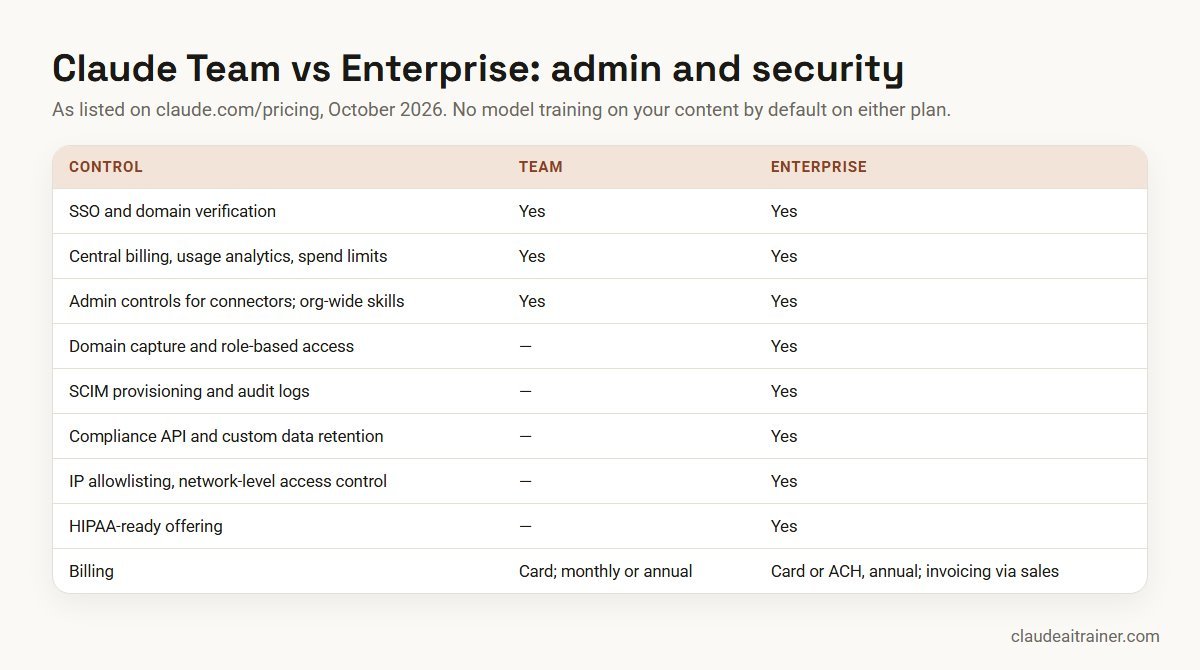
Limits and cautions. Team has no SCIM, audit logs, role-based access, domain capture or custom data retention: on the pricing page those are Enterprise features. Payment is by card only, with no invoicing or ACH. On Fable, the model family Anthropic describes as next-generation intelligence for long-running agents, the pricing page lists access on Team as “50% of weekly limits on premium seats”. Anthropic’s merged Claude experience, where Cowork lives inside every conversation, was announced for Pro and Max first, with Team “to follow soon”.

Claude Enterprise: when governance decides
What it is. Enterprise is for “large businesses operating at scale”. The price is US$20 per seat per month, billed annually, with a 20-seat minimum, plus usage billed at API rates, so the total depends on the models and tasks your people run. It includes everything in Team plus:
- admin-set spend limits for users and the organisation
- role-based access with fine-grained permissions
- SCIM provisioning and audit logs
- a Compliance API for observability and monitoring
- custom data retention controls
- network-level access control and IP allowlisting
- a HIPAA-ready offering
- Claude Security (beta), domain capture and account migration from your domains
Two ways to buy. Self-serve Enterprise takes card or ACH and bills annually. Sales-assisted Enterprise adds invoicing and net terms, AWS Marketplace availability, consultation, trials, tiered incentives on committed spend and customer success support at certain spend thresholds.
Who it suits. Organisations with more than 150 users, regulated industries, and any company whose security team requires automated provisioning, audit trails or set retention periods.
Setting it up. Choose Create plan under Enterprise (self-serve) on the pricing page, or contact sales. Plan identity first: connect SCIM to your identity provider, use domain capture and account migration to bring existing accounts on your domains into the organisation, set roles, then configure retention and spend limits before inviting departments.
Limits and cautions. Because usage is billed at API rates on top of the seat fee, budget with a pilot: measure a month of real use from a representative group before committing everyone. Enterprise has no monthly API credits and no “extra usage” option, because all usage is already metered.
Claude Team vs Enterprise: the real differences
This is the decision most growing companies face. Both plans give you central billing, SSO, domain verification, connector controls, usage analytics, organisation-wide skills, spend controls and no training on your content by default. The differences are governance, scale and billing.
| Question | Choose Team if… | Choose Enterprise if… |
|---|---|---|
| How many people? | 2 to 150 | 20 or more, with no upper limit stated |
| How do you add and remove users? | Manual invites are fine | You need SCIM from your identity provider |
| Does security need audit logs? | No | Yes, or a Compliance API feed to your tools |
| Do you need set retention periods? | Default retention is acceptable | You need custom data retention |
| How predictable must cost be? | Fixed seat price, optional extra usage | Seat fee plus metered usage you can cap |
| How do you pay? | Card, monthly or annual | Annual; ACH, or invoicing and net terms via sales |
A practical path is to start on Team with one or two departments, learn real usage patterns for a quarter, and move to Enterprise once you need SCIM and audit logs or approach 150 seats.
How to choose your Claude plan
- Is Claude for one person or for the company? One person: Pro, or Max if they hit limits daily. More than one: Team or Enterprise, so the company controls access and data.
- Count heavy users honestly. Most people are well served by a Standard seat. Give Premium to those who live in Claude Code or run long research and document tasks every day.
- List your security must-haves. If any of SCIM, audit logs, role-based access, custom retention, IP allowlisting or a HIPAA-ready offering is required, you need Enterprise.
- Check how you must pay. If finance needs invoices or net terms, that means sales-assisted Enterprise.
- Choose monthly or annual. Annual saves 20% on Team seats ($20 instead of $25 Standard). Start monthly if you are still unsure how many seats you need; you can switch to annual later and unused time is credited.
- Plan training with the purchase. Seats that nobody uses well are the most expensive kind.
Worked example: a 30-person marketing and finance team
A company wants Claude for 18 marketers and 12 finance staff. Six of them, two analysts and four content leads, already use Claude for hours every day.
- Option A, all Standard, annual: 30 × $20 = $600 a month ($7,200 a year). Simple, but the six heavy users will hit limits.
- Option B, 24 Standard + 6 Premium, annual: 24 × $20 + 6 × $100 = $1,080 a month ($12,960 a year). Heavy users get five times the room; everyone else stays on Standard.
- Option C, Enterprise, 30 seats: 30 × $20 = $600 a month in seat fees, plus all usage at API rates. Only worth it if the company needs Enterprise controls; the usage cost has to be estimated from a pilot.
For this company, Option B on Team is the sensible starting point: the finance lead confirms the security team does not need SCIM or audit logs yet. They buy monthly for the first quarter, review usage analytics after 60 days, move seats between Standard and Premium, then switch to annual billing. Finance staff are trained on Claude in Excel and marketers on artifacts, Docs and Slides.
Security and governance on business plans
- Keep work on business seats. Team and Enterprise list “none by default” for model training on your content. Pro and Max list training as opt-out. Ask staff not to use personal accounts for company material.
- Switch on SSO and verify your domain on day one of a Team or Enterprise plan; use “restrict org creation” to stop people creating stray workspaces on your domain.
- Review connectors centrally. Both business plans give admins control over remote and local connectors. Our guide to connecting Claude to Google Drive, Gmail, Microsoft 365 and Slack explains scopes.
- Set spend limits at organisation and user level before you switch on extra usage.
- Publish shared skills for repeated tasks; organisation-wide skills deployment is on both business plans. See how to create Claude skills.
- Agree what Claude may do on its own. With Cowork features, Claude asks before acting by default; decide as a team when that default may change.
Once the plan is chosen, decide what your teams will do with it first: our lists of Claude use cases for business teams, skills, plugins and connectors and MCP servers for Claude are good starting points.
For a full programme, see our Claude for Work page and the article on rolling out Claude across your enterprise.
Rolling out Claude Team or Enterprise
Get every seat used well from week one
We help organisations set up shared projects and skills, agree data rules and train each department on the tasks they actually do. Tell us how many seats you are planning and which teams go first.
Changing, upgrading or cancelling a plan
On individual plans you change plans under Settings, then Billing; on Team, an Owner or Primary Owner does it under Organization settings, then Billing. Upgrades take effect immediately and unused time is credited; downgrades take effect at the end of the billing period. Cancelling does not delete chats, projects or files. Sales-assisted Enterprise customers cancel through their Anthropic contact. If you are comparing Claude with other assistants before you buy, our Claude vs ChatGPT vs Gemini vs Copilot comparison covers the business differences, and how to choose the right Claude model helps once you are in.
Key takeaways
- Most companies of 2 to 150 people should start on Claude Team; Pro and Max are individual plans with no central admin
- Team Standard is $25 per seat monthly or $20 annual; Premium is $125 or $100 and gives five times the usage of Standard
- Mix seat types: give Premium only to the heaviest users and review usage monthly
- Enterprise is US$20 per seat per month, annual, with a 20-seat minimum, plus usage billed at API rates
- Choose Enterprise for SCIM, audit logs, role-based access, custom retention, compliance API or a HIPAA-ready offering
- Team and Enterprise do not train models on your content by default; individual plans are opt-out, so keep company work on a business plan
FAQ
Claude plans for business: common questions
What is the best Claude plan for a small business?
For most small businesses with two or more people using Claude, Claude Team is the right starting point. It costs $25 per Standard seat monthly or $20 annually, needs only two seats, and adds central billing, SSO, admin controls and no model training on your content by default.
What is the difference between Claude Team and Claude Enterprise?
Both include central billing, SSO, connector controls and no training on your content by default. Enterprise adds SCIM, audit logs, role-based access, domain capture, a Compliance API, custom data retention, IP allowlisting and a HIPAA-ready offering. Team is 2 to 150 seats at a fixed seat price; Enterprise is US$20 per seat with a 20-seat minimum plus usage at API rates.
How much does Claude Team cost?
Standard seats are $25 per seat per month billed monthly or $20 billed annually. Premium seats are $125 monthly or $100 annually and give five times the usage of Standard. Prices are in USD and exclude tax.
What is the minimum number of seats for Claude Team?
Two. Anthropic’s help centre says Team plans require a minimum of two members and support up to 150 seats.
How much does Claude Enterprise cost?
Anthropic lists US$20 per seat per month, billed annually, with a 20-seat minimum, plus usage billed at API rates. Total cost therefore depends on the models and tasks your people use, and admins can set user and organisation spend limits.
What is a Premium seat on Claude Team?
A Team seat with five times the usage of a Standard seat, priced at $125 per month or $100 billed annually. You can mix Standard and Premium seats in one workspace and move people between them.
Is Claude Max a good choice for a business?
Max suits individuals who use Claude all day, but it is an individual plan with no admin console, no SSO and training listed as opt-out. For several heavy users in one company, Team Premium seats usually fit better.
Does Anthropic train on data from Claude Team or Enterprise?
The pricing page lists model training as none by default on Team and Enterprise. On Free, Pro and Max it is listed as opt-out.
Do Claude Team plans include Claude Code?
Yes. Claude Code is included on Pro, Max, Team and Enterprise and shares the same usage limits as the rest of the plan.
Can I pay for Claude Team by invoice?
No. Team is paid by credit card, monthly or annually. Invoicing and net terms are available with sales-assisted Enterprise; self-serve Enterprise accepts card or ACH.
Can I switch from monthly to annual billing?
Yes. Annual subscriptions are available for Pro and Team, and Enterprise is annual only. When you switch, unused time on the monthly plan is credited toward the first annual invoice.
Are Claude prices shown in Indian rupees?
Anthropic’s pricing page lists prices in US dollars before tax, and its help centre notes that pricing, currency and tax handling vary by region. Check the amount shown at checkout for your country.
Where can my team learn to use Claude after we buy seats?
Once seats are bought, a short hands-on workshop per department helps people use Projects, connectors, skills and the Excel and PowerPoint add-ins on their real tasks. Claude AI Trainer offers these online or on-site; the corporate Claude AI training page lists the formats.
Trusted by
Teams we’ve trained
…and 200+ organisations, across 16+ countries.
What participants say
Real feedback from real sessions
Verified feedback collected from participants across corporate sessions — average rating 4.8/5.
“A very productive session for working professionals. A must-do.”
“The session was highly insightful and conducted in a very professional and interactive manner. Learnt about AI and excited to learn more!”
“Highly recommended! Hands-on and directly useful — from making PPTs and strategic plans to building KRAs.”
“I would recommend everyone to go through this session — it clarifies both what to expect from AI and where AI isn’t needed.”
“A nice interactive session with a lot of new insights and the power of AI. This will help me save time in routine activities.”
“A very good training session. AI can do wonders — we’ll implement it to create efficiency and save time.”
Explore more
Keep going with Claude AI training
Work with us
Planning a Claude Team or Enterprise rollout?
Tell us how many people will use Claude, which departments go first and what data rules apply. We will suggest a practical training format, online or on-site (for example Claude AI training in Mumbai or Hyderabad), and send a fixed proposal, usually within one business day.