Blog · Claude Code
How to Write a CLAUDE.md File: A Practical Guide with Templates
CLAUDE.md is the file Claude Code reads at the start of every session to learn how your project works. A good one saves you from re-explaining the same commands and conventions every day; a bloated one gets half-ignored. This guide shows what to put in it, where each kind of CLAUDE.md lives, how to split instructions into rules, and gives you templates to start from.
Every Claude Code session starts with an empty context window. Claude does not remember that your tests run with pnpm, that src/legacy/ must not be touched, or that the team writes commit messages in a particular style. CLAUDE.md is how you tell it once, in writing, so it starts every session already knowing.
What a CLAUDE.md file is, and what it is not
CLAUDE.md is a plain markdown file that Claude Code loads into context at the start of a session. Anthropic’s documentation is clear on one point that changes how you should write it: Claude treats CLAUDE.md as context, not enforced configuration. It reads the file and tries to follow it, but nothing forces it to. That is why specific, checkable instructions work far better than general advice.
It also means CLAUDE.md is the wrong place for anything that must happen every single time, such as running a formatter after each edit or blocking changes to a secrets file. Those belong in hooks, which run as scripts regardless of what Claude decides. Our guide to Claude Code hooks covers that side.
Create your first CLAUDE.md in two minutes
- Open your repository in a terminal and start Claude Code with
claude. - Run
/init. Claude analyses the codebase and writes a starting CLAUDE.md with the build commands, test instructions and conventions it can discover. If a CLAUDE.md already exists,/initsuggests improvements instead of overwriting it. - Read what it produced and delete anything Claude could work out from the code anyway, such as long directory listings.
- Add what it could not discover: the gotchas, the “never do this” rules, the reasons behind odd conventions.
- Run
/contextand check that the file appears under Memory files.
If your team already uses Cursor rules or .github/copilot-instructions.md, /init reads those too and folds the relevant parts into the new file.
What to put in CLAUDE.md
Anthropic’s own advice is to treat CLAUDE.md as the place for things you would otherwise re-explain: add a line when Claude makes the same mistake twice, when code review catches something Claude should have known, or when a new teammate would need the same context. In practice, a useful project file covers five things:
- Commands: how to build, test a single file, lint and run the app locally.
- Conventions: naming, formatting, error handling, the libraries you prefer and the ones you avoid.
- Layout: only the non-obvious parts, such as where API handlers live or which folder is generated code.
- Boundaries: files, folders and systems Claude must not change without asking.
- Workflow: branch naming, commit style, what to run before declaring a task done.
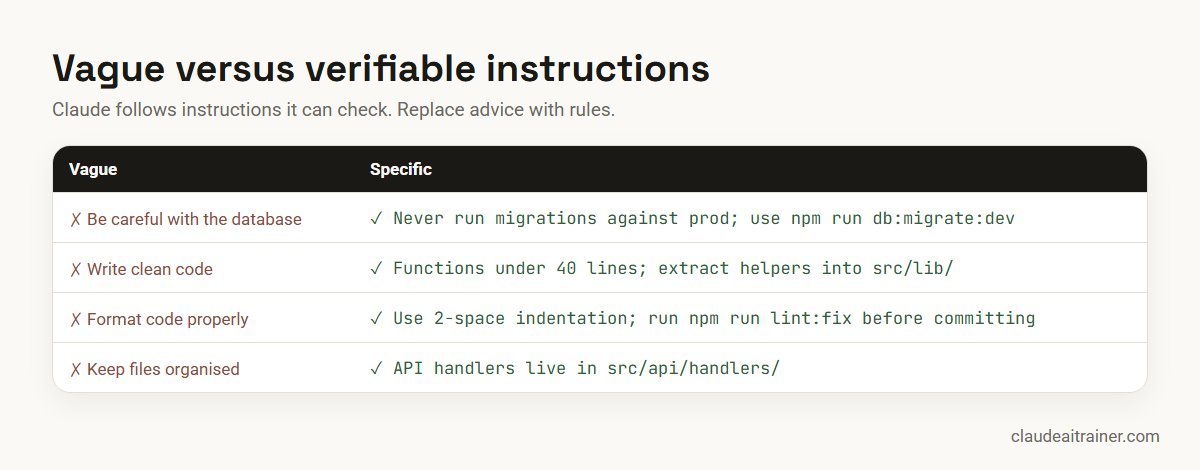
A CLAUDE.md template you can adapt
This is a compact starting point for a typical web application. Replace the commands and paths with your own.
# Project: Orders API

## Commands
- Install: pnpm install
- Run locally: pnpm dev (needs a local Postgres; see docs/setup.md)
- Test one file: pnpm test -- path/to/file.test.ts
- Full checks before a PR: pnpm lint && pnpm typecheck && pnpm test

## Conventions
- TypeScript strict mode; no `any` without a comment explaining why
- API handlers live in src/api/handlers/, one file per resource
- Use the shared error helper in src/lib/errors.ts, never throw raw strings
- Dates are stored in UTC; format only in the UI layer

## Boundaries
- Do not edit files in src/generated/ (rebuilt by pnpm codegen)
- Never change migrations that are already merged; add a new one
- Ask before adding a new dependency

## Workflow
- Branches: feature/<ticket>-short-name
- Commit messages: imperative mood, reference the ticket ID
- A task is done when lint, typecheck and tests pass locally

## More context
- Architecture overview: @docs/architecture.md
Notice what is missing: no description of every folder, no list of dependencies, no essay on code quality. Claude can read those from the repository. Anthropic recommends keeping each CLAUDE.md under 200 lines, because longer files use more context and adherence drops.
Where CLAUDE.md files live, and how they combine
There is not just one CLAUDE.md. Claude Code looks in several places, each with a different reach.
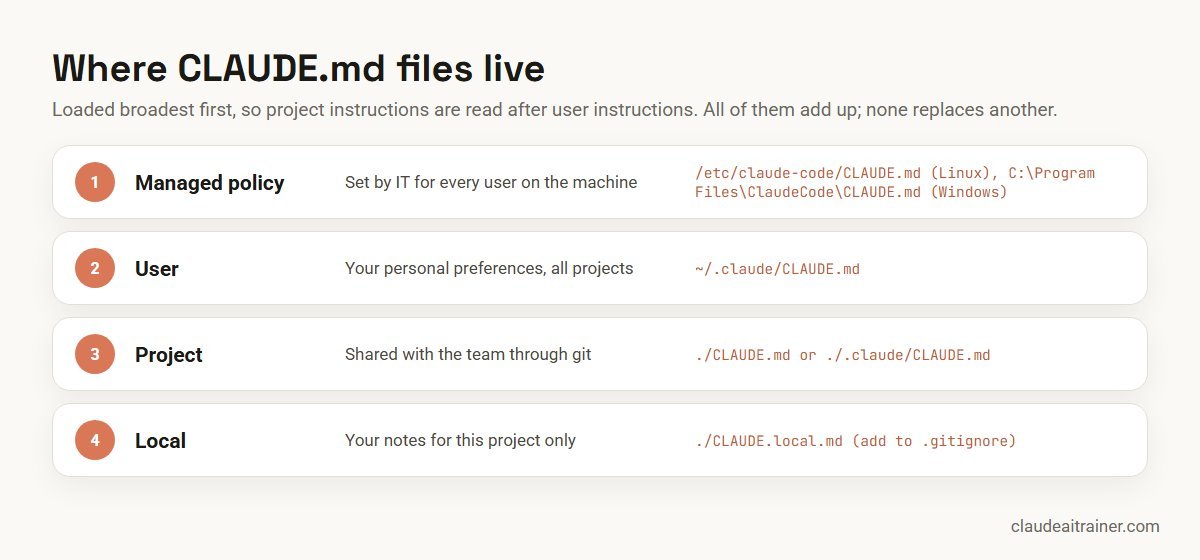
A few details are worth knowing:
- They add up. All discovered files are concatenated, not overridden. Files are ordered from the broadest scope to the most specific, and from the filesystem root down to your working directory, so the instructions closest to where you started Claude are read last.
- Subdirectories load on demand. A CLAUDE.md inside
packages/billing/loads only when Claude reads or edits a file in that folder, which keeps monorepos manageable. - CLAUDE.local.md is personal. Use it for your sandbox URLs or test accounts, and add it to
.gitignore. - The managed file wins on reach. An organisation can deploy a CLAUDE.md at the managed policy location for every developer, and individual settings cannot exclude it.
If your repository already has an AGENTS.md for other coding tools, recent versions of Claude Code read it when no CLAUDE.md exists. If you have both, put @AGENTS.md at the top of your CLAUDE.md so you maintain one shared file.
For engineering teams
Setting up Claude Code for a whole team?
A shared CLAUDE.md is usually the first thing we build with a team in a Claude Code session, alongside permissions and a couple of hooks, using your own repository rather than a demo project. If it would help to talk through your setup, we are happy to.
Keep it lean with imports and .claude/rules/
Imports
A CLAUDE.md can pull in other files with @path/to/file. Paths are resolved relative to the file that contains the import, and imports can be nested up to four levels deep. Wrap a path in backticks if you want to mention it without importing it.
Imports help organisation, but they do not save context: imported files load at launch just like the main file.
Path-scoped rules
For instructions that only matter in one part of the codebase, use the .claude/rules/ directory. Each markdown file covers one topic, and a paths field in its frontmatter limits when it loads:
---
paths:
  - "src/api/**/*.ts"
---

# API rules
- Validate every request body with the shared schema helper
- Return errors in the standard { code, message } format
- Add an OpenAPI comment to every new endpoint
Rules without a paths field load at launch like CLAUDE.md itself. Rules with one load only when Claude reads or edits a matching file, which is the main way to keep a large project’s instructions from crowding the context.
CLAUDE.md, rules, Skills or hooks?
As a setup grows, the question becomes where each instruction belongs.
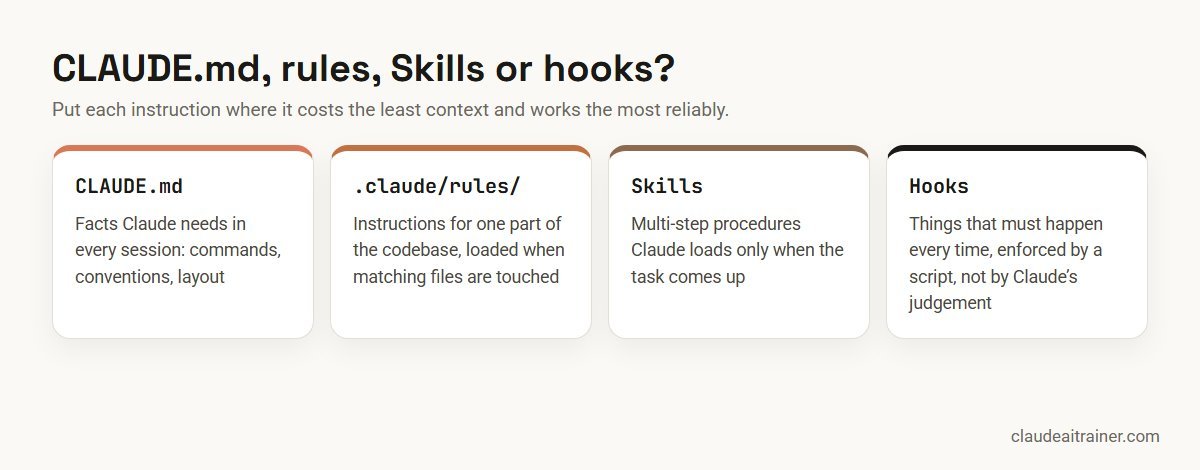
- A fact needed in every session goes in CLAUDE.md.
- Guidance for one area of the code goes in a path-scoped rule.
- A multi-step procedure, such as preparing a release, becomes a Skill; see how to create Claude Skills.
- Anything that must happen every time, or must never happen, becomes a hook.
When Claude ignores your CLAUDE.md
- Check it loaded. Run
/contextand look under Memory files. If it is not there, Claude cannot see it. - Make it specific. Replace “write good tests” with the exact command and the rule you want followed.
- Remove contradictions. If two files disagree, Claude may pick either. Recent versions include
/doctor prompt-audit, which checks your instruction files for outdated or conflicting content and proposes edits. - Shorten it. Claude Code warns you at startup when a file is over the recommended length.
- Escalate to a hook if the instruction must be followed without exception.
After /compact, Claude re-reads the project-root CLAUDE.md from disk, so instructions written there survive compaction. Instructions given only in chat do not, which is one more reason to write recurring corrections into the file.
Treat CLAUDE.md like code
For a team, the file works best when it is owned and reviewed like any other part of the codebase: changes go through pull requests, someone owns it, and it is pruned when the project changes. Block-level HTML comments are stripped before the file reaches Claude, so you can leave notes for human maintainers without spending context on them. For the wider team setup, including permission policy and review discipline, see our Claude Code best practices for teams.
Key takeaways
- CLAUDE.md is context Claude reads every session, not a setting it is forced to obey
- Keep each file under about 200 lines and write instructions that can be checked
- Commit ./CLAUDE.md for the team; keep personal notes in ~/.claude/CLAUDE.md or CLAUDE.local.md
- Use @path imports to organise, and .claude/rules/ with paths frontmatter to load rules only where they apply
- Move procedures into Skills and must-happen actions into hooks
- Run /context to confirm what loaded, and treat CLAUDE.md edits like code reviews
FAQ
CLAUDE.md: common questions
Where should I put my CLAUDE.md file?
For instructions the whole team should share, put it at the root of the repository as ./CLAUDE.md or ./.claude/CLAUDE.md and commit it. Personal preferences for every project go in ~/.claude/CLAUDE.md, and personal notes for one project go in ./CLAUDE.local.md, which you should add to .gitignore.
How long should a CLAUDE.md file be?
Anthropic recommends keeping each CLAUDE.md under about 200 lines. Longer files use more context and Claude follows them less consistently. Move area-specific guidance into .claude/rules/ files with paths frontmatter, and multi-step procedures into Skills.
Does Claude always follow CLAUDE.md?
Not strictly. CLAUDE.md is loaded as context, and Claude tries to follow it, but it is not enforced configuration. Specific, verifiable instructions are followed far more reliably than general advice. Anything that must always happen should be a hook.
What does /init do?
/init analyses your codebase and generates a starting CLAUDE.md with build commands, test instructions and conventions it discovers. If a CLAUDE.md already exists, it suggests improvements rather than overwriting it. You should then trim it and add the context Claude could not discover.
Can CLAUDE.md import other files?
Yes. Use @path/to/file anywhere in the file. Relative paths resolve from the file that contains the import, and imports can be nested up to four levels deep. Imported files still load at launch, so they help organisation but do not reduce context use.
What is the difference between CLAUDE.md and auto memory?
You write CLAUDE.md; Claude writes auto memory. CLAUDE.md holds instructions and rules you want in every session, while auto memory stores notes Claude saves from your corrections and preferences. Both load at the start of a session, and you can review them with /memory. Claude in the web and desktop apps has a separate memory of its own; see how Claude memory works.
Does Claude Code read AGENTS.md?
Recent versions read AGENTS.md when there is no CLAUDE.md in your working directory or above it. If you keep both, the simplest approach is to add @AGENTS.md at the top of your CLAUDE.md so there is one shared source of instructions.
Trusted by
Teams we’ve trained
…and 200+ organisations, across 16+ countries.
What participants say
Real feedback from real sessions
Verified feedback collected from participants across corporate sessions — average rating 4.8/5.
“A very productive session for working professionals. A must-do.”
“The session was highly insightful and conducted in a very professional and interactive manner. Learnt about AI and excited to learn more!”
“Highly recommended! Hands-on and directly useful — from making PPTs and strategic plans to building KRAs.”
“I would recommend everyone to go through this session — it clarifies both what to expect from AI and where AI isn’t needed.”
“A nice interactive session with a lot of new insights and the power of AI. This will help me save time in routine activities.”
“A very good training session. AI can do wonders — we’ll implement it to create efficiency and save time.”
Explore more
Keep going with Claude AI training
Work with us
Want a CLAUDE.md your whole team actually uses?
Tell us about your repositories, your stack and how many developers use Claude Code. We will suggest a short, hands-on format and send a fixed proposal, usually within one business day.