Blog · Claude Code
Claude Code GitHub Actions: How to Set Up @claude, Automated PR Reviews and Safe CI Workflows
Claude Code GitHub Actions lets your team mention @claude in an issue or pull request and have Claude Code answer questions, fix bugs or push a branch, all from inside a normal GitHub workflow. It can also run on its own: reviewing every pull request, or writing a daily report on a schedule. This guide walks through both setup paths, gives you workflow files you can copy, and covers the settings most teams forget: secrets, permissions, untrusted pull requests and cost limits.
Most teams first meet Claude Code in a terminal. GitHub Actions takes the same agent and puts it where code review already happens. Instead of copying an error into a chat window, a developer writes “@claude fix the failing date test” on the pull request, and Claude works on the repository in a GitHub-hosted runner and replies in the thread.
This guide is based on Anthropic’s current Claude Code documentation and the anthropics/claude-code-action repository as of October 2026. The action is moving quickly, so where a detail matters, we point you to the page to double-check.
What Claude Code GitHub Actions does
The Claude Code GitHub Action is a GitHub Action that runs Claude Code inside your repository’s workflows. According to Anthropic’s docs, it is built on the Claude Agent SDK, and you use it in two ways:
- On request: someone mentions
@claudein an issue or pull request comment, and Claude analyses code, answers, implements changes or pushes commits. - Automatically: you give the action a prompt, and it runs on any GitHub event you choose, such as a pull request being opened or a nightly cron schedule.
Typical uses are turning a well-written issue into a branch, fixing a bug from a review comment, answering “how does this module work?” on a pull request, and running a consistent first-pass code review.
Two related products share the name and are easy to confuse. Code Review gives automatic pull request reviews without you maintaining a workflow file, and Claude Code in the cloud runs full sessions on Anthropic’s infrastructure. This guide is about the workflow-file integration, which gives you the most control.
Before you start
- Admin access to the repository. Both setup paths need it.
- A way to pay for model usage: either a Claude API key from the Claude Console, or a Claude subscription token (Pro, Max, Team or Enterprise).
- A github.com repository. The quick installer only works with github.com. For GitLab, Anthropic documents a separate GitLab CI/CD integration; for self-hosted GitHub there is a GitHub Enterprise Server guide.
- Claude Code installed locally if you want the quick path. Our Claude Code installation guide covers that.
Option 1: quick setup with /install-github-app
The fastest route runs from your own terminal. First install the GitHub CLI and sign in with gh auth login, because Claude Code checks for it. Then:
cd your-repository
claude
# inside Claude Code:
/install-github-app
Claude Code walks you through it:
- Installs the Claude GitHub App on the repository.
- Sets up a secret. If Claude Code already has an API key it reuses it; otherwise you choose between pasting an API key or creating a long-lived token from your Claude subscription. It saves the value as a repository secret named
ANTHROPIC_API_KEYorCLAUDE_CODE_OAUTH_TOKEN. - Pushes a branch with the workflow files you selected, already wired to that secret, and opens a pull request page in your browser.
- You merge the pull request. From then on,
@claudeworks in that repository.
If you tick the review workflow during setup, you get a second file, claude-code-review.yml, and Claude posts its findings on each pull request as inline comments, or one summary comment when it finds nothing. You can press Esc to stop at any point, and choose “Skip for now” after the app installs if you only want the app for now. Running the command again later finishes the remaining steps, or offers to update an existing claude.yml to the latest version.
Option 2: manual setup
Use the manual path when you don’t run Claude Code locally, when the installer fails, or when you want to own every line of the workflow.
Step 1: install the Claude GitHub App
Install the app from github.com/apps/claude on the repository. The action itself relies on three permissions: Contents, Issues and Pull requests, each read and write. The app is shared by several Claude features, so GitHub asks you to approve a wider permission set than the action uses. If your security team will only accept those three, Anthropic’s setup guide in the action repository explains how to create a custom GitHub App instead.
Step 2: add the secret
In the repository, open Settings → Secrets and variables → Actions and create one of these:
ANTHROPIC_API_KEY: a key from the Claude Console. Usage is billed through the API.CLAUDE_CODE_OAUTH_TOKEN: a token tied to a Claude subscription, created by runningclaude setup-tokenon your machine.
Step 3: add the workflow file
Create .github/workflows/claude.yml. This is the interactive workflow from Anthropic’s documentation:
name: Claude Code
on:
  issue_comment:
    types: [created]
  pull_request_review_comment:
    types: [created]
jobs:
  claude:
    if: contains(github.event.comment.body, '@claude')
    runs-on: ubuntu-latest
    permissions:
      contents: write
      pull-requests: write
      issues: write
      id-token: write
      actions: read
    steps:
      - uses: actions/checkout@v6
        with:
          fetch-depth: 1
      - uses: anthropics/claude-code-action@v1
        with:
          anthropic_api_key: ${{ secrets.ANTHROPIC_API_KEY }}
A few lines are doing real work. id-token: write is needed for the action’s default GitHub App authentication. actions: read lets Claude read CI results on pull requests. The if: condition stops a runner from starting on every comment that doesn’t mention Claude. If you use a subscription token, replace the last line with claude_code_oauth_token: ${{ secrets.CLAUDE_CODE_OAUTH_TOKEN }}.
Commit the file to your default branch, then test it with a comment such as “@claude explain what this repository does”.
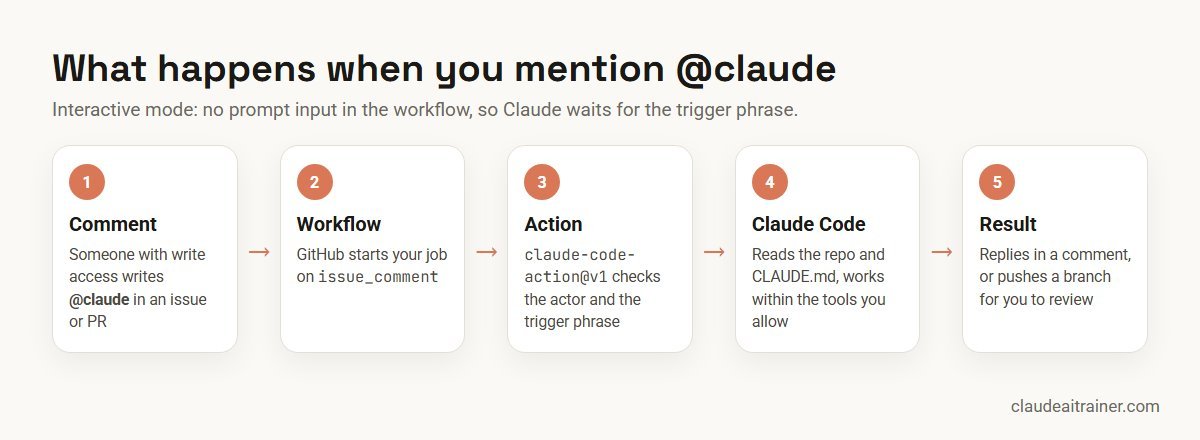
Interactive mode and automation mode
The action decides how to behave from your workflow, not from a setting called “mode”:
- Interactive mode applies when you give it no
promptinput. Claude waits for the trigger phrase,@claudeby default, in a comment, a pull request review, or the title or body of a newly opened issue. Progress and the answer appear as a comment. - Automation mode applies when you do pass a
prompt. Claude runs straight away on whatever event started the workflow. By default the result goes to the workflow run log, not to a comment, unless your prompt asks Claude to post and it has a tool that can.
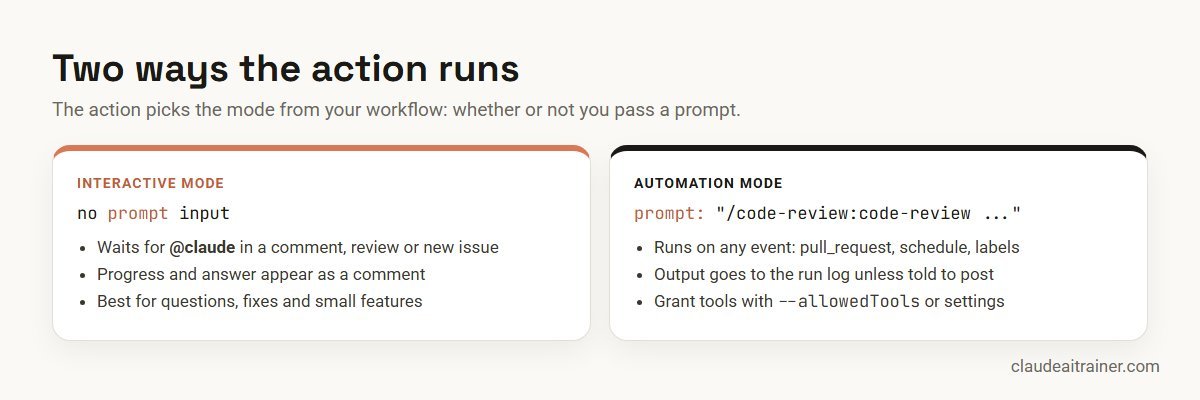
Either way, the action checks who triggered the run before Claude starts. On issue and pull request events, the person must have write access to the repository, and bot accounts are rejected unless you list them in allowed_bots. That second check stops two bots from triggering each other in a loop.
Automated pull request review
The most popular automation is a first-pass review on every pull request. Anthropic’s current example installs the official code-review plugin and runs its skill:
name: Code Review
on:
  pull_request:
    types: [opened, synchronize, ready_for_review, reopened]
jobs:
  review:
    runs-on: ubuntu-latest
    permissions:
      contents: read
      pull-requests: read
      issues: read
      id-token: write
    steps:
      - uses: actions/checkout@v6
        with:
          fetch-depth: 1
      - uses: anthropics/claude-code-action@v1
        with:
          anthropic_api_key: ${{ secrets.ANTHROPIC_API_KEY }}
          plugin_marketplaces: "https://github.com/anthropics/claude-code.git"
          plugins: "code-review@claude-code-plugins"
          prompt: "/code-review:code-review --comment ${{ github.repository }}/pull/${{ github.event.pull_request.number }}"
          claude_args: '--allowedTools "mcp__github_inline_comment__create_inline_comment"'
Two details are easy to miss. The --comment argument is what makes Claude post on the pull request; without it, findings only appear in the run log. And the claude_args line must name the inline-comment tool, because the action only starts that tool’s server when --allowedTools mentions it. Claude skips draft and closed pull requests, ones it judges trivial, and ones it has already commented on. On public repositories, GitHub withholds secrets from runs triggered by fork pull requests, so this review runs only for branches in the same repository.
The prompt input can run any skill. For a skill in your own .claude/skills/ folder, keep the checkout step and pass /skill-name as the prompt. That makes your team’s review checklist reusable both in the terminal and in CI; our guide to Claude Code slash commands shows how to write one.
Scheduled and event-driven jobs
Automation mode works with any trigger, including cron. With a plain-text prompt, Claude has no shell or GitHub API access until you grant the tools it needs. This example from the docs writes a daily summary to the run log and allows two read-only GitHub tools:
name: Daily Report
on:
  schedule:
    - cron: "0 9 * * *"
jobs:
  report:
    runs-on: ubuntu-latest
    permissions:
      contents: read
      issues: read
      id-token: write
    steps:
      - uses: anthropics/claude-code-action@v1
        with:
          anthropic_api_key: ${{ secrets.ANTHROPIC_API_KEY }}
          prompt: "Generate a summary of yesterday's commits and open issues"
          claude_args: |
            --allowedTools "mcp__github__list_commits,mcp__github__list_issues"
Remember that GitHub runs scheduled workflows only from the default branch, and in public repositories it disables a schedule after 60 days without activity.
For engineering teams
Rolling Claude Code into your CI pipeline?
The workflow file is the easy part. Agreeing who can trigger Claude, what it may change, how reviews are read and what each run is allowed to cost takes a conversation. In our Claude Code sessions, developers set this up on their own repositories with the people who will maintain it. If that would help your team, book a short call.
Give Claude project context with CLAUDE.md
Every run starts fresh on a runner, so Claude knows only what is in the repository. A CLAUDE.md file at the root is where you tell it how your project works: build and test commands, code style, review criteria and things it must never touch. Claude reads it on every run, which is also why it should stay short. A CI-friendly section might look like this:
## Commands
- Install: npm ci
- Test one file: npm test -- path/to/file.test.ts
- Lint: npm run lint

## When working from GitHub
- Keep changes small and focused on the issue or comment you were given.
- Run the relevant tests before committing and say which ones you ran.
- Never edit files under migrations/ or .github/workflows/.
- In reviews, flag security issues and missing tests first; skip style nits the linter catches.
Our guide to writing a CLAUDE.md file covers structure and the mistakes that make Claude ignore it. One security detail is worth knowing here: on pull requests, the action restores CLAUDE.md, .claude/ and .mcp.json from the base branch before Claude starts, so a pull request cannot quietly rewrite Claude’s instructions for its own review.
Useful configuration options
Most behaviour is set through inputs on the action step. These are the ones teams change most often:
| Input | What it does |
|---|---|
prompt | Plain text or a skill such as /review-checklist. Omit it for @claude mode. |
claude_args | Any Claude Code CLI flags, such as --max-turns, --model, --allowedTools, --mcp-config or --debug. |
trigger_phrase | Change @claude to another phrase. |
label_trigger / assignee_trigger | Start Claude when an issue gets a label or is assigned to a user. |
settings | Claude Code settings as JSON or a file path, for example permission rules. |
plugin_marketplaces / plugins | Install plugins before Claude runs. |
use_sticky_comment | Deliver pull request feedback in a single comment. |
use_commit_signing | Sign Claude’s commits through GitHub’s API. |
The full list lives in the action’s usage documentation on GitHub. If you are upgrading an older workflow, note that @beta inputs such as direct_prompt, mode, max_turns and model are deprecated: use @v1, rename direct_prompt to prompt, drop mode, and move CLI options into claude_args.
Control cost before it surprises you
Each run uses two things: GitHub Actions minutes on the runner, and model usage, either API tokens or your subscription. Anthropic suggests clearer requests, issue templates, a concise CLAUDE.md, a turn limit, job timeouts and GitHub’s concurrency controls. Here is the interactive job with those limits added:
jobs:
  claude:
    if: contains(github.event.comment.body, '@claude')
    runs-on: ubuntu-latest
    timeout-minutes: 20
    concurrency:
      group: claude-${{ github.event.issue.number || github.event.pull_request.number }}
      cancel-in-progress: false
    permissions:
      contents: write
      pull-requests: write
      issues: write
      id-token: write
      actions: read
    steps:
      - uses: actions/checkout@v6
        with:
          fetch-depth: 1
      - uses: anthropics/claude-code-action@v1
        with:
          anthropic_api_key: ${{ secrets.ANTHROPIC_API_KEY }}
          claude_args: "--max-turns 10"
The concurrency group means a second @claude request on the same issue or pull request waits for the first to finish instead of running alongside it (GitHub keeps at most one waiting run per group). Pick limits from experience: start strict, read a few run logs, then loosen. For organisation-wide tracking, the Claude Console usage views and our Claude Code pricing guide for teams help you set a budget.
Security: the settings that matter
An AI agent with write access in CI deserves the same care as any other automation account. The action’s security documentation is worth reading in full; these are the points we see teams get wrong most often.
- Secrets only. Never paste a key or token into a workflow file. Reference
${{ secrets.ANTHROPIC_API_KEY }}and rotate the key in the Claude Console if it is ever exposed. Deleting the GitHub secret alone does not revoke the key. - Minimal permissions. Give each job only the
permissions:it needs. A review job usually needs read access, plusid-token: writefor authentication. - Be careful who can trigger it.
allowed_non_write_usersbypasses the main safety check and is documented as high risk. Avoidallowed_bots: '*'on public repositories. - Untrusted pull requests. Workflows on
pull_request_targetorworkflow_runrun with your base repository’s secrets. Do not check out a contributor’s branch into the workspace root before the action; check it out into a subfolder and pass it with--add-dirif Claude needs to read it. - Prompt injection. Text in issues and comments can hide instructions. The action strips several hiding techniques, but on public repositories review external input and consider
exclude_comments_by_actor. - Logs. Leave
show_full_outputoff on public repositories, because it can print file contents and tool output into publicly visible logs. - Human review stays. By default Claude pushes a branch and gives you a link to open the pull request; it does not merge anything. Keep branch protection and required reviews on.
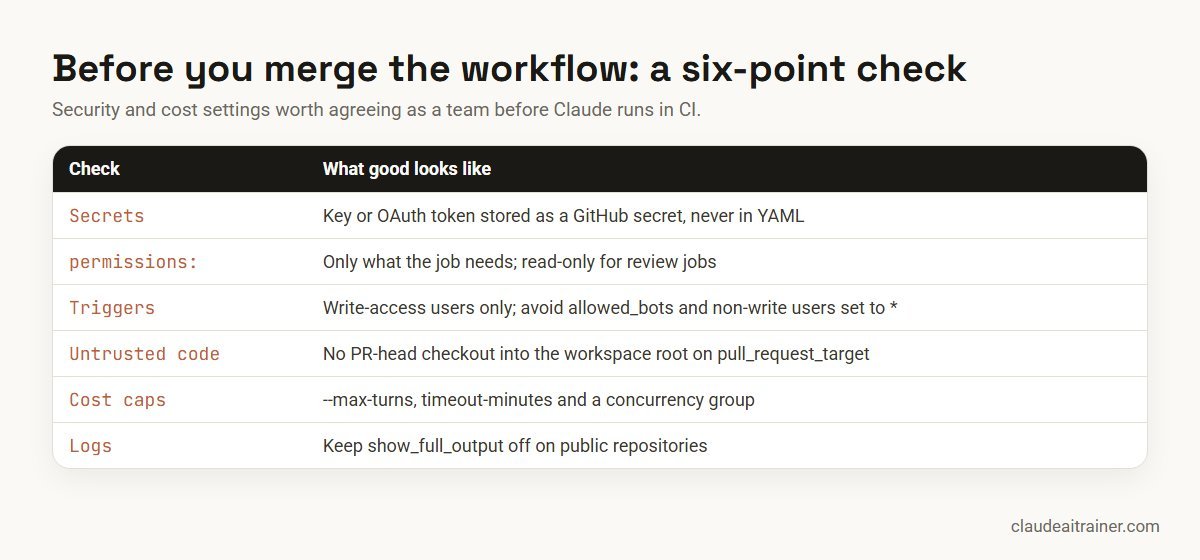
For a broader view of permissions and data handling, see our Claude Code security best practices.
Amazon Bedrock, Google Cloud and Microsoft Foundry
If your organisation must keep model traffic inside its own cloud account, the action supports that. Set use_bedrock: "true" for Amazon Bedrock, use_vertex: "true" for Google Cloud’s Agent Platform (formerly Vertex AI), or use_foundry: "true" for Microsoft Foundry. All three authenticate through GitHub OIDC identity federation, so no static cloud keys sit in your repository. Anthropic’s “Use Claude Code GitHub Actions with cloud providers” page has the provider-side setup. For the Claude API itself, larger organisations can also use workload identity federation, exchanging the workflow’s OIDC token for API access through a Console service account, instead of storing a long-lived key.
Worked example: from issue to reviewed branch
Here is how a small product team might use the setup above in a normal week.
- Setup. A lead runs
/install-github-app, selects both workflows, adds the limits from the cost section and merges. They add the “When working from GitHub” section to CLAUDE.md. - An issue arrives: “CSV export drops rows with commas in the customer name.” The developer who triages it adds steps to reproduce and comments: “@claude reproduce this with a test first, then fix the export. Keep the change inside src/export/.”
- Claude works on a runner. It reads CLAUDE.md, writes a failing test, fixes the quoting, runs the test file named in CLAUDE.md and pushes a
claude/branch. Its comment explains the cause and links to create the pull request. - The developer opens the pull request. The review workflow runs and posts one inline comment about a missing test for line breaks inside quoted fields.
- A quick follow-up: “@claude add the test the review asked for.” Claude pushes a second commit. A human reviewer approves and merges as usual.
Nothing about the team’s process changed: the same branch rules, the same reviewer. Claude simply did the first draft of the work and the first pass of the review.
Troubleshooting
| Symptom | Likely cause and fix |
|---|---|
| Claude doesn’t respond to @claude | Check the GitHub App is installed on this repository, Actions are enabled, the secret exists, the comment contains @claude as a whole word (not /claude), and the commenter has write access. |
| The workflow never starts | The workflow file must be on the default branch for comment events. Check the on: triggers and the if: condition. |
| CI doesn’t run on Claude’s commits | GitHub doesn’t trigger workflows from commits made with the default GITHUB_TOKEN. Remove a github_token input so the action uses the Claude GitHub App, or pass a custom app token. |
| Authentication errors | Test the key or token locally with claude first. Make sure the input name matches the secret type: anthropic_api_key or claude_code_oauth_token. |
| Review runs but posts nothing | Add --comment to the prompt and keep the inline-comment tool in --allowedTools. |
| Scheduled job does nothing useful | A plain prompt has no tools by default. Grant them with --allowedTools or a settings permission rule. |
| Runs are slow or expensive | Lower --max-turns, add timeout-minutes, shorten CLAUDE.md, and write more specific requests. |
For anything else, the action repository has an FAQ, and adding --debug to claude_args gives more detail in the run log.
Rolling it out across an organisation
Once one repository works, you don’t need to repeat the whole setup everywhere. Install the Claude GitHub App once at organisation level for all or selected repositories, store the key as an organisation-level Actions secret, and add the workflow to each repository, or define it once as a reusable workflow that each repository calls. Anthropic recommends an API key rather than a subscription token for shared secrets, because a token is tied to the person who created it. Pair the rollout with agreed conventions: our Claude Code best practices for teams covers how to set those up, and hooks can enforce rules such as formatting on every run.
Key takeaways
- Run /install-github-app for the quickest setup, or install the Claude GitHub App, add a secret and copy claude.yml by hand
- With no prompt input the action waits for @claude; with a prompt it runs automatically on any event
- Store ANTHROPIC_API_KEY or CLAUDE_CODE_OAUTH_TOKEN as a GitHub secret, never in the YAML
- Put review rules and project conventions in a short CLAUDE.md that every run reads
- Cap cost with --max-turns, timeout-minutes and a concurrency group
- Keep permissions minimal and never check out untrusted pull request code into the workspace root
FAQ
Claude Code GitHub Actions: common questions
What is Claude Code GitHub Actions?
It is a GitHub Action, anthropics/claude-code-action, that runs Claude Code inside your repository’s workflows. You can mention @claude in issues and pull requests to get answers, fixes or new branches, or give it a prompt so it runs automatically, for example to review every pull request.
How do I set up Claude Code in GitHub Actions?
The quickest way is to run /install-github-app inside Claude Code in your repository, which installs the Claude GitHub App, saves your secret and opens a pull request with the workflow. Manually, install the app from github.com/apps/claude, add an ANTHROPIC_API_KEY or CLAUDE_CODE_OAUTH_TOKEN secret, and copy the example claude.yml into .github/workflows/.
Can I use my Claude subscription instead of an API key?
Yes. Pro, Max, Team and Enterprise users can run claude setup-token locally to create an OAuth token, store it as CLAUDE_CODE_OAUTH_TOKEN, and pass it with the claude_code_oauth_token input. For secrets shared across an organisation, Anthropic recommends an API key because a token is tied to one person’s subscription.
How do I make Claude review every pull request automatically?
Add a workflow triggered on pull_request that passes a prompt to the action. Anthropic’s example installs the code-review plugin, runs /code-review:code-review with –comment, and allows the inline comment tool in claude_args so the review appears on the pull request.
Who can trigger Claude in a repository?
By default only users with write access can trigger it on issue and pull request events, and bot accounts are rejected unless listed in allowed_bots. Scheduled runs skip the write-access check because no user authored them.
How much does Claude Code GitHub Actions cost?
You pay for GitHub Actions minutes on the runner and for model usage, either API tokens or your Claude subscription if you use an OAuth token. Limit cost with –max-turns in claude_args, job timeout-minutes, a concurrency group and specific requests.
Does it work with Amazon Bedrock or Google Cloud?
Yes. Set use_bedrock, use_vertex or use_foundry to “true” and follow Anthropic’s cloud provider guide. These options authenticate through GitHub OIDC, so no static cloud credentials are stored in the repository.
Is it safe to run on public repositories?
It can be, with care. Keep secrets in GitHub secrets, give jobs minimal permissions, avoid allowing non-write users or all bots, never check out untrusted pull request code into the workspace root on pull_request_target, review external input for hidden instructions, and keep full output logging off.
Trusted by
Teams we’ve trained
…and 200+ organisations, across 16+ countries.
What participants say
Real feedback from real sessions
Verified feedback collected from participants across corporate sessions — average rating 4.8/5.
“A very productive session for working professionals. A must-do.”
“The session was highly insightful and conducted in a very professional and interactive manner. Learnt about AI and excited to learn more!”
“Highly recommended! Hands-on and directly useful — from making PPTs and strategic plans to building KRAs.”
“I would recommend everyone to go through this session — it clarifies both what to expect from AI and where AI isn’t needed.”
“A nice interactive session with a lot of new insights and the power of AI. This will help me save time in routine activities.”
“A very good training session. AI can do wonders — we’ll implement it to create efficiency and save time.”
Explore more
Keep going with Claude AI training
Work with us
Want Claude working safely in your GitHub workflows?
Tell us how your team uses GitHub today: repositories, review process, CI and who approves changes. We will suggest a short, hands-on format, online or on-site (for example Claude Code training in Bengaluru or Noida), and send a fixed proposal, usually within one business day.