Blog · Claude Code
How to Create Subagents in Claude Code: A Practical Guide with Examples
Subagents let Claude Code hand a focused job, such as searching a codebase, running tests or reviewing a change, to a specialist that works in its own context window and reports back. Set up well, they keep your main session clean and your results consistent. This guide shows how to create Claude Code subagents, what each configuration field does, how Claude decides when to use them, and five subagents worth adding to a team’s repository.
A long Claude Code session fills up quickly. Search results, test output and file contents pile into the conversation until the important decisions are buried. Subagents solve that by giving a self-contained job to a separate assistant with its own instructions and its own context, so only the useful result comes back.
What a Claude Code subagent is
According to Anthropic’s documentation, a subagent is a specialised assistant with its own context window, its own system prompt, a specific set of tools and independent permissions. When a task matches a subagent’s description, Claude delegates to it; the subagent works independently and returns its result.
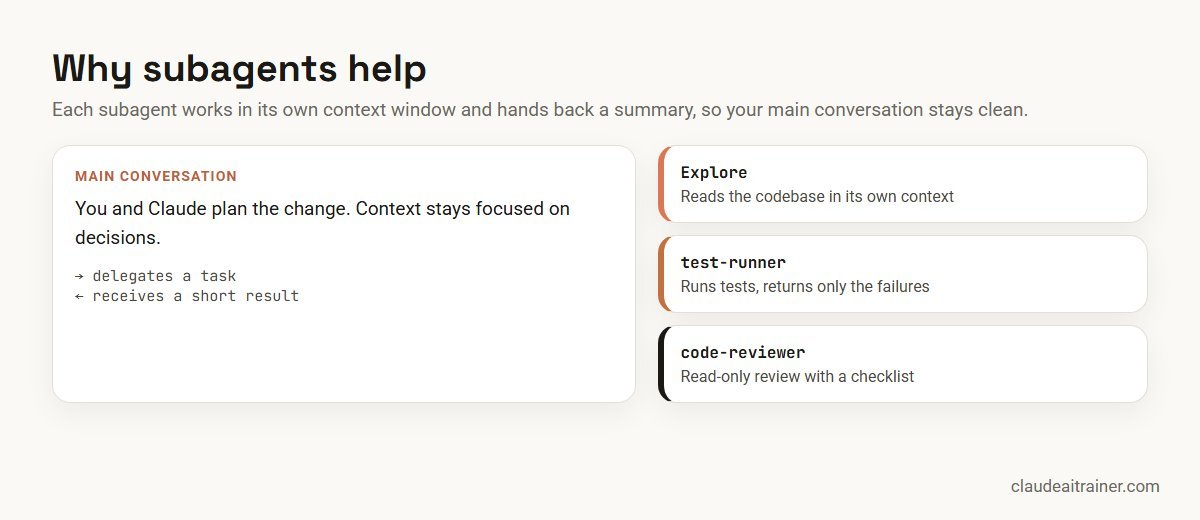
Anthropic lists five practical benefits:
- Preserve context by keeping exploration and implementation out of the main conversation.
- Enforce constraints by limiting which tools a subagent can use.
- Reuse configurations across projects with user-level subagents.
- Specialise behaviour with focused system prompts.
- Control costs by routing simple jobs to faster, lower-cost models.
One thing to understand early: a subagent starts with a fresh context. It does not see your conversation history. It receives your CLAUDE.md files and the message Claude writes when delegating, so the task it is given needs to be self-contained.
The built-in subagents
Claude Code ships with several subagents you already use without noticing. Explore does fast, read-only searches of a codebase, Plan researches during plan mode, and a general-purpose agent handles multi-step tasks that need both exploring and acting. Custom subagents sit alongside these.
How to create your first subagent
The quickest way is to ask Claude to write it. In current versions, running /agents reminds you that you can ask Claude to create one, or edit the agent folders directly.
- Describe it. For example: “Create a project subagent in .claude/agents/ called code-reviewer that reviews changed files for security, readability and missing tests. Make it read-only and use Sonnet.”
- Review the file Claude creates, and tighten the description and instructions.
- Try it: “Use the code-reviewer subagent to review my last change.”
- Commit it if it belongs to the whole team.
You can also write the file by hand, pass a definition for a single session with the --agents flag, or install subagents through plugins.
The subagent file format
A subagent is a Markdown file with YAML frontmatter. The frontmatter configures it; everything below becomes its system prompt.
---
name: code-reviewer
description: Reviews changed code for security issues, readability and missing tests. Use proactively after code changes.
tools: Read, Grep, Glob
model: sonnet
---

You are a senior code reviewer for this repository.

When invoked:
1. Identify the files changed in the current task.
2. Check each change against our conventions in CLAUDE.md.
3. Look for security problems: secrets, unvalidated input, unsafe queries.
4. Note missing or weak tests.

Report findings as a list grouped by severity (must fix, should fix, nice to have),
with the file, the line and a suggested change for each. Do not edit files.
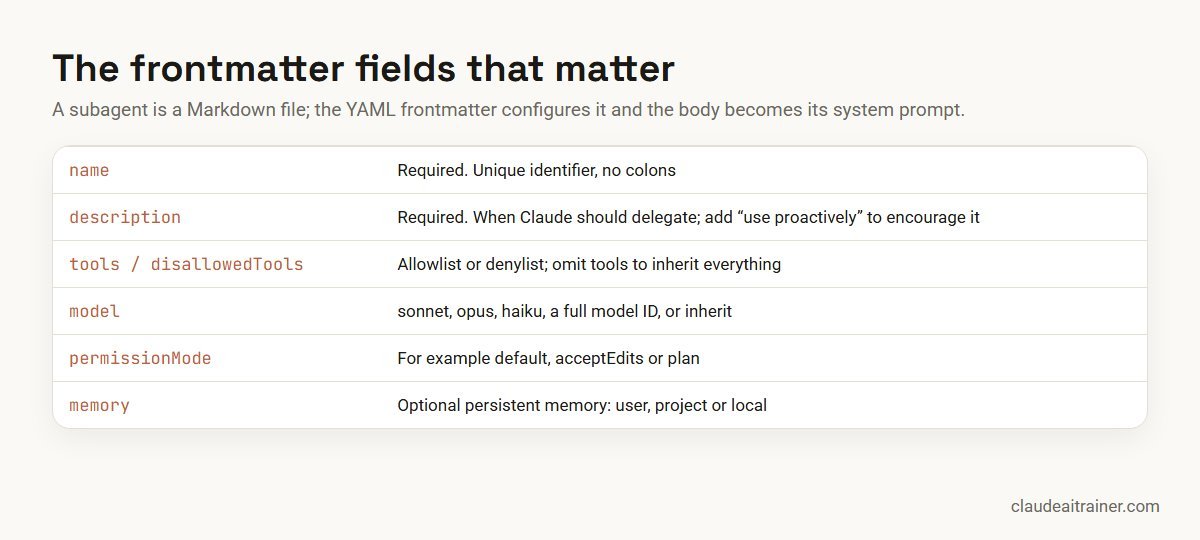
nameanddescriptionare required. The name must be unique and cannot contain a colon.toolsis an allowlist. Leave it out and the subagent inherits all the tools available to the main conversation; usedisallowedToolsto remove specific ones instead.modelacceptssonnet,opus,haiku, a full model ID, orinheritto match the main conversation.permissionModesets how the subagent handles permission prompts, for exampleplanfor a read-only research role.memorygives a subagent its own persistent memory at user, project or local scope.
Where subagents live
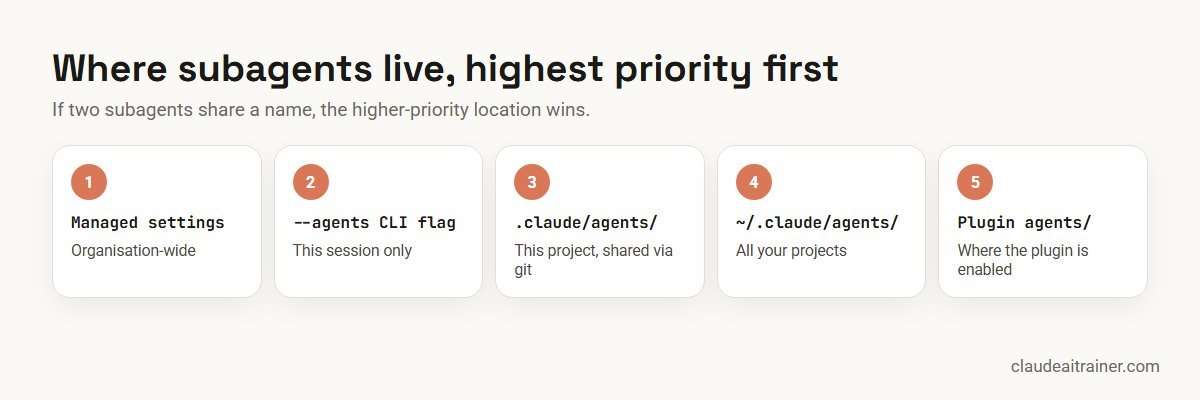
For most teams, two locations matter: .claude/agents/ in the repository for subagents the whole team shares through version control, and ~/.claude/agents/ for your personal ones across all projects. If a project subagent and a personal subagent share a name, the project one wins. Organisations can also provide subagents through managed settings, which take priority over everything else.
For engineering teams
Building a shared set of subagents for your team?
Subagents work best when a team agrees which ones exist, what they may touch and who maintains them. In our Claude Code sessions we build them with your developers on your own repository, alongside CLAUDE.md and hooks. Talk it through with us if that would help.
How Claude decides when to delegate
Claude chooses a subagent based on the task, the subagent’s description and the current context. That makes the description the most important line in the file. Write it like a trigger: what the subagent does and when it should be used. Anthropic suggests adding phrases such as “use proactively” if you want Claude to reach for it without being asked. Keep descriptions brief, because they are loaded into context.
You can also call a subagent directly:
- In plain language: “Use the test-runner subagent to fix the failing tests.”
- With an @-mention: type
@and pick the subagent from the list. - For a whole session: start Claude Code with
claude --agent code-reviewer.
Five subagents worth building
- code-reviewer (read-only): checks changes against your conventions and lists issues by severity, as in the example above.
- test-runner: runs the relevant tests after a change and returns only the failures and likely causes, so pages of test output never reach the main conversation.
- migration-checker (read-only): reviews database migrations for missing rollbacks, locking risks and naming rules before they are merged.
- docs-writer: updates README sections, API docs or changelogs from the code that changed, in your documentation style.
- dependency-auditor (read-only, cheaper model): checks new or updated dependencies against your allowed list and flags licences or versions that need approval.
Start with two or three. A large library of overlapping subagents makes delegation less predictable, and each description adds to the context Claude has to read.
Good practice for teams
- Give each subagent one job. A reviewer that also writes code is hard to trust.
- Restrict tools for read-only roles. Reviewers, auditors and researchers rarely need to edit files.
- Match the model to the job. Use a lighter model for search and checks, and a stronger one for design or complex debugging.
- Make the task self-contained. Because a subagent doesn’t see your conversation, put the essential project context in CLAUDE.md; our guide to writing a CLAUDE.md file covers that.
- Combine with hooks for anything mandatory. A subagent decides how to do a job; a hook guarantees something always happens. See our Claude Code hooks guide.
- Review subagents like code. Changes go through pull requests, and each shared subagent has an owner.
Subagents, Skills and MCP: which one?
Subagents, Skills and MCP servers solve different problems. A subagent is a separate worker with its own context, best for self-contained jobs. A Skill is a set of instructions and resources Claude loads when a task calls for it, best for procedures you want followed the same way every time; see how to create Claude Skills. An MCP server connects Claude to an external tool or data source; our MCP servers explainer covers when to use one. Many teams use all three together.
Key takeaways
- A subagent is a Markdown file with YAML frontmatter; the body is its system prompt
- It runs in its own context window and returns a summary to the main conversation
- Put team subagents in .claude/agents/ and personal ones in ~/.claude/agents/
- The description decides when Claude delegates; add “use proactively” to encourage it
- Limit tools for read-only roles and pick a cheaper model for simple jobs
- Start with two or three subagents, review them like code, and grow from there
FAQ
Claude Code subagents: common questions
What are subagents in Claude Code?
Subagents are specialised assistants that Claude Code can delegate tasks to. Each has its own context window, system prompt, tool access and permissions, works independently on the task and returns a result to the main conversation.
How do I create a subagent in Claude Code?
Ask Claude to create one, for example in .claude/agents/ for a project or ~/.claude/agents/ for yourself, or write a Markdown file with YAML frontmatter by hand. The frontmatter needs a name and description; the body becomes the subagent’s system prompt.
Where are Claude Code subagents stored?
Project subagents live in .claude/agents/ in the repository and can be shared through version control. Personal subagents live in ~/.claude/agents/ and apply to all your projects. Subagents can also come from managed settings, the –agents flag for a single session, or plugins.
How does Claude decide which subagent to use?
Claude matches the task against each subagent’s description and the current context. A clear, specific description works best, and adding a phrase such as “use proactively” encourages Claude to delegate without being asked. You can also call a subagent by name or with an @-mention.
Can a subagent use a different model?
Yes. Set the model field to sonnet, opus, haiku, a full model ID, or inherit to use the same model as the main conversation. Lighter models suit search and checking tasks.
Does a subagent see my conversation history?
No. A subagent starts with a fresh context. It receives your CLAUDE.md files and the delegation message from Claude, so the task description needs to contain what it needs to know.
What is the difference between a subagent and a Skill?
A subagent is a separate worker with its own context window, suited to self-contained jobs. A Skill is a packaged set of instructions and resources Claude loads into the current work when a task calls for it. They are often used together.
Trusted by
Teams we’ve trained
…and 200+ organisations, across 16+ countries.
What participants say
Real feedback from real sessions
Verified feedback collected from participants across corporate sessions — average rating 4.8/5.
“A very productive session for working professionals. A must-do.”
“The session was highly insightful and conducted in a very professional and interactive manner. Learnt about AI and excited to learn more!”
“Highly recommended! Hands-on and directly useful — from making PPTs and strategic plans to building KRAs.”
“I would recommend everyone to go through this session — it clarifies both what to expect from AI and where AI isn’t needed.”
“A nice interactive session with a lot of new insights and the power of AI. This will help me save time in routine activities.”
“A very good training session. AI can do wonders — we’ll implement it to create efficiency and save time.”
Explore more
Keep going with Claude AI training
Work with us
Want subagents your whole team relies on?
Tell us about your repositories, your stack and how your developers use Claude Code today. We will suggest a short, hands-on format and send a fixed proposal, usually within one business day.