Blog · Claude prompting
How to Prompt Claude: A Practical Guide with Before-and-After Examples
Most disappointing Claude answers come from prompts that leave Claude guessing: who the output is for, what matters, what it should look like. This guide shows how to prompt Claude using the techniques in Anthropic’s own best-practice documentation, with before-and-after examples from everyday work, a reusable prompt template and the habits that matter most when you work with long documents.
Claude is very good at following instructions. That is exactly why vague prompts disappoint: Claude does what you asked, not what you meant. The good news is that a few habits fix most problems, and they work the same way in claude.ai, the Claude desktop app, Claude Code and the API.
Start with the golden rule
Anthropic’s prompting guidance describes Claude as a brilliant but new employee who lacks context on your norms and workflows. Its golden rule is simple: show your prompt to a colleague with little context on the task and ask them to follow it. If they would be confused, Claude will be too.
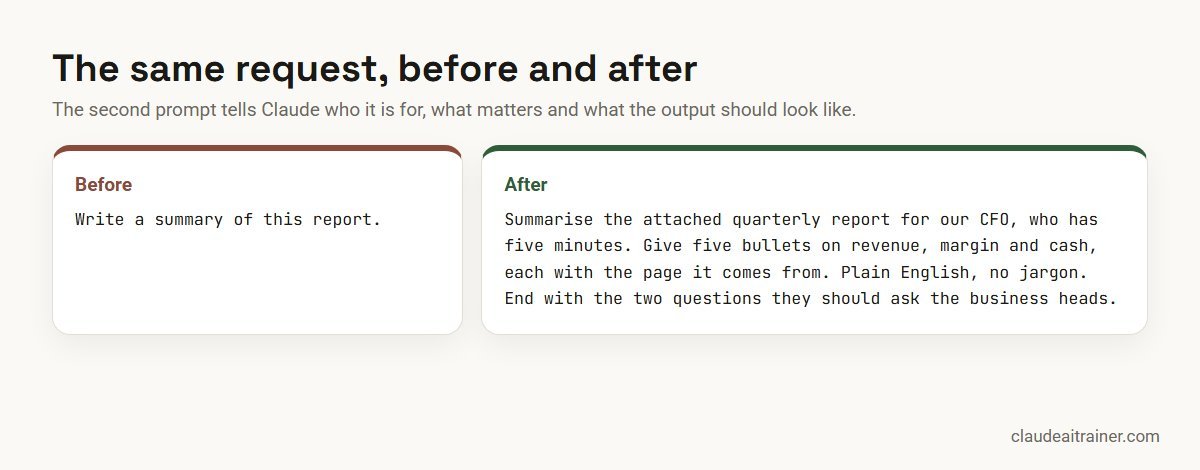
The “after” prompt is longer, but every extra sentence removes a guess: who the reader is, how much time they have, what to focus on, where numbers come from and what to end with.
The six techniques that matter most
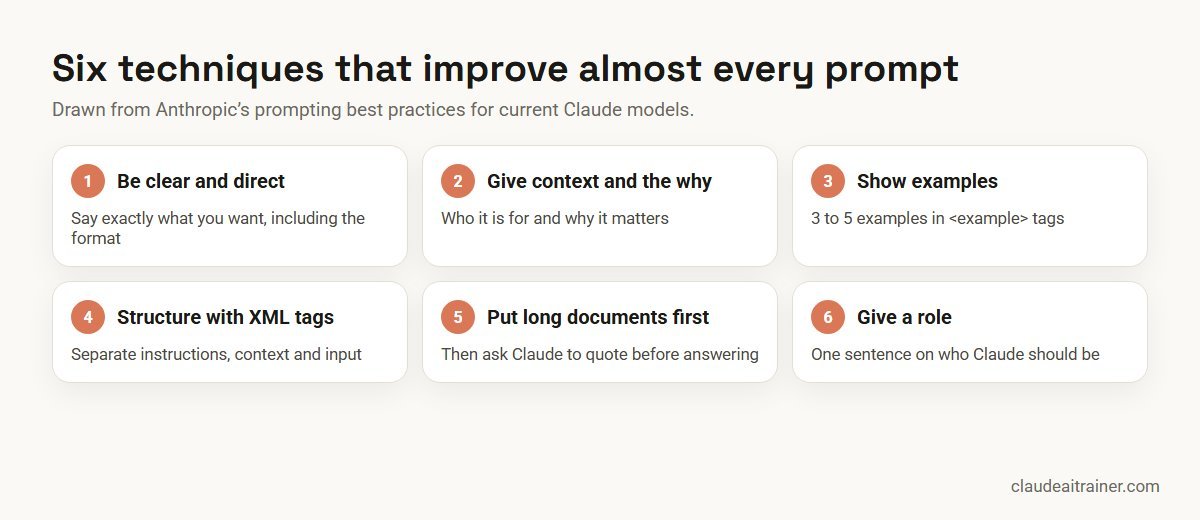
1. Be clear and direct
Say what you want, in the order you want it, including the format. If you want Claude to go beyond the obvious, ask for it explicitly rather than hoping it infers it. Numbered steps help when the order of work matters.
2. Give context and explain why
Context changes the answer. “Keep it short” is an instruction; “keep it short because it will be read on a phone between meetings” tells Claude what kind of short you mean. Anthropic notes that explaining the reason behind an instruction helps Claude deliver more targeted responses.
3. Show examples
When tone, structure or format matter, examples work better than descriptions. Anthropic recommends three to five varied examples, wrapped in <example> tags so Claude can tell them apart from your instructions. Make sure the examples are relevant and different from each other, or Claude may copy one too closely.
4. Structure the prompt with XML tags
When a prompt mixes instructions, background and material to work on, tags keep them apart. The names don’t need to be special; consistency matters more than the exact wording.
<context>
We are a mid-sized logistics company. The audience is our regional managers,
who know operations well but not finance terms.
</context>

<instructions>
Summarise the attached cost report in five bullet points.
Use plain English, explain any finance term in brackets,
and give the source page for every number.
</instructions>

<report>
[paste or attach the report]
</report>
5. Put long documents first, then ask for quotes
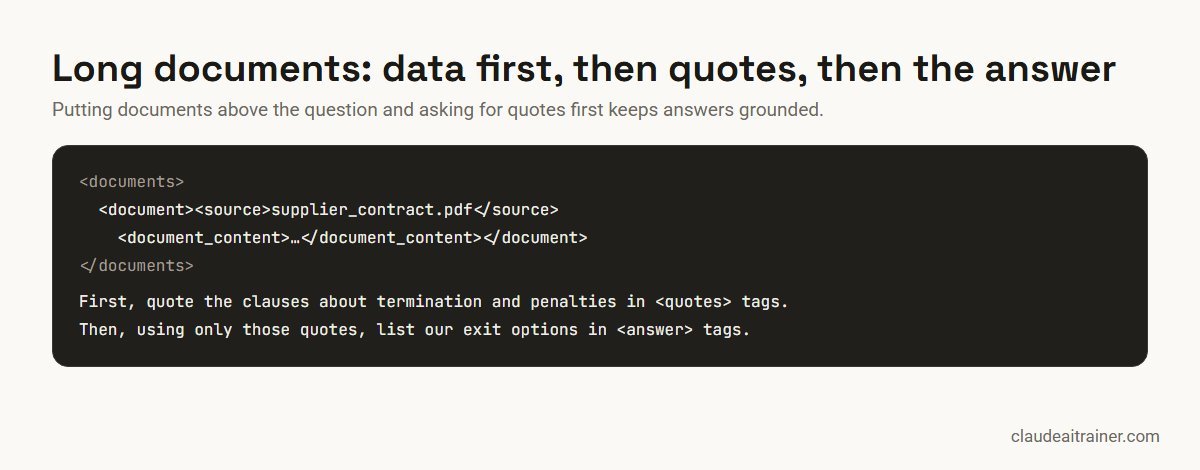
For long material such as contracts, reports or research, Anthropic recommends placing the documents near the top of the prompt, above your question and instructions. Asking Claude to quote the relevant passages first, and then answer using only those quotes, keeps the answer grounded in the text.
6. Give Claude a role
A single sentence such as “You are an experienced procurement analyst reviewing supplier contracts for a manufacturing company” focuses tone and judgement. In the API this usually goes in the system prompt; in claude.ai, at the start of your message or in a Project’s instructions.
For teams using Claude
Want your whole team prompting this way?
Good prompting is a habit, not a cheat sheet. In our corporate Claude sessions, each team rewrites the prompts it uses every week, tests them on real work and saves the ones that hold up. If it would help to talk through your team’s use, we are happy to.
Control the format of the answer
Three habits make output easier to use:
- Say what to do, not only what to avoid. “Write in flowing paragraphs” works better than “don’t use bullet points”.
- Match your prompt to the output you want. Anthropic notes that the style of your prompt can influence the style of the reply; a prompt full of markdown tends to get markdown back.
- Name the container. Ask for the answer inside a tag, a table with named columns, or a specific file type, so you can copy it straight into your work.
Ask for action when you want action
With tools available, as in Claude Code or with connectors, wording matters. Anthropic’s guidance points out that “can you suggest some changes” may get suggestions rather than edits. If you want Claude to make the change, say so: “Update the function to handle empty input and run the tests.”
Break big jobs into steps
For important work, a simple chain often beats one giant prompt: ask Claude for a draft, then ask it to review the draft against your criteria, then ask it to revise. Each step is easy to check, and you can stop at any point. This works just as well in a normal chat as it does in an automated workflow.
A reusable prompt template
Role: You are [who Claude should be].

Context: [Who this is for, why it matters, what they already know.]

Task: [Exactly what to do, in order.]

Material: [Documents or data, ideally above the task for long material.]

Format: [Length, structure, tables, tone, language.]

Checks: [What to quote or cite, what to flag, what not to invent.]
Not every prompt needs every line. A quick email needs two; a contract review needs all six.
Make good prompts reusable
Once a prompt works, don’t retype it. Save the instructions in a Claude Project so everyone working on the same body of work starts from them, or turn a repeatable procedure into a Skill; our guide on how to create Claude Skills shows how. If you call Claude from code, the same principles apply; see our Claude API guide for beginners. For worked examples by team, see our Claude Projects examples and our library of Claude prompts for marketing.
Common mistakes
- Asking for “a summary” without saying who it is for. The right summary for a CFO and for an engineer are different documents.
- Hiding the real question at the end of a long paste. Put long material first and the question after it, clearly marked.
- Contradicting yourself. “Be detailed” and “keep it under 100 words” in the same prompt forces Claude to guess which matters more.
- Not checking. Even a perfect prompt can produce a wrong figure. Ask for sources and verify the ones your decision depends on.
- Using the wrong model for the job. Our guide on choosing the right Claude model explains the trade-offs.
Key takeaways
- Write for a brilliant new colleague who knows nothing about your context
- Say who the output is for, why it matters and exactly what format you want
- Show three to five examples when format or tone matters
- Use XML tags to separate instructions, context and input
- With long documents, put the documents first and ask Claude to quote before it answers
- Save prompts that work as Projects, Skills or templates so the whole team benefits
FAQ
Prompting Claude: common questions
How do I write a good prompt for Claude?
Treat Claude like a capable new colleague: say what you want, who it is for, why it matters and what format you need. Add examples when tone or structure matters, separate instructions from material with XML tags, and ask for sources when accuracy matters.
Does Claude work better with XML tags?
XML tags help Claude separate instructions, context, examples and input in complex prompts, which reduces misunderstandings. The tag names are up to you; what matters is using them consistently.
How many examples should I give Claude?
Anthropic recommends three to five varied, relevant examples when you want to steer format, tone or structure, wrapped in example tags so Claude can tell them apart from your instructions.
How should I prompt Claude with long documents?
Put the documents near the top of the prompt, above your question and instructions, and wrap each in tags with its source. Ask Claude to quote the relevant passages first and then answer using those quotes.
Should I give Claude a role?
Yes, when it helps. A one-sentence role such as an experienced analyst or editor focuses tone and judgement. In the API it usually goes in the system prompt; in claude.ai, at the start of the message or in a Project’s instructions.
Do the same prompting techniques work in claude.ai, Claude Code and the API?
Yes. Clarity, context, examples, structure and format instructions help everywhere. In Claude Code and other tool-using setups, also be explicit about whether you want suggestions or actual changes.
How can my team reuse good prompts?
Save them as instructions in a Claude Project, turn repeatable procedures into Skills, or keep a shared prompt library with examples of good output. Review and update them as your work changes.
Trusted by
Teams we’ve trained
…and 200+ organisations, across 16+ countries.
What participants say
Real feedback from real sessions
Verified feedback collected from participants across corporate sessions — average rating 4.8/5.
“A very productive session for working professionals. A must-do.”
“The session was highly insightful and conducted in a very professional and interactive manner. Learnt about AI and excited to learn more!”
“Highly recommended! Hands-on and directly useful — from making PPTs and strategic plans to building KRAs.”
“I would recommend everyone to go through this session — it clarifies both what to expect from AI and where AI isn’t needed.”
“A nice interactive session with a lot of new insights and the power of AI. This will help me save time in routine activities.”
“A very good training session. AI can do wonders — we’ll implement it to create efficiency and save time.”
Explore more
Keep going with Claude AI training
Work with us
Help your team get better results from Claude
Tell us which teams use Claude, what they use it for and which plan you are on. We will suggest a short, hands-on format built around their own prompts and send a fixed proposal, usually within one business day.