Blog · Claude for marketing
Best Claude Prompts for Marketing Teams: 10 Tested Templates (2026-27)
A marketing prompt is only as good as what Claude knows about your brand, your customer and your numbers. This library gives you ten prompts marketing teams can copy, from positioning to the weekly performance readout. Each comes with what to attach, the Claude feature to run it in, and the check a marketer should make before anything goes live.
Most marketing prompt lists are a long column of one-liners: “write a catchy headline for…”. They produce generic copy because Claude has no idea who you are, who you sell to or what you are allowed to claim. The fix is not a longer list. It is a short list of well-built prompts that sit on top of context you set up once.
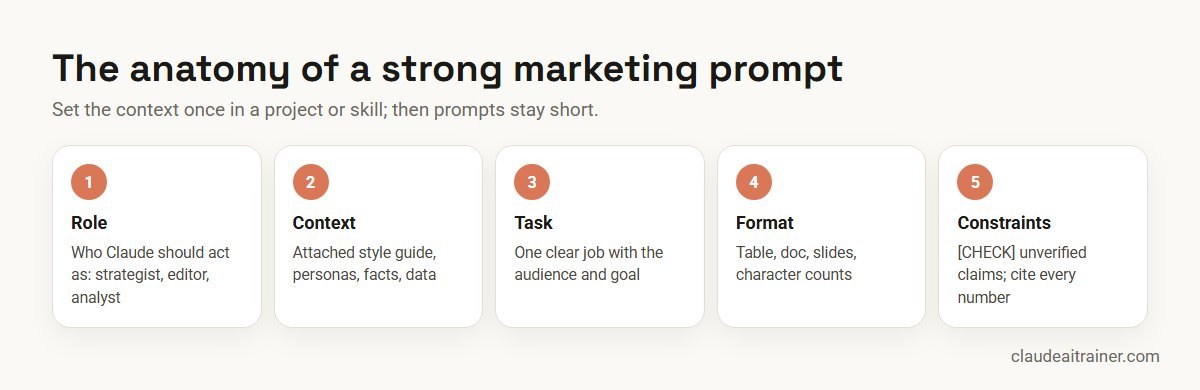
Below are ten prompts marketing teams use, each with what to attach, where to run it, and what to check. They follow the structure in our guide on how to prompt Claude: role, context, task, format, constraints. Product details were checked on Anthropic’s documentation and blog in October 2026. For one starting use case per department rather than a marketing library, see Claude use cases for business. Selling rather than marketing? See Claude prompts for sales. Want themes from support tickets for your messaging? Our guide to Claude for customer support shows how to pull them from a ticket export.
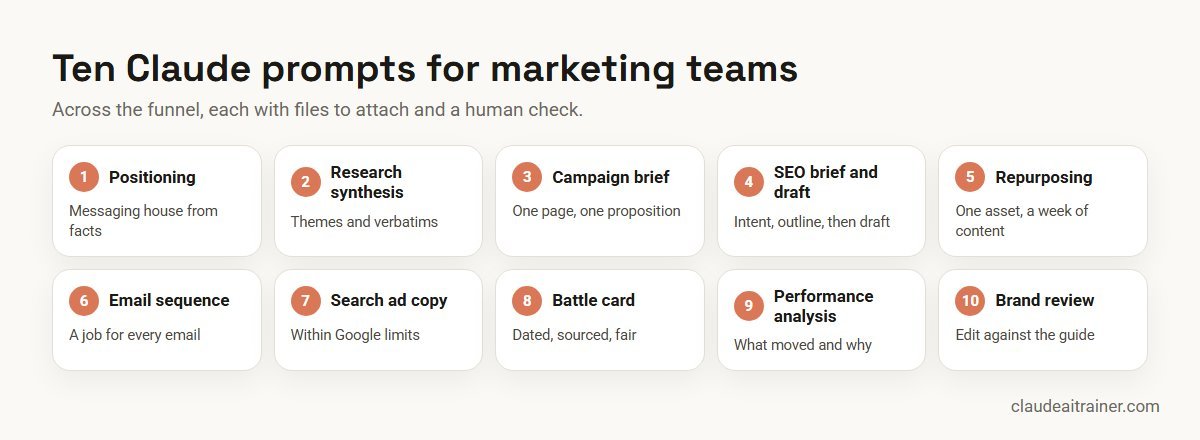
Quick answer: ten prompts for marketing teams
- Positioning and messaging: a messaging house from product and customer facts.
- Customer research synthesis: themes and verbatims from reviews or interviews.
- Campaign brief: a one-page brief the whole team can work from.
- SEO article brief and draft: search intent first, then a draft.
- Content repurposing: one webinar or report into a content set.
- Email nurture sequence: a short sequence with a job for each email.
- Search ad copy: responsive search ad headlines and descriptions within limits.
- Competitor battle card: where you win, where they win, what to say.
- Campaign performance analysis: what moved, why, and what to change.
- Brand voice review: an edit against your style rules before publishing.
Set up the context once
Before the prompts, give Claude the material it needs every time. Three options, from simplest to most powerful:
- A Project. Upload your style guide, messaging, personas, product fact sheet and a few approved pieces, and add standing instructions. Every chat in the project starts briefed. Our Claude Projects examples include a brand voice hub you can copy.
- A skill. Package your brand voice and formats as a skill so it applies wherever it is relevant; see how to create Claude skills.
- The marketing plugin. Anthropic publishes a marketing plugin, designed mainly for Cowork and also usable in Claude Code, with commands such as
/draft-content,/campaign-plan,/brand-review,/competitive-brief,/performance-report,/seo-auditand/email-sequence. It can connect to tools including Slack, Canva, Figma, HubSpot, Amplitude, Notion, Ahrefs, Similarweb, Klaviyo and Supermetrics.
Anthropic’s own marketing teams use this pattern. In a January 2026 post, Anthropic described a growth marketer whose custom command checks ad inputs against skills for brand voice, product accuracy and ad best practice before exporting an upload-ready file, with a person reviewing it before upload.
Comparison table
| Prompt | Attach | Best place to run it | Check before use |
|---|---|---|---|
| Positioning | Product facts, customer interviews, competitor notes | Brand project | Leadership sign-off |
| Research synthesis | Reviews, survey text, interview notes | Chat or Cowork for many files | Verbatims match sources |
| Campaign brief | Goals, budget, audience, past results | Brand project; Docs artifact | Budget and dates confirmed |
| SEO brief and draft | Keyword, audience, sources | Brand project; web search on | Facts and links verified |
| Repurposing | Transcript or report | Brand project or voice skill | Quotes and claims checked |
| Email sequence | Offer, segment, past performance | Brand project; email platform connector | Compliance and links |
| Search ad copy | Landing page, keywords, USPs | Brand project or skill | Character limits, policy |
| Battle card | Dated competitor sources, win/loss notes | Market watch project | Sources under 90 days old |
| Performance analysis | Campaign export or analytics connector | Chat, Cowork or Dashboards artifact | Numbers match the source |
| Brand review | Draft plus style guide | Voice skill or /brand-review | Final human edit |
The ten prompts in detail
1. Positioning and messaging prompt
When to use it. A launch, a rebrand, or when sales and marketing describe the product differently.
You are a B2B positioning strategist. Using the attached product fact
sheet, five customer interview notes and competitor summaries, build a
messaging house: one positioning statement (for [audience] who [need],
[product] is the [category] that [benefit], unlike [alternative]),
three pillars with two proof points each taken only from the files, and
the top three objections with a response. Mark any proof point you are
inferring with [CHECK]. Then give me two alternative positioning
statements and explain the trade-off.
Check. Every proof point traces to a file. Leadership signs off positioning; Claude drafts options.
2. Customer research synthesis prompt
When to use it. You have hundreds of reviews, survey comments or interview notes and need themes you can act on.
Analyse the attached 300 product reviews. Group them into no more than
eight themes. For each theme: a one-line description, how many reviews
mention it, two verbatim quotes with the review ID, and whether it is
a reason to buy, a reason to churn or a feature request. Finish with
the five phrases customers use most that we never use in our copy.
Check. Spot-check quotes against the source. For many files in a folder, run it in Cowork; see Claude Cowork use cases.
3. Campaign brief prompt
When to use it. Before any campaign, so creative, media and sales work from the same page.
Write a one-page campaign brief for [campaign] using the attached goals
and last quarter's results. Sections: objective and KPI with target,
audience and insight, single-minded proposition, key messages, channels
with budget split, timeline, mandatory elements, and how we'll measure
success. Keep it under 450 words. List any information you need from
me that isn't in the files.
Check. Budget, dates and targets are confirmed by the campaign owner. A brief makes a good Docs artifact for comments; see Claude artifacts examples.
4. SEO article brief and draft prompt
When to use it. Planning and drafting an article for a target search query.
Target query: "[keyword]". Audience: [role] at [company type].
Step 1: describe the likely search intent and what the top results
would need to cover, and propose an H2/H3 outline that answers the
query faster and more specifically than a generic article.
Step 2: wait for my approval of the outline.
Step 3: draft 1,500 words in our voice, with a two-sentence direct
answer at the top, one comparison table and five FAQs. Mark every
statistic or product claim with [SOURCE NEEDED] unless it is in the
attached files.
Check. A person verifies every fact and link and adds first-hand experience. The two-step approach stops Claude writing 1,500 words in the wrong direction.
5. Content repurposing prompt
When to use it. You have one strong asset, such as a webinar, report or keynote, and need a week of content from it.
From the attached webinar transcript, create: one 800-word blog post,
three LinkedIn posts (one story, one list, one contrarian take), five
short social posts under 200 characters, and one newsletter section of
150 words. Use only points made in the webinar and attribute quotes to
the speaker by name. Use our voice from the style guide.
Check. Quotes match the transcript and the speaker approves them. Content creation is the second-largest category of Cowork work in Anthropic’s July 2026 usage analysis, so this is a common pattern.
For marketing leaders
Want your whole marketing team prompting to the same standard?
Prompt libraries work when they sit on top of a brand project, a voice skill and a shared review routine. We run hands-on sessions where the team builds those on its own campaigns. Book a short call if that would help.
6. Email nurture sequence prompt
When to use it. A new lead magnet, trial or event needs follow-up emails.
Write a 5-email nurture sequence for people who downloaded [asset].
For each email: its single job (educate, prove, handle objection, offer,
last call), send day, subject line plus two alternatives under 45
characters, preview text, a body under 150 words and one call to
action. Vary the format: one story, one checklist, one customer proof
point from the attached case studies, one FAQ, one direct offer.
Check. Legal and compliance review (consent, unsubscribe, claims), links tested, and sending stays in your email platform.
7. Search ad copy prompt
When to use it. Building or refreshing Google responsive search ads. Google allows up to 15 headlines of up to 30 characters and 4 descriptions of up to 90 characters per ad.
Using the attached landing page copy and USPs, write a responsive search
ad for the keyword theme "[theme]": 15 headlines of at most 30
characters and 4 descriptions of at most 90 characters. Include the
keyword in at least three headlines, a price or offer only if it is on
the landing page, and two headlines that address the main objection.
Output as a table with a character count for each line.
Check. Count characters in the ad platform itself, check claims against the landing page and the platform’s ad policies. Anthropic’s own growth team reviews generated ad files before upload.
8. Competitor battle card prompt
When to use it. Sales keep losing to the same competitor, or a competitor has just changed pricing.
Build a one-page battle card against [competitor] from the attached
sources (each has a capture date). Sections: their pitch in one line,
where they win, where we win, landmines to set, traps to avoid, three
proof points we can cite, and a short talk track for the top objection.
Give the source and date for every fact and flag anything older than
90 days.
Check. Facts are current and fair; never state a competitor claim you cannot source. Keep this prompt inside a competitor watch project so sources accumulate.
9. Campaign performance analysis prompt
When to use it. The weekly or post-campaign readout.
Analyse the attached campaign export for [period] against the targets
in the brief. Give: a five-line summary for leadership, a table of each
channel's spend, leads, cost per lead and conversion rate versus
target, the three biggest changes from the previous period, likely
reasons only where the data supports them (label the rest as
hypotheses), and three changes to test next week. Show the calculation
for every derived metric.
Check. Numbers match the source system. For a recurring version, Cowork can build the readout on a schedule, and a Dashboards artifact can show the charts with their queries.
10. Brand voice review prompt
When to use it. The last step before anything is published, whoever wrote it.
Review the attached draft against our style guide. Return a table:
original sentence, issue (tone, banned word, jargon, unsupported claim,
inconsistent term, spelling style), suggested rewrite. Then give an
overall score out of 10 for voice fit with one sentence of reasoning,
and list every claim that needs a source. Don't rewrite the whole
piece.
Check. The brand lead makes the final edit. If you install the marketing plugin, its /brand-review command applies your configured voice in a similar way.
How to adapt these prompts
- Replace the brackets with specifics: a real audience, a real product, a real number.
- Attach, don’t describe. A style guide file beats a sentence about your tone.
- Ask for the format you will use: a table for review, a doc for comments, slides for a meeting.
- Build in honesty: [CHECK], [SOURCE NEEDED] and “label the rest as hypotheses” make weak points visible.
- Save winners as skills so the next person gets the same result.
Worked example: a six-person marketing team builds a launch kit in a day
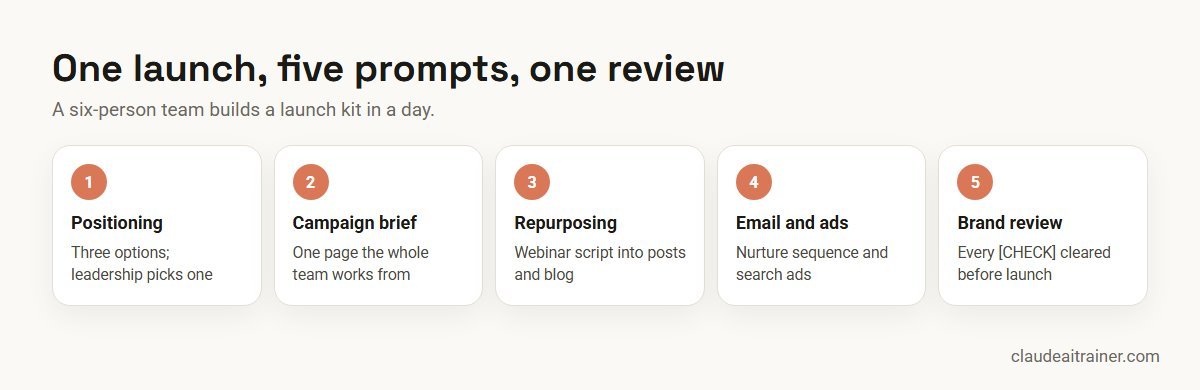
- Morning. The product marketer runs prompt 1 in the team’s brand project with the fact sheet and interviews, and leadership picks one of the three positioning options by lunch.
- Early afternoon. The content lead runs prompt 3 for the brief, then prompt 5 on the launch webinar script and prompt 6 for the follow-up emails.
- Late afternoon. The performance marketer runs prompt 7 for three ad groups. Everything goes through prompt 10 before review.
- Review. Every [CHECK] item goes to the product owner. Nothing ships until the claims are cleared.
The time saved is in first drafts and consistency. The judgement calls (positioning, claims, final edits) stay with people.
Next step
Turn these prompts into your team's playbook
We help marketing teams adapt these templates to their brand, save the best as shared skills and set up the weekly readout. Online or on-site.
Security and governance
- Use a business plan. Keep customer data, unreleased plans and pricing in a Team or Enterprise workspace your company has approved; see the best Claude plan for business.
- Customer data. Anonymise reviews and survey data where you can, and follow your privacy policy before uploading personal data.
- Claims and compliance. Regulated industries need legal review of every claim. Claude drafts; it does not approve.
- Connectors. Marketing connectors such as CRM and email platforms act with each person’s own access. Keep send and publish actions behind human approval; see the best MCP servers for Claude.
- Untrusted input. Competitor pages and customer reviews can contain text aimed at an AI. Ask Claude to analyse them, not to follow them.
Choosing between assistants for the marketing team? See Claude vs ChatGPT vs Gemini vs Copilot.
Sources
Checked October 2026: Anthropic’s marketing plugin and its marketplace listing; How Anthropic uses Claude in marketing (January 2026); How people are using Claude Cowork (July 2026); the Projects help article; and Google’s responsive search ads help page for ad limits.
Key takeaways
- Set up context once in a project or skill; prompts then become short and consistent
- Every prompt names the audience, the goal, the format and the constraints
- Ask Claude to mark unverified claims with [CHECK] and to cite the source of every number
- Use connectors and plugins for live data instead of pasting exports when your plan allows
- Save prompts that work as skills so every marketer gets the same quality
- A person approves every claim, price and asset before it is published
FAQ
Claude prompts for marketing: common questions
What are the best Claude prompts for marketing?
Useful marketing prompts cover positioning, customer research synthesis, campaign briefs, SEO briefs and drafts, content repurposing, email sequences, search ad copy, competitor battle cards, campaign performance analysis and brand voice review. Each works best with your brand files attached.
How do I make Claude write in our brand voice?
Put your style guide, messaging and a few approved pieces in a Project with standing instructions, or package the voice as a skill. Then ask Claude to review drafts against the guide and list every deviation.
Is Claude good for marketing?
Claude is strong at reading long documents, synthesising research and drafting in a defined voice, which covers much marketing work. It does not replace judgement on positioning, claims or final edits, which should stay with marketers.
Does Anthropic have a marketing plugin for Claude?
Yes. Anthropic’s marketing plugin, designed mainly for Cowork and also usable in Claude Code, includes commands such as /draft-content, /campaign-plan, /brand-review, /competitive-brief, /performance-report, /seo-audit and /email-sequence.
Can Claude connect to HubSpot, Canva or Google Analytics?
The marketing plugin lists connectors including HubSpot, Canva, Figma, Amplitude, Notion, Ahrefs, Similarweb, Klaviyo and Supermetrics. Availability depends on your plan and your administrator’s settings.
Can Claude write Google Ads copy within character limits?
Yes, if you state the limits: up to 15 headlines of 30 characters and 4 descriptions of 90 characters for a responsive search ad. Ask for a character count per line and confirm in the ad platform.
Can Claude do SEO keyword research?
Claude can analyse search intent and outline content, and with web search or SEO connectors it can work with live data. It does not have search volume data on its own, so pair it with your SEO tool.
How do I stop Claude inventing statistics in marketing copy?
Attach your sources, ask Claude to use only those, and require markers such as [CHECK] or [SOURCE NEEDED] on any claim it cannot trace. A person verifies every flagged item.
Should marketing prompts be saved as skills?
Yes, once a prompt reliably works. A skill makes the method available to the whole team, so quality does not depend on who wrote the prompt.
Can Claude create the campaign assets as well as the copy?
Yes. Artifacts can produce Docs, Slides and Design mock-ups such as landing pages and social assets, and Cowork can build decks and spreadsheets from your files. Treat them as drafts for review.
Is it safe to upload customer data for analysis?
Use a business plan your company has approved, anonymise where possible and follow your privacy policy. Avoid uploading personal data to personal accounts.
Where can my marketing team learn to use Claude hands-on?
Our Claude for sales and marketing teams training has marketers build a brand project, a voice skill and their own prompt library on real campaigns, online or on-site.
Trusted by
Teams we’ve trained
…and 200+ organisations, across 16+ countries.
What participants say
Real feedback from real sessions
Verified feedback collected from participants across corporate sessions — average rating 4.8/5.
“A very productive session for working professionals. A must-do.”
“The session was highly insightful and conducted in a very professional and interactive manner. Learnt about AI and excited to learn more!”
“Highly recommended! Hands-on and directly useful — from making PPTs and strategic plans to building KRAs.”
“I would recommend everyone to go through this session — it clarifies both what to expect from AI and where AI isn’t needed.”
“A nice interactive session with a lot of new insights and the power of AI. This will help me save time in routine activities.”
“A very good training session. AI can do wonders — we’ll implement it to create efficiency and save time.”
Explore more
Keep going with Claude AI training
Work with us
Help your marketing team get better results from Claude
Tell us about your team, channels and the content or reports you produce every week. We will suggest a short, hands-on format, online or on-site (for example Claude AI training in Mumbai or London), and send a fixed proposal, usually within one business day.