Blog · Claude for academic research
Claude for Academic Research: 10 Workflows + Prompts (2026)
Claude for academic research is most useful for reading, organising and drafting: appraising papers you attach, building literature review matrices, searching peer-reviewed sources through connectors such as Consensus, Scite, Wiley Scholar Gateway and PubMed, writing analysis code and tightening drafts. It can still be wrong, so every citation, number and claim needs checking. Below are ten workflows, the tools to use and the researcher’s check for each.
Research involves a great deal of reading and writing around a small amount of new thinking. A doctoral student may read hundreds of papers for one review chapter; a principal investigator writes grants, reports and responses to reviewers on top of supervising. AI tools can take some of that load, but in research the cost of a confident mistake is high: a citation that does not exist, a misread effect size or a sentence that strays too close to a source.
This guide is built around that risk. Claude for academic research works best when it reads sources you provide or retrieves them through connectors that return real papers, and when every output is checked by the person whose name goes on the work. Each workflow below names what to attach, gives a prompt and ends with the researcher’s check. Product details were checked on Anthropic’s documentation, help centre, connector directory and announcements in October 2026.
Quick answer: ten ways researchers use Claude
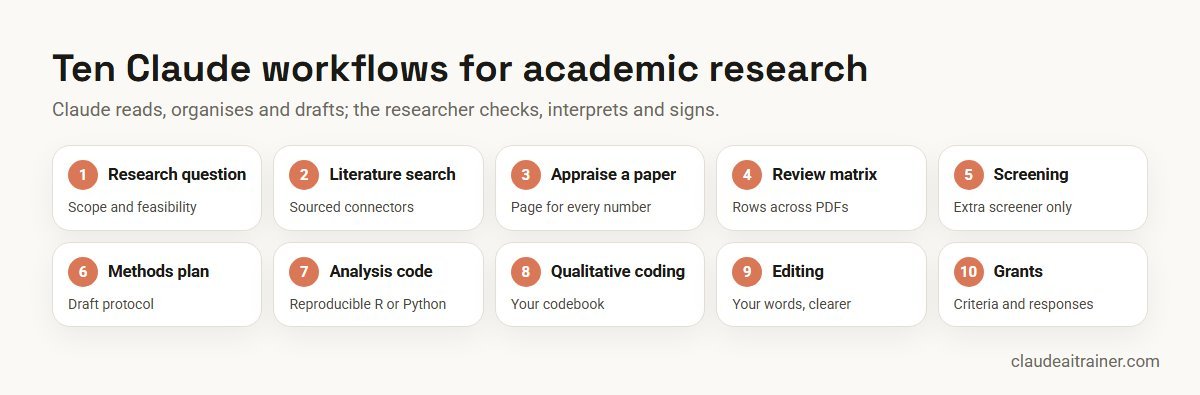
- Sharpen the research question: scope, assumptions and feasibility.
- Sourced literature search: peer-reviewed results through research connectors.
- Appraise a paper: design, methods, limits and how it fits your question.
- Literature review matrix: a comparison table across many PDFs, with page references.
- Screen studies: a first pass against inclusion criteria for a systematic review.
- Methods and analysis plan: a draft protocol or pre-registration.
- Reproducible analysis code: R or Python with comments and checks.
- Qualitative coding support: applying your codebook to transcripts.
- Editing and structure: clarity, flow and journal format, in your own words.
- Grants and reviewer responses: structure, gaps and a point-by-point reply.
Tools for academic research in Claude
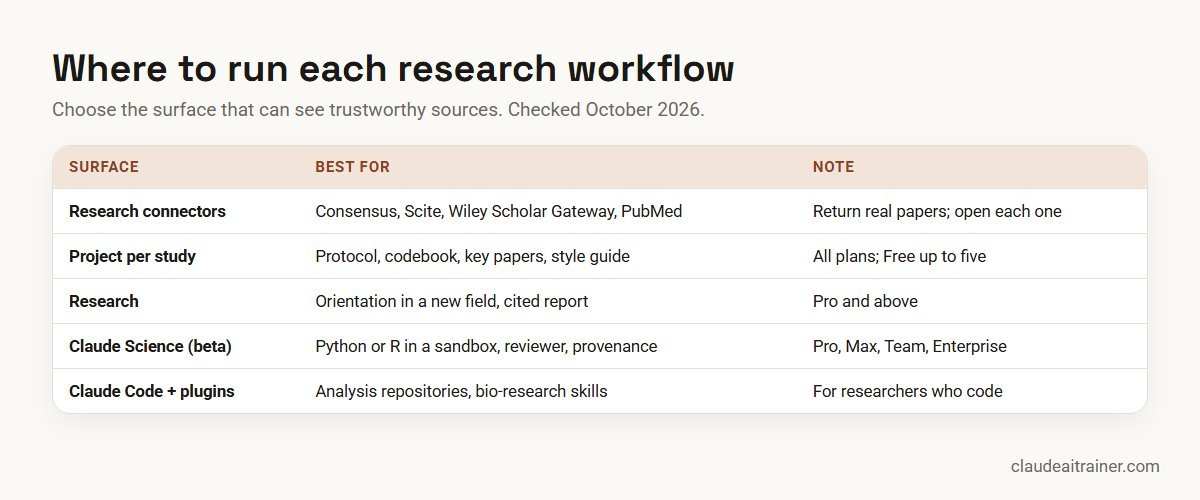
Choose the surface that can see trustworthy sources.
- Research connectors. The connector directory lists Consensus (searches peer-reviewed papers drawn from Semantic Scholar, OpenAlex and PubMed), Scite (shows whether later studies supported or disputed a paper) and Wiley Scholar Gateway (answers grounded in Wiley journal articles with citations and DOI links), all marked Anthropic verified and all requiring a sign-in. Anthropic’s documentation also names PubMed, Clinical Trials, ChEMBL and bioRxiv as directory connectors. Directory connectors are available on all plans; on Team and Enterprise plans an admin adds them for the organisation.
- Projects. A project holds the files and instructions for one study: protocol, codebook, key papers and your style guide. Projects work on every plan; free users can create up to five.
- Research. On Pro and above, Research searches the web and returns a cited report. It is good for orientation in a new area; for scholarship, follow every link to the original paper.
- Claude Science. Anthropic’s desktop workbench for research, in beta on macOS, Windows and Linux. Claude writes and runs Python, R or shell code in a sandbox, reads folders you grant, saves versioned artifacts with a provenance record and offers a background reviewer that checks claims against what actually ran. It is included in Pro, Max, Team and Enterprise plans and is not available on Free. Anthropic says it supports fields well beyond the life sciences, and that it is a research tool, not for clinical or diagnostic use.
- Literature access in Claude Science. Given a DOI or title, Claude Science tries open-access copies first (Unpaywall, Semantic Scholar, PubMed Central), then routes you hold keys for, such as an Elsevier or Springer Nature key or your library’s EZproxy. A key only gives Claude the access you already have. Its Literature Graph connector needs a free OpenAlex API key.
- Plugins and Claude Code. Anthropic’s open-source
bio-researchplugin bundles literature, preprint, trial and chemistry sources with skills for single-cell QC, Nextflow pipelines and a scientific problem-selection framework. Researchers who code can use Claude Code for analysis repositories.
Comparison table
| Workflow | Attach or connect | Best surface | Researcher check |
|---|---|---|---|
| Research question | Draft question, 3-5 key papers | Project | Supervisor or co-PI agrees scope |
| Literature search | Search terms, date range | Consensus, Scite, PubMed | Open every paper |
| Appraise a paper | The PDF | Chat or Project | Read the methods yourself |
| Review matrix | 10-30 PDFs, your columns | Project or Claude Science | Spot-check page references |
| Screening | Exported records, criteria | Project | Two human screeners decide |
| Methods plan | Aims, design, data sources | Project | Statistician and ethics review |
| Analysis code | De-identified data, codebook | Claude Science or Claude Code | Rerun and test the code |
| Qualitative coding | De-identified transcripts, codebook | Project | Researcher codes a sample |
| Editing a draft | Your own draft, journal guide | Chat | Wording stays yours; disclose |
| Grants and responses | Call text, draft, reviews | Project; Research Resources in Claude Science | PI owns every claim |
The ten workflows in detail
1. Sharpen the research question
Use it for testing a question before you invest months in it. Attach: your draft question and three to five papers closest to it.
Here is my draft research question and five key papers. Rewrite the
question in three versions: narrower, broader and as a testable
hypothesis. For each, list the main assumptions, the data or access it
would need, the likely confounders and what result would count as a
contribution beyond the attached papers. Do not cite anything that is
not in the attached files.
Researcher check. Discuss the options with your supervisor or co-investigators. Claude can map the territory; deciding what is worth studying is your call.
2. Sourced literature search
Use it for a first map of a field with real, linked papers. Connect: Consensus, Scite, Wiley Scholar Gateway or PubMed, depending on your discipline.
Using the Consensus and PubMed connectors, find peer-reviewed studies
from 2018 onwards on [topic] in [population or setting]. Return a table:
authors, year, title, journal, DOI, design, sample size and main
finding in one sentence. Only include papers the connectors returned;
if a field is missing, leave it blank. Then group the papers by
finding and note where results disagree.
Researcher check. Open every paper before you cite it and confirm the finding in the original. Connectors reduce invented references, but a one-line summary can still misread a result. Keep the search strings for your methods section.
3. Appraise a paper
Use it for reading a dense paper faster and more critically. Attach: the PDF.
Summarise the attached paper for a researcher in my field: question,
design, sample, measures, analysis, main results with effect sizes and
confidence intervals, and the authors' stated limitations. Then list
weaknesses the authors do not mention, such as selection bias,
measurement issues or multiple comparisons. Quote the sentence and
page for every number you report.
Researcher check. Read the methods and results yourself. Use Claude’s list as prompts for your own appraisal, or alongside a recognised checklist for the study design.
4. Literature review matrix
Use it for comparing many studies side by side. Attach: 10 to 30 PDFs in a project, plus the columns you want.
For each attached paper, fill one row of a matrix with these columns:
citation, country, design, sample, intervention or exposure, outcome
measures, main result, quality concerns and relevance to my question
(high, medium, low with a reason). Add the page number for every cell
you fill. Where a paper does not report something, write "not
reported". Output as a table I can paste into Excel.
Researcher check. Spot-check at least one row in five against the paper, more if errors appear. Large sets of documents suit Claude Science, which keeps a provenance record for each result.
5. Screen studies for a systematic review
Use it for a first pass through titles and abstracts. Attach: the exported search records and your written inclusion and exclusion criteria.
Screen the attached records against our inclusion and exclusion
criteria. For each record give: include, exclude or unsure, the
criterion that decided it, and the words in the abstract that support
the decision. Mark as "unsure" anything that depends on information
the abstract does not give. Do not exclude records for missing data.
Researcher check. Treat Claude as an extra screener, not a replacement for two independent human screeners. Report its use in your methods and follow your review protocol’s rules.
For research groups and graduate schools
Want your lab using Claude carefully and well?
Most researchers have tried a chatbot. Fewer have a routine that holds up to a supervisor, an ethics board or a journal: sourced searches, a shared project per study, reproducible code and a written disclosure. We run hands-on sessions where researchers build that routine on their own projects. Book a call if that would help.
6. Methods and analysis plan
Use it for drafting a protocol, pre-registration or ethics application section. Attach: your aims, design notes, data sources and any template from your ethics board or registry.
Draft a methods section from my notes in the attached template: design,
participants and sampling, measures, procedures, sample size reasoning
(show the calculation and assumptions), analysis plan for each
hypothesis, handling of missing data and ethical considerations. List
every decision I still need to make as a question at the end.
Researcher check. Have a statistician check the sample size and analysis plan. The ethics application is yours; describe AI use there if your board asks.
7. Reproducible analysis code
Use it for clean, commented R or Python that a colleague can rerun. Attach: a de-identified data file and your codebook. Claude Science runs code in a sandbox on your computer; Claude Code works inside your project repository.
Using the attached de-identified dataset and codebook, write R code
that loads the data, checks for impossible values and missing data,
runs the pre-registered models for H1 and H2, and saves tables and
figures. Comment every step, set a random seed, record package
versions and do not drop any rows without printing how many and why.
Researcher check. Rerun the code yourself and compare key numbers with a manual check. In Claude Science, use the reviewer, but remember Anthropic’s note that it reduces errors without eliminating them. For general analysis methods, see Claude for data analysis.
8. Qualitative coding support
Use it for applying an agreed codebook consistently across many transcripts. Attach: de-identified transcripts and your codebook with definitions and examples.
Apply the attached codebook to these three transcripts. For each coded
segment give the transcript ID, line numbers, the code and the exact
quote. List segments that fit no code, and segments where two codes
seem to apply, as "for discussion". Do not create new codes; suggest
possible new codes separately at the end.
Researcher check. Code a sample yourself and compare. Interpretation and theme building stay with the research team. Check that your ethics approval and consent forms allow transcripts to be processed this way.
9. Editing and structuring a draft
Use it for clarity and structure in text you have written. Attach: your draft and the journal’s author guidelines.
Edit the attached draft for clarity and flow without changing its
meaning, claims or citations. Show tracked suggestions as a table:
original sentence, suggested sentence, reason. Flag paragraphs that
make a claim without a citation, and check the structure against the
attached author guidelines (word limits, section order, abstract
format).
Researcher check. Accept or reject each change yourself, so the wording remains yours. Check your target journal’s AI policy and disclose use as it asks.
10. Grant proposal and reviewer response
Use it for getting the structure right and answering reviewers fully. Attach: the funding call, your draft and, later, the reviews. In Claude Science, the Research Resources connector searches Grants.gov and the Antibody Registry.
Compare my attached draft proposal with the funding call's assessment
criteria. For each criterion, say where the draft addresses it, how
strongly, and what is missing. Then, from the attached reviews, build a
response table: reviewer comment, our response, and the change made
with page and line. Do not promise analyses I have not agreed to.
Researcher check. The PI owns every claim, budget figure and commitment. Funders set their own rules on AI use in applications, so read the call carefully.
How to adapt these prompts
- Ground every answer. “Use only the attached papers” or “only papers the connector returned” is the single most useful line in research prompts.
- Ask for page numbers and quotes. They turn an output into something you can verify quickly.
- Separate extraction from interpretation. Ask Claude to extract first; interpret in a second step once you have checked the extraction.
- Save what works as a skill. A reliable appraisal or matrix prompt can become a skill your whole group uses. See how to create Claude skills and how to prompt Claude.
Worked example: a literature review chapter in four weeks
Here is how a doctoral student might use Claude for a hypothetical review chapter on remote work and employee wellbeing.
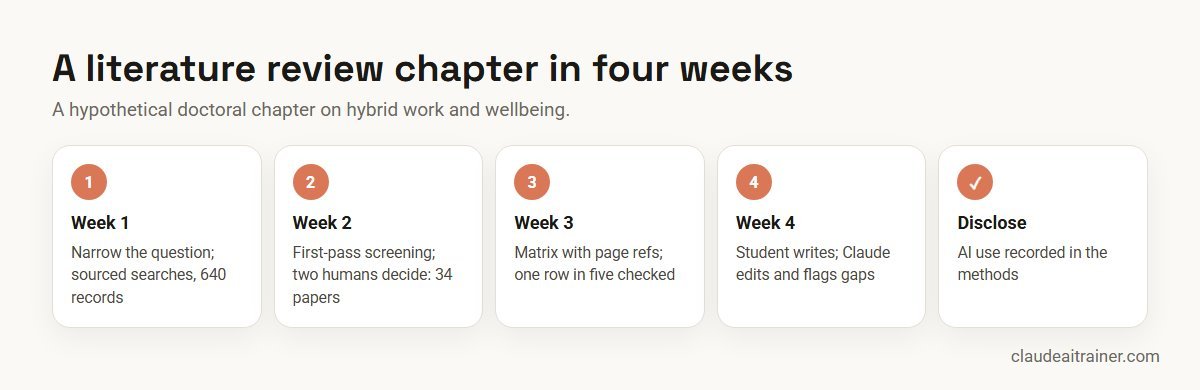
- Week 1. Workflow 1 narrows the question to hybrid workers in knowledge jobs. Workflow 2 runs sourced searches through Consensus and PubMed; the student exports 640 records.
- Week 2. Workflow 5 gives a first screening pass; the student and a second screener make the decisions, leaving 34 papers.
- Week 3. Workflow 4 builds a matrix across the 34 PDFs with page references. The student checks one row in five and corrects two.
- Week 4. The student writes the chapter, then uses workflow 9 to tighten structure and flag uncited claims, and records AI use in the methods.
The student saved time on searching, sorting and extracting, and spent it on reading the key papers properly and on the argument.
Next step
Set up Claude for your research group
We help research groups set up shared projects with protocols and style guides, connect literature sources, agree rules for sensitive data and turn reliable prompts into skills the whole group uses. Online or on-site.
Is Claude free for researchers?
Partly. Anthropic’s Claude Team plan for scientists, announced on 27 August 2026 with 10,000 seats, offers standard seats at $0 and premium seats at $15 per user a month ($180 a year billed annually) for 12 months. Principal investigators or equivalent at accredited universities or nonprofit research institutes in the natural sciences, maths, computer science, engineering and related fields can apply, then add postdocs, students and researchers; groups have 1 to 25 seats. Every seat includes Claude Science, Claude Code and Cowork. Anthropic says most applications are reviewed within seven business days and that inactive groups may return to standard pricing after 90 days. Companies and industry R&D teams are not the intended audience. Separately, Anthropic’s AI for Science programme offers usage credits by application, and universities can buy an institution-wide Education plan.
Research integrity and governance
- Authorship and disclosure. COPE’s position is that AI tools cannot be listed as authors, and that authors must disclose how they used them and remain responsible for the whole manuscript. Many journals have adopted similar rules.
- Peer review confidentiality. Do not upload manuscripts or grant applications you are reviewing. NIH, for example, prohibits its peer reviewers from using generative AI to analyse or critique applications.
- Personal and sensitive data. De-identify where you can and follow your ethics approval and data management plan. Anthropic says Team and Enterprise plans do not train models on your content by default; on Free, Pro and Max, training is a setting you can turn off.
- Licences. Anthropic notes that some databases behind Claude Science connectors have non-commercial or attribution terms; check them before you publish.
- Verification. Treat every citation, number and quote as unverified until you have checked it in the source.
Sources
Checked October 2026: Anthropic’s Claude Science overview, connectors and skills and literature access documentation; the help article on the Claude Team plan for scientists and the announcement Expanding our support for scientists; the Consensus, Scite, Wiley Scholar Gateway and PubMed connector listings; the bio-research plugin; Claude pricing; COPE’s position on authorship and AI tools; and NIH notice NOT-OD-23-149.
Key takeaways
- Use Claude to read, organise and draft; keep judgement, interpretation and authorship with the researcher
- Search through sourced connectors such as Consensus, Scite, Wiley Scholar Gateway and PubMed, and open every paper before you cite it
- Keep one Claude Project per study with the protocol, codebook and style guide
- Ask for quotes with page numbers so every extracted claim can be checked in seconds
- For heavy analysis, Claude Science (beta) runs Python or R in a sandbox and includes a reviewer step
- Follow COPE, your journal and your funder: disclose AI use, never list it as an author, and never upload manuscripts you are reviewing
FAQ
Claude for academic research: common questions
How good is Claude for academic research?
Claude is strong at reading long papers, extracting information into tables, writing analysis code and editing drafts. It is reliable only when it works from sources you attach or that a research connector returns, and when you check every citation and number against the original.
Can I use Claude for scientific research?
Yes. Anthropic’s Claude Science, a beta desktop app included in Pro, Max, Team and Enterprise plans, runs Python, R and shell code in a sandbox, connects to scientific databases and has a reviewer step. Anthropic says it is a research tool, not for clinical or diagnostic use.
Which model of Claude is best for academic research?
Use the most capable model your plan offers for long synthesis, appraisal and analysis, and a faster model for quick edits or reformatting. Model names change over time, so check the model picker; our guide to choosing the right Claude model explains the trade-offs.
Is Claude free for researchers?
Eligible academic and nonprofit research groups can apply for the Claude Team plan for scientists: standard seats are $0 and premium seats $15 per user a month for 12 months, for 1 to 25 seats per group. The PI applies and verifies eligibility. Otherwise, the Free plan offers chat, uploads and connectors but not Research or Claude Science.
Is Claude good for researchers?
For reading, organising, coding and drafting, yes, especially with sourced connectors and a project per study. Judgement, interpretation and authorship stay with the researcher.
Does Claude make up citations?
Any language model can produce a reference that looks real but is not. Reduce the risk by asking Claude to use only attached papers or results returned by connectors such as Consensus, Scite or PubMed, and open every paper before citing it.
Which Claude connectors are useful for academic research?
The directory lists Consensus, Scite and Wiley Scholar Gateway, all marked Anthropic verified, and Anthropic’s documentation names PubMed, Clinical Trials, ChEMBL and bioRxiv. Claude Science adds featured connectors, mostly for the life sciences, plus a Literature Graph covering OpenAlex and arXiv.
Can Claude write a literature review?
Claude can search, screen, extract and organise studies, and suggest structure. The argument, synthesis and final wording should be yours, and journals expect you to disclose how AI was used.
Can Claude read PDFs of research papers?
Yes. Attach the PDFs in a chat or project and ask for summaries, appraisals or extraction tables with page numbers. Claude Science can also retrieve open-access full text from a DOI or title.
Can I list Claude as a co-author?
No. COPE states that AI tools cannot meet authorship requirements because they cannot take responsibility for the work. Disclose how you used Claude in the methods or acknowledgements, as your journal asks.
Is it safe to upload research data to Claude?
Follow your ethics approval and data management plan, and de-identify where you can. Team and Enterprise plans do not train models on your content by default; on Free, Pro and Max, training is a setting you control.
Can I use Claude to peer review a manuscript?
Do not upload a manuscript or grant application you are reviewing unless the journal or funder explicitly allows it. NIH, for example, prohibits peer reviewers from using generative AI in its review process.
Where can our research group learn this hands-on?
Our corporate Claude AI training and Claude Code training take researchers through these workflows on their own projects, online or on-site.
Trusted by
Teams we’ve trained
…and 200+ organisations, across 16+ countries.
What participants say
Real feedback from real sessions
Verified feedback collected from participants across corporate sessions — average rating 4.8/5.
“A very productive session for working professionals. A must-do.”
“The session was highly insightful and conducted in a very professional and interactive manner. Learnt about AI and excited to learn more!”
“Highly recommended! Hands-on and directly useful — from making PPTs and strategic plans to building KRAs.”
“I would recommend everyone to go through this session — it clarifies both what to expect from AI and where AI isn’t needed.”
“A nice interactive session with a lot of new insights and the power of AI. This will help me save time in routine activities.”
“A very good training session. AI can do wonders — we’ll implement it to create efficiency and save time.”
Explore more
Keep going with Claude AI training
Work with us
Help your researchers use Claude well
Tell us about your group: the field, the tools you use (reference managers, R or Python, survey or interview data), the plan you are on and your institution’s AI policy. We will suggest a short, hands-on format, online or on-site, and send a fixed proposal, usually within one business day.