Blog · Custom GPTs
Best GPTs for Work in 2026, and the Plugins Replacing Them
The GPT Store still lists thousands of custom GPTs, but only a handful are worth a place in a working day. This list picks ten for research, writing, data, diagrams, design and video, each checked in the store in October 2026 with its publisher. It also covers the change that matters most: OpenAI plans to retire custom GPTs on 11 December 2026 and move them to plugins.
A custom GPT is a version of ChatGPT set up for one purpose, with its own instructions, reference files and tools. Since the GPT Store opened, publishers from research databases to design companies have built GPTs on top of their products, alongside the GPTs OpenAI’s own ChatGPT team publishes.
This list is for people who want a short, trustworthy set for work. Each entry was checked in the GPT Store in October 2026, with its publisher as shown in the store, and we note what each is good for, who should use it and what to watch. Because OpenAI has announced that custom GPTs will retire, each entry also says what to do next. We do not show store ratings or conversation counts: they change daily and say little about fit for your work.
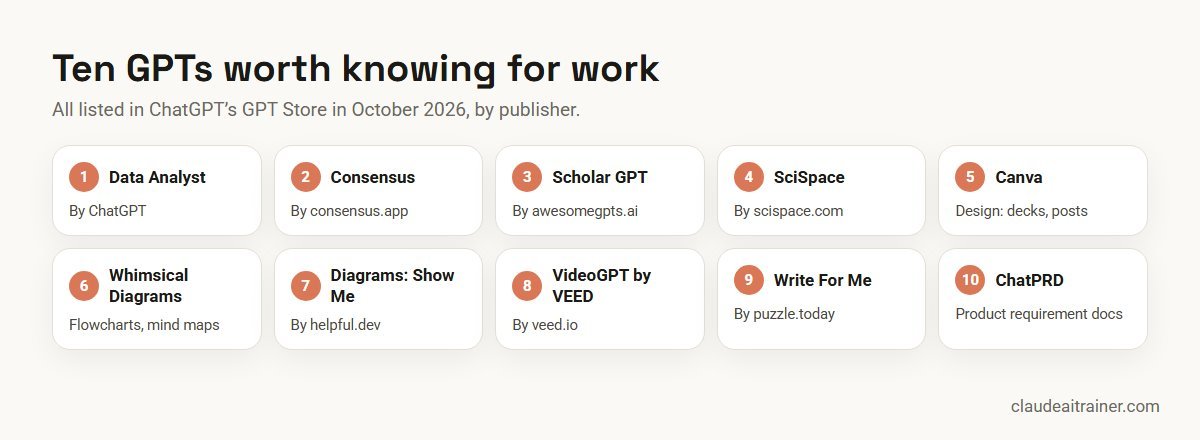
Quick answer: ten GPTs worth knowing for work
- Data Analyst (by ChatGPT): analyse and chart spreadsheets and files.
- Consensus (by consensus.app): answers from scientific literature, with references.
- Scholar GPT (by awesomegpts.ai): searches academic sources such as Google Scholar, PubMed and arXiv.
- SciSpace (by scispace.com): find, analyse and cite research papers.
- Canva: presentations, social posts and other designs, opened in Canva.
- Whimsical Diagrams: flowcharts, mind maps and sequence diagrams.
- Diagrams: UML, Flowcharts by ShowMe (by helpful.dev): many diagram types, from UML to Gantt.
- VideoGPT by VEED (by veed.io): generate and edit short videos.
- Write For Me (by puzzle.today): a general writing assistant.
- ChatPRD: drafts and improves product requirement documents.
Before you pick: custom GPTs retire on 11 December 2026
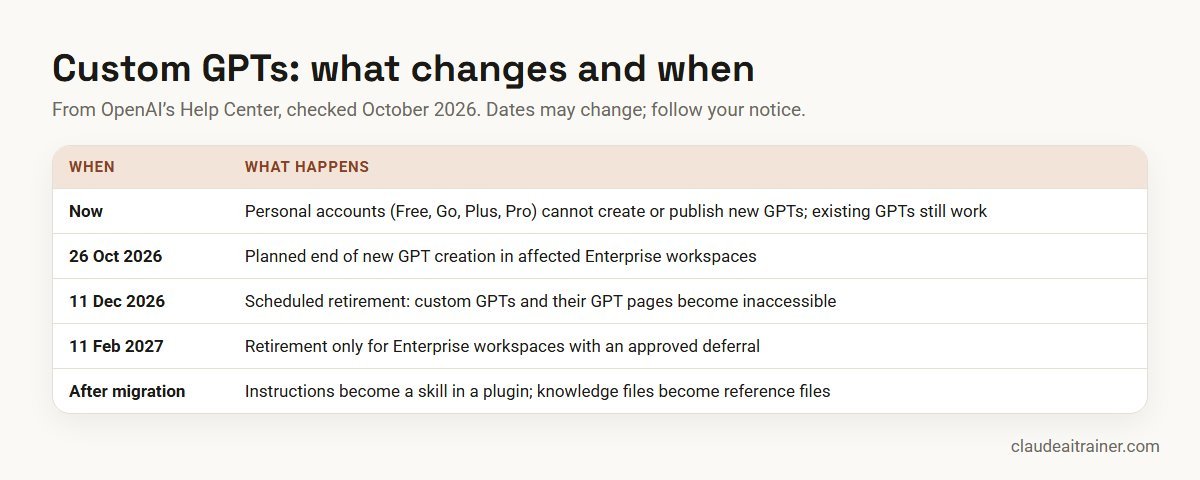
OpenAI’s Help Center now opens its GPTs article with a retirement notice, and the GPT Store shows a banner asking creators to migrate their GPTs to plugins by 11 December. The key points from OpenAI’s retirement FAQ:
- All ChatGPT plans are affected. Custom GPTs are scheduled to retire on 11 December 2026. For affected Enterprise workspaces with an approved deferral, the date is 11 February 2027. OpenAI says dates may change, so follow the notice for your account.
- Creation has already stopped on personal accounts. Free, Go, Plus and Pro accounts cannot create or publish new GPTs. Existing GPTs remain usable until retirement. In affected Enterprise workspaces, new GPT creation was planned to end on 26 October 2026.
- Plugins are the replacement. A plugin can hold skills (reusable instructions), connected apps and reference files. When a creator migrates a GPT, its instructions become a skill, its knowledge files are copied as reference files, and connected apps are added as apps.
- Custom actions do not transfer. A GPT that calls an external API through actions needs that connection rebuilt, for example as an app or a custom MCP server.
- Users do not migrate other people’s GPTs. If you only use a GPT, check its notice and the publisher’s guidance about a replacement. Your past conversations stay accessible after retirement.
So the honest way to use this list: these GPTs are useful today, and for each one you should know where the publisher’s plugin or app is, or what you will use instead.
Comparison table
| GPT | Publisher | Best for | Watch out for | After 11 Dec 2026 |
|---|---|---|---|---|
| Data Analyst | ChatGPT | Quick analysis and charts | Check formulas and totals | Use file analysis in a normal chat |
| Consensus | consensus.app | Evidence from research papers | Read the papers it cites | Check the publisher’s guidance |
| Scholar GPT | awesomegpts.ai | Literature searches | Third-party publisher | Check the GPT’s notice |
| SciSpace | scispace.com | Paper analysis, citations | Citation accuracy | Check the publisher’s guidance |
| Canva | Canva | Decks and social posts | Brand templates need paid Canva | Canva plugin in ChatGPT |
| Whimsical Diagrams | Whimsical | Flowcharts and mind maps | Edits happen in Whimsical | Whimsical plugin in ChatGPT |
| Diagrams: ShowMe | helpful.dev | UML, ERD, Gantt | Diagram links leave ChatGPT | Check the GPT’s notice |
| VideoGPT by VEED | veed.io | Short marketing videos | Brand and rights review | Check the publisher’s guidance |
| Write For Me | puzzle.today | General drafting | Generic tone | Your own writing skill |
| ChatPRD | ChatPRD | Product requirement docs | Confidential roadmaps | Check the publisher’s guidance |
The ten GPTs in detail
1. Data Analyst (by ChatGPT)
What it does. In the store’s words, you “drop in any files” and it helps analyse and visualise the data.
Who it’s for. Managers and analysts who need a quick look at an export: totals by region, a trend chart, outliers.
How to use it well. Upload a clean CSV or Excel file, say what each column means, and ask it to show the steps it ran. Ask for one chart at a time.
Watch out for. Check totals against the source file. Do not upload customer or payroll data on a personal account.
Next step. ChatGPT can also analyse uploaded files in an ordinary chat, so this one is easy to replace.
2. Consensus (by consensus.app)
What it does. Answers questions from scientific literature, with references, and can draft content backed by papers.
Who it’s for. Health, policy, L&D and marketing teams who need evidence rather than opinion.
How to use it well. Ask a narrow question (“does spaced repetition improve retention in adult workplace training?”) and ask it to separate strong from weak evidence.
Watch out for. Open and read the key papers before you quote them.
Next step. Follow the GPT’s notice and Consensus’s own guidance for a replacement.
3. Scholar GPT (by awesomegpts.ai)
What it does. Searches academic sources; the store listing names Google Scholar, PubMed, bioRxiv and arXiv.
Who it’s for. Researchers and analysts doing a first literature scan.
How to use it well. Ask for a reading list with one line on why each source matters, then read the originals.
Watch out for. It is a third-party GPT, not built by the databases it searches. Treat summaries as leads.
Next step. Check the GPT’s notice; for regular research work, a dedicated research tool or connector may be the better long-term choice.
4. SciSpace (by scispace.com)
What it does. Finds and analyses research papers and helps draft content with citations.
Who it’s for. R&D, medical affairs and academic teams.
How to use it well. Ask it to compare methods and sample sizes across three or four papers in a table.
Watch out for. Verify every citation; a wrong page or year is easy to miss.
Next step. Check SciSpace’s guidance for a plugin or other route.
For team leads and L&D
Want your team using AI assistants on real work, safely?
Tools change every quarter; good habits last. We run hands-on sessions where people turn their own repeated tasks into reusable instructions, with review rules the whole team follows. Book a short call if that would help.
5. Canva
What it does. Creates presentations, logos, social posts and other designs from a prompt.
Who it’s for. Marketing, sales and HR teams who need a first visual draft quickly.
How to use it well. Give the format, audience, brand colours and the exact text. Pick an option and finish it in Canva.
Watch out for. Canva’s help page says Brand Templates need a paid Canva plan, and in ChatGPT Business or Enterprise your admin must enable apps and connectors first.
Next step. Canva already offers a Canva plugin in ChatGPT, connected through Settings and Plugins, according to Canva’s help centre.
6. Whimsical Diagrams
What it does. Explains and visualises concepts as flowcharts, mind maps and sequence diagrams.
Who it’s for. Operations, product and training teams mapping a process.
How to use it well. Paste the process as numbered steps with decision points, then refine the diagram in Whimsical.
Watch out for. Detailed edits happen in Whimsical, not in the chat.
Next step. Whimsical’s own page describes a Whimsical plugin for ChatGPT that works on all ChatGPT plans, including Free, and can also create wireframes.
7. Diagrams: UML, Flowcharts by ShowMe (by helpful.dev)
What it does. Produces many diagram types; the listing names flowcharts, UML, mind maps, Gantt charts, ERDs and org charts.
Who it’s for. Developers, architects and project managers documenting systems and plans.
How to use it well. Ask for one diagram type at a time and give it the entities or steps explicitly.
Watch out for. Do not paste confidential system details into a third-party GPT without approval.
Next step. Check the GPT’s notice for a replacement.
8. AI Video Generator: VideoGPT by VEED (by veed.io)
What it does. Generates and edits short videos; the listing names several current video models.
Who it’s for. Marketing and internal communications teams making short clips.
How to use it well. Write the script and shot list first, then generate. Finish the edit in VEED.
Watch out for. Review brand use, music rights and any people or likenesses in generated video.
Next step. Check VEED’s guidance for its route after retirement.
9. Write For Me (by puzzle.today)
What it does. A general writing assistant for articles, emails and posts.
Who it’s for. Anyone who needs a first draft quickly.
How to use it well. Give the audience, length, tone and three points that must appear.
Watch out for. Output sounds generic unless you add your own examples. For team writing, your own style guide in a skill or project does better.
Next step. Write your own writing skill with your style guide; it will outlast any public GPT.
10. ChatPRD: AI for Product Managers
What it does. Drafts and improves product requirement documents and coaches product managers.
Who it’s for. Product managers and engineering leads.
How to use it well. Give it the problem, users, constraints and success metric, and ask it to list open questions before drafting.
Watch out for. Roadmaps are confidential; check your company’s rules before pasting them into any third-party tool.
Next step. Check the publisher’s guidance; the listing points to its own site for more features.
How to choose GPTs, and what to use instead
- Prefer publishers you can identify. A GPT from the company that owns the product (Canva, Whimsical, Consensus) is easier to trust and more likely to have a supported replacement.
- Check what leaves ChatGPT. GPTs with actions or apps can send parts of your input to the publisher’s service. OpenAI says it does not audit how those services use your data.
- Do not build a process on a GPT now. With retirement weeks away, new team workflows should start as plugins or skills.
- Keep your own instructions. The value in most team GPTs was the instructions and reference files. Keep them in a document you own.
Build your own for your team
If your team relied on an internal GPT, for supplier questions, proposal writing or onboarding, the work now moves to a plugin. In OpenAI’s planned workflow, the GPT’s creator (or an Enterprise workspace admin) selects Migrate to plugin under My GPTs. Migration uses the latest published version, so publish any drafts first; it does not need to be public. The new plugin starts private, so you share it again with the people who need it. OpenAI also offers a Plugin Creator for building plugins from scratch.
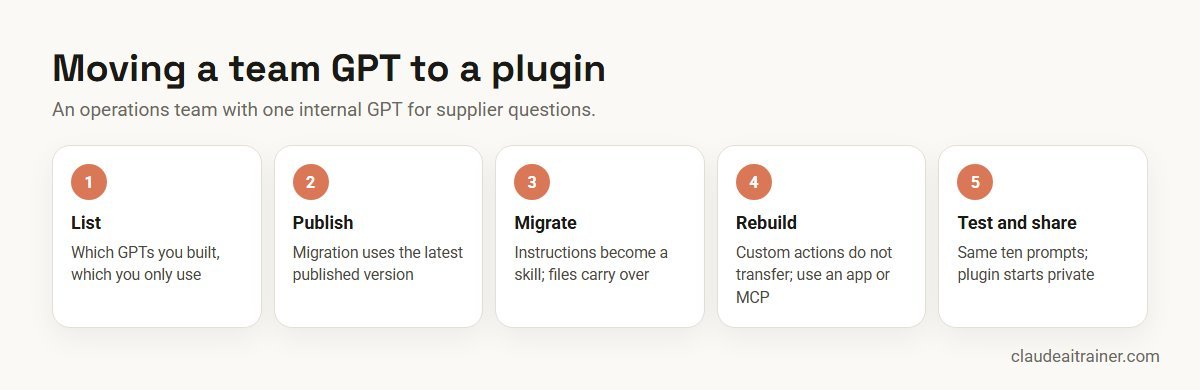
Worked example: an operations team’s supplier GPT
A twelve-person operations team at a distribution company built a GPT two years ago. It answers questions about supplier terms from a folder of contracts and a policy file, and calls an internal API to check purchase order status.
- Inventory. The team lead lists three GPTs the team uses: one they built and two public ones.
- Publish and migrate. She publishes the latest draft, then migrates it. The instructions become a skill and the contracts become reference files.
- Rebuild the action. The purchase order lookup does not transfer. IT rebuilds it as a connected app with a reviewed set of permissions.
- Test. The team runs the same ten questions on the old GPT and the new plugin and compares answers, including one difficult case.
- Share and switch. The plugin is shared with the team, and the GPT is left read-only until retirement.
Next step
Plan your move from GPTs to plugins and skills
We help teams list the GPTs they depend on, decide what to migrate, rebuild or retire, and set up a tested replacement before the deadline. Online or on-site.
Security and governance
- Plans and training data. OpenAI says Business, Enterprise and Edu data is not used for training by default; on consumer plans (Free, Go, Plus, Pro) it may be, depending on your data controls.
- Builder access. GPT builders cannot see your individual conversations with their GPT.
- Third-party calls. When a GPT uses apps or external APIs, relevant parts of your input may go to that service. Only use those you trust.
- No memory. GPTs do not use your saved memory or custom instructions; each conversation starts fresh.
- Workspace controls. In Enterprise and Edu, admins control which GPTs and plugins people can use and share. Ask before you rely on one.
- Verification badges are not a security review. OpenAI says its Verified badge for plugins does not replace your own privacy, security or vendor review.
GPTs compared with Claude Projects and Skills
The retirement of GPTs follows a pattern across the industry: Google is replacing Gemini Gems with skills, and Claude already organises reusable work into Projects, Skills and plugins.
- Claude Projects are the closest match to a team GPT: shared instructions and reference files in one workspace. See our Claude Projects examples.
- Claude Skills are reusable instructions in the SKILL.md format, the same idea as the skill a migrated GPT becomes. See our list of Claude skills, plugins and connectors.
- Choosing between assistants depends on your documents, systems and plan. Our comparison of Claude vs ChatGPT vs Gemini vs Copilot sets out the differences, and how to prompt Claude covers writing instructions that travel well.
Sources
Checked October 2026: the ChatGPT GPT Store (chatgpt.com/gpts) for listings and publishers; OpenAI Help Center articles GPTs in ChatGPT, Custom GPT retirement and migration FAQ and Plugins in ChatGPT; Canva’s help page Connect your Canva account to ChatGPT; and Whimsical’s ChatGPT integration page.
Key takeaways
- OpenAI plans to retire custom GPTs on 11 December 2026; affected Enterprise workspaces with an approved deferral have until 11 February 2027
- Personal ChatGPT accounts (Free, Go, Plus, Pro) can no longer create or publish new GPTs, but can still use existing ones
- Plugins replace GPTs: instructions become a skill, knowledge files become reference files, custom actions must be rebuilt
- Canva and Whimsical already offer ChatGPT plugins, so their GPTs have a clear next step
- GPT builders cannot see your conversations, but GPTs with actions or apps can send parts of your input to third parties
- The skills-and-plugins pattern now spans ChatGPT, Gemini and Claude, so instructions you write well carry across
FAQ
Custom GPTs: common questions
What are the best GPTs for work?
For research, Consensus, Scholar GPT and SciSpace; for data, Data Analyst; for visuals, Canva, Whimsical Diagrams and the ShowMe diagrams GPT; for video, VideoGPT by VEED; and for writing, Write For Me and ChatPRD. All were listed in the GPT Store in October 2026.
Are custom GPTs being discontinued?
Yes. OpenAI plans to retire custom GPTs on 11 December 2026. Affected Enterprise workspaces with an approved deferral have until 11 February 2027. OpenAI says dates may change.
What replaces custom GPTs?
Plugins. A plugin can combine skills (reusable instructions), connected apps and reference files. When a GPT is migrated, its instructions become a skill and its knowledge files become reference files.
Can I still create a GPT on ChatGPT Plus?
No. OpenAI’s help article says new GPT creation and publishing are not available on personal accounts, including Free, Go, Plus and Pro. You can still use existing GPTs.
Will my conversations with GPTs disappear?
OpenAI says existing conversations with custom GPTs remain accessible after retirement. The GPTs and their pages become inaccessible.
What happens to GPTs that use custom actions?
Custom actions do not transfer when a GPT is migrated. The connection has to be rebuilt, for example with an available app or a custom MCP server.
Do I need a paid plan to use GPTs?
OpenAI says GPTs are available to all ChatGPT users who are signed in. Some GPTs need an account with the publisher’s own service for certain features.
Can the person who built a GPT see my chats?
No. OpenAI says GPT builders cannot view individual conversations. GPTs that use apps or external APIs can send parts of your input to those services.
Is Canva available in ChatGPT after GPTs retire?
Canva’s help centre describes a Canva plugin in ChatGPT, connected from Settings and Plugins, available for all Canva accounts. Brand Templates need a paid Canva plan.
Which GPTs are best for research?
Consensus, Scholar GPT and SciSpace focus on academic literature. Always open and read the papers they cite before relying on them.
Are GPTs safe for company data?
Use a Business or Enterprise workspace, where OpenAI says data is not used for training by default, follow your admin’s rules, and avoid third-party GPTs with actions for confidential data.
How is a GPT different from a Claude Project?
Both combine instructions and reference files. Claude Projects are shared workspaces in Claude; Claude Skills package reusable instructions in the SKILL.md format, similar to the skills inside ChatGPT plugins.
Can you train our team on moving from GPTs to plugins or skills?
Yes. We run hands-on sessions where teams list the GPTs they rely on, rebuild the important ones and agree review rules, in ChatGPT, Claude or both.
Trusted by
Teams we’ve trained
…and 200+ organisations, across 16+ countries.
What participants say
Real feedback from real sessions
Verified feedback collected from participants across corporate sessions — average rating 4.8/5.
“A very productive session for working professionals. A must-do.”
“The session was highly insightful and conducted in a very professional and interactive manner. Learnt about AI and excited to learn more!”
“Highly recommended! Hands-on and directly useful — from making PPTs and strategic plans to building KRAs.”
“I would recommend everyone to go through this session — it clarifies both what to expect from AI and where AI isn’t needed.”
“A nice interactive session with a lot of new insights and the power of AI. This will help me save time in routine activities.”
“A very good training session. AI can do wonders — we’ll implement it to create efficiency and save time.”
Explore more
Keep going with Claude AI training
Work with us
Help your team move from GPTs to what comes next
Tell us which assistants your team uses, which GPTs people rely on and the tasks they repeat every week. We will suggest a short, hands-on format, online or on-site (for example AI training in London or Claude Enterprise training), and send a fixed proposal, usually within one business day.