Blog · Comparison
Claude vs ChatGPT vs Gemini vs Copilot for Work (2026-27): Top 5 Differences
Most companies now have access to at least two AI assistants, and many leaders are asked which one the whole team should standardise on. This comparison looks at Claude, ChatGPT, Gemini and Microsoft Copilot the way a business buyer would: where each one sits in your day, how it handles long files, what its agents can do, how it treats your data and how it is priced. Every plan detail below comes from the vendors’ own pages, checked on 23 October 2026.
The quick answer
There is no single winner for every company, and anyone who tells you otherwise is selling something. The four assistants are now close enough on everyday writing and summarising that the decision usually comes down to five practical differences: where the assistant lives, how it handles long files, what its agents can do, how it treats your data, and how you pay for it.
- Claude suits teams that want a focused work assistant with very long context, strong document and spreadsheet work, Claude Code for technical staff, and add-ins for Excel, PowerPoint, Word and Outlook.
- ChatGPT suits teams that want one broad workspace for chat, agents (ChatGPT Work), coding (Codex) and shared custom tools, with a large range of connectors.
- Gemini suits companies that run on Google Workspace and want AI inside Gmail, Docs, Sheets, Meet and Drive without another vendor.
- Microsoft Copilot suits companies that run on Microsoft 365 and want AI grounded in their mail, files, chats and meetings, under existing Microsoft governance.
Many organisations end up with two: the assistant built into their office suite, plus Claude or ChatGPT for deeper work. That is a reasonable outcome, as long as both sit on business plans with the data controls described below. If your team relies on Gemini Gems or custom GPTs, both are being retired in favour of skills and plugins; see our lists of the best Gemini Gems and the best GPTs for work.
How we compared. We read each vendor’s pricing page, help centre and documentation on 23 October 2026: claude.com/pricing and support.claude.com for Claude, chatgpt.com/pricing and help.openai.com for ChatGPT, workspace.google.com, support.google.com and cloud.google.com for Gemini, and microsoft.com and learn.microsoft.com for Copilot. Products in this category change monthly, so treat every number as a snapshot and confirm on the vendor page before you buy. This site trains teams on Claude, which is why the article is written from a Claude user’s point of view; we have tried to be equally precise about all four. Because these products change every month, it helps to follow one or two of the best AI newsletters or, if you prefer video, a few AI YouTube channels in India.
Claude vs ChatGPT vs Gemini vs Copilot at a glance
| Dimension | Claude | ChatGPT | Gemini | Microsoft Copilot |
|---|---|---|---|---|
| Home base | Claude app (web, desktop, mobile) plus add-ins for Microsoft 365 and Google Workspace | ChatGPT app (Chat, Work and Codex) plus extensions for Excel, Word, PowerPoint and Google Sheets | Inside Google Workspace apps and the Gemini app | Inside Microsoft 365 apps, Teams and the Copilot app |
| Context window (as published) | Up to 1M tokens, varies by model | Business: 54K (Instant), 256K (Reasoning). Enterprise: 128K (Instant) | 1M on Business Standard, Plus and Enterprise; 32K on Base and Starter | No number published |
| Agent features | Cowork (now part of Claude), scheduled tasks, Claude Code, Claude in Chrome | ChatGPT Work, workspace agents, Codex, ChatGPT agent | Workspace Studio flows, Deep Research, scheduled actions; Gemini Enterprise agents | Copilot Cowork, Researcher, Analyst, Copilot Studio agents |
| Training on business data | None by default on Team and Enterprise | None by default on Business and Enterprise | Not used outside your domain without permission | Not used to train foundation models |
| Entry business price | Team: $25 per seat monthly, $20 annual; 2 to 150 seats | Business: $25 per seat monthly, $20 annual; from 2 seats | Included in Workspace plans (priced locally); Gemini Enterprise Business from $21 per seat | Copilot add-on $30 per user per month (annual); Business add-on $21 |
Sources: claude.com/pricing, chatgpt.com/pricing, help.openai.com (ChatGPT Business overview), support.google.com (Gemini app limits by edition), cloud.google.com/gemini-enterprise, microsoft.com Copilot pricing pages. Prices exclude tax. Checked October 2026.
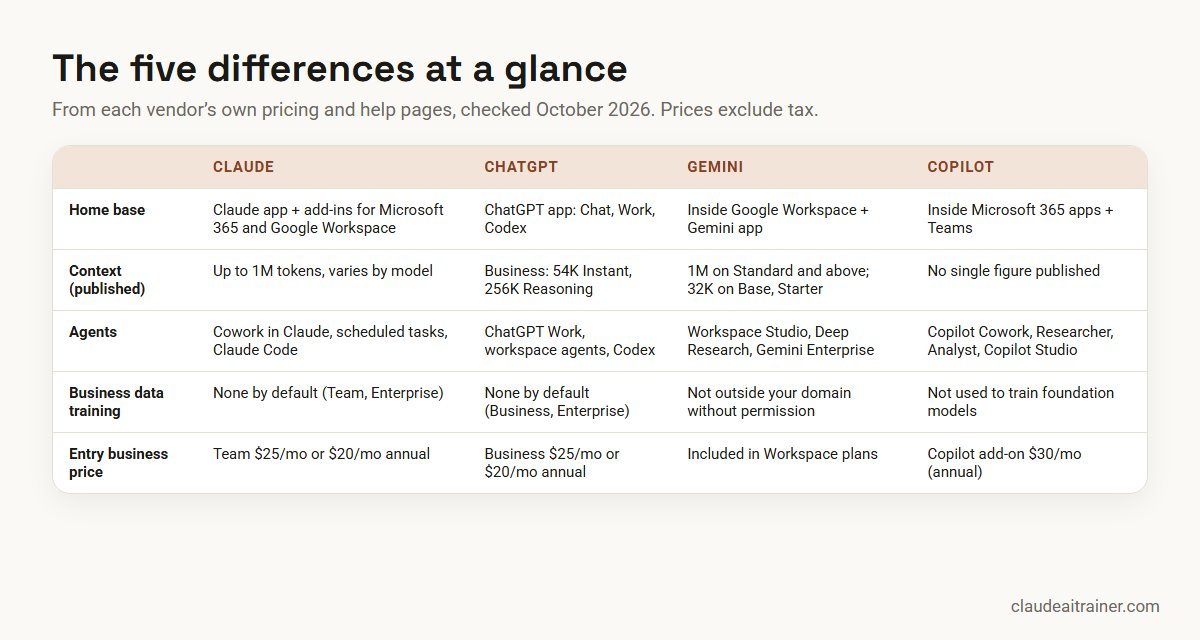
Difference 1: where each assistant lives in your working day
The first question is not “which model is smartest” but “where will people actually use it?”
Gemini and Copilot: built into the suite you already pay for
Gemini is part of Google Workspace. On the India pricing page we checked, Business Starter includes the Gemini assistant in Gmail and basic access to the Gemini app, while Business Standard adds Gemini in Docs, Sheets, Slides, Drive, Meet and Chat, plus expanded app access. Copilot works the same way on the Microsoft side: with a Microsoft 365 Copilot licence, Copilot appears in Word, Excel, PowerPoint, Outlook and Teams and is grounded in your organisation’s mail, files, chats and meetings. (Microsoft’s documentation now calls the product Microsoft Copilot, though pricing pages still use the Microsoft 365 Copilot name.) Microsoft also includes Copilot Chat, a web-grounded assistant, at no extra cost with eligible Microsoft 365 plans. If your organisation runs on Google Workspace in the Gulf, see how we run Google Gemini training for Bahrain teams on Arabia Standard Time.
Who it suits: organisations that want AI in the documents and meetings people already open every day, with no extra sign-in. Watch for: the deepest features sit on higher tiers, and Gemini on Business Base is offered only as an additional service, where Google notes chats may be reviewed by human reviewers.
Claude and ChatGPT: standalone workspaces that connect outwards
Claude and ChatGPT are separate apps that reach into your tools through connectors. Claude’s Team plan help page lists connectors for Google Drive, Gmail, Google Calendar, GitHub, Microsoft 365 and Slack. Anthropic also offers Claude for Microsoft 365, which works inside Excel, PowerPoint and Word (generally available on all paid plans) and Outlook (beta), and Claude for Google Workspace, an add-on for Docs, Sheets and Slides that is currently in beta. ChatGPT Business lists connections to Google Workspace, Slack, GitHub and Microsoft 365, plus extensions for Excel, Word, PowerPoint and Google Sheets.
Who it suits: teams that work across both suites, or that want one assistant for writing, analysis and technical work regardless of where files live. Watch for: connectors need admin approval and sensible scopes; our guide to connecting Claude to Google Drive, Gmail, Microsoft 365 and Slack covers the set-up and the read-only limits.
Difference 2: long documents, files and context windows
If your teams work with contracts, policy manuals, tender documents or large spreadsheets, how much an assistant can hold in one conversation matters more than benchmark scores. The context window is the amount of text the model can consider at once.
- Claude: Anthropic’s pricing page lists a context window of “up to 1M” tokens on every plan, with the note that it varies by model. Projects keep reference files in one place, and Claude can create and edit files with code execution, so it can read a spreadsheet, run the numbers and hand back a workbook.
- ChatGPT: the pricing page lists a total context of 54K tokens for the Instant model and 256K for Reasoning models on Business (about 40 and 320 pages of input), and 128K for Instant on Enterprise. OpenAI notes the space for your own input is smaller than the total.
- Gemini: Google’s help centre lists a 1 million token context window (about 1,500 pages of text) on Business Standard, Plus and Enterprise editions, and 32 thousand on Business Base and Starter. You can upload up to 10 files per prompt.
- Copilot: Microsoft does not publish a single context figure for Copilot. Its support guidance says models tend to prioritise the beginning and end of long files, and suggests splitting very long documents.
What it means in practice: for a 200-page agreement or a year of board minutes, check the tier, not just the brand. A Gemini Business Starter seat and a Gemini Business Standard seat behave very differently here, and so do ChatGPT’s Instant and Reasoning modes. For spreadsheet-heavy teams, compare Claude’s Excel add-in with Copilot in Excel on a real model; our guide to Claude in Excel shows what to test.
For teams choosing an assistant
Still deciding? Test them on your own work
A two-week pilot with real documents tells you more than any feature table. In our Claude sessions, teams bring their own reports, contracts and spreadsheets and compare results side by side with the tools they already use. If you want help designing that pilot, book a short call.
Difference 3: agentic work, from Cowork to Copilot Cowork
All four vendors now sell “agents”: assistants that take a goal, work through several steps with your tools, and come back with a finished piece of work. The names overlap confusingly, so here is what each one actually is.
Claude: Cowork, now part of Claude itself
Anthropic launched Cowork as a separate space for bigger tasks. On 16 September 2026 it announced that Cowork and chat are merging into one Claude: you no longer choose where a task goes, and Cowork features work from any conversation with your existing skills, projects and connectors. Longer tasks keep running after you close your laptop, you can schedule recurring jobs such as a weekly report, and by default Claude asks before acting. The rollout started with Pro and Max, with Team and Free to follow, and Enterprise admins get at least 30 days’ notice. Technical staff also get Claude Code on every paid plan. See our Claude Cowork training for how teams set this up safely.
ChatGPT: ChatGPT Work, workspace agents and Codex
OpenAI’s new desktop app splits into Chat, Work and Codex. According to its help centre, Work is for research, analysis and creating documents, spreadsheets, presentations, reports and Sites, and cloud Work chats sync across web, mobile and desktop. On Business and Enterprise, workspace agents let you build an agent for a repeatable task, connect it to apps, share it, run it on a schedule, use it in Slack or trigger it through an API. Premium Business seats also get “Dots”, which OpenAI describes as always-on agents.
Gemini: Workspace Studio and Gemini Enterprise
Inside Workspace, Workspace Studio is generally available on all Business and Enterprise plans and builds automated flows from a plain-language description. The Gemini app adds Deep Research (5 reports a month on Base and Starter, 20 a day on Standard and above) and scheduled actions on Standard and above. Companies that need agents across many systems can buy Gemini Enterprise separately: it includes Google’s Deep Research agent, no-code agents and over 100 integrations, including Microsoft 365, Slack, Salesforce and Jira. Google says multi-step background tasks are still in early access there.
Copilot: Copilot Cowork, Researcher and Analyst
Copilot Cowork became generally available on 16 June 2026. Microsoft says it sends emails, schedules meetings, creates documents, posts in Teams and manages your calendar, and that you approve each action before it happens. It needs a Microsoft 365 Copilot licence and is billed by usage in Copilot Credits. Notably, Microsoft states Cowork runs on Anthropic models, including Opus 4.8 and Sonnet 4.6. The Researcher and Analyst agents are included with the licence (Researcher is capped at 25 queries per user per month), and Copilot Studio lets licensed users build internal agents.
The honest summary: the agent layer is the least mature part of every product. Pilot one repeatable task, such as a weekly sales summary, before you promise anything bigger. Check whether agent runs are included in the seat or metered, and who approves actions that send email or change files.
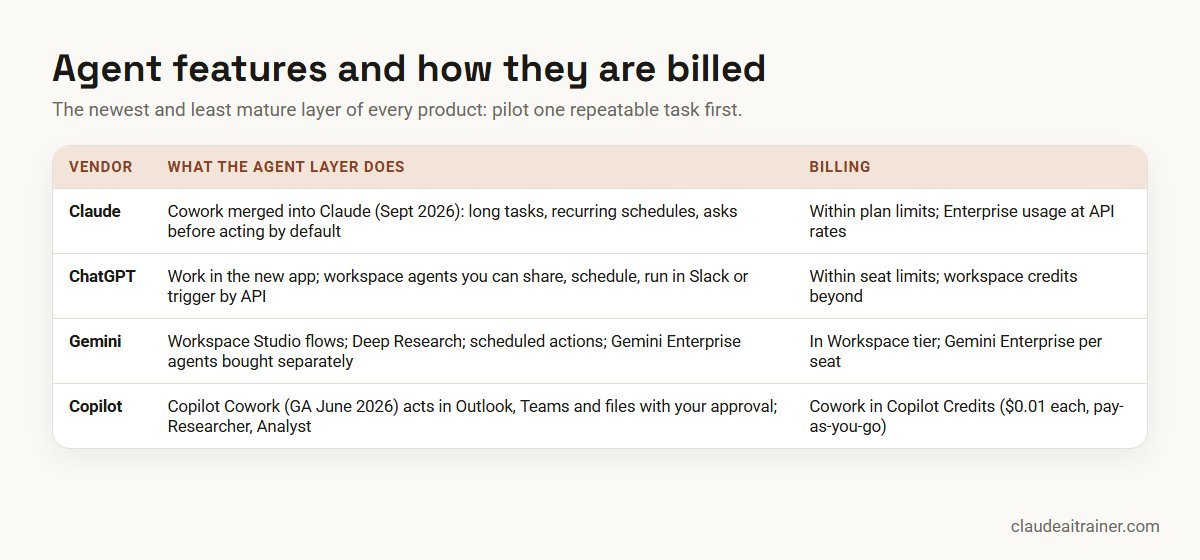
Difference 4: data controls and admin on business plans
The good news first: on their business plans, all four vendors state that your content is not used to train their models by default. The differences are in the detail.
| Control | Claude | ChatGPT | Gemini (Workspace) | Copilot |
|---|---|---|---|---|
| Training on business data | None by default on Team and Enterprise | No training on Business or Enterprise data by default | Not used for model training outside your domain without permission | Prompts, responses and Graph data not used to train foundation models |
| SSO | Team and Enterprise | SAML SSO on Business and Enterprise | Workspace identity | Microsoft Entra ID |
| SCIM and audit logs | Enterprise | SCIM on Enterprise; Compliance API logs on Enterprise | Audit logs for Gemini activity | Microsoft Purview audit and eDiscovery |
| Retention controls | Custom data retention on Enterprise | Custom retention policies on Enterprise | Admin-set retention, up to 36 months for Gemini app prompts | Your Microsoft 365 retention policies apply |
| Data location | No region choice listed on the plans page; Enterprise adds IP allowlisting and network-level access control | Data residency in ten regions on Enterprise, including India and UAE | EU or US data regions (not for Gemini Notebook) | EU Data Boundary, except Anthropic models |
Three details are easy to miss:
- Personal plans are different. Claude’s pricing page lists model training as “opt-out” on Free, Pro and Max, and ChatGPT’s individual plans also offer an opt-out. Staff who paste company documents into personal accounts are outside your controls, so give them a business seat.
- Copilot can use Anthropic models. Microsoft’s documentation says Anthropic is a Microsoft subprocessor, that its models are on by default for most commercial tenants outside the EU, EFTA and UK, and that they are excluded from the EU Data Boundary. If your compliance team assumed “Copilot means OpenAI only”, update that assumption.
- Some agent outputs sit outside normal review. Microsoft notes that Researcher prompts and outputs are not available to eDiscovery by default, and Google notes data regions do not apply to Gemini Notebook. Read the fine print for each feature you switch on.
Difference 5: how you pay
Pricing models now differ more than prices.
- Claude: Team costs $25 per standard seat monthly or $20 billed annually, and $125 or $100 for a premium seat with five times the usage; teams of 2 to 150. Enterprise is US$20 per seat per month billed annually, with a 20-seat minimum, plus usage billed at API rates. Our guide to the best Claude plan for business walks through each tier.
- ChatGPT: Business publishes the same seat prices as Claude Team in US dollars: $25 or $20 for a standard seat and $125 or $100 for premium, with a two-seat minimum. On the India pricing page these show as ₹2,250 monthly or ₹1,800 annual for a standard seat. Enterprise is custom pricing, with credit-based and token-based options.
- Gemini: included in Google Workspace plans, which Google prices by country. On the India page we checked (annual commitment, before tax), Business Starter was ₹270 and Business Standard ₹1,080 per user per month. Gemini Enterprise Business edition starts at $21 per seat per month.
- Copilot: the Microsoft 365 Copilot add-on is $30 per user per month paid yearly (₹2,495 on the India page) on top of a qualifying Microsoft 365 plan. For smaller firms, the Copilot Business add-on is $21, with a promotional $18 for the first year until 31 December 2026. Cowork, Code, Autopilot and the Work IQ APIs are billed by usage in Copilot Credits, at $0.01 per credit on pay-as-you-go.
When you compare costs, add three things the headline price hides: usage beyond the included limits (extra usage on Claude, workspace credits on ChatGPT, Copilot Credits on Microsoft), the higher tier needed for the features you actually want, and the time people need to learn the tool well.
How to choose: start from your stack and your hardest task
- Look at your office suite. If everyone lives in Microsoft 365, Copilot is the natural baseline; on Google Workspace, Gemini is. Then ask whether that baseline covers your hardest work.
- Name your hardest recurring task. A long contract review, a monthly board pack, a messy reconciliation. Run the same task in two assistants with the same files.
- Check the tier, not the brand. Context windows, agents and admin controls differ sharply between tiers of the same product.
- Ask your security team three questions: where is data processed, who can see conversation history, and which features send data to a subprocessor.
- Budget for usage, not just seats, especially if you plan to use agents.
- Plan the training. Adoption depends far more on people knowing what to ask than on which logo is on the screen.
| If your team mostly… | Shortlist first |
|---|---|
| Works inside Outlook, Teams, Word and Excel | Copilot, plus Claude for Microsoft 365 for heavy Excel, Word or PowerPoint work |
| Works inside Gmail, Docs, Sheets and Meet | Gemini, plus Claude or ChatGPT for long-document and agent work |
| Reviews long contracts, policies or research | Claude or Gemini on a 1M-token tier; test both on your own files |
| Builds internal tools or writes code | Claude (Claude Code) or ChatGPT (Codex) |
| Wants shared, scheduled agents across many apps | Compare Claude, ChatGPT workspace agents and Gemini Enterprise on one real workflow |
Worked example: a 40-person consultancy on Microsoft 365
A professional services firm with 40 staff runs on Microsoft 365. Partners want faster first drafts of client reports; analysts spend days on Excel models; one person maintains the firm’s internal tools.
- Baseline: everyone already has Copilot Chat through Microsoft 365, at no extra cost. The firm checks what that covers before buying anything.
- Pilot: for two weeks, six people (two partners, three analysts, the tools developer) run the same five tasks in Copilot with a Microsoft 365 Copilot licence and in Claude on a Team plan: a 60-page tender summary, a variance commentary from a trial balance, a client report first draft, a slide deck from that report, and a small script to clean an export.
- Scoring: each output is rated by the person who would normally sign it off, on accuracy, editing time and whether it followed the firm’s template.
- Decision: in a firm like this, one sensible outcome would be Copilot for the whole company (mail, meetings, Teams) and a smaller group of Claude seats for analysts and report writers, with premium seats only for the heaviest users. The firm then writes one short policy covering both tools.
- Training: a half-day session per team on their own files, followed by a shared prompt and skills library.
The point of the example is the method, not the result. Your pilot may reach a different answer, and that is the reason to run one.
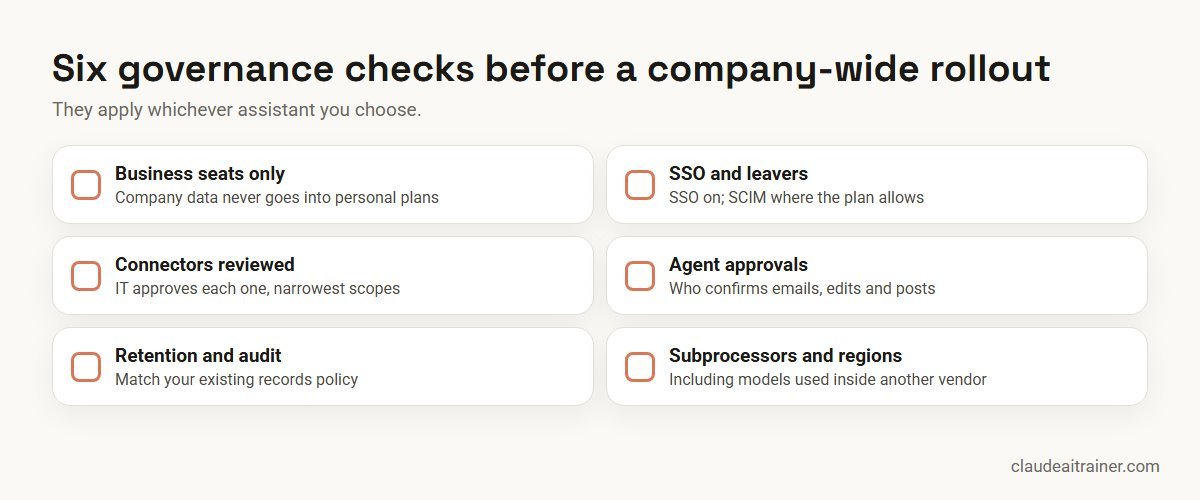
Security and governance checklist
- Business seats only for company data, with personal plans discouraged in policy.
- SSO on and, where your plan allows, SCIM to remove leavers automatically.
- Connectors reviewed by IT before they are enabled, with the narrowest scopes that work.
- Agent permissions agreed: which actions need human approval, especially sending email or editing shared files.
- Retention and audit configured to match your existing records policy.
- Subprocessors and regions checked against your contracts, including model providers used inside another vendor’s product.
- A named owner for spend controls and usage reports.
For a wider rollout plan, our article on rolling out Claude across your enterprise covers phases, champions and measurement. If your developers are comparing coding tools rather than workplace assistants, see Claude Code vs GitHub Copilot and Claude API vs OpenAI API instead. Teams in Western Australia that have settled on Copilot can see how we run hands-on Copilot sessions for Perth teams on AWST.
Rolling out Claude
Picked Claude? Make the first month count
Licences are the easy part. Teams get value when people learn where Claude fits their own tasks, which connectors to switch on and what must still be checked by a person. We run hands-on workshops for business teams, online or on-site, built around your workflows.
Where Claude fits best, in our experience
Because this site focuses on Claude, here is where we see it earn its place in mixed environments. Teams that work with long, dense documents use the large context window and Projects to keep a whole matter or programme in one place. Finance and operations teams use Claude in Excel to trace formulas and build models with cell-level citations. Report writers use Claude’s Docs and Slides and the PowerPoint add-in to go from analysis to a branded deck. Technical staff use Claude Code. And because Claude Team publishes clear seat prices and a two-seat minimum, it is easy to run as a second assistant for the people who need it most.
If you want to go deeper on any of these, start with how to prompt Claude, how to create Claude skills and how to choose the right Claude model.
If you are building a shortlist of what to switch on first, three companion lists help: the top Claude use cases for business teams, the best Claude skills, plugins and connectors and the best MCP servers for Claude.
Key takeaways
- All four are capable; the bigger differences are integration, agents, data controls and billing model
- Gemini and Copilot are built into Google Workspace and Microsoft 365; Claude and ChatGPT are standalone workspaces that connect to both
- Claude Team and ChatGPT Business publish the same seat prices: $25 monthly or $20 annual (standard) and $125 or $100 (premium)
- Copilot's agent features such as Cowork are billed by usage in Copilot Credits on top of the licence
- None of the four trains on business-plan data by default, but personal plans differ, so keep company work in a company workspace
- Run a short pilot on your own documents before you standardise
FAQ
Claude vs ChatGPT vs Gemini vs Copilot: common questions
Which is better for work: Claude, ChatGPT, Gemini or Copilot?
It depends on your office suite and your hardest tasks. Gemini and Copilot are built into Google Workspace and Microsoft 365; Claude and ChatGPT are standalone workspaces that connect to both. Run the same real task in two of them before you decide.
Is Claude cheaper than ChatGPT for business?
Their published seat prices are the same in October 2026: $25 per standard seat monthly or $20 billed annually, and $125 or $100 for a premium seat. Claude Team covers 2 to 150 seats; ChatGPT Business starts at 2 seats. Enterprise pricing works differently for each.
Do Claude, ChatGPT, Gemini or Copilot train on my company's data?
On business plans, all four state that your content is not used to train their models by default. Personal plans differ: Claude Free, Pro and Max list training as opt-out, so company data should stay in a company workspace.
Which has the largest context window for long documents?
Claude lists up to 1M tokens (varies by model), and Gemini lists 1 million tokens on Business Standard, Plus and Enterprise. ChatGPT Business lists 256K for Reasoning models. Microsoft does not publish one figure for Copilot.
What is the difference between Claude Cowork and Copilot Cowork?
Claude Cowork is Anthropic’s feature for longer, multi-step tasks, which merged into the main Claude app from September 2026. Copilot Cowork is Microsoft’s agent inside Microsoft 365 that sends email, schedules meetings and creates documents with your approval, billed in Copilot Credits; Microsoft says it runs on Anthropic models.
What is ChatGPT Work?
It is the agentic part of the new ChatGPT app, alongside Chat and Codex. OpenAI describes it as a place to research, analyse information and create documents, spreadsheets, presentations, reports and Sites.
Can I use Claude inside Microsoft 365 or Google Workspace?
Yes. Claude for Microsoft 365 works in Excel, PowerPoint and Word on all paid plans, with Outlook in beta. Claude for Google Workspace is a beta add-on for Docs, Sheets and Slides. Connectors also let Claude read from Google Drive, Gmail, Microsoft 365 and Slack.
Does Microsoft Copilot use Claude models?
Microsoft’s documentation says Anthropic models are used in Copilot, Researcher, Copilot Studio and Copilot in Microsoft 365 apps, and that Copilot Cowork runs on Anthropic models. They are on by default for most commercial tenants outside the EU, EFTA and UK and are excluded from the EU Data Boundary.
Is Gemini included in Google Workspace?
Yes, at different levels. On Google’s pricing page, Business Starter includes Gemini in Gmail and basic Gemini app access, while Business Standard adds Gemini in Docs, Sheets, Slides, Drive, Meet and Chat with expanded access.
Should a company standardise on one AI assistant?
Many end up with two: the assistant built into their office suite for everyone, and Claude or ChatGPT for people doing heavier analysis, writing or technical work. What matters is that every tool in use is on a business plan with agreed controls.
How do agent features affect cost?
Check whether agent runs are included in the seat or metered. Copilot Cowork and Autopilot are billed in Copilot Credits. Claude Team and ChatGPT Business include agent use within plan limits, with paid extra usage or credits beyond them, while Claude Enterprise bills all usage at API rates on top of the seat fee.
How long should an AI assistant pilot run?
Two to four weeks with five to ten people is usually enough, provided they use real tasks and the person who normally signs off each output scores the results.
Where can my team learn to use Claude properly?
Claude AI Trainer runs hands-on corporate Claude workshops, online or on-site, built around your own documents and workflows. See the corporate Claude AI training page for formats.
Trusted by
Teams we’ve trained
…and 200+ organisations, across 16+ countries.
What participants say
Real feedback from real sessions
Verified feedback collected from participants across corporate sessions — average rating 4.8/5.
“A very productive session for working professionals. A must-do.”
“The session was highly insightful and conducted in a very professional and interactive manner. Learnt about AI and excited to learn more!”
“Highly recommended! Hands-on and directly useful — from making PPTs and strategic plans to building KRAs.”
“I would recommend everyone to go through this session — it clarifies both what to expect from AI and where AI isn’t needed.”
“A nice interactive session with a lot of new insights and the power of AI. This will help me save time in routine activities.”
“A very good training session. AI can do wonders — we’ll implement it to create efficiency and save time.”
Explore more
Keep going with Claude AI training
Work with us
Want a fair, hands-on comparison for your team?
Tell us which assistants your company already licenses, what your teams work on and any data rules you follow. We will suggest a short, practical format, online or on-site (for example Claude AI training in Bengaluru or Delhi NCR), and send a fixed proposal, usually within one business day.