Blog · Claude for real estate
Claude for Real Estate Agents: 10 Workflows + Prompts (2026)
Claude for real estate works best on the writing and number work around a deal: listing descriptions, comparable-sales notes, lead follow-ups, offer comparisons, market updates and rental yield maths. Give it the property facts, your comps export or CRM notes, and check every figure and claim before it reaches a client. Below are ten workflows for agents, each with the file to attach, a prompt to copy and the check to make.
An agent’s week is full of writing that has to be right: the listing that goes live tonight, the price conversation with a seller, the follow-up to twenty viewers, the summary of three offers. Most of it starts from information the agent already has, in a fact sheet, a comps export, a CRM or a notebook. Turning that into clear, accurate copy is where hours go.
Claude for real estate is useful exactly there. It reads the facts, drafts in your agency’s voice and points out gaps. It does not know the property, the street or the client the way the agent does, and it can be wrong about numbers if you let it guess. Every workflow below names what to attach, gives a prompt and ends with the check an agent should make. Product details were checked on Anthropic’s help centre, connector directory and pricing page in October 2026.
Quick answer: ten ways real estate agents use Claude
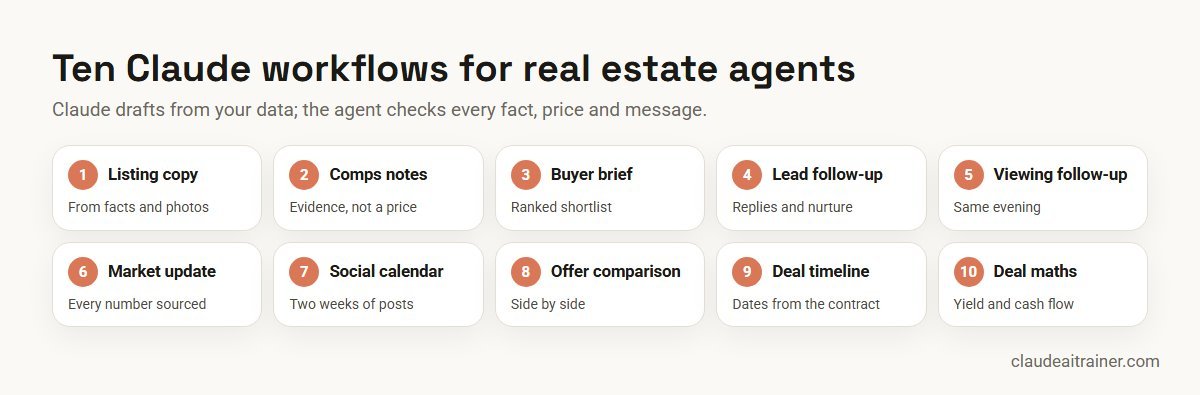
- Listing description: portal-ready copy from the fact sheet and photos, in your template.
- Comparable sales notes: a plain-language summary of comps for a pricing conversation.
- Buyer brief and shortlist: must-haves, deal-breakers and a ranked shortlist.
- Lead follow-up: replies and a short nurture sequence from CRM notes.
- Viewing follow-up: personalised notes after an open house or viewing.
- Market update: a sourced monthly update for your area.
- Social calendar: two weeks of posts with captions and image ideas.
- Offer comparison: a side-by-side table of offers for the seller.
- Transaction timeline: key dates and a document checklist from the signed contract.
- Deal maths: rental yield, cap rate and cash flow with every assumption visible.
Where to run each workflow
Pick the place that can see the right information.
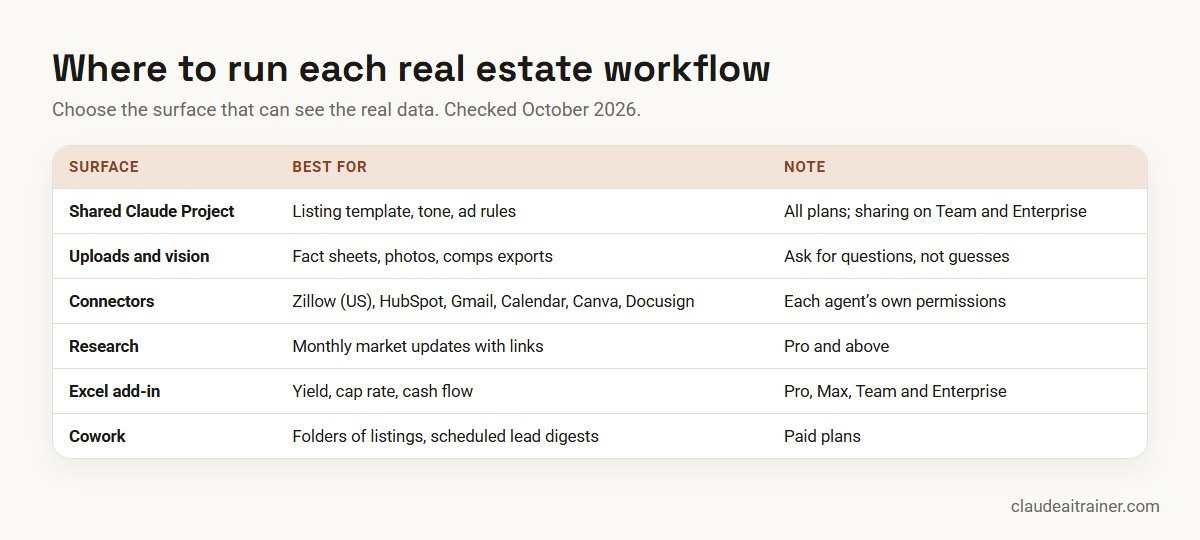
- A shared Claude Project. Projects work on every plan; free users can create up to five. Upload your listing template, brand voice notes, a list of words your agency avoids and your local advertising rules, so every chat starts from the same standards. On Team and Enterprise plans, a project can be shared with colleagues.
- File uploads and vision. Claude reads PDFs, spreadsheets and photos. A fact sheet, a comps export and the listing photos are often all a description needs.
- Connectors. The connector directory lists a Zillow connector made by Zillow and marked Anthropic verified: it searches US homes and rentals and returns property details, neighbourhood information, Zestimates, rent Zestimates, affordability and mortgage payment estimates, with no Zillow account required. The directory also lists connectors for HubSpot, Close and Attio (CRM), Gmail and Google Calendar, Calendly, Canva, Docusign, Google Drive, Dropbox and Microsoft 365. Directory connectors are available on all plans; on Team and Enterprise an owner enables each one.
- Research. On Pro and above, Research searches the web and returns a cited report, useful for a market update. Check every source.
- Claude for Excel. The add-in works on Pro, Max, Team and Enterprise and suits yield, cash flow and comparison sheets.
- Cowork and Claude in Chrome. On paid plans, Cowork runs multi-step tasks on folders and connected apps, and can run scheduled tasks such as a Monday lead digest. Claude in Chrome lets Claude work in your browser; respect each portal’s terms of use before asking it to collect data.
Comparison table
| Workflow | Attach | Best surface | Agent check |
|---|---|---|---|
| Listing description | Fact sheet, photos, template | Shared Project | Every fact verified; ad rules |
| Comparable sales notes | Comps export, subject details | Excel add-in or chat | Agent sets the price range |
| Buyer brief | Call notes, budget, area list | Project; Zillow in the US | Buyer confirms priorities |
| Lead follow-up | CRM notes, enquiry | CRM and Gmail connectors | Agent sends each message |
| Viewing follow-up | Sign-in sheet, notes | Chat or Cowork | Consent to contact |
| Market update | Your sales data, sources | Research | Every number sourced |
| Social calendar | Listings, past posts | Project, Canva | Claims and permits checked |
| Offer comparison | Offer documents | Chat or Excel | Agent explains, seller decides |
| Transaction timeline | Signed contract | Chat; Docusign | Lawyer or conveyancer confirms |
| Deal maths | Rent, costs, loan terms | Excel add-in | Assumptions checked |
The ten workflows in detail
1. Listing description from facts and photos
Use it for a description that is accurate, specific and ready for portals. Attach: the property fact sheet, 6 to 10 photos, your listing template and the portal’s character limit.
Write a listing description from the attached fact sheet and photos,
in our template: a 70-character headline, a 120-word portal summary
and a 250-word full description. Use only facts from the sheet; where
a photo suggests a feature the sheet does not mention, list it as a
question for me instead of including it. Avoid any wording about who
the home suits by age, family status, religion, nationality or other
protected characteristics; describe the property, not the buyer.
Agent check. Verify measurements, room counts and every amenity. In the US, the Fair Housing Act bars ads that indicate a preference based on protected characteristics; in India, RERA requires registered projects’ ads to show the registration number; other markets have their own permit and disclosure rules. Claude can flag wording, but you own compliance.
2. Comparable sales notes for a pricing conversation
Use it for preparing for a listing appointment. Attach: an export of recent comparable sales and the subject property’s details.
Using the attached comps export, summarise the six most comparable
sales to [address]: price, date, size, price per square foot or metre,
condition and key differences. Explain in plain language which comps
support a higher price and which a lower one. Do not suggest a final
list price; give me the evidence and the questions a seller will ask.
Agent check. The agent sets the price range. A summary is not a formal valuation or appraisal, and comps from more than a few months back may mislead in a moving market.
3. Buyer brief and shortlist
Use it for turning a long discovery call into a clear search brief. Attach: call notes, budget and pre-approval details, and the areas the buyer mentioned. In the US you can connect Zillow; elsewhere, attach a portal export.
From the attached call notes, write a one-page buyer brief: budget,
must-haves, nice-to-haves, deal-breakers, commute and timing. Then
rank the attached listings against the brief in a table with a short
reason for each, and list three questions to ask the buyer before the
first viewing. Do not comment on neighbourhood demographics.
Agent check. Send the brief to the buyer to confirm priorities before booking viewings. With the Zillow connector, treat Zestimates as estimates and check listing status before you share anything.
4. Lead follow-up and nurture
Use it for answering new enquiries quickly and keeping cold leads warm. Attach or connect: the enquiry and CRM notes, through HubSpot, Close or Attio, plus Gmail and your calendar.
For each new portal enquiry since [time], draft a reply that answers
their question from the listing, offers two viewing slots from my
calendar, and asks one qualifying question about timing or finance.
Then draft a three-message follow-up for leads with no reply after 7,
14 and 30 days. Keep each under 90 words and in our tone.
Agent check. The agent sends each message. Check consent and opt-out rules for email and text marketing where you work.
5. Viewing and open house follow-up
Use it for personalised notes the same evening. Attach: the sign-in sheet and your notes from each conversation.
From the attached sign-in sheet and my notes, draft a short follow-up
for each visitor who agreed to be contacted. Mention one thing they
asked about, answer it if the fact sheet does, and suggest a next step.
Group visitors into hot, warm and cold with a one-line reason, and
list any feedback the seller should hear.
Agent check. Only contact people who agreed to it. Share seller feedback without names.
For agencies and brokerages
Want your agents working this way next month?
Most agents can get a listing description out of Claude. Fewer have a routine: a shared project with brand rules and ad checks, a CRM connected with the right permissions, and a review step before anything reaches a client. We run hands-on sessions where agents build that routine on their own listings. Book a call if that would help.
6. Market update for your farm area
Use it for a monthly email or post that shows local knowledge. Attach: your own closed-sales data for the area; use Research for public sources.
Draft a 300-word market update for [area] for [month]. Use the attached
sales data for local figures: median price, days on market and number
of sales compared with last month and last year. From public sources,
add one paragraph on interest rates or policy changes that matter to
buyers here, with a link and date for each fact. No forecasts.
Agent check. Check every number against the source and remove anything you cannot verify. Statistics from portals and boards often differ; say which one you used.
7. Social media calendar
Use it for two weeks of posts without staring at a blank screen. Attach: current listings, recent sales and three past posts that did well. Connect Canva to produce designs.
Plan two weeks of posts for our agency: one per weekday. Mix new
listings, a recent sale, a local tip and one short explainer for
first-time buyers. For each post give the caption, image idea and
call to action. Use only facts from the attached listings, and add
any registration or permit number our ads must show.
Agent check. Check prices, claims and required permit or registration numbers before posting. See Claude prompts for marketing for more.
8. Offer comparison for sellers
Use it for explaining several offers clearly. Attach: each offer document or a summary of terms.
Compare the attached offers in a table: price, deposit, finance type
and approval status, conditions, settlement or completion date,
inclusions and any unusual terms. Below the table, explain in plain
language the main risk in each offer. Do not recommend which to accept.
Agent check. The agent explains the options and the seller decides. Contract terms go to the seller’s lawyer or conveyancer.
9. Transaction timeline and checklist
Use it for keeping a deal on track after acceptance. Attach: the signed contract.
From the attached signed contract, list every deadline with its date
and the clause it comes from: deposit, inspections, finance approval,
appraisal or valuation, searches, final walk-through and completion.
Then build a checklist of documents each party must provide and by
when. Mark anything ambiguous as "check with the lawyer".
Agent check. Confirm dates with the lawyer or conveyancer; contract interpretation is their job. If you use the Docusign connector, send anything for signature only after you have read the final documents.
10. Rental and investment deal maths
Use it for investor clients who want the numbers before a viewing. Attach: the asking price, expected rent, service charges, taxes, insurance, vacancy and loan terms. Work in Excel.
Build a one-sheet model for this rental property: gross and net
yield, cap rate, monthly cash flow after the mortgage, and cash-on-cash
return. Put every input in a labelled assumptions block, show the
formulas, and add a sensitivity table for rent +/-10% and interest
rate +/-1 point. Flag any input I have not given you.
Agent check. Check the assumptions with the client. The model is a discussion tool, not financial advice. The Claude for Excel add-in keeps formulas live so you can change inputs during the meeting; see how to use Claude in Excel.
How to adapt these prompts
- Write your house rules once. A list of words to avoid, your tone, required disclosures and permit numbers belongs in the shared project, not in every prompt.
- Ask for questions, not guesses. “List anything you are unsure of as a question for me” stops invented features before they reach a portal.
- Turn repeat prompts into skills. A listing workflow that works should become a skill the whole office uses. See how to create Claude skills.
- Keep data inside the right account. Client details belong in a company workspace, not a personal one.
Worked example: one listing from appointment to completion
Here is how an agent might use Claude on a hypothetical three-bedroom house.
- Before the appointment. Workflow 2 summarises six comps and the questions the seller is likely to ask. The agent decides the range.
- Listing day. Workflow 1 drafts portal copy from the fact sheet and photos and asks two questions about features in the photos that the sheet did not mention. Workflow 7 plans the launch posts.
- First weekend. Workflow 5 drafts follow-ups for eighteen visitors who agreed to contact and summarises feedback for the seller.
- Offers. Three offers arrive. Workflow 8 lays them side by side; the seller picks the cleanest finance, not the highest price.
- After acceptance. Workflow 9 turns the signed contract into a timeline, which the conveyancer confirms.
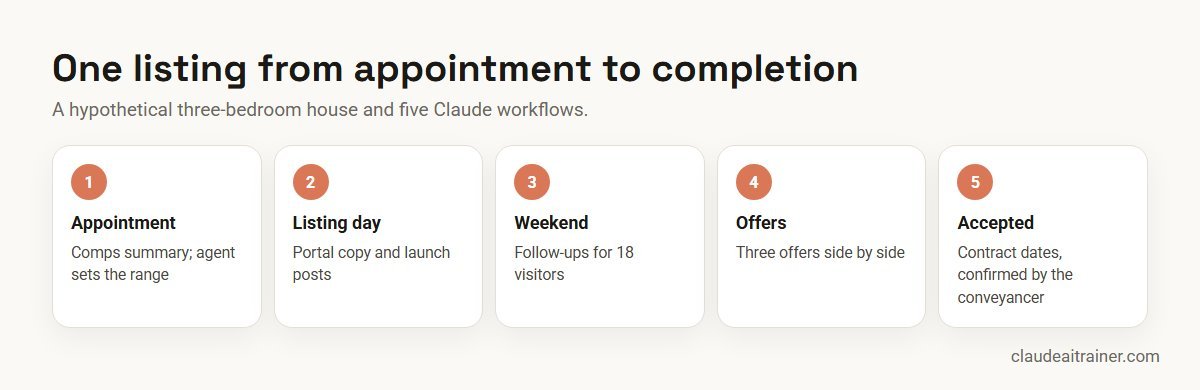
The agent saved time on drafting and collating, and spent it on the seller conversation, the viewings and the negotiation.
Next step
Set up Claude for your agency
We help agencies set up shared projects with listing templates and ad rules, connect the CRM, email and calendar sensibly, and turn the best prompts into skills every agent uses. Online or on-site.
Claude or ChatGPT for real estate?
Both can write listings and follow-ups. Claude’s practical advantages for agents in October 2026 are shared Projects for agency standards, the verified Zillow connector in the US, add-ins for Excel, Word and PowerPoint, and Cowork for multi-step tasks. The best test is your own: give both the same fact sheet and comps export, and compare accuracy and how much editing each draft needs. For a wider comparison, see Claude vs ChatGPT vs Gemini vs Copilot.
Security, compliance and governance
- Use an approved workspace. Anthropic’s pricing page says Team and Enterprise plans do not train models on your content by default; on Free, Pro and Max, training is a setting you can turn off. Client and transaction data belongs in a company workspace.
- Connect with least privilege. Claude inherits each person’s permissions from a connected app. Keep write actions in the CRM and email on approval.
- Own the ad compliance. Fair housing, RERA and local permit rules apply to AI-drafted ads just as to hand-written ones.
- Respect portal terms. Use official connectors or exports rather than scraping portals that forbid it.
- Keep advice human. Prices, valuations, legal terms and investment views come from the agent and the client’s professionals, not from a draft.
Sources
Checked October 2026: the Zillow connector listing; the HubSpot, Docusign and Canva connector listings; Anthropic’s help articles on Projects and connectors; Claude pricing; and HUD’s fair housing advertising guidance.
Key takeaways
- Keep one shared Claude Project per agency with your listing template, brand voice and local advertising rules
- Feed Claude real data: property facts, comps exports and CRM notes; never let it invent square footage, prices or school names
- Ask Claude to flag wording that could breach fair housing or local ad rules, then check it yourself
- Use Excel and visible assumptions for any yield, cap rate or mortgage figure
- In the US, the verified Zillow connector adds listings, Zestimates and affordability maths; elsewhere, attach portal exports
- The agent signs off every price, claim and message before it goes to a client
FAQ
Claude for real estate: common questions
Is Claude good for real estate agents?
Yes, for the writing and analysis around a deal: listing descriptions, comps summaries, follow-ups, offer comparisons and investment maths. It works best when you give it real property facts and data, and when the agent checks every figure and claim before it reaches a client.
Is Claude better than ChatGPT for real estate?
Both can write good listings. Claude adds shared Projects for agency standards, a verified Zillow connector in the US, Excel, Word and PowerPoint add-ins and Cowork for multi-step work. Test both on the same fact sheet and choose the one that needs less editing.
How can I use Claude in real estate?
Start with three workflows: listing descriptions from your fact sheet and photos, lead follow-ups from CRM notes, and a comps summary before listing appointments. Add market updates, offer comparisons and deal maths once those are routine.
Can Claude analyze real estate deals?
Yes. Give it rent, costs, taxes, vacancy and loan terms, and ask for yield, cap rate and cash flow with every assumption visible, ideally in Excel. Check the inputs with the client; the result is a discussion tool, not financial advice.
Which AI is best for real estate agents?
The best tool is the one that fits your CRM, portals and checking routine. Claude’s strengths are long, accurate drafting, file and photo reading, and connectors to tools such as Zillow, HubSpot, Gmail, Canva and Docusign.
How to use Claude AI as a real estate agent?
Create a shared Project with your listing template, tone and ad rules; attach real data for each task; ask Claude to list anything it is unsure of as a question; and review every output before sending or publishing.
Can Claude write listing descriptions?
Yes. Attach the fact sheet and photos and ask for copy in your template using only facts from the sheet. Check measurements, amenities and compliance wording before publishing.
Does Claude connect to Zillow or my CRM?
The connector directory lists a Zillow connector, made by Zillow and marked Anthropic verified, covering US homes, rentals, Zestimates and affordability. HubSpot, Close and Attio CRM connectors are also listed. Outside the US, attach portal or CRM exports instead.
Can Claude do a comparative market analysis?
Claude can summarise comparable sales you provide and explain which support a higher or lower price. The agent sets the price range, and the summary is not a formal valuation.
Is Claude Cowork useful for real estate agents?
Yes, on paid plans. Cowork can work across a folder of listings and connected apps and run scheduled tasks, such as a Monday digest of new leads and viewings.
How do I keep AI-written property ads compliant?
Keep your local rules in a shared project, ask Claude to describe the property rather than the ideal buyer, and check every ad yourself. In the US that means fair housing rules; in India, RERA registration details; elsewhere, your regulator’s permit rules.
Is client data safe in Claude?
Use a Team or Enterprise workspace your agency has approved; these plans do not train models on your content by default. Connect apps with each agent’s own permissions and keep write actions on approval.
Where can our agents learn this hands-on?
Our Claude Cowork training and corporate Claude AI training take agents through these workflows on their own listings, online or on-site.
Trusted by
Teams we’ve trained
…and 200+ organisations, across 16+ countries.
What participants say
Real feedback from real sessions
Verified feedback collected from participants across corporate sessions — average rating 4.8/5.
“A very productive session for working professionals. A must-do.”
“The session was highly insightful and conducted in a very professional and interactive manner. Learnt about AI and excited to learn more!”
“Highly recommended! Hands-on and directly useful — from making PPTs and strategic plans to building KRAs.”
“I would recommend everyone to go through this session — it clarifies both what to expect from AI and where AI isn’t needed.”
“A nice interactive session with a lot of new insights and the power of AI. This will help me save time in routine activities.”
“A very good training session. AI can do wonders — we’ll implement it to create efficiency and save time.”
Explore more
Keep going with Claude AI training
Work with us
Help your agents use Claude well
Tell us how your agency works: the CRM and portals you use, the documents you produce each week and who signs them off. We will suggest a short, hands-on format, online or on-site, and send a fixed proposal, usually within one business day.