Blog · Claude for project managers
Claude for Project Managers: 10 Workflows and Prompts (2026-27)
Project managers spend much of the week turning scattered inputs into documents other people rely on: plans, logs, status reports and decisions. Claude is good at exactly that conversion, as long as it works from your real tracker data and someone checks the output. This guide gives ten workflows, each with the file to attach, a prompt you can copy and the check that keeps the result honest.
A project manager’s week has a familiar shape. Updates arrive in a tracker, in meeting notes, in email threads and in chat. By Friday they have to become a status report, an updated risk log and a clear list of decisions for the sponsor. None of this is hard thinking, but it eats hours, and the quality drops when the PM is busy on the work that actually needs judgement.
Claude for project managers is useful in that gap. It reads the inputs, drafts the document in your format and points out what looks inconsistent. It does not know whether a workstream is really on track; the PM does. This guide is built around that split. Each workflow names what to attach, gives a prompt to copy and ends with the check a PM should make before the output goes anywhere. Product details were checked on Anthropic’s help centre, documentation, connector directory and plugin repository in October 2026.
A note on names: Claude has a feature called Projects, a shared workspace with files and instructions. It is handy for project managers, but it is not a project management tool. Our Claude Projects examples cover the feature itself; this article is about the PM role.
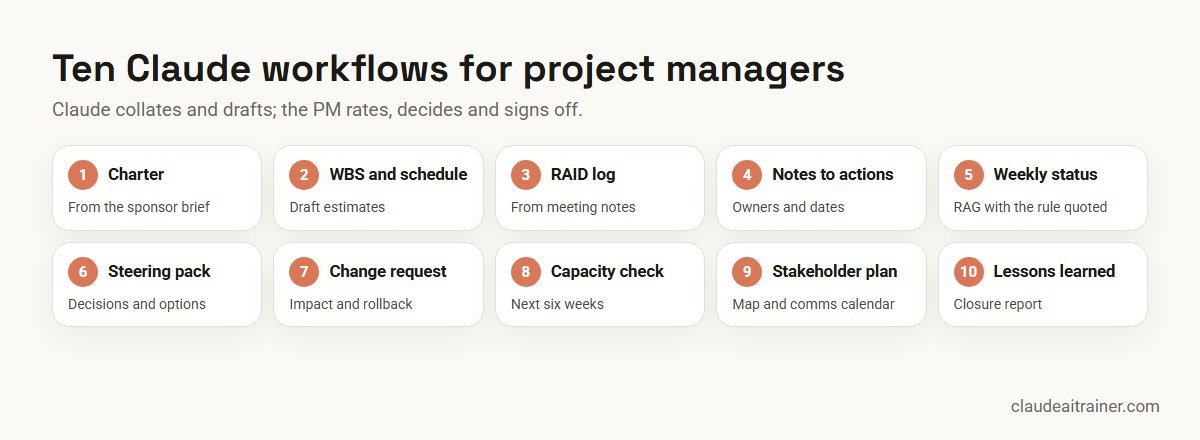
Quick answer: ten ways project managers use Claude
- Charter from a brief: a one-page charter with scope, success measures and open questions.
- WBS and first schedule: deliverables broken into work packages, with dependencies and a draft timeline.
- RAID log: risks, assumptions, issues and dependencies pulled from notes, in your log format.
- Meeting notes to actions: decisions, actions, owners and dates from a transcript.
- Weekly status report: a RAG status that quotes your own RAG rules, built from tracker data.
- Steering pack: the decisions the sponsor needs to make, with options and impact.
- Change request note: impact on scope, time, cost and risk, with a rollback plan.
- Capacity check: who is over-allocated in the next six weeks and what could move.
- Stakeholder plan: a map of interest and influence and a communication calendar.
- Lessons learned: themes from the retrospective and a closure report.
Where to run each workflow
Pick the surface that can see the information. A status report written from memory is the main way these tools go wrong.
- A shared Claude Project. Projects are available on every plan; free users can create up to five. Upload your charter template, status template, RAG definitions and glossary, and write instructions such as “use UK English and our RAG rules.” On Team and Enterprise plans, a project can be shared with colleagues as Can view or Can edit, so a whole PMO works from the same standards. On paid plans, large project knowledge switches to retrieval, which Anthropic says expands capacity by up to 10 times.
- Tracker connectors. The connector directory lists Asana (made by Asana, with more than 30 tools), Atlassian (Jira, Confluence and Loom, working with your existing Atlassian permissions), monday.com, Smartsheet, Wrike, ClickUp and Linear, all marked Anthropic verified. Directory connectors are available to all users; on Team and Enterprise an owner enables each one and every person then signs in with their own account.
- Meeting connectors. Fireflies, Granola and Otter.ai connectors let Claude search transcripts you already record. The Microsoft 365 connector (built by Anthropic) reads SharePoint, OneDrive, Outlook and Teams content you have access to.
- Cowork with Anthropic’s plugins. Cowork runs multi-step tasks on files in folders you connect and is available on paid plans. The open-source
operationsplugin adds/status-report,/process-doc(flowcharts, RACI matrices and SOPs),/change-request,/capacity-plan,/vendor-reviewand/runbook, plus a risk-assessment skill that covers risk registers. Theproductivityplugin keeps your own task list in aTASKS.mdfile and syncs with Asana, Linear, Atlassian, monday.com or ClickUp when connected. Both work without connectors if you supply the context. - Claude for Excel and PowerPoint. Add-ins for Pro, Max, Team and Enterprise. Excel suits plans and resource sheets; PowerPoint builds slides in your own template.
- Scheduled tasks. In Cowork you can type
/scheduleto run a task on a schedule. Anthropic says scheduled tasks run in the cloud with no device online, which suits a Monday-morning tracker digest.
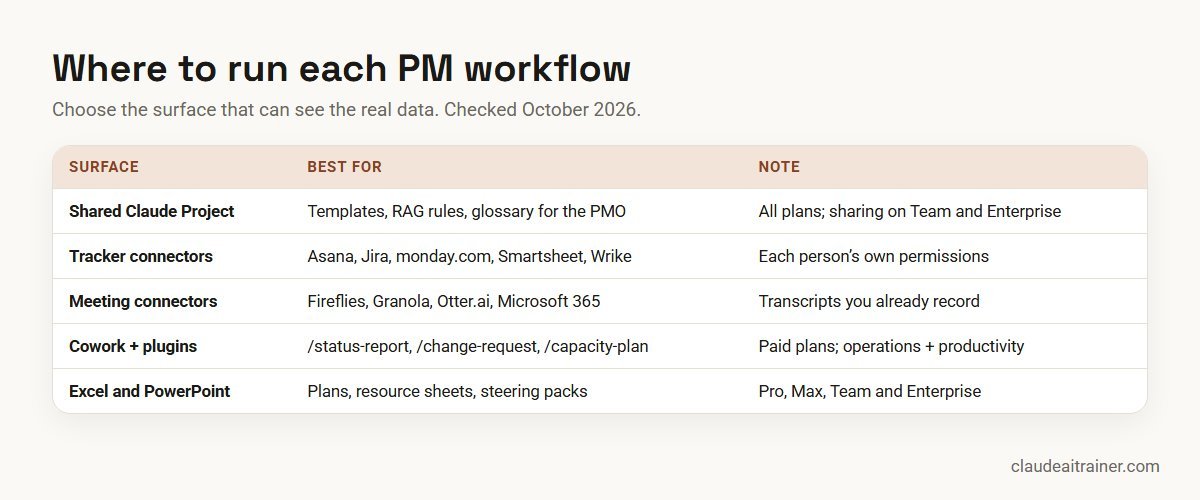
Comparison table
| Workflow | Attach | Best surface | Reviewer check |
|---|---|---|---|
| Charter from a brief | Sponsor brief, charter template | Shared Project | Sponsor confirms scope and measures |
| WBS and schedule | Charter, team list, fixed dates | Chat, then Excel add-in | Leads confirm estimates |
| RAID log | Meeting notes, current log | Project or Cowork | Owners agree each new item |
| Notes to actions | Transcript or notes | Meeting connector or chat | Owners confirm their actions |
| Weekly status | Tracker export, RAG rules | Tracker connector or /status-report | PM sets the final RAG |
| Steering pack | Status, RAID, decisions needed | PowerPoint add-in | Sponsor pre-read before the meeting |
| Change request | Request, baseline plan | /change-request or chat | Cost and dates checked by the PM |
| Capacity check | Allocation sheet, leave calendar | Excel add-in or /capacity-plan | Line managers confirm |
| Stakeholder plan | Org chart, charter | Shared Project | Sponsor reviews sensitive ratings |
| Lessons learned | Retro notes, final status | Chat or Project | Team agrees the themes |
The ten workflows in detail
1. Project charter from a brief
Use it for turning a sponsor’s email or kickoff notes into a charter people can sign. Attach: the brief, your charter template and any budget or date constraints.
Using the attached brief and our charter template, draft a one-page
project charter: purpose, in-scope and out-of-scope items, deliverables,
success measures (each one measurable), key dates, budget if stated,
sponsor and team roles, and top five risks. Do not invent figures or
dates; where the brief is silent, write "TBC" and add the question to a
list of open points for the sponsor at the end.
Check. Every “TBC” becomes a question in the kickoff. The sponsor confirms scope and success measures in writing.
2. Work breakdown structure and first schedule
Use it for a first cut of the plan that leads can then correct. Attach: the approved charter, the team list and any fixed dates such as a go-live or a regulatory deadline.
Create a work breakdown structure from the attached charter: deliverables,
then work packages of roughly one to two weeks each. For each package,
list the likely owner role, dependencies and an estimate range (best,
likely, worst). Then build a draft schedule as a table I can paste into
Excel, working back from the fixed dates. Flag the critical path and any
package where the estimate range is wide. Mark all estimates as drafts.
Check. Leads replace the draft estimates with their own. If the plan lives in Excel, the Claude for Excel add-in can then build the timeline and keep formulas linked when dates move.
3. RAID log from meeting notes
Use it for keeping risks, assumptions, issues and dependencies current without retyping. Attach: this week’s meeting notes and the current RAID log.
Read the attached meeting notes and compare them with our current RAID
log. Propose new entries and updates in the same columns as the log:
type, description, cause, impact, likelihood and impact score using our
1-5 scale, owner, due date and status. Quote the sentence in the notes
that each entry comes from. Do not close any item; list items that look
resolved so I can confirm.
Check. Each owner agrees to their new item before it is added. The quoted source sentence makes this quick.
4. Meeting notes to actions and decisions
Use it for the follow-up email nobody wants to write. Attach: the transcript, or connect Fireflies, Granola or Otter.ai and name the meeting.
From the transcript of [meeting], list: decisions made (with who made
them), actions (owner, due date, and the exact words that created the
action), open questions, and anything that sounds like a new risk.
Where an owner or date was not said explicitly, mark it "unassigned"
rather than guessing. Then draft a short follow-up email in plain
language, under 200 words.
Check. Send the actions to owners for confirmation. “Unassigned” items go back to the chair, not to whoever seems likely.
5. Weekly status report with honest RAG
Use it for the report that takes most PMs an hour or more. Attach: a tracker export, or connect Asana, Jira, monday.com or Smartsheet; plus your written RAG definitions and last week’s report.
Using the attached tracker data and our RAG rules, draft this week's
status report in our template: overall RAG, then one paragraph per
workstream covering progress against plan, slippage in days, top risk
and next milestone. For every RAG rating, quote the rule that applies
and the data that triggers it. Compare with last week's report and
list any change in RAG. Do not soften amber or red ratings.
Check. The PM sets the final RAG. Claude proposes; it cannot know about the conversation in the corridor that changes everything. In Cowork, the /status-report command produces a similar report with KPIs, risks and next steps.
6. Steering committee pack
Use it for getting decisions, not just giving updates. Attach: the status report, the RAID log and a note of the decisions you need.
Build an outline for a steering committee pack of no more than six
slides: one-slide summary, progress against milestones, top three
risks with mitigations, and one slide per decision needed. For each
decision, give two or three options with the impact on scope, time,
cost and risk, and a recommendation marked as the PM's view. Keep each
slide to a headline and at most four bullets.
Check. Build the slides in your template with the Claude for PowerPoint add-in. Its documentation says it is not recommended for final deliverables without human review, so send the pre-read to the sponsor first. See Claude for PowerPoint use cases.
For PMOs and delivery leads
Want your project managers working this way by next month?
Most PMs can write a prompt. Fewer have a routine: a shared project space, connected trackers with the right permissions, and a review step before anything reaches a sponsor. We run hands-on sessions where teams build that routine on their own projects. Book a short call if that would help.
7. Change request impact note
Use it for answering “can we just add this?” with facts. Attach: the request and the baseline plan or schedule.
Assess the attached change request against the baseline plan. Describe
the change, then its impact on scope, schedule (which milestones move,
by how many days), cost, resources, quality and risk. List options:
accept, defer to a later phase, or reject, with consequences of each.
Include a rollback plan if it is accepted. Show your working on any
date or cost change and state assumptions separately.
Check. The PM checks dates and cost with the people who own them. The operations plugin’s /change-request command adds impact analysis, a rollback plan and approval routing in Cowork.
8. Resource and capacity check
Use it for spotting over-allocation before it becomes slippage. Attach: the allocation sheet and the leave calendar.
Using the attached allocation sheet and leave calendar, show each
person's planned load by week for the next six weeks as a % of their
available hours. Highlight anyone above 100% and any week where a
critical-path task has no available owner. Suggest up to three changes
that would fix the worst conflicts, such as moving a non-critical task,
and say what each change would delay.
Check. Line managers confirm availability; percentages are only as good as the timesheet data.
9. Stakeholder map and communication plan
Use it for new programmes with many groups to keep informed. Attach: the charter and a list of stakeholder groups.
From the attached charter and stakeholder list, draft a stakeholder map
with interest and influence rated high, medium or low and one line on
what each group needs from the project. Then propose a communication
plan as a table: audience, message, channel, frequency and owner.
Keep descriptions factual and neutral; they may be shared.
Check. Ratings of named senior people are sensitive. Keep the map in a restricted project, and have the sponsor review it.
10. Lessons learned and closure report
Use it for closing well, so the next project benefits. Attach: retrospective notes, the final status report and the original charter.
Compare the original charter with the final status report and the
retrospective notes. Report: objectives met, partly met and not met,
with evidence; schedule and budget variance; the five most useful
lessons, grouped as keep, change or stop; and three concrete
recommendations for the next project of this type. Avoid naming
individuals in any lesson.
Check. The team agrees the themes before the report is filed. Add the lessons to the PMO’s shared project so future charters can draw on them.
How to adapt these prompts
- Write your RAG rules down. “Amber if the next milestone is forecast to slip by more than five working days” is a rule Claude can apply and quote. “Amber if we’re a bit worried” is not.
- Use your templates. Upload the charter, status and closure templates to the shared project, and ask for output “in our template”.
- Ask for sources. “Quote the sentence this came from” turns a draft into something you can verify in seconds.
- Turn repeat prompts into skills. A weekly status prompt that works should become a skill the whole PMO shares; see how to create Claude skills.
Worked example: one week on a CRM migration
Here is how a PM might run one week of a hypothetical twelve-week CRM migration with five workstreams, using Jira and Confluence for delivery and a shared Claude Project for the PMO.
- Monday. A Cowork scheduled task, using the Atlassian connector, prepares a digest of tickets that moved, slipped or were reopened since Friday.
- Tuesday. After the data workstream meeting, workflow 4 turns the transcript into actions, and workflow 3 proposes two new risks for the RAID log, each with its source sentence.
- Wednesday. Sales asks to add a lead-scoring field. Workflow 7 shows it would push user testing by four days; the PM recommends deferring it to phase two.
- Thursday. Workflow 5 drafts the status report from Jira data and the written RAG rules. The PM changes one workstream from green to amber because of a supplier call Claude could not know about.
- Friday. Workflow 6 outlines a four-slide steering pack around the deferral decision, built in the company template.
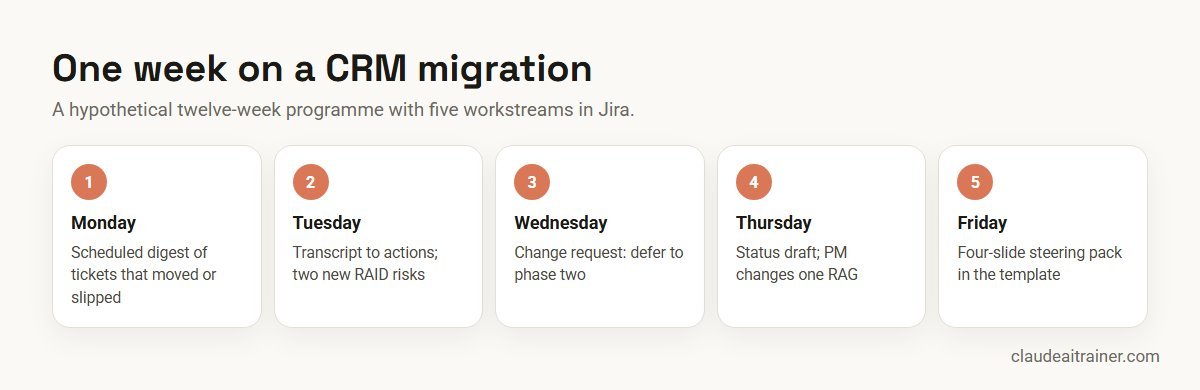
The PM saves time on collating and drafting, and spends it where it matters: the supplier call, the deferral conversation and the sponsor.
Next step
Set up a PMO workspace in Claude
We help PMOs set up shared Projects with templates and RAG rules, connect Asana, Jira or monday.com with sensible permissions, and turn the best prompts into skills the whole office uses. Online or on-site.
Security and governance
- Use an approved workspace. Anthropic’s pricing page states that Team and Enterprise plans do not train models on your content by default; on Free, Pro and Max, training is an opt-out setting. Client, staff and contract data belongs in the company workspace. See the best Claude plan for business.
- Connect with least privilege. Anthropic says Claude inherits each person’s permissions from the connected service. A PM who can see every board in Jira gives Claude the same reach, so keep sensitive boards in restricted spaces.
- Control write actions. On Team and Enterprise, owners can set each connector tool to Always allow, Needs approval or Blocked. Creating and updating tasks is a good candidate for Needs approval.
- Treat external files with care. Supplier documents and downloaded templates can hide instructions. Anthropic’s add-in documentation warns about this prompt-injection risk and asks you to review confirmations carefully.
- Keep people decisions human. Use capacity data for planning, not for judging performance, and keep stakeholder ratings of individuals in restricted projects.
- Record the human sign-off. Status, risk scores and dates are the PM’s statements. Claude drafts them; the PM owns them.
Sources
Checked October 2026: Anthropic’s help articles on Projects, connectors and getting started with Cowork; the open-source operations and productivity plugins; the Asana, Atlassian, monday.com and Smartsheet connector listings; Claude for PowerPoint documentation; and Claude pricing.
Key takeaways
- Keep a shared Claude Project per programme with your templates, RAG rules and glossary, so every answer uses your standards
- Feed Claude real tracker data through a connector or an export; never let it guess progress
- Write your RAG definitions down once and make Claude quote them when it rates a workstream
- Use Anthropic’s operations plugin in Cowork for status reports, RACI and change requests, and the productivity plugin for your own task list
- Give connectors the minimum access and set write actions to Needs approval
- The PM signs off every status, risk rating and date before it leaves the team
FAQ
Claude for project managers: common questions
Is Claude good for project management?
Claude is good at the writing and collating side of project management: charters, RAID logs, status reports and steering packs. It is not a tracker. Pair it with your project tool through a connector or an export, and keep the PM responsible for ratings and dates.
Can Claude connect to Asana, Jira or monday.com?
Yes. The connector directory lists Asana, Atlassian (Jira and Confluence), monday.com, Smartsheet, Wrike, ClickUp and Linear, all marked Anthropic verified as of October 2026. Each person signs in with their own account, so Claude sees only what they can see.
Is there a Claude plugin for project managers?
There is no plugin named for project management, but Anthropic’s open-source operations plugin includes /status-report, /change-request, /capacity-plan and /process-doc for RACI matrices, with a risk-assessment skill for risk registers. The productivity plugin manages your own task list.
Can Claude write a weekly status report?
Yes. Give it tracker data, your written RAG rules and last week’s report, and ask it to quote the rule behind each rating. The PM should set the final status before it is sent.
Can Claude create a Gantt chart or project schedule?
Claude can draft a work breakdown and a schedule table, and with code execution or the Excel add-in it can build a timeline chart from it. Treat the estimates as drafts until the team leads confirm them.
Can Claude take meeting notes?
Claude can work from transcripts you already have. Connectors for Fireflies, Granola and Otter.ai let it search recorded meetings, and it can turn a transcript into decisions, actions and risks.
What is the difference between Claude Projects and project management?
Claude Projects is a feature: a workspace that holds files and instructions for related chats. It is useful for a PMO’s templates and rules, but it does not track tasks or dates like a project management tool.
Should project managers use Claude or Claude Cowork?
Use chat or a shared Project for drafting from a few documents. Use Cowork, on paid plans, when a task spans many files or steps, or when you want plugins and scheduled tasks.
Which Claude plan do project managers need?
Projects and connectors work on every plan, with Free limited to five projects. Cowork, Research and the Office add-ins need a paid plan. For company projects, a Team or Enterprise workspace adds sharing and admin controls.
Is it safe to put project data into Claude?
Use a Team or Enterprise workspace your company has approved, connect trackers with each person’s own permissions, set write actions to need approval and keep personal data to what the task needs.
Can Claude update tasks in my project tool?
Some connectors include tools to create and update tasks, for example Asana, monday.com and Smartsheet. On Team and Enterprise, owners can require approval for those actions, which is a sensible default.
Can Claude replace a project manager?
No. Claude speeds up drafting and checking, but negotiating scope, judging risk and managing people stay with the PM. The best results come when the PM reviews everything before it is shared.
Where can our PMO learn this hands-on?
Our corporate Claude AI training and Claude Cowork training take PMs through these workflows on their own projects, online or on-site.
Trusted by
Teams we’ve trained
…and 200+ organisations, across 16+ countries.
What participants say
Real feedback from real sessions
Verified feedback collected from participants across corporate sessions — average rating 4.8/5.
“A very productive session for working professionals. A must-do.”
“The session was highly insightful and conducted in a very professional and interactive manner. Learnt about AI and excited to learn more!”
“Highly recommended! Hands-on and directly useful — from making PPTs and strategic plans to building KRAs.”
“I would recommend everyone to go through this session — it clarifies both what to expect from AI and where AI isn’t needed.”
“A nice interactive session with a lot of new insights and the power of AI. This will help me save time in routine activities.”
“A very good training session. AI can do wonders — we’ll implement it to create efficiency and save time.”
Explore more
Keep going with Claude AI training
Work with us
Help your project managers use Claude well
Tell us how your PMO works: the trackers you use (Asana, Jira, monday.com, Smartsheet or spreadsheets), the reports you produce each week and who signs them off. We will suggest a short, hands-on format, online or on-site, and send a fixed proposal, usually within one business day.