Blog · Claude Cowork
Top 10 Claude Cowork Use Cases for Business Teams (2026-27)
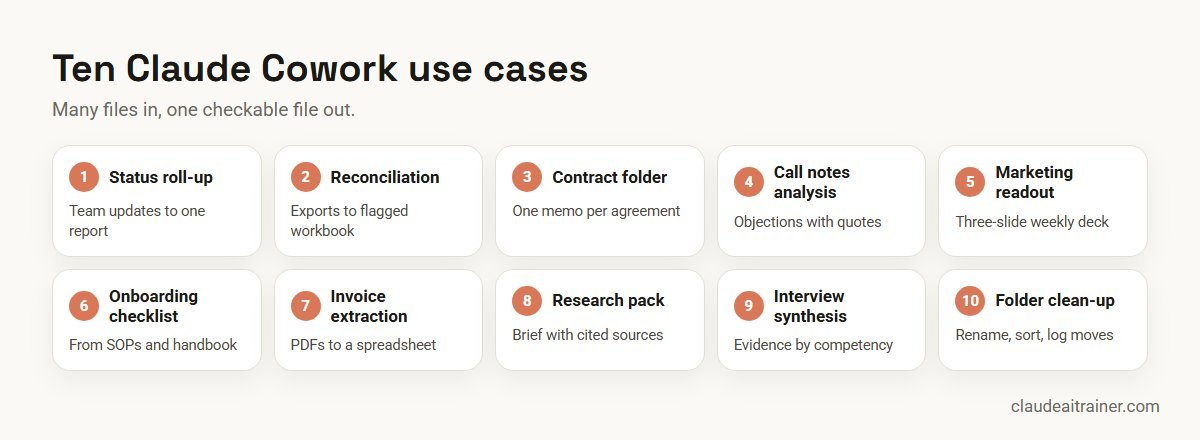
Cowork is the part of Claude that does the work rather than talking about it: it opens the folder, reads the files, builds the spreadsheet or deck and comes back when it is done. Anthropic’s own analysis of 1.2 million sampled sessions found that a third of Cowork use is business process and operations work. This list gives ten Cowork use cases business teams can start with, each with a prompt, the setting to run it under and the check a person should make.
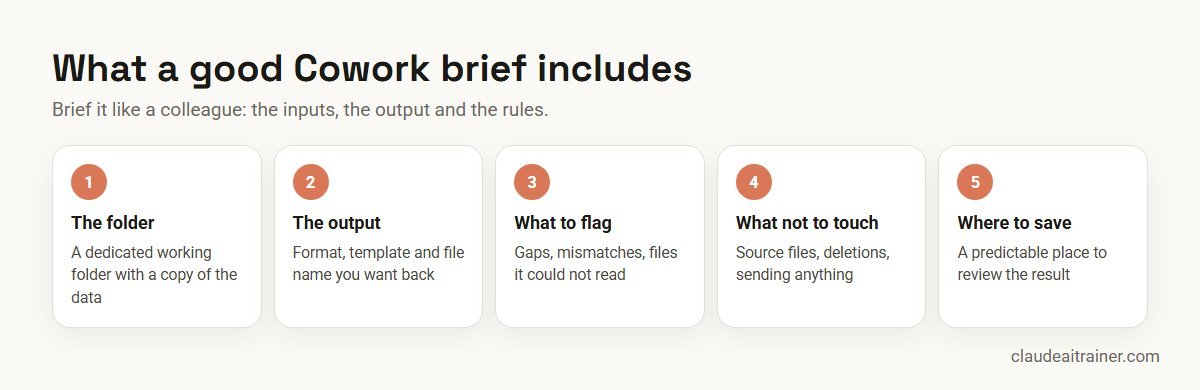
Most people try Cowork with a vague request, get a vague result and go back to chat. The people who stick with it treat it differently. They give it a folder, describe the file they want back, say what to flag and what not to touch, and check the result against the source. Cowork then does the tedious middle: opening twenty files, copying numbers, building the table and writing the summary.
This guide lists ten use cases that fit that pattern, drawn from Anthropic’s own Cowork examples and usage analysis. For each you get the task, a prompt, the settings to use and the human check. Product facts were checked on Anthropic’s help centre, documentation and blog in October 2026. New to Cowork? Start with our guide on how to use Claude Cowork. For one task per department across all Claude features, see Claude use cases for business; this article goes deeper on Cowork alone. Wondering where Cowork stops and Claude Code starts? See Claude Cowork vs Claude Code.
Quick answer: ten Cowork use cases
- Roll scattered updates into one status report.
- Reconcile spreadsheets and flag what does not match.
- Review a folder of contracts against your playbook.
- Analyse a quarter of sales call notes for blockers and objections.
- Build the weekly marketing readout as a short deck.
- Turn a process into an onboarding checklist.
- Extract invoices and receipts into a spreadsheet.
- Assemble a desk research pack with sources.
- Synthesise interview feedback for a hiring decision.
- Clean up and organise a shared folder.
What people actually use Cowork for
In July 2026 Anthropic published an analysis of 1.2 million sampled Cowork sessions from more than 600,000 organisations, collected between 11 and 31 May 2026. The largest category was business process and operations at 33.4%, such as pulling scattered updates into one report, building onboarding checklists and reconciling spreadsheets. Next came content creation and copywriting at 16.4%, then software development (8.7%), DevOps (7%), research (6.4%), data analysis (5.8%), document processing (4.1%) and sales and revenue operations (4%). Anthropic notes these are shares of a rate-capped sample, not absolute volumes, and that its categories have no standalone bucket for finance, marketing or HR.
Where Cowork stands (checked October 2026)
- One Claude. On 16 September 2026 Anthropic began merging Cowork and chat into one Claude, starting with Pro and Max. On Team (beta) and Enterprise, the combined experience appears where “Chat and Cowork unified” is turned on.
- Availability. Cowork on desktop is available on all paid plans. Web and mobile Cowork is on Pro, Max and Team (beta), and on Enterprise when an owner enables it.
- What it can do. Read and write local files without uploads, use a built-in browser or Claude in Chrome, split work across sub-agents, and produce Excel files with working formulas, PowerPoint decks and formatted documents.
- Extensions. Connectors, skills and plugins, managed from Customize.
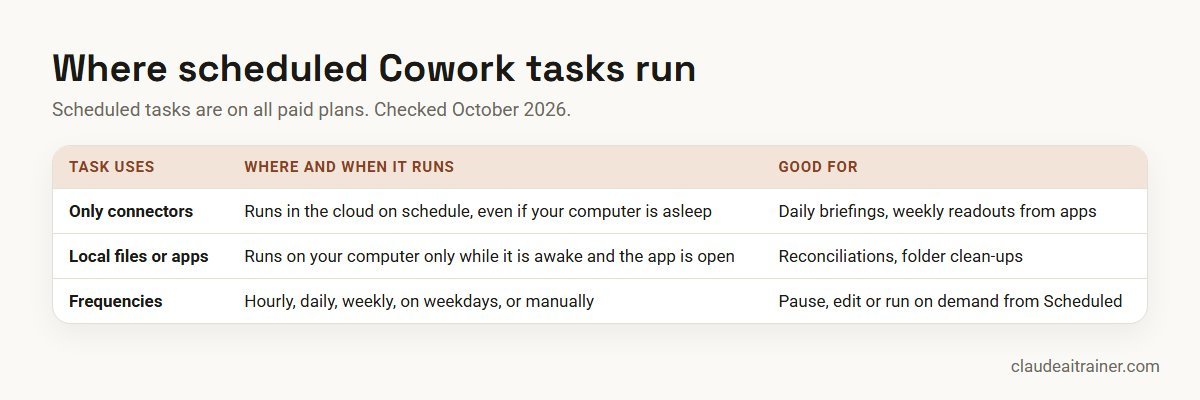
- Scheduled tasks. On all paid plans, hourly, daily, weekly, on weekdays or manually. Tasks that use only connectors run in the cloud; tasks that need local files run only while your computer is awake and the app is open.
- Permissions. Auto is the default on Pro, Max and Team; Manual is the default on Enterprise. Cowork always asks before permanently deleting files.
Comparison table
| Use case | Starts from | Hands back | Schedule it? | Human check |
|---|---|---|---|---|
| Status roll-up | Team update files, trackers | One report or deck | Weekly | Owner checks three items against source |
| Reconciliation | Regional exports, budget file | Workbook with variances flagged | Monthly | Controller reviews every flag |
| Contract folder review | Inbound agreements, playbook | One memo per contract | No | Lawyer decides positions |
| Call notes analysis | A quarter of call notes | Memo with quoted objections | Quarterly | Sales lead checks quotes |
| Marketing readout | Analytics and Drive trackers | Three-slide deck | Weekly | Marketing lead checks numbers |
| Onboarding checklist | SOPs, handbook | Checklist document | No | Process owner approves |
| Invoice extraction | Folder of PDFs or images | Spreadsheet with totals | Monthly | Accounts spot-check sample |
| Research pack | Question, trusted sites | Brief with cited sources | Optional | Reader checks citations |
| Interview synthesis | Interviewer notes | Comparison and open questions | No | Hiring manager decides |
| Folder clean-up | A messy shared folder | Renamed, sorted files and a log | Monthly | Owner reviews the move log |
The ten use cases in detail
1. Roll scattered updates into one status report
The task. Every week, updates arrive as documents, spreadsheets and notes in different formats. Someone copies them into one report. This is the single most common type of Cowork work in Anthropic’s analysis.
In the Weekly Updates folder, read this week's files from each team.
Build the status report in our template: one row per project with RAG
status, what changed, next milestone and blockers. Flag any project
that hasn't sent an update. Save as Status-[date].docx and don't edit
the source files.
Settings and check. Work on a dedicated folder. Once the output is trusted, schedule it weekly. The owner checks three projects against their source files each week.
2. Reconcile spreadsheets and flag variances
The task. Month-end close work across regional exports and a budget file. Anthropic’s Cowork page describes getting back a working spreadsheet with variances flagged and a note on what did not reconcile.
Reconcile the four regional sales exports in /Close/October against
the consolidated ledger extract. Build a workbook with a summary tab,
one tab per region and a Variances tab listing every difference over
500 with the rows involved. Use formulas, not pasted values. Add a note
listing anything you couldn't match.
Settings and check. Use a copy of the files, not the originals. Anthropic’s safety guidance advises against giving Cowork access to local files with sensitive financial information, so prepare a working set. The controller reviews every flagged variance. Anthropic also offers a finance plugin for reconciliation and variance analysis. For work inside one workbook, see how to use Claude in Excel.
3. Review a folder of contracts against a playbook
The task. A batch of inbound NDAs or supplier agreements needs a first pass before a lawyer spends time on them.
Review each agreement in /Contracts/Inbound against Playbook.docx.
For each one, write a one-page memo: parties, term, every departure
from the playbook cited to its clause, risk rating, and gaps the
playbook doesn't cover. Save memos in /Contracts/Memos with the same
file name. Don't give a final opinion on enforceability.
Settings and check. Manual approval for confidential folders. A lawyer reads every memo and decides positions. Anthropic’s legal plugin covers contract review and NDA triage. See Claude for legal teams.
4. Analyse a quarter of sales call notes
The task. Reading three months of call notes to find what is blocking each open deal and which objections keep coming up.
Read all call notes in /Sales/Q3 Notes. Produce a memo: each open deal
with what is blocking it, the five most common objections with a
direct quote and file name for each, and three changes to our pitch
the evidence supports. Quote only from the notes.
Settings and check. The quote-and-file requirement makes the memo checkable. The sales lead verifies a sample of quotes. See Claude for sales and marketing teams.
For operations and team leads
Want your team handing real work to Cowork, safely?
Cowork pays off when people learn to brief it like a colleague, give it a dedicated folder and check the right things afterwards. In our hands-on sessions each person runs a real task from their own week. Book a short call if that would help.
5. Build the weekly marketing readout
The task. Pulling web and signup numbers from an analytics tool plus newsletter, social and webinar numbers from a tracker, comparing with last week and building a short deck. This is one of Anthropic’s own Cowork examples.
Every Monday morning, build last week's marketing readout. Pull web
visits and signups from the analytics connector and newsletter, social
and webinar numbers from the Marketing Tracker sheet. Compare each with
the prior week, and save a three-slide deck: headline numbers, what
moved and why (only if the data shows it), and next week's focus.
Settings and check. Schedule it weekly; if it uses only connectors it can run in the cloud. The marketing lead checks the headline numbers against the source before sharing. For the prompts that go into the content itself, see Claude prompts for marketing.
6. Turn a process into an onboarding checklist
The task. New joiners need a checklist; the information is spread across SOPs, the handbook and old emails.
From the SOPs and handbook in /Onboarding/Sources, build a 30-day
onboarding checklist for new warehouse supervisors: day 1, week 1,
weeks 2-4, with an owner and a link to the source for each item.
List any step where the sources disagree.
Settings and check. The disagreement list is the valuable part. The process owner resolves it and approves the checklist.
7. Extract invoices and receipts into a spreadsheet
The task. Turning a folder of supplier invoices or receipt photos into a structured spreadsheet. Document processing and extraction is its own category in Anthropic’s analysis.
Read every invoice in /AP/October. Create a spreadsheet with supplier,
invoice number, date, net, tax, gross, currency and file name, plus a
totals row. Flag duplicates, missing tax numbers and any invoice where
net plus tax doesn't equal gross.
Settings and check. Accounts staff spot-check a sample against the originals, and every flag. Nothing gets paid from this sheet without the normal approval process.
8. Assemble a desk research pack with sources
The task. Answering a business question, such as market entry or supplier options, from the web and your own files, with every claim sourced.
Research the cold-chain logistics providers serving Pune and Nashik.
Use only company websites and government sources. For each provider:
services, locations, certifications and a link to where you found each
fact. Save as a brief with a comparison table and a list of what you
couldn't verify.
Settings and check. Anthropic strongly advises against using the built-in browser or Claude in Chrome with sensitive information, and recommends trusted sites only. The reader checks citations before relying on the brief.
9. Synthesise interview feedback for a hiring decision
The task. Several interviewers write notes in different styles. The hiring manager needs a fair comparison against the scorecard. Anthropic gives a hiring manager synthesising interview feedback as an example of Cowork work.
Read the interview notes in /Hiring/Role-142. Map each interviewer's
evidence to the five scorecard competencies for each candidate. Show
where interviewers disagree and what evidence is missing. Don't rank
candidates or recommend a hire.
Settings and check. Follow your HR data policy, keep the folder restricted and leave the decision with the hiring panel.
10. Clean up and organise a shared folder
The task. A shared folder with hundreds of files named “final_v3_REAL”. Cowork can rename, sort and archive by rules.
Organise /Shared/Projects: rename files to YYYY-MM-DD_Project_Type,
move them into one folder per project, and move anything not modified
in 24 months into /Archive. Don't delete anything. Save a log of every
move as Moves.csv.
Settings and check. Cowork always asks before permanently deleting files, in any mode, and the prompt tells it not to delete at all. Keep a backup, and review the move log.
How to choose your first Cowork task
- Many files, one output. Cowork shines when the work is gathering, not judging.
- A checkable result. Ask for file names, cell references or quotes so a person can verify quickly.
- Low blast radius. Start with tasks that produce a new file, not ones that change or send things.
- Repeats. Weekly or monthly work is worth scheduling once trusted.
- Worth the usage. Agentic tasks generally use more of your plan’s limits than chat, so pick tasks that save real time.
Worked example: a finance team schedules its month-end pack
- Prepare. The financial controller creates a Cowork project with a dedicated /Close folder, standing instructions (“never edit source exports; use formulas”) and the template.
- Run manually twice. Using use case 2, the team runs the reconciliation by hand for two months, with manual approval, and logs every correction.
- Fix the brief. Corrections show that one region exports dates in a different format. The instruction is added to the project.
- Schedule. In month three the task is scheduled for the second working day. Because it uses local files, the controller keeps the desktop app open that morning.
- Review every run. The controller reviews the Variances tab each month before anything goes into the management pack.
Next step
Pick two of these and run them with your team
We help teams choose the first Cowork tasks, set approval and folder rules, and schedule the ones that repeat. Online or on-site, for finance, operations, legal, sales and marketing teams.
Security and governance
- Limit what Cowork can read. Anthropic’s safety guidance says risk depends on what Claude can read and what it is allowed to do. Use a dedicated working folder and keep backups.
- Choose the approval mode. Use “Manually approve” for sensitive files, unfamiliar tools or hard-to-undo actions. “Automatically approve” still screens actions; “Skip all approvals” checks nothing.
- Prompt injection. Content from outside your trusted boundary can carry hidden instructions. Narrow either what Claude reads or what it can do, for example by disabling write actions.
- Scheduled tasks run unattended. Avoid scheduling tasks that touch sensitive data or take hard-to-reverse actions, and review outputs after each run.
- Vet extensions. Prefer verified plugins and connectors from the directory; see the best Claude skills, plugins and connectors and best MCP servers for Claude.
- Monitoring. Cowork activity on web and mobile is captured in the Compliance API, and Team and Enterprise owners can stream Cowork events to SIEM tools through OpenTelemetry.
- Accountability. You remain responsible for what Claude does on your behalf. Check our Claude plan guide for which admin controls each plan includes.
Sources
Checked October 2026: How people are using Claude Cowork (Anthropic, July 2026); the Cowork overview; the Cowork product page; help articles on scheduled tasks, using Cowork safely and Cowork and chat as one Claude; and the 16 September 2026 announcement. Rollout status varies by plan and account.
Key takeaways
- Cowork suits multi-step work across many files that ends in a file you can check
- Give it a dedicated working folder and a copy of the data, not your whole drive
- Brief the finished output: format, file name, what to flag and what not to change
- Schedule only low-risk, repeatable tasks and review each run
- Use manual approval for sensitive files and anything hard to undo; Cowork always asks before permanently deleting files
- Agentic tasks use plan limits faster than chat, so start with tasks that save real time
FAQ
Claude Cowork use cases: common questions
What are the best Claude Cowork use cases?
Strong starting points are status roll-ups, spreadsheet reconciliation, contract folder reviews, sales call notes analysis, a weekly marketing readout, onboarding checklists, invoice extraction, research packs, interview feedback synthesis and folder clean-up. All involve many files and end in a checkable output.
What do most people use Cowork for?
In Anthropic’s July 2026 analysis of 1.2 million sampled sessions, business process and operations was the largest category at 33.4%, followed by content creation and copywriting at 16.4%. Software development was 8.7%.
Is Cowork still a separate app?
Anthropic began merging Cowork and chat into one Claude on 16 September 2026, starting with Pro and Max. On Team (beta) and Enterprise it appears where the unified setting is turned on. Check what your account shows.
Which plans include Claude Cowork?
Cowork on desktop is available on all paid plans: Pro, Max, Team and Enterprise. Web and mobile Cowork is on Pro, Max and Team (beta), and on Enterprise when an owner enables it.
Can Cowork run tasks on a schedule?
Yes, on all paid plans. You can schedule tasks hourly, daily, weekly, on weekdays or manually. Tasks that use only connectors run in the cloud; tasks that need local files run only while your computer is awake and the app is open.
Can Cowork delete my files?
Cowork always asks for your explicit permission before permanently deleting files, in any mode. It is still good practice to work on copies and keep backups.
Can Cowork build Excel and PowerPoint files?
Yes. Anthropic says Cowork creates Excel spreadsheets with working formulas, PowerPoint presentations and formatted documents.
Is it safe to give Cowork access to finance or HR files?
Anthropic advises against giving access to local files with sensitive information such as financial documents. Use a dedicated folder with only the data the task needs, choose manual approval and follow your data policy.
What is the difference between Cowork and Claude Code?
Cowork uses the same agentic architecture as Claude Code but is built for knowledge work on documents, spreadsheets and apps, without a terminal. Claude Code is built for software development.
Does Cowork use more of my plan limits?
Yes, generally. Anthropic says agentic tasks that search, run code or create files use more of your plan’s usage than simple chat.
Do Cowork projects sync to my team?
No. Cowork projects live on your computer and are not shared. You can link a claude.ai project, which can be shared on Team and Enterprise, so Cowork sessions draw on its knowledge.
Where can my team learn Cowork hands-on?
Our Claude Cowork training has each person run real tasks from their own week, set folder and approval rules, and schedule the ones that repeat. Sessions run online or on-site.
Trusted by
Teams we’ve trained
…and 200+ organisations, across 16+ countries.
What participants say
Real feedback from real sessions
Verified feedback collected from participants across corporate sessions — average rating 4.8/5.
“A very productive session for working professionals. A must-do.”
“The session was highly insightful and conducted in a very professional and interactive manner. Learnt about AI and excited to learn more!”
“Highly recommended! Hands-on and directly useful — from making PPTs and strategic plans to building KRAs.”
“I would recommend everyone to go through this session — it clarifies both what to expect from AI and where AI isn’t needed.”
“A nice interactive session with a lot of new insights and the power of AI. This will help me save time in routine activities.”
“A very good training session. AI can do wonders — we’ll implement it to create efficiency and save time.”
Explore more
Keep going with Claude AI training
Work with us
Get your team confident with Claude Cowork
Tell us which teams will use Cowork, the files and tools they work with and two tasks they repeat every week. We will suggest a short, hands-on format, online or on-site (for example Claude AI training in Delhi NCR or Abu Dhabi), and send a fixed proposal, usually within one business day.