Blog · Claude for consultants
Claude for Consultants: 10 Workflows for Proposals, Research and Client Decks (2026-27)
Consulting work runs on research, structure and documents: proposals, interview notes, models, decks and memos. Claude can speed up nearly every one of them, but clients pay for judgement and accuracy, and they trust you with confidential data. This guide follows a typical engagement through ten workflows, each with the input to attach, a prompt to copy and the check that keeps the work client-ready.
Most consulting engagements follow the same arc. You win the work with a proposal, get up to speed fast with desk research and interviews, form hypotheses, test them with data, and then tell the story in a deck and a memo. Each step produces documents, and most of the hours go into producing them rather than thinking about what they should say.
Claude for consultants fits into every step of that arc. It drafts in your firm’s structure, reads long documents quickly, builds models in Excel and slides in your template. What it cannot do is take responsibility for a number in front of a client. So each workflow below names what to attach, gives a prompt to copy and ends with the check a senior consultant should make. Product details were checked on Anthropic’s help centre, documentation and connector directory in October 2026.
If you are an independent consultant, the same workflows apply; just pay extra attention to the data section at the end. If what you need is a consultant to roll Claude out across your organisation, that is a different service: see our Claude Enterprise rollout support.
Quick answer: ten ways consultants use Claude
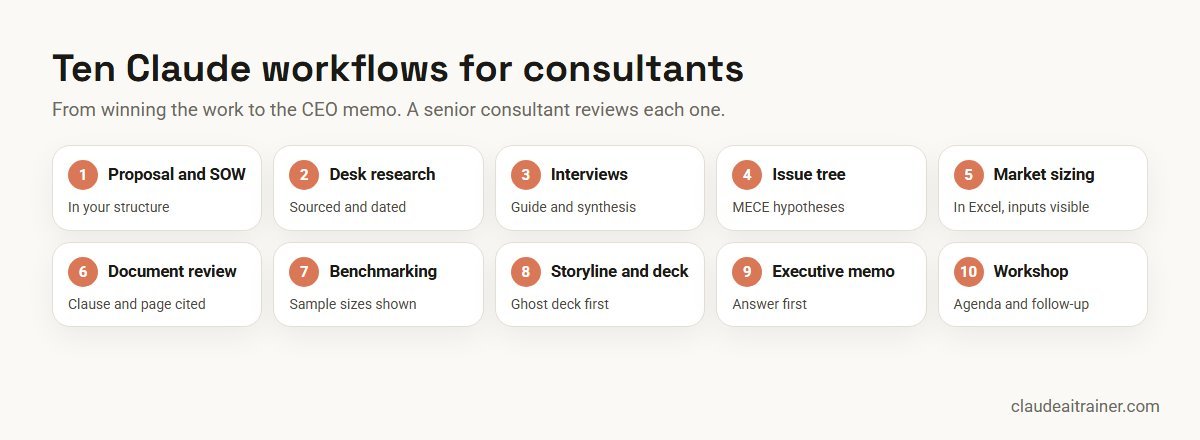
- Proposal and SOW: a first draft in your structure from the RFP and discovery notes.
- Desk research brief: an industry primer with a source link for every fact.
- Interviews: a guide before, and themes with quotes after.
- Issue tree: a MECE breakdown of the client question with hypotheses to test.
- Market sizing: a top-down and bottom-up model with assumptions visible.
- Document review: key terms and red flags pulled from a data room.
- Benchmarking: survey or peer data analysed with code, with sample sizes shown.
- Storyline and deck: a ghost deck of headlines, then slides in the client template.
- Executive memo: a one-page recommendation with the evidence behind it.
- Workshop: an agenda and exercises, then a write-up of outcomes.
Where to run each workflow
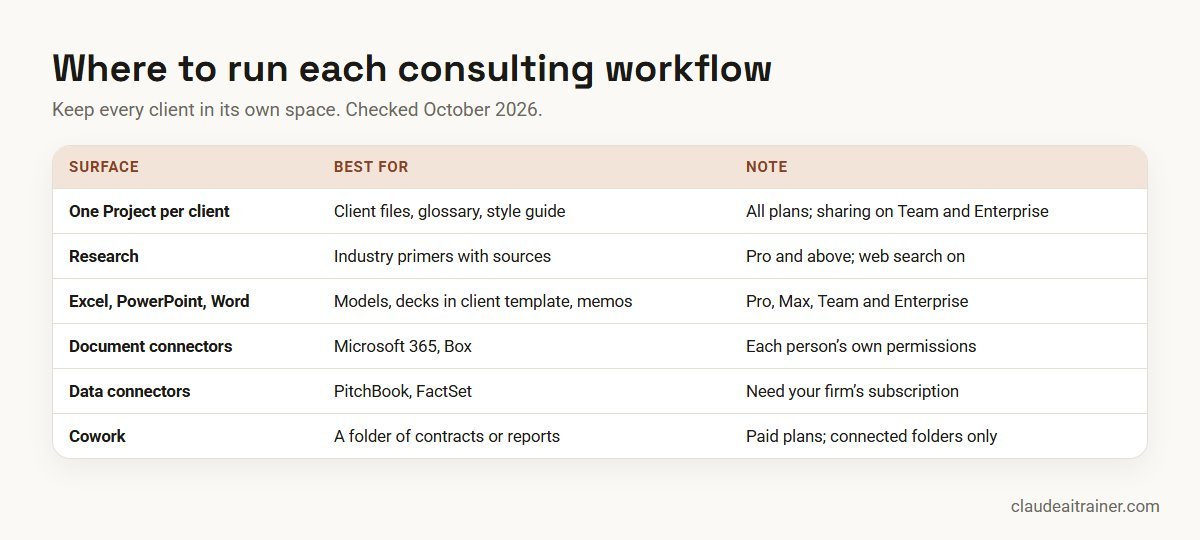
- One Claude Project per client. Projects work on every plan (up to five on Free) and hold files plus instructions such as “use the client’s terminology and UK spelling.” Separate projects keep one client’s documents out of another’s answers. On Team and Enterprise, share a project with the engagement team as Can view or Can edit.
- Research. On Pro, Max, Team and Enterprise, Research runs several web searches that build on each other and can use connectors you have enabled, such as Google Drive or Gmail. Web search must be turned on, and Research uses your limits faster than a normal chat.
- Claude for Excel, PowerPoint and Word. The add-ins are generally available on Pro, Max, Team and Enterprise. Anthropic’s PowerPoint documentation lists “consulting deliverables” among its examples, builds slides from your client or corporate template and produces native, editable charts. It also says the add-in is not recommended for final client deliverables without human review. See our guides to Claude for PowerPoint, Claude for Word and Claude in Excel.
- Document and data connectors. The connector directory lists Box and Microsoft 365 (SharePoint, OneDrive, Outlook and Teams) for documents, and PitchBook and FactSet for market and company data, all marked Anthropic verified. PitchBook’s listing describes the connector as being for PitchBook clients, so licensed data sources need your firm’s own subscription.
- Cowork. On paid plans, Cowork works through multi-step tasks on files in folders you connect, which suits reviewing a folder of client documents or assembling a weekly engagement update.
Comparison table
| Workflow | Attach | Best surface | Reviewer check |
|---|---|---|---|
| Proposal and SOW | RFP, discovery notes, past proposal structure | Client Project, Word add-in | Partner signs off scope and fees |
| Desk research brief | Client question, sources to prefer | Research | Open every cited link |
| Interviews | Hypotheses, interview notes | Client Project | Quotes match the notes |
| Issue tree | Client question, context | Chat or Project | Team tests MECE and priorities |
| Market sizing | Data sources, assumptions | Excel add-in | Second person checks the model |
| Document review | Contracts, reports, data room files | Cowork or Box connector | Specialist reviews red flags |
| Benchmarking | Survey or peer data export | Chat with code execution | Sample sizes shown and adequate |
| Storyline and deck | Findings, client template | PowerPoint add-in | Manager reviews every slide |
| Executive memo | Findings, deck | Word add-in or chat | Every claim traced to evidence |
| Workshop | Objectives, attendee roles | Client Project | Client lead agrees the agenda |
The ten workflows in detail
1. Proposal and statement of work
Use it for a first draft that follows your firm’s structure. Attach: the RFP or brief, your discovery notes and an anonymised past proposal as a structure guide.
Draft a proposal for [client] using the structure of the attached
example. Cover: our understanding of the situation, objectives,
approach by phase with activities and deliverables, timeline, team
roles, assumptions and what is out of scope. Use only facts from the
RFP and discovery notes. Leave fees as [FEES] and add a list of
questions where the brief is unclear. Keep the tone plain and specific.
Check. A partner signs off scope, assumptions and fees. Make sure the example proposal carries no other client’s confidential detail.
2. Desk research brief with sources
Use it for getting up to speed on an industry in hours. Attach: the client question and any sources your firm prefers.
Using Research, write a 2-page primer on [industry] in [market] for a
consulting team: market structure, main players, how they make money,
regulation, recent changes in the last 24 months, and the key
debates. Every fact needs a source link and date. Prefer regulators,
company filings and industry bodies over blogs. End with five
questions we should ask the client.
Check. Open every cited link before a fact goes into a deliverable. Where your firm licenses PitchBook or FactSet, connect it so company data comes from the licensed source.
3. Interview guide and synthesis
Use it for expert and stakeholder interviews. Attach: before, your hypotheses; after, the interview notes with interviewee codes.
Step 1: From the attached hypotheses, write a 45-minute interview guide
for [role]: warm-up, five core questions with follow-ups, and two
questions that could disprove our main hypothesis.
Step 2 (after interviews): Synthesise the attached notes. For each
hypothesis, say supported, mixed or not supported, with the number of
interviewees and two quotes with their codes. List surprises.
Check. Quotes match the notes, and interviewee codes are used everywhere instead of names. Follow any expert-network rules on what may be recorded.
4. Hypothesis and issue tree
Use it for structuring an ambiguous client question. Attach: the question and background.
Build an issue tree for: "[client question]". Make each level mutually
exclusive and collectively exhaustive, three levels deep. For each
branch, state a hypothesis, the analysis that would test it and the
data we'd need. Mark the three branches most likely to matter and
explain why. Point out any branch that overlaps another.
Check. The team tests whether the tree is really MECE and agrees which branches to work first.
5. Market sizing model
Use it for a TAM, SAM and SOM estimate that the client can follow. Attach: the data sources you trust, or work inside the model in Excel.
In this workbook, build a market sizing model for [product] in
[market]: a top-down estimate from total market data and a bottom-up
estimate from customer counts and spend. Put every assumption on an
inputs sheet with its source and a low / base / high value. Link all
calculations to the inputs, add a sensitivity table for the three
biggest drivers, and reconcile the two estimates in a short note.
Check. A second person checks formulas and sources. Claude for Excel gives cell-level citations; Anthropic advises verifying audit-critical calculations rather than relying on the add-in alone.
For consulting firms and strategy teams
Want your consultants using Claude with client-grade care?
Speed is easy. The harder habits are keeping each client in its own space, citing every fact and checking every number before a partner sees it. We run hands-on sessions where teams practise these workflows on realistic engagement material. Book a short call if that would help.
6. Data room and document review
Use it for pulling key terms from dozens of contracts or reports. Attach: the documents in a connected folder in Cowork, or through the Box or Microsoft 365 connector.
Review every document in the connected folder and build a table: file
name, document type, parties, date, term and renewal, pricing terms,
change-of-control or termination clauses, and anything unusual. Quote
the clause and page for each entry. Flag documents you couldn't read
fully. Don't give legal conclusions; mark items for specialist review.
Check. Legal or financial specialists review the flagged items. Data rooms often contain external documents, so watch for hidden instructions and review any action Claude proposes.
7. Benchmarking and survey analysis
Use it for comparing the client with peers or analysing a survey. Attach: the data export and definitions of each metric.
Using code, analyse the attached [survey / benchmark] data. Show the
client's position against the peer median and quartiles for each
metric, with the number of peers behind each figure. For the survey,
break results down by [segment], show sample sizes and flag any group
under 30 responses. Show the code and state anything you excluded.
Check. Sample sizes are visible on every chart. Peer data shared under confidentiality must not identify individual peers.
8. Storyline and client deck
Use it for getting from findings to a deck with a clear story. Attach: findings, the client template and the audience.
Write a ghost deck for [audience]: one action title per slide that
together tell the story, in the order the audience needs to hear it,
starting with the answer. Under each title, list the evidence that
supports it and the chart type. Keep it to 12 slides. Mark any title
the evidence does not yet support.
Check. The manager reviews the storyline before slides are built. Then build in the client template with the Claude for PowerPoint add-in, and review every slide before it leaves the team.
9. Executive memo and recommendation
Use it for the one page a CEO will actually read. Attach: the findings and the deck.
Write a one-page memo to [executive] recommending [decision]. Start with
the recommendation, then three reasons with the evidence for each, the
main risk and how to manage it, what it costs or saves if known, and
the decision needed by [date]. Use plain language and no jargon. Add a
list mapping each claim to the slide or source it comes from.
Check. Every claim maps to evidence. Remove the mapping list before sending, and keep it on file.
10. Workshop design and follow-up
Use it for client workshops that end with decisions. Attach: objectives, attendee roles and time available; afterwards, notes or photos of the boards.
Design a [3-hour] workshop to reach these objectives: [objectives]. Give
an agenda with timings, the purpose of each session, exercises with
instructions, pre-reads and the decisions we want by the end. After the
workshop, I will attach the notes: turn them into decisions, open
issues, owners and next steps, and a two-paragraph summary for the
sponsor.
Check. The client lead agrees the agenda beforehand and the summary afterwards. The Miro and Lucid connectors can help if your boards live there.
How to adapt these prompts
- Separate clients. One project per client, named clearly, with the client’s glossary and style guide inside.
- Demand sources. “Every fact needs a source link and date” and “quote the clause and page” make checking fast.
- Start with the answer. Ask Claude for action titles and a recommendation first; the evidence follows.
- Reuse what works. Turn your firm’s proposal and ghost-deck routines into skills; see how to create Claude skills.
Worked example: a three-week diagnostic
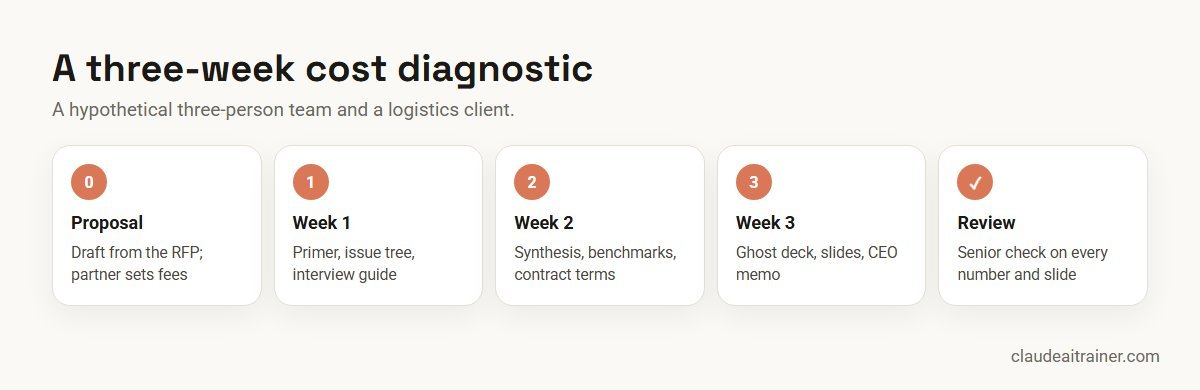
A hypothetical three-person team runs a three-week cost diagnostic for a mid-sized logistics client. Here is how Claude fits in.
- Week 0. Workflow 1 drafts the proposal from the RFP; the partner rewrites the approach section and sets the fees.
- Week 1. Workflow 2 produces an industry primer with sources; workflow 4 builds the issue tree; workflow 3 writes the interview guide for eight site managers.
- Week 2. Workflow 3 synthesises the interviews; workflow 7 benchmarks cost per shipment against peer data the client supplied; workflow 6 extracts terms from 40 carrier contracts for the procurement lead.
- Week 3. Workflow 8 writes the ghost deck, the team builds slides in the client template, and workflow 9 drafts the CEO memo.
The team spends less time on first drafts and formatting, and more time with the client and on the recommendation itself.
Next step
Set up an engagement workspace in Claude
We help firms set up one Project per client, connect document stores and research sources with the right permissions, and turn proposal, research and deck routines into shared skills. Online or on-site.
Client confidentiality and governance
- Read the contract first. Many client agreements and NDAs limit which tools may process client data. Check them, and your firm’s policy, before uploading anything.
- Use an approved workspace. Anthropic’s pricing page states Team and Enterprise plans do not train models on your content by default; on Free, Pro and Max, training is an opt-out setting. Client work belongs in the firm’s workspace.
- Keep clients apart. One project per client, with access limited to the engagement team.
- Connect with least privilege. Claude inherits each person’s permissions from the connected service. On Team and Enterprise, owners can set connector actions to Always allow, Needs approval or Blocked.
- Know what the add-ins log. Anthropic’s documentation says Claude for PowerPoint activity is not in Enterprise audit logs, while Enterprise organisations with the Compliance API enabled do get those sessions (in public beta). Its chat history is stored locally in the browser.
- Respect data licences. Data from licensed sources such as PitchBook or FactSet stays subject to your firm’s licence terms when it appears in a deliverable.
- Review before the client sees it. A senior consultant checks every number, source and slide.
Sources
Checked October 2026: Claude for PowerPoint documentation; Anthropic’s help articles on Research, Projects, connectors and Cowork; the PitchBook, FactSet, Box and Microsoft 365 connector listings; and Claude pricing.
Key takeaways
- Keep one Claude Project per client so documents and instructions never mix between engagements
- Ask for a source link or document reference behind every fact, and mark the rest as unconfirmed
- Use Research for desk research, Claude for Excel for models and Claude for PowerPoint for decks in the client’s template
- Connect Box, SharePoint or licensed data sources such as PitchBook and FactSet with each consultant’s own access
- Check client contracts and NDAs before uploading anything, and use an approved Team or Enterprise workspace
- A senior consultant reviews every number, claim and slide before it reaches the client
FAQ
Claude for consultants: common questions
How do consultants use Claude?
Across the engagement: drafting proposals, desk research with sources, interview guides and synthesis, issue trees, market sizing models, document review, benchmarking, decks and executive memos. Senior consultants review everything before it reaches the client.
Is Claude good for management consulting?
It is strong at the reading, structuring and drafting that fill much of a consultant’s week, and the Office add-ins work inside Excel and PowerPoint. It does not replace judgement on what the client should do, and every fact needs checking.
Can Claude make consulting slides?
Yes. Claude for PowerPoint builds slides from your client or corporate template, edits single slides and creates native charts. Anthropic’s documentation lists consulting deliverables as an example but advises human review before anything goes to a client.
Can Claude do market research for consultants?
Research on paid plans runs several connected web searches and can use enabled connectors. Ask for a source link and date for every fact, and use licensed sources such as PitchBook or FactSet where your firm subscribes.
Can I upload client documents to Claude?
Only if your client contract and firm policy allow it. Use an approved Team or Enterprise workspace, keep each client in its own project and remove data the task does not need.
Does Claude train on my client data?
Anthropic’s pricing page states Team and Enterprise plans do not train on your content by default. On Free, Pro and Max plans, model training is an opt-out setting, which is one reason client work belongs in a company workspace.
Can Claude build a financial or market sizing model?
Yes. In Claude for Excel it can build a model with inputs, linked calculations and sensitivities, and cite cells. Have a second person check formulas and sources before the client sees numbers.
Which connectors are useful for consultants?
Microsoft 365 and Box for client documents, PitchBook and FactSet for company and market data if your firm subscribes, and Miro or Lucid for workshop boards. All appear in the connector directory as Anthropic verified as of October 2026.
Claude or ChatGPT for consulting?
Both can draft and research. Choose based on your firm’s approved tools, data terms, the Office add-ins you use and the connectors you need. Test both on a real, non-confidential task before deciding.
Which Claude plan should a consultant use?
Independent consultants often start on Pro, which includes Research, Claude Code and the Office add-ins. Firms handling client data should use Team or Enterprise for admin controls and default no-training terms.
Can Claude write a proposal or statement of work?
Yes. Give it the RFP, your discovery notes and an anonymised structure guide. Leave fees and final scope to a partner, and ask Claude to list unclear points as questions.
Can Claude replace junior consultants?
It changes their work rather than removing it. Juniors still gather data, check sources and talk to clients; Claude speeds up drafting and formatting, so review and judgement become a bigger part of the job.
Where can our consulting team learn this hands-on?
Our corporate Claude AI training and Claude in Excel training take consulting teams through these workflows on realistic engagement material, online or on-site.
Trusted by
Teams we’ve trained
…and 200+ organisations, across 16+ countries.
What participants say
Real feedback from real sessions
Verified feedback collected from participants across corporate sessions — average rating 4.8/5.
“A very productive session for working professionals. A must-do.”
“The session was highly insightful and conducted in a very professional and interactive manner. Learnt about AI and excited to learn more!”
“Highly recommended! Hands-on and directly useful — from making PPTs and strategic plans to building KRAs.”
“I would recommend everyone to go through this session — it clarifies both what to expect from AI and where AI isn’t needed.”
“A nice interactive session with a lot of new insights and the power of AI. This will help me save time in routine activities.”
“A very good training session. AI can do wonders — we’ll implement it to create efficiency and save time.”
Explore more
Keep going with Claude AI training
Work with us
Help your consultants use Claude well
Tell us about your practice: the kind of engagements you run, where client documents live (SharePoint, Box, Google Drive) and the deliverables you produce. We will suggest a short, hands-on format, online or on-site, and send a fixed proposal, usually within one business day. If you need help rolling Claude out across a firm rather than training a team, see our Claude Enterprise rollout support.