Blog · Claude for Work
Top 10 Claude Use Cases for Business Teams (2026-27): By Department, with Prompts
The fastest way to get value from Claude is not a long list of ideas. It is one well-chosen task per team, done with the right feature and checked by the right person. This guide gives you ten, one for each department from finance to IT. For each use case you get the task, the Claude feature that fits it (Projects, artifacts, Cowork, skills, connectors, the Excel and PowerPoint add-ins or Claude Code), a prompt you can copy, and the review step that keeps a person accountable.
Most organisations that buy Claude seats see the same pattern. A handful of people use it every day, most try it twice, and nobody can say what it is for in their team. The fix is rarely more licences or a bigger prompt library. It is a clear answer to one question per department: which task do we hand to Claude first, and who checks it?
This guide answers that question for ten departments. Each use case follows the same structure: the task, the Claude feature that suits it, a sample prompt, the human review step, and the training that fits. Feature names and plan details were checked on Anthropic’s documentation and help centre in October 2026. Where a feature is in beta or rolling out, we say so.
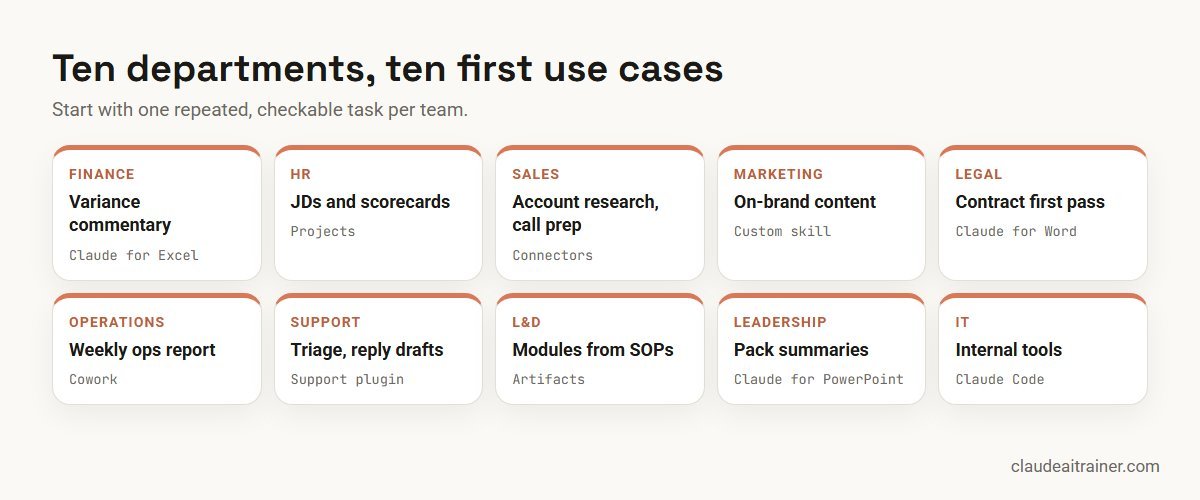
Quick answer: ten use cases, one per team
- Finance: monthly variance commentary, in Claude for Excel.
- HR: job descriptions and interview scorecards, in a Project.
- Sales: account research and call prep, with CRM connectors.
- Marketing: on-brand campaign content, with a brand voice skill.
- Legal: first-pass contract review against your playbook.
- Operations: the weekly operations report, in Cowork.
- Customer support: ticket triage and reply drafts, with help desk connectors.
- Learning and development: training modules from SOPs, as artifacts.
- Leadership: board and management pack summaries, in Claude for PowerPoint.
- IT: internal tools and automation, with Claude Code.
Comparison table
| Team | Task | Claude feature | Who reviews |
|---|---|---|---|
| Finance | Variance commentary | Claude for Excel | Financial controller |
| HR | Job descriptions, scorecards | Projects | HR business partner |
| Sales | Account research, call prep | Connectors, sales plugin | Account owner |
| Marketing | Campaign content | Custom skill, artifacts | Brand lead |
| Legal | Contract first pass | Projects, Claude for Word, legal plugin | Lawyer |
| Operations | Weekly ops report | Cowork | Operations manager |
| Customer support | Triage, reply drafts | Connectors, support plugin | Agent, team lead |
| L&D | Modules and quizzes | Artifacts, Slides | Process owner |
| Leadership | Pack summaries | Projects, Claude for PowerPoint | Chief of staff, CFO |
| IT | Internal tools, scripts | Claude Code | Engineer, code review |
The ten use cases in detail
1. Finance: monthly variance commentary
The task. Every month someone explains why actuals moved against budget. The numbers are in a workbook; the explanation takes hours of tracing formulas and writing the same kind of sentence fifty times.
The Claude feature. Claude for Excel, the add-in that works inside the open workbook. Anthropic’s documentation says it answers questions about a workbook with cell-level citations, traces assumptions, debugs errors and updates values while keeping formula relationships intact. It is generally available on Pro, Max, Team and Enterprise plans. Ready-made templates are in our Claude prompts for finance.
Sample prompt.
Using the Actuals and Budget tabs, list every cost line more than 10% over
budget this month. For each line give the variance in amount and percent,
the cells you used, and a one-sentence likely cause based on the
transaction detail tab. Put the results in a new tab called Commentary.
Don't change any existing cells.
Human review. The controller checks each cited cell, replaces “likely cause” with the confirmed cause, and signs off. Anthropic itself says the add-in is not recommended for audit-critical calculations or final client deliverables without human review.
Training that fits. Claude for finance teams, Claude in Excel training, and for accounting firms, Claude for chartered accountants. Our guide on how to use Claude in Excel covers setup.
2. HR: job descriptions and interview scorecards
The task. Writing a consistent job description, then an interview scorecard that matches it, for every open role.
The Claude feature. A Project. Upload your job architecture, competency framework, house style and two good past examples as project knowledge, and add instructions such as “use our levels and inclusive language guidance”. Every chat in that project then starts with that context. Projects are available on all plans (Free users can create up to five), and on Team and Enterprise plans you can share a project with colleagues. For ten ready-made setups, see our Claude Projects examples.
Sample prompt.
Draft a job description for a Senior Payroll Analyst (level P3) using our
framework and the two example JDs in this project. Then create a
structured interview scorecard with five competencies, two questions each,
and what a strong, acceptable and weak answer looks like.
Flag any requirement that may not be essential to the role.
Human review. The HR business partner and hiring manager check accuracy, remove requirements that would narrow the pool without reason, and confirm the scorecard against local employment rules. Keep candidate personal data out of general-purpose chats unless your organisation’s policy allows it.
Training that fits. Claude for HR teams. For twelve ready-to-use HR templates, see Claude prompts for HR.
3. Sales: account research and call preparation
The task. Before a call, a rep pieces together CRM history, recent emails, meeting notes and public news. It is valuable work and it is often skipped.
The Claude feature. Connectors to the CRM, email and meeting tools, optionally with Anthropic’s sales plugin, which researches prospects, preps calls, reviews pipeline and drafts outreach. HubSpot, for example, publishes an official connector that respects each user’s CRM permissions. For ten copy-ready templates, see Claude prompts for sales.
Sample prompt.
Prepare me for tomorrow's 11:00 call with Northwind Logistics. From
HubSpot: deal stage, amount, contacts and last three activities. From
Outlook: the latest thread with their procurement lead. Then give me
three open questions to ask, the likely objection, and one sentence
I should not say. Keep it to one page.
Human review. The account owner checks facts against the CRM, especially amounts and dates, and writes or edits any outreach before it goes out. Keep CRM write tools on “Needs approval”.
Training that fits. Claude for sales and marketing teams. See also our list of the best MCP servers for Claude.
4. Marketing: on-brand campaign content
The task. Turning one campaign brief into a landing page draft, three emails, social posts and ad variants that all sound like the brand.
The Claude feature. A custom skill that holds your brand voice, banned phrases and formats, plus artifacts to produce a shareable draft document or page. Skills load automatically when a request matches, so every marketer gets the same voice without pasting a style guide. Our guide on how to create Claude skills shows how to write one.
Sample prompt.
Using our brand voice skill and the attached brief, create the launch
content set: a landing page draft (headline, three benefit sections,
FAQ), three nurture emails under 150 words each, and five LinkedIn posts.
Mark every product claim that needs a source with [CHECK].
Human review. The brand lead checks tone; a product owner verifies every [CHECK] claim. Nothing is published without both.
Training that fits. Claude for sales and marketing teams. For artifacts, see how to use Claude artifacts. For a library of ready-to-use marketing prompts, see Claude prompts for marketing.
For department heads
Want each team to leave with a working use case?
A use case sticks when a team builds it on its own files, with its own review rules, in the session itself. We run department-specific sessions for finance, HR, legal, sales, marketing and operations, online or on-site. If that would help, book a short call.
5. Legal: first-pass contract review
The task. Reviewing inbound NDAs and supplier contracts against the company’s standard positions before a lawyer spends time on them.
The Claude feature. A Project holding your contract playbook, or Anthropic’s legal plugin, which reviews contracts, triages NDAs and assesses risk. For redlines, Claude for Word drafts, redlines and reviews documents with tracked changes. For nine more legal workflows and the practice-area plugins, see Claude for lawyers.
Sample prompt.
Review the attached supplier agreement against our playbook. Produce a
table: clause, what the contract says, our standard position, risk
(high/medium/low) and a suggested fallback. List any clause our playbook
doesn't cover. Do not give a final opinion on enforceability.
Human review. A lawyer reviews every high and medium item and decides the position. Claude does issue-spotting and drafting; legal judgement stays with the lawyer. Use only tools your organisation has approved for confidential documents.
Training that fits. Claude for legal teams.
6. Operations: the weekly operations report
The task. Every Monday someone opens six spreadsheets and two exports, copies numbers into a template and writes the commentary.
The Claude feature. Cowork, Anthropic’s agentic workspace. It works on multi-step tasks, reads and writes local files without manual uploads, and produces Excel files with working formulas, decks and documents. Since September 2026 Anthropic has been merging Cowork into the main Claude app, starting with Pro and Max, and says you can schedule recurring work such as a weekly report.
Sample prompt.
In the Weekly Ops folder, combine this week's files from Dispatch,
Inventory and Returns into our ops report template. Update the KPI table,
build the on-time delivery chart, and write five bullet points on what
changed versus last week. Save it as Ops-Report-[date].xlsx and list
any file you couldn't read.
Human review. The operations manager spot-checks three KPIs against source files every week and reviews the commentary. Start with a copy of the folder until the output is trusted. For nine more tasks to hand over, see our list of Claude Cowork use cases. If the report needs real analysis rather than collation, see Claude for data analysis.
Training that fits. Claude Cowork training; see also how to use Claude Cowork.
7. Customer support: ticket triage and reply drafts
The task. Sorting incoming tickets by urgency and topic, drafting replies for common questions, and turning solved problems into help articles.
The Claude feature. Connectors to the help desk and knowledge base, with Anthropic’s customer support plugin, which triages tickets, drafts responses, packages escalations and turns resolved issues into knowledge base articles.
Sample prompt.
Triage the 30 newest open tickets. For each: category, urgency (P1-P3)
with a one-line reason, and whether an existing help article answers it.
Draft replies only for P3 tickets with a matching article, in our support
tone. Package P1 tickets as escalation summaries for the on-call lead.
Human review. Agents read and send every reply. Team leads review P1 escalations. Remember that customer messages are untrusted input and can contain text aimed at Claude, so no refunds, account changes or bulk replies without a person.
Training that fits. Corporate Claude AI training, tailored for support teams. Our guide to Claude for customer support covers ten support workflows in detail.
8. Learning and development: training modules from SOPs
The task. Turning a dense standard operating procedure into a short module, a quiz and a one-page job aid.
The Claude feature. Artifacts. Since Anthropic’s September 2026 relaunch, Claude can produce Docs, Slides and interactive pages from a conversation; Claude Docs and Slides are in beta on paid plans and can be downloaded as PowerPoint or PDF. An interactive quiz is a natural fit for an artifact.
Sample prompt.
Turn the attached returns SOP into: (1) a 6-slide module for new
warehouse staff, (2) a 10-question interactive quiz with feedback on
each wrong answer, and (3) a one-page job aid. Use plain language for
readers with English as a second language. Don't add steps that aren't
in the SOP.
Human review. The process owner checks every step against the live SOP, and L&D pilots the quiz with three new starters before rollout.
Training that fits. AI Champions programme for L&D teams who will support others, and corporate Claude AI training.
9. Leadership: board and management pack summaries
The task. Reading a 120-page board pack and arriving with the right questions, or turning a pile of updates into a ten-slide management review.
The Claude feature. A private Project for the pack and prior minutes, and Claude for PowerPoint, which builds slides from your corporate template, edits specific slides and converts bullets into native charts. It is generally available on Pro, Max, Team and Enterprise.
Sample prompt.
From this quarter's board pack and last quarter's minutes, give me:
the five decisions we're asked to make, the numbers behind each, what
changed since last quarter, and the three questions a sceptical
non-executive director would ask. Cite the page for every number.
Human review. The chief of staff or CFO checks every cited page and number before anything is shared. Leaders use the summary to prepare, not instead of reading the papers that matter.
Training that fits. Claude AI for CXOs and private Claude training for senior leadership.
10. IT: internal tools and automation with Claude Code
The task. The backlog of small internal tools nobody has time for: a script to clean a user export, a small approval form, a report that pulls from two systems.
The Claude feature. Claude Code, Anthropic’s agentic coding tool, which reads a repository, edits files and runs commands. Claude Code is included in Pro, Max, Team and Enterprise plans.
Sample prompt.
In this repo, write a script that reads the weekly HR leavers export
(CSV), finds matching accounts in our identity export, and produces a
deactivation checklist for review. Don't call any live API. Add tests
with the sample files in /fixtures and explain how to run them.
Human review. An engineer reviews the code in a normal pull request, runs the tests and approves before anything touches production systems. No automation runs against live accounts without IT approval.
Training that fits. Claude Code training; see also Claude Code for teams.
The pattern behind every use case
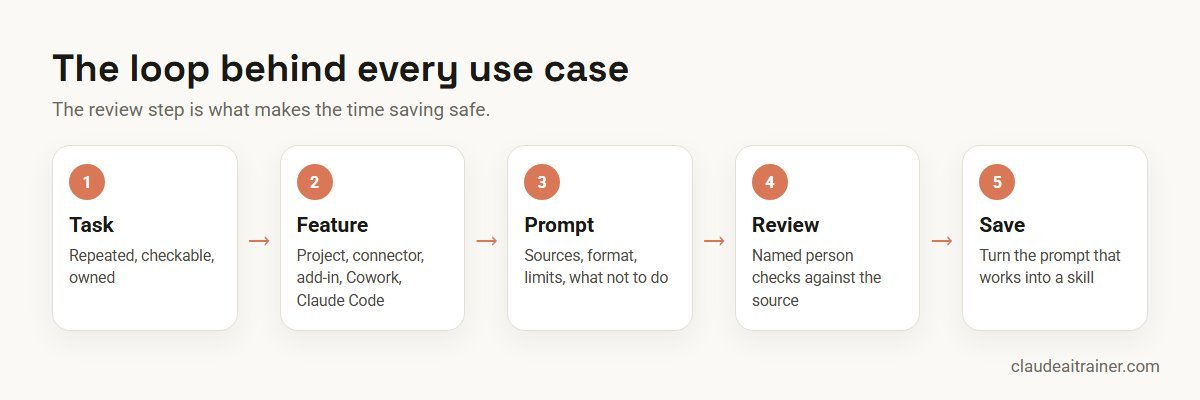
All ten follow the same loop: a well-defined task, the right feature, a precise prompt, and a named reviewer who checks before anything leaves the team. Once a prompt works, save it as a skill so the whole team gets the same result.
How to choose your first use case
- Repeated. It happens weekly or monthly, so improvements compound.
- Checkable. Someone can verify the output in minutes against a source.
- Low blast radius. A mistake is caught before it reaches a customer, regulator or bank.
- Owned. One person is responsible for the result and for improving the prompt or skill.
- Data-ready. The inputs are in files or tools Claude can reach through Projects, uploads or connectors.
Use cases that fail these tests, such as fully automated customer replies or unreviewed financial filings, should wait until the team has experience with the safer ones.
Worked example: a four-week rollout for a 200-person company
- Week 1: pick and baseline. Three department heads (finance, operations and sales) each pick one use case from this list and record how long it takes today.
- Week 2: build together. In a working session, each team builds its prompt on its own files, agrees the reviewer and the checks, and connects only the tools it needs.
- Week 3: run for real. Teams use Claude for the real task. Reviewers log every correction they make.
- Week 4: measure and save. Compare time taken and corrections against the baseline. Turn the prompts that worked into shared skills, and choose the next three departments.
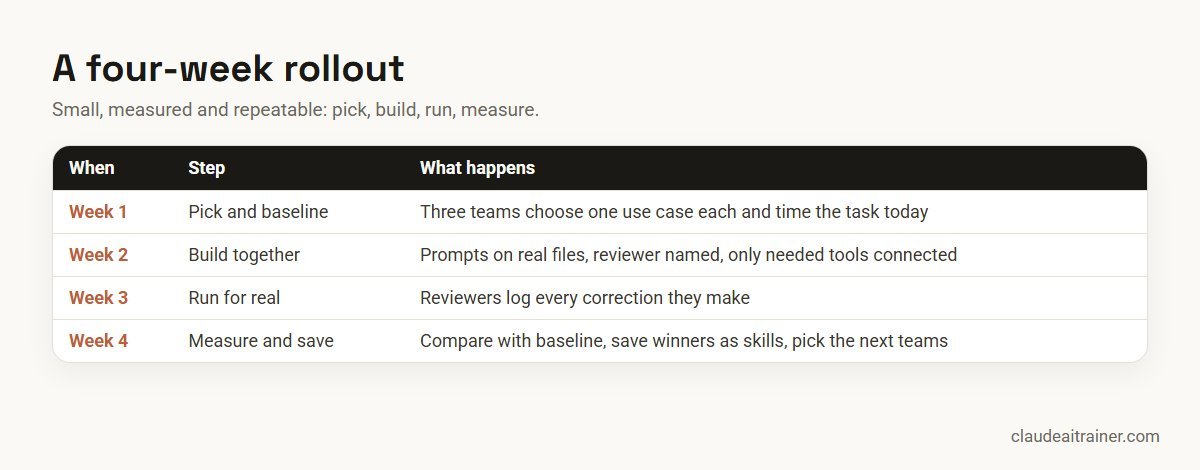
The point of the log in week 3 is honesty. If a use case saves time but needs heavy correction, refine the prompt or skill before you expand it.
Security and governance
- Use the right plan. Team and Enterprise plans add shared projects, organisation-wide skills and plugins, and admin controls; Enterprise adds features such as SCIM, audit logs and the Compliance API.
- Connect with care. Connectors act with each person’s own access. Keep send, delete, pay and publish actions on “Needs approval”.
- Treat inputs as untrusted. Anthropic warns that files from external sources can contain hidden instructions. Only use the Excel and PowerPoint add-ins with trusted files, and review confirmations carefully.
- Know where data goes. For example, Anthropic says Claude for Excel activity is not included in Enterprise audit logs, though Enterprise organisations with the Compliance API enabled get those sessions there (public beta). Check such details against your policies.
- Keep people accountable. Every use case above has a named reviewer. That is not a formality; it is what makes the time saving safe.
For a full programme, see rolling out Claude AI across your enterprise.
Sources
Checked October 2026: Anthropic’s Claude for Excel, Claude for PowerPoint and Claude for Microsoft 365 documentation, the Projects help article, the Cowork overview, the September 2026 announcement, Claude plans and pricing, and the knowledge-work plugins. Plans and features change, so confirm before you roll out.
Key takeaways
- Pick one repeated, checkable task per department rather than a long list of ideas
- Match the feature to the task: Projects for reference material, connectors for live data, add-ins for Excel and PowerPoint, Cowork for multi-file work, Claude Code for software
- Save prompts that work as skills so the whole team gets the same quality
- Name a reviewer for every use case and decide what they check before anything leaves the team
- Keep anything that sends, pays, publishes or changes records behind a human approval
- Measure time saved and error rates for four weeks before expanding
FAQ
Claude use cases for business: common questions
What are the best Claude use cases for business?
The best first use cases are repeated, checkable tasks with a named reviewer: variance commentary in finance, job descriptions in HR, call prep in sales, on-brand content in marketing, contract first passes in legal, weekly reports in operations, ticket triage in support, training modules in L&D, board pack summaries for leaders, and internal tools in IT.
For role-by-role detail, see our guides to Claude for project managers, Claude for product managers and Claude for consultants.
Which Claude feature should we use for each task?
Use Projects for reference material that every chat needs, connectors for live data in your tools, the Excel and PowerPoint add-ins for work inside those files, Cowork for multi-step work across many files, skills to save a process, artifacts for shareable documents and interactive pages, and Claude Code for software.
Which Claude plan do business teams need?
Projects work on every plan, but most business features, including Claude for Excel and PowerPoint, plugins and Claude Code, need Pro, Max, Team or Enterprise. Team adds shared projects and admin controls; Enterprise adds features such as SCIM, audit logs and the Compliance API.
How do we keep Claude's work accurate?
Give it the source files or connect the tool, ask it to cite cells, pages or records, and have a named reviewer check the output against the source before it leaves the team. Log corrections so you can improve the prompt or skill.
Can Claude send emails or update records on its own?
Some connectors can, if your administrators allow write actions. For example, the Microsoft 365 connector can send mail when write actions are on, while the Gmail connector is read-only. Keep such tools on Needs approval so a person confirms every action.
Is Cowork still a separate product?
Anthropic announced in September 2026 that Cowork and chat are becoming one Claude, rolling out to Pro and Max first, with Team and Free plans to follow and Enterprise admins notified at least 30 days before changes. Check what your plan shows today.
Can HR use Claude with employee data?
Only within your organisation’s data policy and the plan your company has approved. Start with tasks that need little personal data, such as job descriptions and policy drafts, and keep personal data out of general-purpose chats unless policy allows it.
Is Claude suitable for legal work?
It is useful for first-pass review, issue-spotting and drafting against your playbook, but it does not replace a lawyer. A lawyer should decide every material position and review anything sent outside the company.
Do non-technical teams need Claude Code?
Usually not. Claude Code suits IT and engineering teams building software. Business teams get most value from Projects, connectors, the Office add-ins, Cowork and skills.
How do we measure the value of a Claude use case?
Record how long the task takes before you start, then track time taken and the number of reviewer corrections for four weeks. Expand use cases that save time with few corrections, and refine those that need heavy editing.
How many use cases should a team start with?
One per team. A single use case that becomes routine teaches more than ten that are tried once. Add the next when the first is saved as a skill and running every week.
Where can our teams learn these use cases hands-on?
Our department training pages cover finance, HR, legal, sales and marketing, Excel, Cowork and Claude Code, and corporate programmes can combine several departments. Each session is built around the team’s own tasks and files.
Trusted by
Teams we’ve trained
…and 200+ organisations, across 16+ countries.
What participants say
Real feedback from real sessions
Verified feedback collected from participants across corporate sessions — average rating 4.8/5.
“A very productive session for working professionals. A must-do.”
“The session was highly insightful and conducted in a very professional and interactive manner. Learnt about AI and excited to learn more!”
“Highly recommended! Hands-on and directly useful — from making PPTs and strategic plans to building KRAs.”
“I would recommend everyone to go through this session — it clarifies both what to expect from AI and where AI isn’t needed.”
“A nice interactive session with a lot of new insights and the power of AI. This will help me save time in routine activities.”
“A very good training session. AI can do wonders — we’ll implement it to create efficiency and save time.”
Explore more
Keep going with Claude AI training
Work with us
Turn these use cases into your team’s routine
Tell us which departments you want to start with, the tools they use and one task each team repeats every week. We will suggest a short, hands-on format, online or on-site (for example Claude AI training in Mumbai or Dubai), and send a fixed proposal, usually within one business day.