Blog · Claude Code
Top 10 Claude Code Use Cases for Engineering Teams (2026-27)
Claude Code can read a repository, edit files, run commands, open pull requests and now run on a schedule in the cloud. The question engineering managers ask is not what it can do but where it pays off first. This list gives ten use cases that engineering teams adopt, ordered roughly from safest to most automated, each with a prompt or command, the surface to run it on, the plan it needs and the guardrail that keeps it reviewable.
Claude Code is Anthropic’s agentic coding tool. It works in the terminal, in VS Code and JetBrains, in the Claude desktop app and on the web, and it can read your codebase, edit files, run commands and work with git. Most teams start by asking it questions about code. The teams that get lasting value go further, but in a deliberate order: first work that is easy to check, then work backed by tests, and only then automation that runs without someone watching.
That is how this list is arranged. Each use case covers what it is, a prompt or command, where to run it, the plan it needs and the guardrail. Facts were checked on Anthropic’s Claude Code documentation in October 2026. If you are new to the tool, start with what Claude Code is; for team standards, see Claude Code best practices for teams. This article is about where to use it.
Quick answer: ten Claude Code use cases
- Onboarding to an unfamiliar codebase.
- Fixing bugs from an error message or stack trace.
- Writing and repairing tests.
- Refactoring and legacy modernisation.
- Pull request review, locally or on every PR.
- Issue triage and backlog grooming on a schedule.
- Dependency upgrades and security fixes.
- Documentation and release notes, including docs drift.
- CI failure and alert triage that ends in a draft PR.
- Slack bug reports to pull requests.
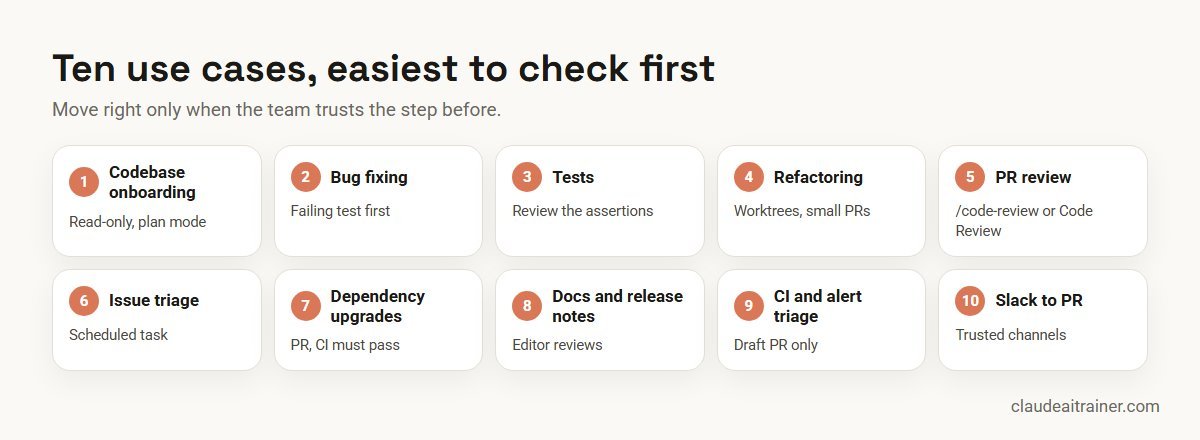
Comparison table
| Use case | Where it runs | Plan notes | Guardrail |
|---|---|---|---|
| Codebase onboarding | Terminal, IDE, desktop | Any plan with Claude Code | Read-only questions; plan mode |
| Bug fixing | Terminal, IDE | Any plan with Claude Code | Reproduce with a failing test first |
| Tests | Terminal, IDE | Any plan with Claude Code | Review assertions, not just pass/fail |
| Refactoring | Terminal, worktrees | Any plan with Claude Code | Small increments, tests before and after |
| PR review | /code-review locally; Code Review on GitHub | Local: any plan. Code Review: Team, Enterprise | Never approves or blocks; humans merge |
| Issue triage | Cloud scheduled task | Pro, Max, Team, Enterprise (research preview) | Labels and comments only |
| Dependency upgrades | Scheduled task or GitHub Actions | As above, or API key for Actions | Opens a PR; CI must pass |
| Docs and release notes | Terminal, scheduled task | Any plan with Claude Code | Editor reviews docs PRs |
| CI and alert triage | Scheduled task with API trigger; claude -p | Pro, Max, Team, Enterprise | Draft PR only; on-call decides |
| Slack to PR | Claude in Slack or Claude Tag | Earlier app: Pro, Max. Claude Tag: Team, Enterprise | Trusted channels only; PR review |
The ten use cases in detail
1. Onboarding to an unfamiliar codebase
What it is. A new joiner, or a senior engineer moving teams, asks Claude Code to explain architecture, data models and how a request flows through the system.
give me an overview of this codebase
explain the main architecture patterns used here
trace the login process from front-end to database
use a subagent to investigate how our auth system handles token refresh
Why it works. It is read-only, so the risk is low, and the answer can be checked against the code. Anthropic’s docs suggest starting broad and narrowing down, and asking for a glossary of project terms. Subagents explore in their own context and return only the findings, which keeps the main session clean.
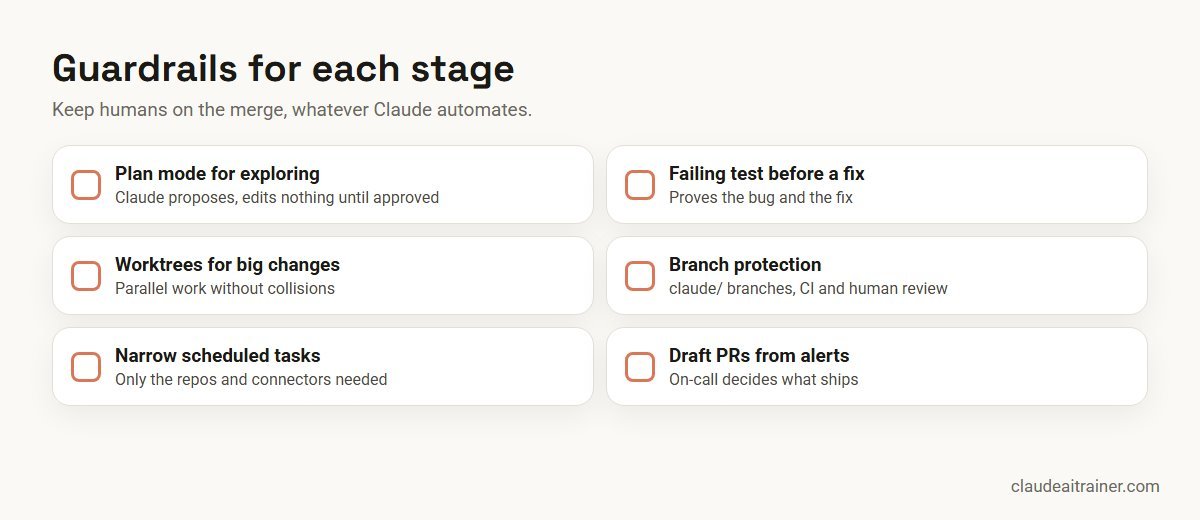
Guardrail. Run in plan mode (claude --permission-mode plan, or Shift+Tab), where Claude reads and proposes but makes no edits until you approve. Write what you learn into the repository’s CLAUDE.md so the next person starts further ahead; see how to write CLAUDE.md.
2. Fixing bugs from an error or stack trace
What it is. You paste the error, give the command that reproduces it and let Claude trace the cause and propose a fix.
npm test fails in checkout.spec.ts with "Cannot read properties of
undefined (reading 'currency')". Reproduce it, find the root cause,
write a failing test that captures it, then fix it. Explain the cause
in two sentences before you change anything.
Guardrail. Insist on a failing test first. A fix without a test that fails before and passes after is a guess. Tell Claude whether the bug is intermittent, and review the diff as you would a colleague’s.
3. Writing and repairing tests
What it is. Finding untested functions, adding tests that follow your existing patterns and covering edge cases people skip.
find functions in the billing module that are not covered by tests,
add tests that follow our existing test style, include edge cases for
zero amounts, currency rounding and expired cards, then run them and
fix any failures in the tests (not in the code) and report what you
changed.
Guardrail. Read the assertions. A test that passes because it asserts nothing useful is worse than no test. Ask Claude to explain what each new test proves.
4. Refactoring and legacy modernisation
What it is. Replacing deprecated APIs, modernising old modules or porting code, in small steps that keep behaviour the same.
find deprecated API usage in the payments service, propose a migration
plan in steps of no more than five files each, and wait for my approval.
For each step: make the change, run the tests, and stop if anything
fails.
Where to run it. In a separate git worktree (claude --worktree payments-migration) so the work does not collide with other changes. Our guide to legacy code modernisation with Claude Code covers larger migrations.
Guardrail. Tests before and after each step, and small pull requests reviewers can actually read.
5. Pull request review
What it is. Two options. Locally, any developer can run /code-review in a session on any plan. For organisations, Anthropic’s Code Review service has several agents examine each pull request, verify their findings and post ranked inline comments with a summary and a check run.
Plan and settings. Code Review is for Team and Enterprise plans on GitHub, and an organisation Owner turns it on. Each repository can run reviews when a PR opens, after every push or only on request, and anyone with write access can comment @claude review. Review levels are Quick, Standard and Deep, with cost rising with depth. It is not available to organisations with Zero Data Retention or the HIPAA configuration.
Guardrail. Anthropic is explicit that a review never approves or blocks a pull request, and that a review with no findings does not mean the code is error-free. Your merge rules stay the same. To tune what it flags, add a REVIEW.md. Teams that prefer their own CI can run Claude in GitHub Actions instead.
For engineering managers
Want your engineers using Claude Code the same way?
Teams get the most from Claude Code when they agree a shared CLAUDE.md, permission rules and a review routine, then practise on their own repositories. Our Claude Code sessions are built around that. Book a short call to talk through your stack.
6. Issue triage and backlog grooming
What it is. A cloud scheduled task (formerly called routines) that runs every weeknight, reads new issues, applies labels, suggests owners based on the code involved and posts a summary to Slack. This is one of Anthropic’s own documented examples.
/schedule every weekday at 7:07am, read issues opened since the last
run in acme/webapp, apply area labels, suggest an owner from CODEOWNERS,
and post a summary to #eng-triage
Plan and limits. Scheduled tasks are in research preview on Pro, Max, Team and Enterprise. They run on Anthropic-managed cloud infrastructure, so they keep working when your laptop is closed, and can be triggered by a schedule, an API call or GitHub events. There are hourly limits on runs, and runs draw on subscription usage. Team and Enterprise Owners can turn the feature off for everyone.
Guardrail. A scheduled task belongs to the person who created it, and anything it does through GitHub or connectors appears as that person. Remove connectors it does not need, and limit it to labels and comments until the team trusts it.
7. Dependency upgrades and security fixes
What it is. A weekly dependency audit that upgrades packages, runs the tests and opens a pull request with a summary of breaking changes.
Check for outdated dependencies. Upgrade patch and minor versions only,
one package per commit. Run the full test suite after each. Open one PR
with a table of package, old version, new version, test result and any
changelog notes about breaking changes. Do not touch major versions.
Where to run it. As a scheduled task, or in GitHub Actions if you want it to live with your workflow config. Anthropic’s overview lists weekly dependency audits among the recurring tasks it suits.
Guardrail. Claude pushes to branches prefixed claude/ by default; use branch protection so nothing reaches main without CI and a human review.
8. Documentation and release notes
What it is. Adding missing docstrings, writing release notes from merged PRs and catching docs drift, where documentation references APIs that have changed.
Scan PRs merged since last Friday. List documentation pages that refer
to functions or endpoints those PRs changed, and open a PR against the
docs folder with suggested updates. Then draft customer-facing release
notes grouped into New, Improved and Fixed.
Guardrail. An editor or tech writer reviews documentation PRs. Release notes go through product marketing before customers see them. Product managers who want to prototype or write specs with Claude should read Claude for product managers.
9. CI failure and alert triage
What it is. When a monitoring tool or pipeline fails, it calls a scheduled task’s API endpoint with the alert text. Claude pulls the stack trace, correlates it with recent commits and opens a draft pull request with a proposed fix. On-call reviews a PR instead of starting from a blank terminal. For quick local triage, you can also pipe logs into Claude Code:
tail -200 app.log | claude -p "summarise errors by type and point to the most likely recent commit"
Guardrail. Text sent to the API endpoint arrives labelled as untrusted data, and the task’s own prompt must say how to use it. Keep the output to draft PRs and summaries, and keep tokens in a secret store.
10. Slack bug reports to pull requests
What it is. Someone reports a bug in a Slack thread, a developer mentions @Claude and a Claude Code cloud session investigates and offers a “Create PR” button when done.
Plan notes. The earlier Claude Code in Slack app answers channel mentions only from Pro and Max accounts in workspaces not connected to Claude Tag. Team and Enterprise organisations use Claude Tag, which runs @Claude as the organisation’s shared identity with admin-configured access. Repositories must be on GitHub.
Guardrail. Anthropic warns that Claude may follow directions from other messages in the Slack context, so use it only in trusted channels. Every PR still goes through normal review.
How to choose your first three
- Week 1: codebase onboarding (1) for everyone. It builds familiarity at no risk.
- Week 2: bug fixing with a failing test (2) and new tests (3), where results are easy to verify.
- Month 2: local
/code-reviewand refactoring in worktrees (4, 5). - Month 3 onward: one scheduled task (6, 7 or 8) with narrow permissions, then alert triage (9) once the team trusts the output.
Worked example: a 12-engineer product team pilots Claude Code
- Set-up (day 1). The tech lead writes a team CLAUDE.md with build commands, coding standards and “never edit migrations without asking”. The team agrees a shared permission allowlist.
- Weeks 1 to 2. Every engineer uses use cases 1 to 3 on real tickets and logs time saved and any correction they had to make.
- Weeks 3 to 4. Two engineers run a refactor in worktrees; the rest use
/code-reviewbefore requesting human review. - Week 5. The tech lead creates one scheduled task for nightly issue triage, limited to labels and a Slack summary.
- Review. The team compares cycle time, review rounds per PR and escaped bugs with the previous quarter. Use cases that save time without more review rounds are kept.

For a fuller measurement approach, see measuring the ROI of Claude Code adoption. If you are still choosing a tool, our comparisons of Claude Code vs GitHub Copilot and Claude Code vs Cursor cover the differences.
Next step
Pilot three of these use cases with your team
We help engineering teams pick the first use cases, set up the guardrails and run them on real tickets, online or on-site, with follow-up on what to automate next.
Security and governance
- Permissions. Start in plan mode for new users, use allowlists for routine commands and deny rules for sensitive paths. See Claude Code security best practices.
- Policy as code. Use hooks to run formatters, linters or checks automatically; see the Claude Code hooks guide.
- Automation scope. For scheduled tasks, limit repositories, the cloud environment’s network access and connectors to what the task needs. The default environment allows only a list of trusted domains.
- Identity. Scheduled tasks and Slack sessions act as the individual who set them up. Make sure that person’s access is appropriate.
- Human merge. Keep branch protection and required reviews. Claude’s reviews and PRs are inputs to your process, not a replacement for it.
- MCP servers. Connect only servers you trust; see Claude Code MCP servers explained.
Sources
Checked October 2026: Anthropic’s Claude Code documentation: overview, common workflows, Code Review, scheduled tasks and Claude Code in Slack, plus Claude plans and pricing. Research preview features can change, so confirm before rollout.
Key takeaways
- Start with read-only and test-backed work: codebase onboarding, bug fixes with a failing test, new tests
- Agree a team CLAUDE.md and permission rules before scaling usage
- Keep a human merge decision: Anthropic's Code Review comments but never approves or blocks a pull request
- Scheduled tasks (research preview) run in the cloud on a schedule, an API call or a GitHub event, and act as the person who created them
- Scope every automated run to the repositories, network access and connectors it needs
- Measure cycle time and review effort before and after, not lines of code
FAQ
Claude Code use cases: common questions
What are the main Claude Code use cases?
Common use cases are codebase onboarding, bug fixing, writing tests, refactoring and legacy modernisation, pull request review, issue triage, dependency upgrades, documentation and release notes, CI and alert triage, and turning Slack bug reports into pull requests.
Which Claude Code use case should a team start with?
Start with codebase onboarding and test-backed bug fixes. They are easy to check, low risk and build the team’s confidence before you automate anything.
Which plans include Claude Code?
Claude Code is included in Pro, Max, Team and Enterprise plans, and developers can also use it with an Anthropic Console account or supported cloud providers. Some features, such as Code Review, are Team and Enterprise only.
Can Claude Code review pull requests automatically?
Yes. Anthropic’s Code Review service for Team and Enterprise plans reviews GitHub pull requests with several agents and posts ranked inline comments. It never approves or blocks a PR. Any developer can also run /code-review locally on any plan.
Can Claude Code run on a schedule?
Yes. Cloud scheduled tasks, formerly called routines, are in research preview on Pro, Max, Team and Enterprise. They run on a schedule, an API call or GitHub events, and keep running when your computer is off.
Does Claude Code work in VS Code and JetBrains?
Yes. There is a VS Code extension, a JetBrains plugin, a terminal CLI, the Claude desktop app and a web version at claude.ai/code.
Can Claude Code modernise legacy code?
It can find deprecated APIs, propose a migration plan and make changes in small steps with tests run after each. Use git worktrees to isolate the work and keep pull requests small enough to review.
Is it safe to let Claude Code run without supervision?
Only with narrow scope. Limit repositories, network access and connectors, keep branch protection on, and start with tasks whose output is a label, comment or draft pull request rather than a merge or deployment.
Can non-engineers use Claude Code?
It works in any folder, including documentation and notes, but business teams usually get more from Cowork, Projects and the Office add-ins. Claude Code suits people comfortable reviewing code changes.
How is Claude Code different from GitHub Copilot or Cursor?
Claude Code is an agentic tool that plans and carries out multi-step tasks across files, commands and git, from the terminal, IDE, desktop or web. See our separate comparisons of Claude Code vs GitHub Copilot and Claude Code vs Cursor for detail. For non-coding work such as reports and spreadsheets, see Claude Cowork vs Claude Code.
How do we measure the value of Claude Code?
Track cycle time, review rounds per pull request, escaped bugs and engineer-reported time saved before and after a pilot. Lines of code generated is not a useful measure.
Where can our engineers get hands-on Claude Code training?
Our Claude Code training covers CLAUDE.md, permissions, hooks, subagents, MCP and automation on your own repositories, online or on-site.
Trusted by
Teams we’ve trained
…and 200+ organisations, across 16+ countries.
What participants say
Real feedback from real sessions
Verified feedback collected from participants across corporate sessions — average rating 4.8/5.
“A very productive session for working professionals. A must-do.”
“The session was highly insightful and conducted in a very professional and interactive manner. Learnt about AI and excited to learn more!”
“Highly recommended! Hands-on and directly useful — from making PPTs and strategic plans to building KRAs.”
“I would recommend everyone to go through this session — it clarifies both what to expect from AI and where AI isn’t needed.”
“A nice interactive session with a lot of new insights and the power of AI. This will help me save time in routine activities.”
“A very good training session. AI can do wonders — we’ll implement it to create efficiency and save time.”
Explore more
Keep going with Claude AI training
Work with us
Bring Claude Code into your engineering workflow
Tell us about your stack, team size and the work that slows you down: reviews, tests, legacy code or on-call. We will suggest a short, hands-on format, online or on-site (for example Claude Code training in Bengaluru or Noida), and send a fixed proposal, usually within one business day.