Blog · Claude for product managers
Claude for Product Managers: 10 Workflows, Prompts and Connectors (2026-27)
Product managers live between evidence and decisions: interviews, tickets, usage data and competitor moves on one side; specs, roadmaps and launch plans on the other. Claude can carry much of the load in between, from synthesis to first drafts, if it works from real evidence and you keep the decisions. Here are ten workflows with the input to attach, a prompt to copy and the check to make.
Ask product managers where their week goes and the answer is rarely “deciding”. It is reading interview notes, sorting feedback, rewriting specs for different audiences and answering “what shipped?” in three channels. That work matters, but it crowds out the thinking the role exists for.
Claude for product managers is most useful as a fast, careful analyst and first-draft writer that works from your evidence. It can theme two hundred tickets, draft a spec in your template or build a clickable prototype for a design review. It cannot tell you which problem is worth solving for your customers this quarter. Every workflow below keeps that line clear: what to attach, a prompt to copy and the check a PM makes before anything is shared. Product details were checked on Anthropic’s help centre, documentation, connector directory and plugin repository in October 2026.
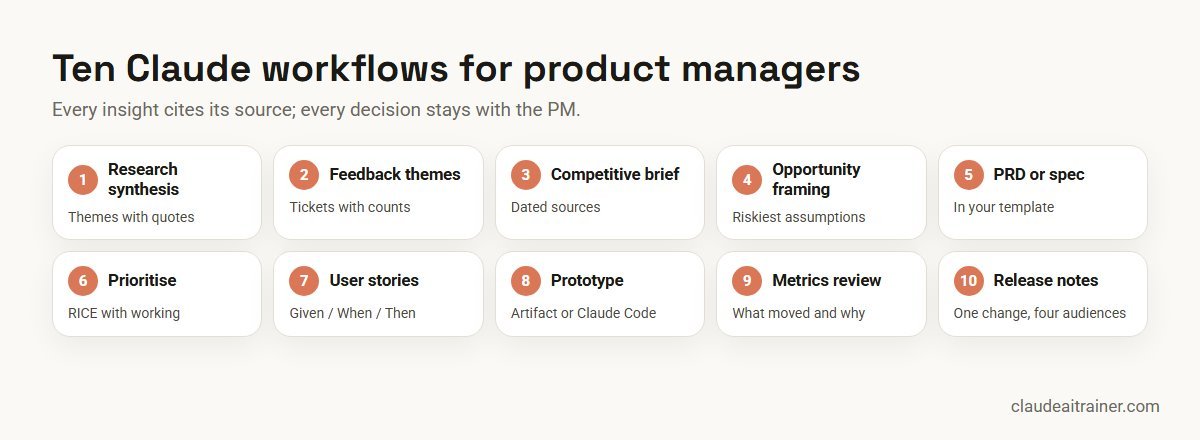
Quick answer: ten ways product managers use Claude
- Research synthesis: themes from interviews, with quotes and how many people said each thing.
- Feedback themes: a ticket or survey export grouped into problems, with counts.
- Competitive brief: a feature and positioning comparison from public sources.
- Opportunity framing: problem statement, assumptions and the cheapest test for each.
- PRD or feature spec: a first draft in your template, with open questions listed.
- Prioritisation: RICE or MoSCoW scoring with the inputs shown, ready for debate.
- User stories: stories and testable acceptance criteria, including edge cases.
- Prototype: a clickable mock-up as an artifact or with Claude Code.
- Metrics review: what moved, by how much and what could explain it.
- Release notes and updates: one change, written for customers, sales and leadership.
Where to run each workflow
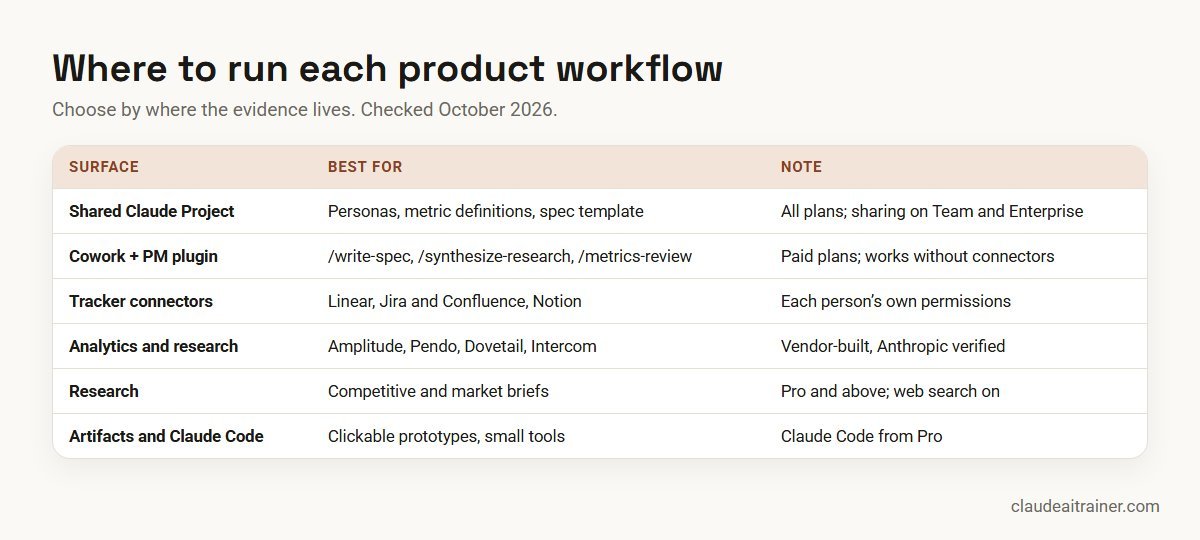
- A shared Claude Project. Projects work on every plan (up to five on Free). Put the product overview, personas, metric definitions, spec template and tone guide in project knowledge. On Team and Enterprise, share the project with your squad as Can view or Can edit.
- Cowork with Anthropic’s product-management plugin. Cowork is on paid plans and works through multi-step tasks on files in folders you connect. The open-source plugin adds
/write-spec,/roadmap-update,/stakeholder-update,/synthesize-research,/competitive-brief,/metrics-reviewand/brainstorm, with skills covering PRD structure, RICE and MoSCoW prioritisation, research synthesis and OKRs. It works without connectors if you supply the context. - Connectors for product tools. The connector directory lists Linear, Atlassian (Jira and Confluence), Notion, Figma, Amplitude, Pendo, Dovetail, Intercom and Miro, each built by the vendor and marked Anthropic verified. Amplitude’s listing describes querying charts, dashboards, experiments and feature flags; Dovetail’s gives Claude access to research projects and insights.
- Research. On Pro, Max, Team and Enterprise, Research runs several web searches that build on each other, and can also use connectors you have enabled. It needs web search turned on, and it uses your usage limits faster than a normal chat.
- Artifacts and Claude Code. Artifacts turn a description into an interactive page you can share. Claude Code, included from the Pro plan and in Team seats, suits prototypes that use real components or data. See our Claude Code use cases.
Comparison table
| Workflow | Attach | Best surface | Reviewer check |
|---|---|---|---|
| Research synthesis | Interview notes or transcripts | /synthesize-research or Dovetail connector | Spot-check quotes against sources |
| Feedback themes | Ticket or survey export | Chat with code execution | Counts add up to the export |
| Competitive brief | Competitor list, your positioning | Research or /competitive-brief | Every claim has a dated link |
| Opportunity framing | Research themes, goals | Shared Project | Team challenges the assumptions |
| PRD or spec | Problem statement, template | /write-spec or Project | Engineering and design review |
| Prioritisation | Backlog export, scoring inputs | Chat or Excel add-in | PM owns the final order |
| User stories | Approved spec | Project or Linear/Jira connector | QA reviews acceptance criteria |
| Prototype | Flow description, screenshots | Artifact or Claude Code | Labelled as a prototype |
| Metrics review | Dashboard export, metric definitions | /metrics-review or Amplitude | Analyst confirms the numbers |
| Release notes and updates | Shipped tickets, audience list | /stakeholder-update | PM approves each version |
The ten workflows in detail
1. Synthesise user research
Use it for getting from a pile of interview notes to themes you can defend. Attach: transcripts or notes, the research questions and a participant list with segments (no personal contact details).
Synthesise the attached interviews against our research questions. For
each theme, give a one-line statement, how many participants raised it
(out of the total), which segments, and two verbatim quotes with the
participant code. Separate what people did from what they said they
would do. List contradictions and themes raised by only one person.
Don't recommend solutions yet.
Check. Spot-check three quotes against the transcripts. Counts matter: a theme from two of twelve people is a lead, not a finding. In Cowork, /synthesize-research does this with affinity mapping and personas.
2. Theme feedback and support tickets
Use it for turning a large export into problems you can size. Attach: a CSV of tickets, feature requests or survey comments with account segment and date.
Using code, group the attached feedback into problem themes (not
feature requests). For each theme: number of items, number of distinct
accounts, segment split, trend by month, and three representative
comments. Put items you can't classify into "other" and tell me how
many there are. Show the code and confirm the totals match the file.
Check. Totals reconcile to the export. With the Intercom connector, Claude can read conversations directly, using your own Intercom access.
3. Competitive brief
Use it for a factual comparison before a planning cycle. Attach: the competitor list and your current positioning statement.
Research how [competitors] currently position and price [capability].
Build a comparison table: target customer, key features, pricing model
(only if published), recent launches in the last six months, and the
source link and date for each fact. Then list where we are stronger,
weaker or simply different. Mark anything you could not confirm from
the vendor's own pages as "unconfirmed".
Check. Open the links. Competitor pages change often, so date the brief and keep it out of customer-facing material unless every fact is confirmed.
4. Opportunity framing and assumptions
Use it for testing an idea before anyone writes a spec. Attach: the research themes, the quarter’s goals and any relevant metrics.
Frame this opportunity: [one-line idea]. Write a problem statement,
who has the problem and how we know (cite the attached evidence), and
the outcome we'd expect if we solved it. Then list the riskiest
assumptions under value, usability, feasibility and viability, and for
each, the cheapest test we could run in under two weeks. Argue the
case against doing this at all in one paragraph.
Check. The squad challenges the assumptions in a review. The “case against” paragraph is there to make that conversation easier.
5. PRD or feature spec
Use it for a complete first draft in your format. Attach: the approved problem statement, your spec template and constraints from engineering or legal.
Draft a PRD in our attached template for [feature]. Include problem,
goals and non-goals, users and scenarios, requirements split into must
/ should / could, success metrics with the baseline and target (write
"baseline TBC" if you don't have it), dependencies, risks, and open
questions. Keep requirements testable. Don't specify UI details beyond
what the evidence supports.
Check. Engineering and design review before anything is estimated. The plugin’s /write-spec command produces a similar draft from a problem statement.
For product leaders
Want your product team using Claude on real evidence?
The hard part is not the prompt. It is connecting research, analytics and the tracker with sensible permissions, and building the habit of checking every claim against its source. We run hands-on sessions where product teams do that on their own backlog. Book a short call if that would help.
6. Prioritise the backlog
Use it for a transparent first pass that the team can argue with. Attach: a backlog export and your scoring inputs: reach, impact, confidence and effort estimates, or a MoSCoW list.
Score the attached backlog using RICE with the inputs provided. Show
the calculation for each item in a table and sort by score. Flag items
with missing inputs instead of guessing them, items where confidence
is below 50%, and dependencies that force a different order. Then
suggest the top five for next quarter and explain in one line each
what would change your view.
Check. The PM owns the final order. A score is a way to structure the debate, not to end it.
7. User stories and acceptance criteria
Use it for turning an approved spec into tickets. Attach: the spec; connect Linear or Jira if you want Claude to draft the tickets there.
Break the attached spec into user stories in the form "As a [user], I
want [action] so that [outcome]". For each, write acceptance criteria
in Given / When / Then form, including at least one edge case and one
error state. Group stories into a sensible release order. Draft them
as text first; don't create tickets until I approve the list.
Check. QA and engineering review the criteria. If Claude then creates tickets through a connector, set that action to need approval.
8. Clickable prototype
Use it for a design conversation that needs something to click. Attach: a flow description, screenshots of the current product and your design tokens if you have them.
Build a clickable prototype of this flow: [steps]. Use the attached
screenshots for layout and the colours listed. Include realistic but
clearly fake sample data, an empty state and one error state. Add a
banner that says "Prototype: not production code". Keep it to one page
I can share for feedback.
Check. Label it as a prototype everywhere. Artifacts suit quick mock-ups; Claude Code suits prototypes that need real components, and the Figma connector can pull design context into code. See Claude artifacts examples.
9. Metrics review
Use it for a weekly or post-launch look at what moved. Attach: a dashboard export or connect Amplitude or Pendo; include your metric definitions.
Review the attached metrics for [period] against the previous period
and the targets in our definitions. For each metric: value, change,
whether the change is outside normal week-to-week variation, and
possible explanations ranked by evidence (a release, a campaign, a
data issue). Separate what the data shows from your hypotheses, and
list the follow-up queries an analyst should run.
Check. An analyst confirms the numbers before conclusions travel. For method, see Claude for data analysis.
10. Release notes and stakeholder update
Use it for telling each audience what shipped without writing it four times. Attach: the shipped tickets and a list of audiences.
From the attached shipped tickets, write: customer-facing release notes
(benefit first, no internal ticket names), a short note for sales and
support (what changed, who it helps, known limits), and a leadership
update (outcome, metric to watch, next step). Mark anything that is
behind a feature flag or limited to certain plans. Keep each under 150
words.
Check. The PM approves every version, and support confirms the known limits. The plugin’s /stakeholder-update command covers weekly, monthly and launch updates.
How to adapt these prompts
- Make Claude cite its evidence. “Quote the ticket” or “give the participant code” is the single most useful line in product work.
- Keep context in one place. A shared project with personas, metric definitions and the spec template saves you pasting them every time; see Claude Projects examples.
- Ask for the counter-argument. Request the case against an idea or the weakest assumption. It makes the review faster and more honest.
- Turn your best prompts into skills. A synthesis or spec prompt that works should become a team skill; see how to create Claude skills.
Worked example: one feature from feedback to launch
A hypothetical B2B software team keeps hearing that exporting reports is painful. Here is how the PM might use seven of the workflows over one cycle.
- Evidence. Workflow 2 themes a quarter of support tickets and finds export problems concentrated in mid-market accounts. Workflow 1 synthesises six follow-up interviews.
- Framing. Workflow 4 states the problem and lists the riskiest assumption: that users want scheduled exports, not just faster ones. A two-week test with a simple email export is chosen.
- Spec. After the test, workflow 5 drafts the PRD in the team template; engineering adds two constraints.
- Order and tickets. Workflow 6 shows the work ranks third once effort is included; workflow 7 drafts stories and edge cases for Linear.
- Launch. Workflow 10 writes release notes and the sales note, and four weeks later workflow 9 reviews adoption against the target.
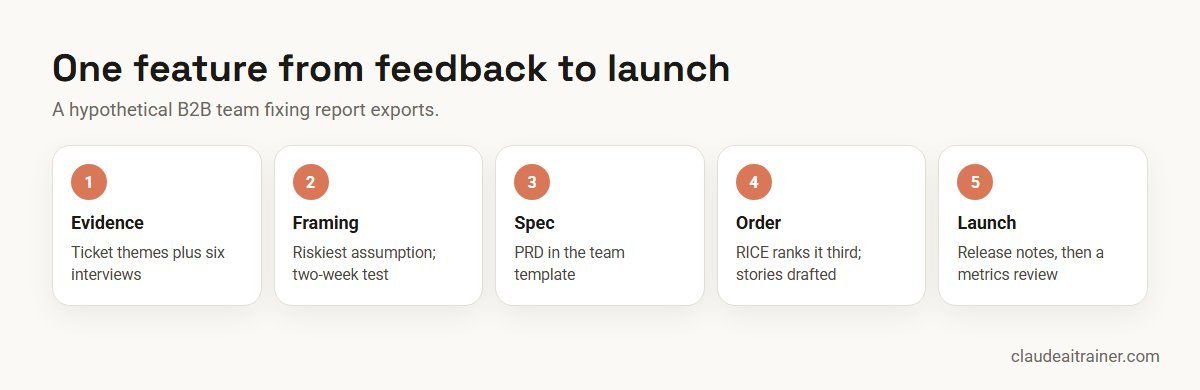
Claude shortens each step. The PM still chooses the problem, defends the order and decides when the evidence is good enough.
Next step
Build a product workspace your whole team uses
We help product teams set up a shared Project with spec templates and product context, connect Linear or Jira, analytics and research tools, and turn their best prompts into shared skills. Online or on-site.
Security and governance
- Use an approved workspace. Anthropic’s pricing page states Team and Enterprise plans do not train models on your content by default; Free, Pro and Max are opt-out. Roadmaps, research and customer feedback belong in the company workspace; see the best Claude plan for business.
- Protect research participants. Replace names with participant codes before uploading transcripts, and follow the consent you collected.
- Connect with least privilege. Claude inherits each person’s permissions from the connected service, so restricted roadmap or security boards stay restricted only if your tool’s permissions say so.
- Approve writes. On Team and Enterprise, owners can set connector tools to Always allow, Needs approval or Blocked. Creating tickets or editing pages is a good fit for Needs approval.
- Watch for prompt injection. Customer tickets and competitor pages are external text and can contain instructions aimed at AI tools. Review actions Claude proposes after reading them.
- Label prototypes. A prototype that looks finished can be mistaken for a commitment. Mark it clearly and never put real customer data in one.
Sources
Checked October 2026: the open-source product-management plugin; Anthropic’s help articles on Projects, connectors, Research and Cowork; the Linear, Amplitude, Dovetail and Figma connector listings; and Claude pricing.
Key takeaways
- Keep product context, personas, metric definitions and a spec template in a shared Claude Project
- Make Claude cite the quote, ticket or chart behind every insight, so you can check it in seconds
- Use Anthropic’s product-management plugin in Cowork for specs, roadmaps, research synthesis and stakeholder updates
- Connect Linear or Jira, Amplitude or Pendo, and Dovetail or Intercom with each person’s own access
- Treat scores, estimates and prototypes as inputs to a conversation, not decisions
- The PM owns prioritisation, scope and every external message
FAQ
Claude for product managers: common questions
How do product managers use Claude?
Mostly for synthesis and first drafts: theming research and feedback, competitive briefs, PRDs, user stories, metrics reviews and release notes. The PM keeps prioritisation and scope decisions, and checks each output against its sources.
Is there a Claude plugin for product management?
Yes. Anthropic’s open-source product-management plugin adds /write-spec, /roadmap-update, /stakeholder-update, /synthesize-research, /competitive-brief, /metrics-review and /brainstorm. It is designed for Cowork and works without connectors if you supply the context.
Can Claude write a PRD?
Yes. Give it an approved problem statement, your template and known constraints, and ask it to list open questions instead of guessing. Engineering and design should review the draft before estimates.
Can Claude connect to Jira or Linear?
Yes. The connector directory lists Atlassian (Jira and Confluence) and Linear, both built by the vendors and marked Anthropic verified. Each person signs in with their own account and Claude sees what they can see.
Can Claude analyse product analytics?
Yes. Amplitude and Pendo connectors let Claude query charts, dashboards and usage data, and with code execution it can analyse exported data. Have an analyst confirm numbers before you share conclusions.
Should product managers learn Claude Code?
It helps if you build prototypes or small internal tools. Claude Code comes with Pro and Team seats; for quick mock-ups, artifacts in a normal chat are usually enough.
Can Claude build a prototype?
Yes. It can build a clickable mock-up as an artifact from a description and screenshots, or a code prototype with Claude Code. Label it as a prototype and use fake sample data.
Can Claude prioritise my roadmap?
It can apply RICE or MoSCoW to your inputs and show the working, which structures the discussion. The order is still the product manager’s decision.
How do I synthesise user interviews with Claude?
Upload transcripts with participant codes, give your research questions and ask for themes with counts and verbatim quotes. Spot-check quotes against the source before using them.
Which Claude plan do product managers need?
Projects, connectors and artifacts work on every plan. Research, Cowork, Claude Code and the Office add-ins need a paid plan; Team or Enterprise add sharing and admin controls for company data.
Is it safe to put roadmaps and customer feedback into Claude?
Use a Team or Enterprise workspace your company has approved, remove personal data the task does not need, connect tools with each person’s own access and require approval for write actions.
Can Claude replace a product manager?
No. It speeds up reading, sorting and drafting. Choosing which problems matter, making trade-offs and aligning people remain the PM’s job.
Where can our product team learn this hands-on?
Our corporate Claude AI training and Claude Code training take product teams through these workflows on their own backlog, online or on-site.
Trusted by
Teams we’ve trained
…and 200+ organisations, across 16+ countries.
What participants say
Real feedback from real sessions
Verified feedback collected from participants across corporate sessions — average rating 4.8/5.
“A very productive session for working professionals. A must-do.”
“The session was highly insightful and conducted in a very professional and interactive manner. Learnt about AI and excited to learn more!”
“Highly recommended! Hands-on and directly useful — from making PPTs and strategic plans to building KRAs.”
“I would recommend everyone to go through this session — it clarifies both what to expect from AI and where AI isn’t needed.”
“A nice interactive session with a lot of new insights and the power of AI. This will help me save time in routine activities.”
“A very good training session. AI can do wonders — we’ll implement it to create efficiency and save time.”
Explore more
Keep going with Claude AI training
Work with us
Help your product team use Claude well
Tell us about your product team: the tracker you use (Linear, Jira or another), where research and analytics live, and the documents you write each sprint. We will suggest a short, hands-on format, online or on-site, and send a fixed proposal, usually within one business day.