Blog · Claude Code
Best Claude Code Plugins: 12 Worth Installing in 2026
Anthropic’s official plugin marketplace for Claude Code lists hundreds of entries, and community directories list thousands more. Most teams need four or five. This guide picks twelve from the official marketplace that cover the everyday work of a developer team: committing, reviewing, security checks, type errors, browser testing and keeping project memory current. Each entry has the install command, what it adds and what to watch for, checked in October 2026.
A Claude Code plugin is a bundle that can add commands, skills, subagents, hooks, and MCP or language servers in one install. That makes plugins the quickest way to give Claude Code new abilities, and also the quickest way to fill every session with instructions you never use. The trick is to pick a few that solve problems your team actually has.
We built this list from Anthropic’s official marketplace, claude-plugins-official, which Claude Code adds for you the first time you start an interactive session. We read each plugin’s README or the matching page in the Claude Code docs on 27 October 2026. This is our shortlist, not a ranking, and no vendor paid or asked to be included. Plugins update often, so check the details pane before you install.
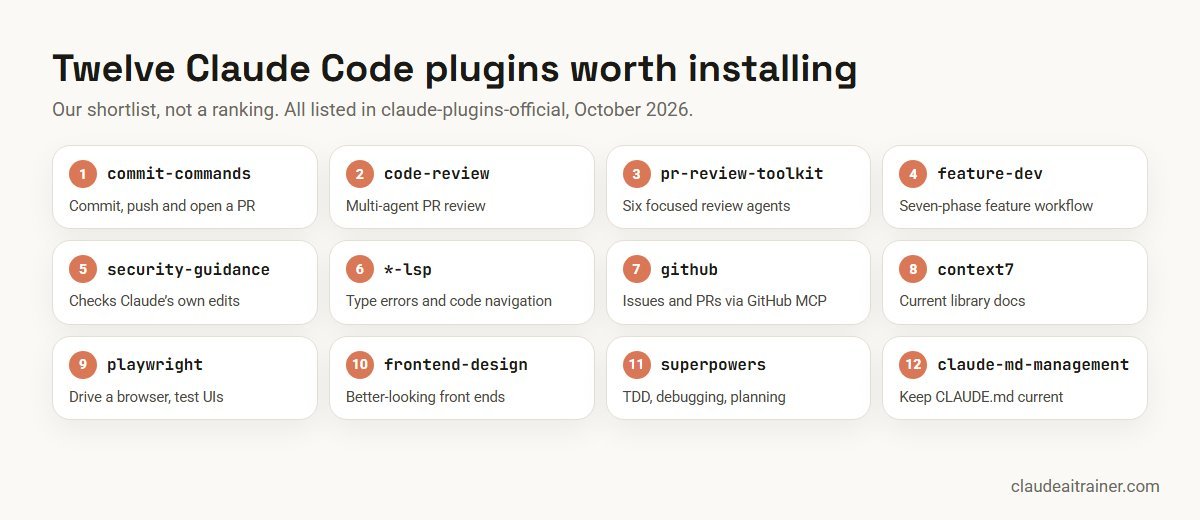
Quick answer: the shortlist
- commit-commands: commit, push and open a pull request with one command.
- code-review: a multi-agent pull request review that posts only high-confidence issues.
- pr-review-toolkit: six focused review agents for comments, tests, error handling, types and more.
- feature-dev: a seven-phase workflow that explores, designs, then builds.
- security-guidance: Claude checks its own edits for common vulnerabilities as it works.
- LSP plugins (typescript-lsp, pyright-lsp and others): type errors and code navigation after every edit.
- github: issues, pull requests and repository search through GitHub’s MCP server.
- context7: current, version-specific library docs pulled into context.
- playwright: drive a real browser for end-to-end tests and UI checks.
- frontend-design: more polished, less generic front-end output.
- superpowers: brainstorming, TDD, systematic debugging and subagent-driven development.
- claude-md-management: keep CLAUDE.md accurate as the code changes.
If you only install three, start with commit-commands, security-guidance and the LSP plugin for your main language. They need little setup and help on every task.
How to install a plugin
In a terminal session, run /plugin to browse the Discover tab, or name the plugin directly. The install command opens the plugin’s details first; nothing installs until you pick a scope: just you, everyone on this repository, or you in this repository only.
# inside a Claude Code session
/plugin install commit-commands@claude-plugins-official

# or from your shell, e.g. in a setup script
claude plugin install commit-commands@claude-plugins-official --scope project
In the VS Code extension, type /plugins to open Manage plugins. In the desktop app, use the + button next to the prompt and choose Add plugins. Cloud sessions on claude.ai/code do not load the plugins you installed locally; organisations distribute those through managed settings.
Comparison table
| Plugin | What it adds | Type | Maintained by | Best for |
|---|---|---|---|---|
| commit-commands | /commit, /commit-push-pr and /clean_gone | Commands | Anthropic | Everyone using git |
| code-review | 4 parallel review agents, confidence threshold 80 | Command + agents | Anthropic | Teams on GitHub |
| pr-review-toolkit | 6 specialist review agents | Agents | Anthropic | Thorough reviews |
| feature-dev | 7-phase workflow, explorer/architect/reviewer agents | Command + agents | Anthropic | Multi-file features |
| security-guidance | Per-edit, end-of-turn and commit security checks | Hooks | Anthropic | Any team shipping code |
| LSP plugins | Diagnostics and symbol navigation | Language server | Anthropic (Liquid: Shopify) | Typed languages |
| github | GitHub MCP server | MCP | Listed in official marketplace | Issue and PR work |
| context7 | Hosted docs lookup | MCP | Upstash | Fast-moving libraries |
| playwright | Browser automation MCP server | MCP | Microsoft’s Playwright MCP | Web apps, E2E tests |
| frontend-design | Design-focused front-end skill | Skill | Anthropic | UI work |
| superpowers | Workflow skills for planning, TDD, debugging | Skills | Community author | Disciplined workflows |
| claude-md-management | CLAUDE.md audit skill and /revise-claude-md | Skill + command | Anthropic | Long-lived repos |
Sources: the official marketplace catalogue (anthropics/claude-plugins-official) and each plugin’s README, checked October 2026.
The twelve plugins in detail
1. commit-commands
What it does. Adds git workflow commands. /commit reviews staged and unstaged changes, looks at recent commit messages to match your style, drafts a message and creates the commit. /commit-push-pr goes further: it creates a branch if you are on main, commits, pushes and opens a pull request. Commands appear under the plugin’s name, for example /commit-commands:commit. Who it is for: anyone who commits from Claude Code. A third command, /clean_gone, removes local branches already deleted on the remote. Watch for: /commit-push-pr needs the GitHub CLI installed and signed in. Read the drafted message before you accept it.
2. code-review
What it does. Runs a pull request review with four agents in parallel: two check the change against your CLAUDE.md, one looks for obvious bugs in the changed lines, and one reads git history for context. A separate step scores each issue from 0 to 100 and drops anything under 80, then posts a single comment on the pull request. It skips closed, draft and trivial pull requests. Who it is for: teams on GitHub who want a quick first pass. Watch for: it needs the GitHub CLI and focuses on the change, not pre-existing issues. This plugin is separate from Anthropic’s managed Code Review service, which is a Team and Enterprise feature.
3. pr-review-toolkit
What it does. Bundles six specialist review agents: a comment analyser, a test coverage analyser, a silent-failure hunter for weak error handling, a type design analyser, a general code reviewer and a code simplifier. You call them by asking, for example “check if the tests are thorough” or “review the error handling”. Who it is for: teams that want deeper, targeted reviews than a single pass. Watch for: running all six on every change uses more of your plan; pick the ones that match the change.
4. feature-dev
What it does. /feature-dev runs a seven-phase workflow: discovery, codebase exploration with parallel code-explorer agents, clarifying questions, architecture options from code-architect agents, implementation after your approval, a quality review by three code-reviewer agents, and a summary. Who it is for: multi-file features and loosely defined requirements. Watch for: it is deliberately slow; do not use it for one-line fixes or urgent hotfixes.
5. security-guidance
What it does. Makes Claude review its own code for vulnerabilities while it works. It checks each edit against risky patterns such as eval(, pickle and .innerHTML = without a model call; reviews the whole diff in the background at the end of each turn for issues such as injection, SSRF and authorisation bypass; and runs a deeper review when Claude commits or pushes. Findings go back to Claude to fix. You can add your own rules in .claude/claude-security-guidance.md and .claude/security-patterns.yaml. Who it is for: every team shipping code. Anthropic’s docs say it is available on all plans. Watch for: it needs Python 3.7 or later (3.10 for the commit review) and a git repository; the model-backed reviews use extra usage; and it does not block writes, so keep your CI scanners.
For engineering teams
Plugins help most when the basics are right
A plugin cannot fix a vague CLAUDE.md or loose permissions. We run hands-on Claude Code sessions on your own repositories, covering setup, plugins, hooks and review habits. Book a short call if that would help.
6. Code intelligence (LSP) plugins
What they do. Connect Claude Code to a language server, so after each edit Claude sees the errors and warnings your editor would show, and gets an LSP tool to find definitions and references by symbol rather than text search. The official marketplace has plugins for C/C++ (clangd-lsp), C#, Go (gopls-lsp), Java (jdtls-lsp), Kotlin, Lua, PHP, Python (pyright-lsp), Ruby, Rust (rust-analyzer-lsp), Swift and TypeScript/JavaScript (typescript-lsp), plus Shopify’s liquid-lsp. Who it is for: anyone working in a typed language. Watch for: the plugin does not include the language server itself; install the binary first (for TypeScript, npm install -g typescript-language-server typescript). Language servers do not start in cloud sessions, and large monorepos can use a lot of memory while indexing.
npm install -g typescript-language-server typescript
# then, inside Claude Code
/plugin install typescript-lsp@claude-plugins-official
7. github
What it does. Connects Claude Code to GitHub’s official MCP server so it can create issues, manage pull requests, review code and search repositories through GitHub’s API. Who it is for: teams that live in GitHub issues and pull requests. Watch for: it authenticates with a GitHub personal access token in the GITHUB_PERSONAL_ACCESS_TOKEN environment variable. Give that token the narrowest scopes that work, and use a fine-grained token limited to the repositories involved.
8. context7
What it does. Connects to Upstash’s hosted Context7 MCP server to pull version-specific documentation and code examples into context, which helps when a library has changed since the model was trained. Who it is for: teams on fast-moving frameworks and SDKs. Watch for: it works anonymously; an API key raises rate limits. Your queries go to a third-party service, so check that with your security team for private code.
9. playwright
What it does. Adds Microsoft’s Playwright MCP server, so Claude can open web pages, click, fill forms, take screenshots and run browser tests. Who it is for: web teams who want Claude to check its own UI changes or write end-to-end tests. Watch for: it starts the server with npx, so Node.js must be installed. Point it at local or staging environments, not production accounts.
10. frontend-design
What it does. A skill that steers Claude towards distinctive, production-grade front-end interfaces instead of generic layouts. Who it is for: developers building landing pages, dashboards and components without a designer on every task. Watch for: it improves the starting point, not your design system. Give it your brand tokens and component library in CLAUDE.md.
11. superpowers
What it does. A community-authored set of skills, listed in the official marketplace, that teaches Claude brainstorming, red/green test-driven development, systematic debugging and subagent-driven development with built-in review, plus how to write and test new skills. Who it is for: developers who want Claude to follow a disciplined process by default. Watch for: it is maintained outside Anthropic, from its author’s own repository. Read it before rolling it out, and check the context cost in the details pane.
12. claude-md-management
What it does. Two tools for project memory: a claude-md-improver skill that audits CLAUDE.md files against the current codebase, and a /revise-claude-md command that captures what a session taught you. Who it is for: long-lived repositories where CLAUDE.md drifts out of date. Watch for: review the suggested edits; a shorter, accurate CLAUDE.md beats a long one. Our guide to writing CLAUDE.md covers what belongs in it.
Also worth a look
- sentry and linear: production errors and issue tracking from inside Claude Code.
- code-simplifier: an agent that tidies recently changed code without changing behaviour.
- hookify: create hooks from plain-language rules. Pair it with our Claude Code hooks guide.
- plugin-dev and skill-creator: for teams building their own plugins and skills. See how to create Claude skills.
- claude-code-setup: analyses a codebase and suggests hooks, skills, MCP servers and subagents.
- session-report: an HTML report of your session usage, including the most expensive prompts.
- supabase, vercel, figma, gitlab and atlassian: if those are your platforms.
Looking for plugins for business teams in claude.ai and Cowork rather than for developers? See the best Claude skills, plugins and connectors. For MCP servers on their own, see the best MCP servers for Claude.
How to choose
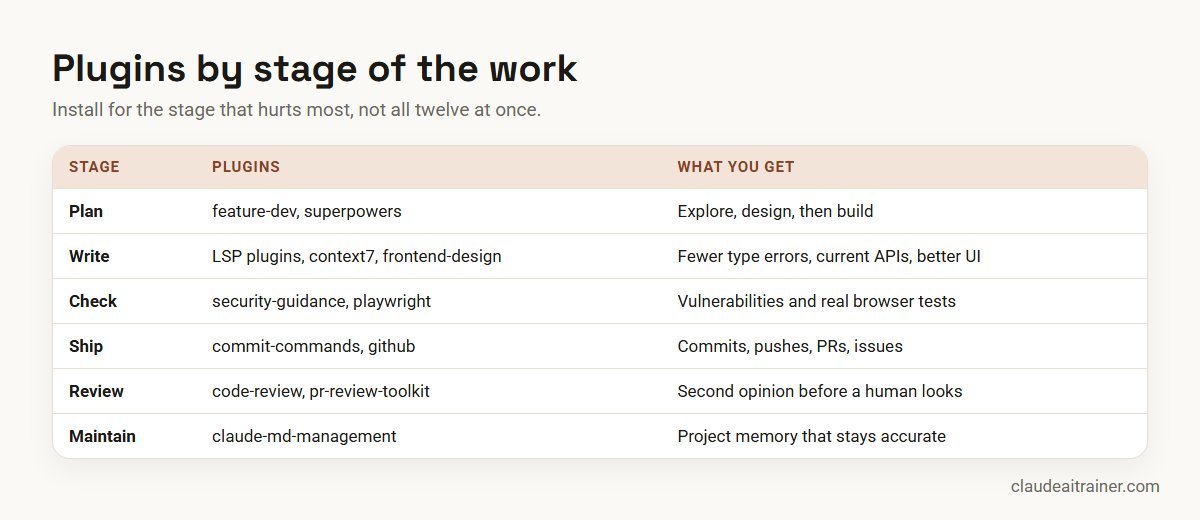
- Start from the pain point. Slow reviews point to code-review or pr-review-toolkit. Type errors slipping through point to an LSP plugin. Outdated API calls point to context7.
- Check the context cost. For official-marketplace plugins, the details pane shows how many tokens a plugin adds to every turn and when invoked. After installing,
claude plugin details <name>prints the same figure. Fewer, smaller plugins leave more room for your code, which is the honest answer to “plugins to save tokens”. - Prefer the official marketplace. Anthropic accepts the official and community marketplace names only from its own GitHub organisation, so a third-party catalogue cannot pose as one. A plugin’s quality still depends on its author, so review it either way.
- Check the setup cost. LSP plugins need a binary, playwright needs Node.js, github needs a token, security-guidance needs Python.
- Prune monthly. The Installed tab marks plugins you have not used recently. Remove them.
Worked example: a team plugin set
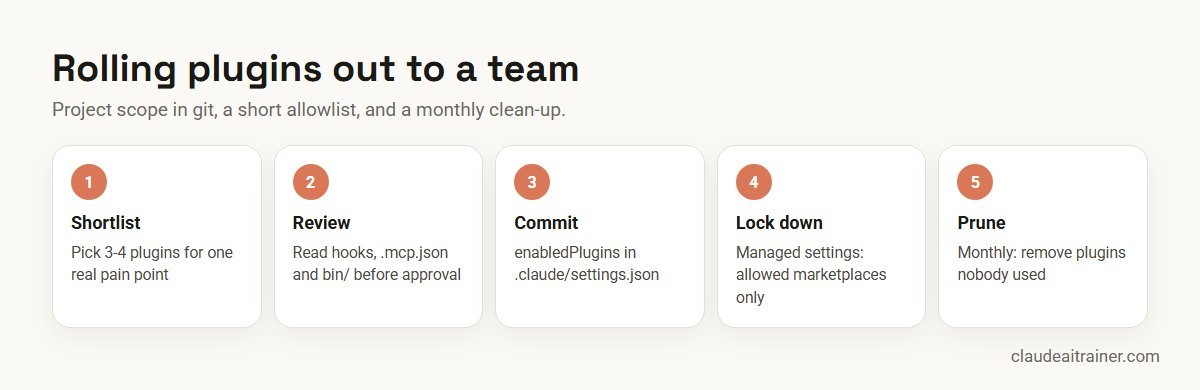
Imagine a 25-person web team with a Next.js front end and a Python API on GitHub. Reviews take two days, and type errors keep reaching CI. The tech lead proposes four plugins, reviews them and commits this to the repository:
{
  "enabledPlugins": {
    "commit-commands@claude-plugins-official": true,
    "code-review@claude-plugins-official": true,
    "security-guidance@claude-plugins-official": true,
    "typescript-lsp@claude-plugins-official": true
  }
}
Committing that file turns the plugins on for everyone in the repository, but each developer still runs the install once (for example claude plugin install code-review@claude-plugins-official --scope project), and installs the TypeScript language server. The Python developers add pyright-lsp at their own user scope. Security adds a short .claude/claude-security-guidance.md with the team’s own rules, such as never logging customer IDs.
After a month the lead checks the Installed tab, removes nothing, and adds playwright for the two developers who own end-to-end tests. Small, reviewed and shared through git is easier to support than everyone installing whatever they find.
Security and governance
Anthropic’s docs are direct about this: a Claude Code plugin you install can run arbitrary code on your machine with your user privileges. Hooks and monitors run as shell commands, MCP and language servers start as local processes, and a plugin’s bin/ folder is added to the shell’s path. These run outside the sandbox. Claude Code’s permission rules cover Claude’s own tool calls, not the code a plugin runs by itself.
- Review before installing. Read the details pane, then the plugin’s
hooks/hooks.json,.mcp.jsonand everything inbin/.claude --plugin-dir <dir> plugin details <name>lists what a plugin contains without starting a session. - Mind auto-update. Auto-update is on by default for the official marketplace and off for community and third-party ones. Files you reviewed can change after an update, so re-check plugins from sources you trust less.
- Control it centrally. With managed settings, admins can allowlist or blocklist marketplace sources, force-enable approved plugins, turn off
--plugin-dir, limit hooks to managed ones, and stop plugins synced from claude.ai accounts from loading. - Least privilege for tokens. MCP plugins such as github act with the token you give them. Use fine-grained, short-lived tokens.
- Keep humans and CI in the loop. Review plugins and security-guidance are extra layers. They do not replace code review or your existing scanners.
For the wider picture, see Claude Code security best practices and Claude Code best practices for teams.
Next step
Pick your team's plugin set together
We help teams choose, review and roll out a small set of plugins, write the project settings and managed rules, and train developers on real tickets. Online or on-site.
Related reading
How we checked
We read the official marketplace catalogue in the anthropics/claude-plugins-official repository, the README of each plugin listed, and Claude Code’s plugin, security and code intelligence docs on 27 October 2026. We did not count stars or installs, and we have no affiliation with any plugin author. Plugins change quickly, so check the details pane and the source before you install.
Key takeaways
- Start with three or four plugins that fix a real pain point, not a dozen
- commit-commands, code-review and security-guidance are low-effort first installs
- An LSP plugin for your main language lets Claude see type errors after each edit
- github, context7 and playwright connect Claude Code to your repo host, current docs and a real browser
- Every plugin can run code on your machine: read its hooks, .mcp.json and bin/ before installing
- Share the team set through .claude/settings.json and restrict marketplaces with managed settings
FAQ
Claude Code plugins: common questions
What are the best Claude Code plugins to start with?
For most teams, commit-commands, security-guidance and the LSP plugin for your main language. They need little setup and help on almost every task. Add code-review or pr-review-toolkit if reviews are a bottleneck, and github, context7 or playwright when you need those connections.
How do I install a Claude Code plugin?
In a terminal session run /plugin install followed by the plugin name and marketplace, for example /plugin install commit-commands@claude-plugins-official, then choose a scope. From your shell you can run claude plugin install with the same name. In VS Code type /plugins, and in the desktop app use the + button and Add plugins.
Where is the official Claude Code plugin marketplace?
It is claude-plugins-official, from the anthropics/claude-plugins-official repository on GitHub. Claude Code adds it automatically the first time you start an interactive terminal session. You can also browse the catalogue on the Claude Marketplace website.
Are Claude Code plugins safe?
Treat them like any software you install. A plugin can run code on your machine with your user permissions, and Anthropic’s own install warning says it does not control what MCP servers, files or other software plugins include. Read the details pane and the plugin’s hooks, MCP configuration and bin folder before installing, and prefer the official marketplace.
Do plugins use more tokens?
Some do. Skills, agents and instructions add to context. For official-marketplace plugins the details pane shows the per-turn and when-invoked token estimates, and claude plugin details prints the always-on figure for an installed plugin. Disable plugins you are not using.
What is the difference between a plugin, a skill and an MCP server?
A skill is a set of instructions and files Claude loads when relevant. An MCP server gives Claude tools to reach an outside system. A plugin is a package that can contain skills, agents, hooks, MCP servers and language servers together, installed in one step.
Is the code-review plugin the same as Claude Code Review?
No. The code-review plugin runs inside your Claude Code session and posts a comment using the GitHub CLI. Code Review is Anthropic’s managed pull request review service, available on Team and Enterprise plans.
Which Claude Code plugins help with front-end or web development?
frontend-design for better-looking interfaces, playwright for browser testing, typescript-lsp for type errors, and context7 for current framework docs. Platform plugins such as vercel, supabase and figma help if you use those services.
Do plugins work in Claude Code on the web?
Not the ones you installed locally. Cloud sessions do not load plugins from your user settings or the repository’s settings file, and language servers do not start there. Organisations can distribute plugins to cloud sessions through managed settings.
How do I share plugins with my team?
Install at project scope, which records the plugin in .claude/settings.json, and commit that file. Each teammate still runs the install once. Admins can force-enable or restrict plugins for everyone through managed settings.
Can I build my own Claude Code plugin?
Yes. A plugin is a folder with a manifest plus any skills, agents, hooks or servers. The plugin-dev and skill-creator plugins help, and you can share it through your own marketplace, such as a private Git repository.
Do you offer Claude Code training for teams?
Yes. We run hands-on Claude Code sessions on your own repositories, covering setup, CLAUDE.md, permissions, plugins, hooks and review workflows. See our Claude Code training page or book a short call.
Trusted by
Teams we’ve trained
…and 200+ organisations, across 16+ countries.
What participants say
Real feedback from real sessions
Verified feedback collected from participants across corporate sessions — average rating 4.8/5.
“A very productive session for working professionals. A must-do.”
“The session was highly insightful and conducted in a very professional and interactive manner. Learnt about AI and excited to learn more!”
“Highly recommended! Hands-on and directly useful — from making PPTs and strategic plans to building KRAs.”
“I would recommend everyone to go through this session — it clarifies both what to expect from AI and where AI isn’t needed.”
“A nice interactive session with a lot of new insights and the power of AI. This will help me save time in routine activities.”
“A very good training session. AI can do wonders — we’ll implement it to create efficiency and save time.”
Explore more
Keep going with Claude AI training
Work with us
Set up Claude Code properly for your team
Tell us about your stack and the work you want Claude Code to help with. We will suggest a short, hands-on format, online or on-site (for example Claude Code training in Bengaluru, Pune or Noida), and send a fixed proposal, usually within one business day.