Blog · Claude Code
Claude Code vs Codex: Which AI Coding Agent Fits Your Team?
Claude Code and OpenAI Codex now look alike on the surface: both run in a terminal, both edit your files and run commands, and both read an AGENTS.md file. The differences that matter sit underneath, in the plan you already pay for, how each one sandboxes commands, how far you can extend it and what admins can lock down. This comparison uses each vendor’s own docs and pricing pages, checked in October 2026.
A year ago the comparison was easy: Claude Code was a terminal agent and Codex was mostly a cloud service you handed tasks to. That is no longer true. Both now run locally in a terminal, inside VS Code-style editors, in a desktop app and in the cloud, and both can open pull requests, use MCP servers and follow project instructions. So “which is better” is the wrong question. The useful one is which fits the way your team already works, the accounts you already pay for and the controls your security team will ask about.
We wrote this from Anthropic’s and OpenAI’s own documentation and pricing pages, which we opened on 27 October 2026. We do not quote head-to-head benchmark scores: the public numbers come from different harnesses, models and dates, and they rarely predict how either tool behaves on your codebase. Section 8 shows how to test that yourself.
Quick answer
- Choose Claude Code if your company already uses Claude Pro, Max, Team or Enterprise, or if you want deep customisation: lifecycle hooks, subagents, skills and a large plugin marketplace.
- Choose Codex if your company already pays for ChatGPT Business or Enterprise, if you want local commands sandboxed by default (including on native Windows), or if an open-source CLI matters to you.
- Use both if different teams prefer different tools. Keep one
AGENTS.mdin the repository, because both agents can read it.
On price, the paid entry point is the same: Claude Pro and ChatGPT Plus are both US$20 a month (checked October 2026). The bigger cost question is how much usage your developers need, which a short pilot answers better than any table.
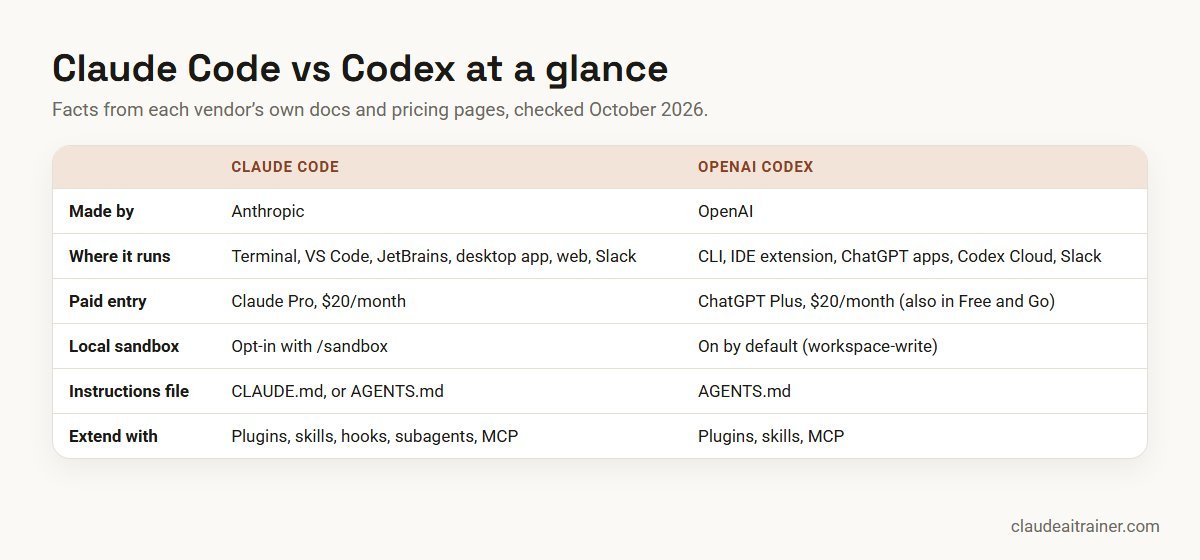
Comparison table
| Area | Claude Code (Anthropic) | Codex (OpenAI) |
|---|---|---|
| Surfaces | Terminal CLI, VS Code (and Cursor) extension, JetBrains plugin, desktop app, web and mobile, Slack, GitHub Actions | Codex CLI, IDE extension for VS Code, Cursor and Windsurf, ChatGPT desktop and mobile apps, Codex Cloud, Slack, GitHub |
| Plans that include it | Pro, Max, Team, Enterprise; or pay-as-you-go with a Console API key. Not on the Free plan | ChatGPT Free, Go, Plus, Pro, Business, Edu, Enterprise; or an API key |
| Entry price | Pro US$20/month (US$17/month billed annually) | Go US$8/month; Plus US$20/month |
| Heavy-use tier | Max from US$100/month (5x or 20x Pro usage) | Pro from US$100/month (US$100, US$200 or US$500) |
| Team seat | Team standard US$25/month (US$20 annual); premium US$125 (US$100 annual) | Business US$25/user monthly (US$20 annual, 2+ users) |
| Local sandbox | Opt-in (/sandbox); Seatbelt on macOS, bubblewrap on Linux and WSL2; not on native Windows | On by default (workspace-write); Seatbelt on macOS, bubblewrap on Linux, native sandbox on Windows |
| Approval controls | Six permission modes, from Manual to auto and bypass | Approval policy (on-request or never) plus sandbox mode |
| Instructions file | CLAUDE.md; reads AGENTS.md when there is no CLAUDE.md | AGENTS.md (plus AGENTS.override.md) |
| Extending it | Plugins, skills, hooks, subagents, MCP, Agent SDK | Plugins, skills, MCP, Codex SDK |
| PR review | Code Review on Team and Enterprise; GitHub Actions; review plugins | GitHub code review via the ChatGPT Codex connector |
| Source code | Proprietary | CLI open source under Apache-2.0 |
Sources: Claude pricing, Claude Code overview, Codex pricing and openai/codex on GitHub, all checked October 2026. Prices are in US dollars before tax; local-currency prices can differ at checkout.
1. What each tool is
Claude Code
Anthropic describes Claude Code as an agentic coding tool that reads your codebase, edits files, runs commands and works with your development tools. You install it with a one-line script, Homebrew or WinGet, run claude in a project folder and sign in. The same engine runs in the terminal, the VS Code extension, the JetBrains plugin, the desktop app’s Code tab and the browser at claude.ai/code, so your CLAUDE.md, settings and MCP servers carry across surfaces. It uses Anthropic’s Claude models.
Codex
OpenAI’s Codex covers the Codex CLI, an IDE extension for VS Code and compatible editors, Codex inside the ChatGPT apps, and Codex Cloud for longer tasks that run in a remote environment. The CLI’s repository describes it as a lightweight coding agent that runs in your terminal, and it is licensed under Apache-2.0. You install it with a script, npm or Homebrew, run codex in a project and sign in with ChatGPT or an API key. It uses OpenAI’s GPT models; the pricing page lists GPT-6.1 Sol, GPT-6.1 Terra and GPT-6 Luna among others in October 2026.
# Claude Code (macOS, Linux, WSL)
curl -fsSL https://claude.ai/install.sh | bash
cd your-project && claude

# Codex CLI
npm install -g @openai/codex
cd your-project && codex
2. Pricing and plans
Both tools are bundled into the vendor’s main subscriptions rather than sold on their own, which means the cheapest option for your team is usually the one attached to accounts you already have.
Claude Code is included in Pro (US$20/month, or US$17/month billed annually), Max (from US$100/month with 5x or 20x Pro usage), Team (standard seats US$25/month or US$20 billed annually; premium seats US$125 or US$100) and Enterprise (US$20 per seat per month billed annually, 20-seat minimum, plus usage at API rates). It is not included in the Free plan. Developers can also use a Console API key and pay per token: in October 2026 Sonnet 5.5 lists at US$2 input and US$10 output per million tokens, and Opus 5.5 at US$4 and US$20.
Codex is included in every ChatGPT plan: Free, Go (US$8/month), Plus (US$20/month), Pro (US$100, US$200 or US$500/month), Business (US$25 per user monthly or US$20 billed annually, two or more users), and Enterprise and Edu (contact sales). Plus and Pro users can buy extra credits when they hit their included limits. Using Codex with an API key bills at API rates and, per OpenAI’s pricing page, does not include cloud features such as GitHub code review and Slack.
Both vendors meter usage in rolling windows rather than unlimited use. Anthropic expresses Max as a multiple of Pro usage; OpenAI publishes estimated local messages per five-hour window for each model. For a deeper look at Claude’s side, see our Claude Code pricing guide for teams.
3. Where you can run each one
Both now cover the same broad set of places to work, with some differences in detail:
- Terminal: both are full-featured CLIs with non-interactive modes for scripts and CI (
claude -pandcodex exec). - Editors: Claude Code has a VS Code extension (also installable in Cursor) and a JetBrains plugin. The Codex IDE extension supports VS Code, Cursor and Windsurf; JetBrains IDEs and Xcode have their own integrations.
- Desktop: Claude Code is the Code tab of the Claude desktop app, which needs a paid subscription. Codex runs in the ChatGPT desktop app.
- Cloud: Claude Code on the web runs sessions in the browser, and
claude --teleportpulls one back into your terminal. Codex Cloud runs tasks in environments you configure, and you can start cloud work from the IDE. - Chat: both can take tasks from Slack.
If your developers live in JetBrains IDEs, test both integrations early. If they live in the terminal, either will feel natural. Claude Code can also drive a Chrome window to test and debug web apps; see how to use Claude in Chrome.
4. Sandboxing and permissions
This is the clearest technical difference between the two, and the one your security team will care about most.
Codex sandboxes by default. For local work its default sandbox mode is workspace-write: the agent can edit files in the workspace and run routine commands inside that boundary, and asks before going beyond it. The other modes are read-only and danger-full-access, and the approval policy is either on-request or never. OpenAI’s docs say it uses Seatbelt on macOS, bubblewrap on Linux and WSL2, and a native sandbox in Windows PowerShell.
Claude Code relies on permission modes first, with an optional sandbox. Its six modes run from Manual (the default, where only reads run without asking) through acceptEdits, plan and auto (background safety checks instead of prompts) to dontAsk for locked-down CI and bypassPermissions for isolated containers only. The OS-level sandbox is off by default; you turn it on with /sandbox or sandbox.enabled in settings. It uses Seatbelt on macOS and bubblewrap on Linux and WSL2, blocks direct network access through a domain allowlist, and covers shell commands only. On native Windows, Claude Code runs commands unsandboxed, so Windows teams that need a sandbox should run it inside WSL2.
In practice, a team can reach a similar level of safety with either tool. Codex gets there with fewer settings to change. Claude Code gives you finer control, but only once someone actually configures it.
5. Project instructions: CLAUDE.md and AGENTS.md
Codex reads AGENTS.md files from your Codex home folder, the repository root and each directory down to where you are working, with AGENTS.override.md taking priority in the same folder. The combined instructions are capped at 32 KiB by default.
Claude Code’s native file is CLAUDE.md, but since version 2.1.277 it also reads AGENTS.md directly when the repository has no CLAUDE.md. If you have both, it reads CLAUDE.md only, unless you set Project instructions to claude-md-and-agents-md or import AGENTS.md from CLAUDE.md.
That makes a mixed setup simple: keep your shared rules in AGENTS.md, and put anything Claude-specific, such as hooks or skills to mention, in a short CLAUDE.md that imports it. Our guide to writing CLAUDE.md covers what to put in it.
@AGENTS.md

## Claude Code only
- Run the test suite with npm test before proposing a commit.
- Use the code-review plugin before opening a pull request.
For engineering teams
Picking the tool is the easy part
The gains come from how your developers use it: good instruction files, sensible permissions, review habits and repeatable workflows. We run hands-on Claude Code sessions on your own repositories. Book a short call if that would help.
6. Extending each tool
Both support MCP servers, skills and plugins, so either can connect to your issue tracker, docs or database. Claude Code goes further on lifecycle control:
- Hooks run your own shell commands before or after Claude Code actions, for example formatting after every edit or blocking edits to protected files. See our Claude Code hooks guide.
- Subagents let a lead session hand parts of a task to specialised agents with their own context and tools. See Claude Code subagents.
- Plugins bundle skills, agents, hooks and MCP servers, and install from Anthropic’s official marketplace with
/plugin. Our list of the best Claude Code plugins picks twelve. - The Agent SDK lets you build your own agents on Claude Code’s tools.
Codex has its own plugins and skills, MCP support, a Codex SDK and an App Server for building on top of it. Because the CLI is open source, you can also read and fork the agent itself, which some platform teams value.
7. Code review and pull requests
Both can review code before a human does. Claude Code offers Code Review for pull requests on Team and Enterprise plans, a GitHub Actions integration, a built-in /security-review command and review plugins. Codex reviews GitHub pull requests through the ChatGPT Codex connector, can review automatically when that is turned on, and its CLI can review uncommitted changes, a commit or a branch without modifying your working tree.
Neither should be the only reviewer. Treat both as a first pass that catches the obvious so your reviewers can focus on design and risk.
8. Worked example: a two-week pilot
Here is how a 40-developer product team with a TypeScript front end and a Python API might choose. They already have ChatGPT Business for the whole company and are considering Claude Team for engineering. Rather than argue from blog posts, they run a short pilot.
- Prepare the repo. Write one AGENTS.md covering how to run tests, coding conventions and what never to touch (migrations, secrets, CI files). Add a two-line CLAUDE.md that imports it. Turn on Claude Code’s sandbox in WSL2 for the Windows users, and leave Codex on its default
workspace-writemode. - Pick five real tickets. One bug with a failing test, one test-coverage gap, one refactor across several files, one documentation task and one small feature. Same tickets for both tools.
- Run both. Four developers, two per tool, swap after the first week so each person tries both.
- Score the output, not the demo. For each ticket record: did the tests pass, how many review comments, how much rework, rough time taken, and how much of the plan’s usage it consumed. Note any time the agent tried something outside the agreed rules.
- Decide and write it down. Choose one tool or both, record the permission settings and house rules, and plan a short training session so the other 36 developers start with good habits rather than defaults.
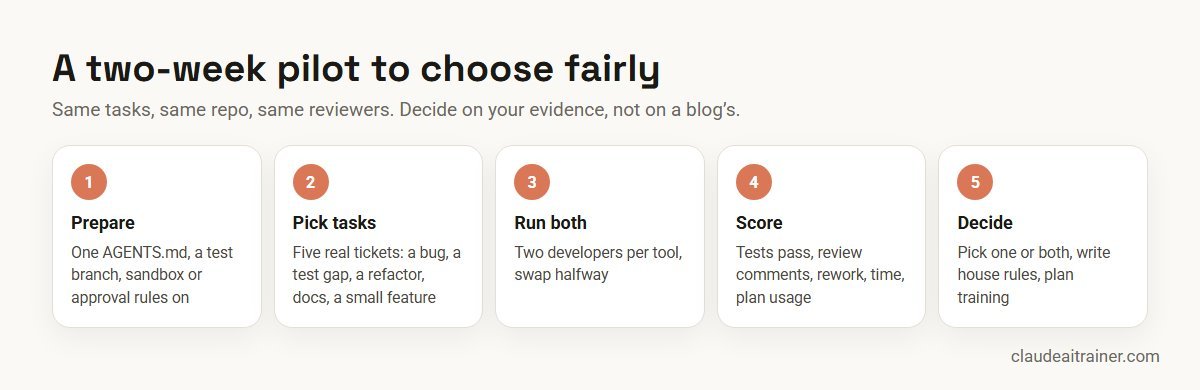
The result might be “Codex for everyone, because it is already licensed”, “Claude Code for the platform team, which needs hooks and subagents”, or both. All three are reasonable. What matters is that the decision rests on your code and your reviewers.
9. Which to choose for which team
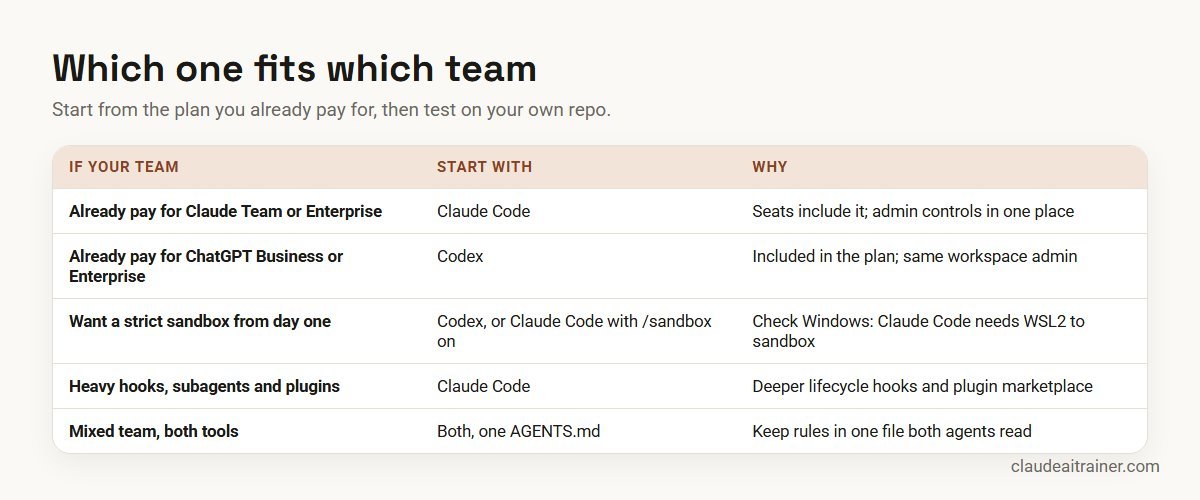
- Already on Claude Team or Enterprise: start with Claude Code. Seats include it, and admins manage it alongside Claude chat and Cowork.
- Already on ChatGPT Business or Enterprise: start with Codex for the same reason, and add Claude Code where a team needs its extra depth.
- Security-first teams on native Windows: Codex’s default sandbox is the simpler path; with Claude Code, plan for WSL2.
- Platform and DevEx teams: Claude Code’s hooks, subagents, managed settings and plugin marketplace give more ways to standardise how the agent behaves across many repos.
- Teams that want to inspect or fork the agent: Codex, because the CLI is open source.
- Individual developers on a budget: Codex is available on ChatGPT Free and Go; Claude Code starts at Pro.
Comparing other tools too? See Claude Code vs Cursor and Claude Code vs GitHub Copilot.
10. Security and governance
Whichever tool you pick, the governance checklist is much the same:
- Account type. Use business plans (Claude Team or Enterprise, ChatGPT Business or Enterprise) for company code, not personal accounts, so admins control access and data settings.
- Permissions. Decide which modes are allowed. In Claude Code, managed settings can, for example, turn off auto mode for the organisation. In Codex, decide whether anyone may use
danger-full-accessor an approval policy ofnever. - Sandbox and network. Turn sandboxing on where it is optional and keep network access to an allowlist of hosts the build needs.
- Secrets. Keep credentials out of the repository and out of instruction files. Remember that a sandbox limits what commands can write and reach; reading files is a separate setting.
- Extensions. Review plugins and MCP servers before approving them; a plugin can run code on a developer’s machine. Allow only the marketplaces you trust.
- Review. Keep human review on every pull request, and keep your existing CI security scanning. AI review is an extra layer, not a replacement.
- Audit. Check what usage and audit data each admin console exports before rollout, so you can answer “who ran what” later.
For a Claude-specific checklist, see Claude Code security best practices.
Next step
Run your pilot with a plan
We help teams set up CLAUDE.md or AGENTS.md, permission rules, hooks and review workflows, then train developers on real tickets. Online or on-site.
Related reading
How we checked
We read Anthropic’s Claude Code documentation and Claude pricing page, and OpenAI’s Codex documentation, Codex pricing page and the openai/codex GitHub repository, on 27 October 2026. We did not run benchmarks and we quote none. Both products change quickly, so check the linked pages before you buy, and treat model names and limits as correct for October 2026 only.
Key takeaways
- Both are terminal-first coding agents with IDE, desktop and cloud options; neither is a simple autocomplete tool
- Start from the plan you already pay for: Claude Pro, Max, Team or Enterprise includes Claude Code; ChatGPT plans from Free upwards include Codex
- Codex sandboxes local commands by default; in Claude Code the sandbox is opt-in and not available on native Windows
- Claude Code goes further on hooks, subagents and its plugin marketplace; Codex is open source under Apache-2.0
- One AGENTS.md can serve both tools, so a mixed team does not need two sets of rules
- Decide with a short pilot on your own repo, not on public benchmark claims
FAQ
Claude Code vs Codex: common questions
Is Claude Code better than Codex?
Neither is better for every team. Claude Code offers more ways to customise behaviour, such as hooks, subagents and a large plugin marketplace. Codex sandboxes local commands by default, is included in every ChatGPT plan and has an open-source CLI. Run both on a few real tickets in your own repository and decide on that evidence.
How much does Claude Code cost compared with Codex?
The paid entry point is the same: Claude Pro and ChatGPT Plus are both US$20 a month (checked October 2026). Codex is also included in ChatGPT Free and Go (US$8). For heavy use, Claude Max starts at US$100 a month and ChatGPT Pro at US$100. Team seats are US$25 a month on Claude Team standard and on ChatGPT Business, or US$20 billed annually.
Can I use Claude Code on the free Claude plan?
No. Claude Code is included in Pro, Max, Team and Enterprise, or you can use it with a pay-as-you-go Console API key. The free plan covers Claude chat only.
Is Codex open source?
The Codex CLI is. Its GitHub repository, openai/codex, is licensed under Apache-2.0. Codex Cloud and the models it uses are OpenAI services, not open source.
Do Claude Code and Codex both read AGENTS.md?
Yes. Codex uses AGENTS.md as its instruction file. Claude Code reads AGENTS.md directly when the repository has no CLAUDE.md (version 2.1.277 or later), or you can import it into CLAUDE.md with a line that says @AGENTS.md.
Which one has a stronger sandbox?
Codex sandboxes local commands by default on macOS, Linux and Windows. Claude Code’s sandbox is opt-in, uses similar operating-system mechanisms on macOS, Linux and WSL2, adds a network domain allowlist, and is not available on native Windows. Both can be configured to a similar level; Codex needs fewer changes to get there.
Can Claude Code use OpenAI models, or Codex use Claude models?
Not as a supported setup. Claude Code is built for Anthropic’s Claude models, including through Amazon Bedrock, Google Cloud and Microsoft Foundry. Codex uses OpenAI’s models. If you want one editor with a choice of models, look at tools such as Cursor instead.
Which works better in VS Code or JetBrains?
Both have a VS Code extension that also installs in Cursor. Claude Code has a JetBrains plugin that runs the CLI in the IDE’s terminal; OpenAI lists a separate JetBrains integration for Codex. Try both in the IDE your team actually uses.
Can both review pull requests on GitHub?
Yes. Claude Code has Code Review on Team and Enterprise plans plus a GitHub Actions integration. Codex reviews pull requests through the ChatGPT Codex connector. Keep a human reviewer on every pull request either way.
Should a team standardise on one tool?
It is simpler to support one tool, but not essential. If you allow both, share one AGENTS.md, agree the same permission and review rules, and approve extensions centrally.
Are public benchmarks a good way to choose?
Use them with care. Scores depend on the model version, the agent harness and the task set, and they change every few months. A pilot on your own tickets tells you more about rework, review effort and cost.
Do you offer Claude Code training for teams?
Yes. We run hands-on Claude Code sessions on your own repositories, covering CLAUDE.md or AGENTS.md, permissions, hooks, plugins and review workflows. See our Claude Code training page or book a short call.
Trusted by
Teams we’ve trained
…and 200+ organisations, across 16+ countries.
What participants say
Real feedback from real sessions
Verified feedback collected from participants across corporate sessions — average rating 4.8/5.
“A very productive session for working professionals. A must-do.”
“The session was highly insightful and conducted in a very professional and interactive manner. Learnt about AI and excited to learn more!”
“Highly recommended! Hands-on and directly useful — from making PPTs and strategic plans to building KRAs.”
“I would recommend everyone to go through this session — it clarifies both what to expect from AI and where AI isn’t needed.”
“A nice interactive session with a lot of new insights and the power of AI. This will help me save time in routine activities.”
“A very good training session. AI can do wonders — we’ll implement it to create efficiency and save time.”
Explore more
Keep going with Claude AI training
Work with us
Train your developers on Claude Code
Tell us about your stack and what you want an AI coding agent to take off your team’s plate. We will suggest a short, hands-on format, online or on-site (for example Claude Code training in Bengaluru, Hyderabad or Noida), and send a fixed proposal, usually within one business day.