Blog · Claude for support
Claude for Customer Support: 10 Workflows and Prompts for Support Teams (2026-27)
Support teams were among the first to try Claude, usually for reply drafts. The bigger gains come from the work around the reply: sorting the queue, packaging escalations, keeping the knowledge base current and spotting themes early. This guide gives ten workflows for support leads and agents, each with the material to attach, the prompt and the review step that keeps customers safe.
Ask Claude to “reply to this angry customer” and you will get a polite, well-written answer that may promise a refund your policy doesn’t allow. Support prompts work when they carry the ticket history, the policy that applies, your tone guide and a clear rule: Claude drafts, an agent decides and sends.
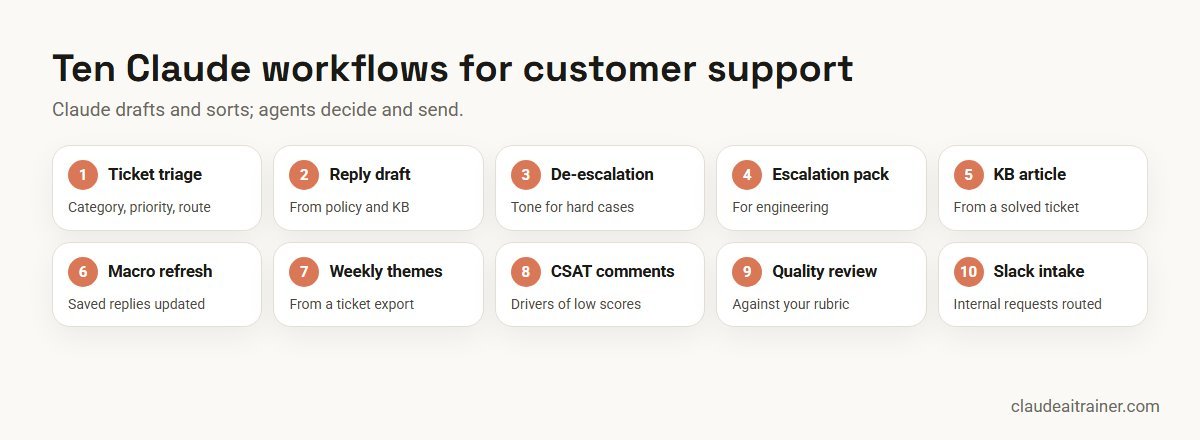
The ten workflows below cover the support cycle: sorting incoming work, answering it, escalating what you can’t solve, learning from what you did solve, and checking quality. Product details were checked on Anthropic’s documentation, connector listings and plugin repository in October 2026. For the sales and marketing side of the customer relationship, see Claude prompts for sales and Claude prompts for marketing.
Quick answer: ten ways to use Claude for customer support
- Ticket triage: category, priority and routing for new tickets.
- Reply drafts: answers built from your policy and knowledge base.
- De-escalation: tone help for difficult conversations.
- Escalation packages: reproducible bug reports for engineering.
- Knowledge base articles: drafted from solved tickets.
- Macro refresh: saved replies updated after a policy change.
- Weekly themes: top contact reasons from a ticket export.
- CSAT comments: what drives low scores.
- Quality review: conversations scored against your rubric.
- Internal request triage: a Slack intake channel answered and routed.
Where to run support work in Claude
Most of this is agent assistance: Claude helps a person do the job faster. That is different from a bot that talks to customers on its own.
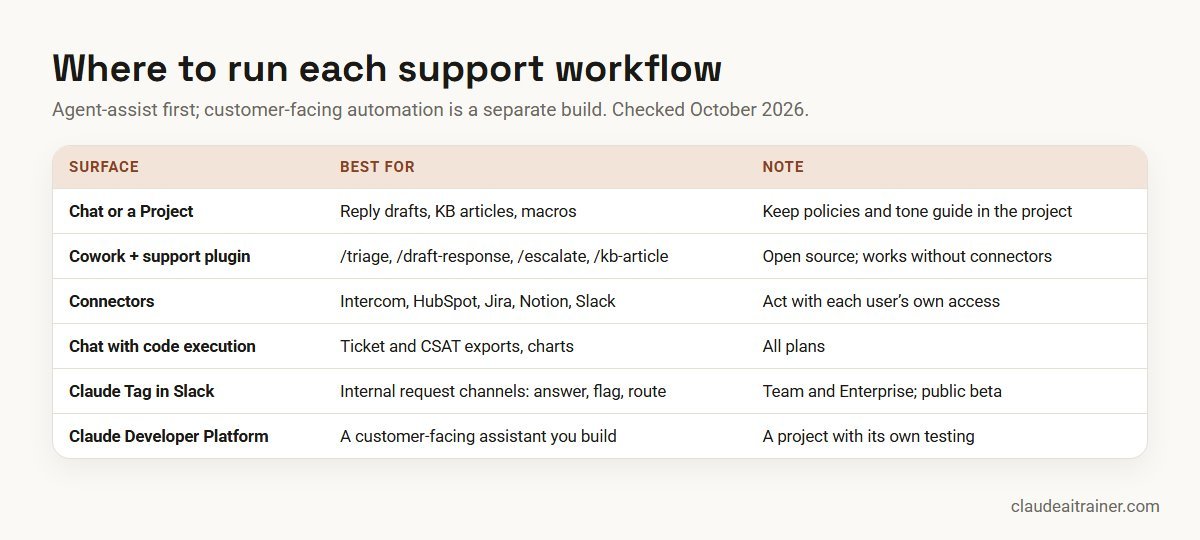
- A chat or a Project. A support Project holding your refund and returns policies, tone guide, product notes and top knowledge base articles makes every reply draft start from the right facts. See our Claude Projects examples.
- Cowork with Anthropic’s customer-support plugin. The open-source plugin, designed mainly for Cowork and also usable in Claude Code, adds
/triage,/research,/draft-response,/escalateand/kb-article, with skills for a P1 to P4 priority framework, escalation tiers and knowledge base standards. It works without connectors by asking you for context. - Connectors. The connectors directory includes Intercom (Anthropic verified; its listed tools search and fetch conversations and contacts) and HubSpot (verified). The plugin’s defaults also point to Slack, Notion, Guru, Atlassian and Microsoft 365. Connectors act with each person’s own access.
- A chat with code execution. For ticket and CSAT exports, Claude runs code on the file and returns tables and charts. It is available on every plan.
- Claude Tag in Slack. On Team and Enterprise plans, in public beta, Claude can take a standing role in an intake channel: answer what it can, flag duplicates, route the rest and post a weekly summary.
- The Claude Developer Platform. A customer-facing assistant on your website or app is built through the API, with your own testing, guardrails and hand-off to humans. See the Claude Developer Platform overview.
Comparison table
| Workflow | Attach | Best surface | Reviewer check |
|---|---|---|---|
| Ticket triage | New tickets, category list | /triage or Project | Lead spot-checks priorities |
| Reply draft | Thread, policy, KB article | Project or /draft-response | Agent edits and sends |
| De-escalation | Thread, draft reply | Project | No new promises added |
| Escalation package | Thread, logs, screenshots | /escalate | Steps reproduce the issue |
| KB article | Solved ticket, KB template | /kb-article | Product owner approves |
| Macro refresh | Macro export, policy change | Chat or Word add-in | Every changed macro reviewed |
| Weekly themes | Ticket export | Chat with code execution | Sample of tickets per theme |
| CSAT comments | Survey export | Chat with code execution | Quotes checked against source |
| Quality review | Conversations, QA rubric | Project | QA lead calibrates scores |
| Internal requests | Slack channel, runbook | Claude Tag | Owner reviews routing weekly |
The ten workflows in detail
1. Ticket triage
Use it for sorting a backlog or the morning queue. Attach: the new tickets (export or pasted) and your category list with priority rules.
Triage the attached tickets using our category list and priority
rules. For each ticket return: ticket ID, category, priority (P1-P4)
with a one-line reason, the team it should go to, and whether it looks
like a duplicate of another ticket in the batch. Put anything that
mentions a safety issue, legal threat, data breach or a high-value
account at the top, whatever its category.
Check. A team lead spot-checks priorities each day for the first few weeks. The plugin’s /triage command applies a P1 to P4 framework you can edit to match yours.
2. Reply draft from policy and knowledge base
Use it for first drafts of written replies on email and helpdesk tickets. Attach: the full ticket thread, the policy that applies and the relevant knowledge base article.
Draft a reply to the customer in the attached thread. Use only the
attached [refund / warranty / delivery] policy and KB article for
facts and options. Quote the policy line behind any refund, credit or
exception you offer. Follow our tone guide: plain words, no blame,
under 150 words, one clear next step. If the policy doesn't cover
this case, say so in a note to me instead of offering anything.
Check. The agent checks the facts, edits the tone and sends it. Claude never sends on its own in this setup.
3. De-escalation rewrite
Use it for difficult conversations where tone matters as much as the answer. Attach: the thread and the agent’s draft.
The customer in the attached thread is frustrated. Rewrite my draft
reply so it acknowledges the specific problem in their words,
apologises once for what went wrong on our side, explains what we
will do and when, and avoids defensive phrases. Keep every fact and
commitment exactly as in my draft; do not add new offers. Show the
changes you made and why.
Check. Compare the commitments in the rewrite with the original draft line by line.
4. Escalation package for engineering
Use it for bugs and outages that need another team. Attach: the ticket thread, logs, screenshots and the customer’s account details your process allows.
Turn the attached ticket and evidence into an escalation for the
engineering team. Include: a one-line summary, customer impact
(number of customers affected if known, revenue at risk if stated),
exact steps to reproduce, expected vs actual behaviour, environment
details, what support has already tried, and the priority with a
reason. Remove any personal data the engineers don't need.
Check. Someone follows the steps and confirms they reproduce the issue. In Cowork, /escalate uses a structured escalation format, and with the Atlassian connector it can file the ticket in Jira.
5. Knowledge base article from a solved ticket
Use it for capturing a fix so the next agent, or the customer, can find it. Attach: the solved ticket and your KB article template.
Write a knowledge base article from the attached solved ticket, using
our KB template. Title it with the words a customer would search for.
Include: symptoms, cause in plain language, step-by-step fix, and when
to contact support instead. Remove all customer details. List anything
in the ticket that was a one-off workaround rather than a general fix.
Check. The product or engineering owner approves the fix before publishing. The plugin’s /kb-article command and knowledge-management skill follow the same pattern.
For support leaders
Want the whole support team using Claude to one standard?
Reply drafts only help when they follow your policies and tone, and when every agent reviews them the same way. We run hands-on sessions where support teams build a support Project, practise these workflows on real (anonymised) tickets and agree the review rules. Book a short call if that would help.
6. Macro and saved-reply refresh
Use it for updating saved replies after a policy, price or product change. Attach: an export of your macros and the approved change note.
Review the attached export of our saved replies against the attached
change note. List every saved reply affected by the change, the
sentence that is now wrong, and suggested new wording. Do not edit
replies the change doesn't affect. Flag replies that contradict each
other or the change note, and any that promise timeframes we no
longer meet.
Check. A support lead approves each changed macro before it is loaded back into the helpdesk.
7. Weekly ticket theme report
Use it for telling product and operations teams what customers are contacting you about. Attach: last week’s ticket export with category, subject, first message and resolution time.
Analyse the attached export of last week's tickets with code. Show:
ticket volume by day and category, median first-response and
resolution time by category, the eight most common contact reasons
(grouped from the text, not just the category field) with counts and
two example subjects each, and reasons that grew most against the
prior week. End with three suggestions for the product team, each
tied to a theme and its count.
Check. Read a sample of tickets in each theme to confirm the grouping before the report goes out.
8. CSAT comment analysis
Use it for learning why customers score you low, beyond the average. Attach: the survey export with score, comment, channel and category.
From the attached CSAT export, compare comments from low scores (1-2)
with high scores (4-5). Group low-score comments into no more than
six drivers, with counts, the share of low scores each explains, and
two short quotes per driver. Note which drivers are about the product
and which are about the support experience. Do not include names or
contact details in the quotes.
Check. Confirm the quotes appear in the source and that counts add up to the number of low-score comments.
9. Conversation quality review
Use it for giving QA reviewers a consistent first pass. Attach: a sample of conversations and your QA rubric.
Score each attached conversation against our QA rubric. For every
rubric item give the score and the line from the conversation that
justifies it. Highlight anything that could breach policy or create
a compliance risk. Finish with one specific coaching point per agent,
phrased as something to try next time. Mark scores you are unsure
about so the QA lead can decide.
Check. The QA lead calibrates a sample against their own scores before anything is shared with agents. Use it to support coaching, not to make employment decisions.
10. Internal request triage in Slack
Use it for internal help channels, such as IT, HR or sales operations questions, where the same requests keep arriving. Set up: Claude Tag in the channel, with an optional runbook document.
@Claude remember for this channel: when someone tags you on a request,
check whether it duplicates something already reported, answer it
directly if the answer exists in our runbook, and otherwise route it
to the right owner with a one-line summary. Track recurring themes.
Check. The channel owner reviews routing and the weekly summary. This standing-role message follows Anthropic’s Claude Tag documentation, which also describes a Friday rollup that sweeps up requests that never tagged Claude.
How to adapt these workflows
- Build the support Project first. Policies, tone guide, product notes and your top 20 KB articles. Every workflow above gets better with it.
- Make the policy quote mandatory. Any refund, credit or exception should carry the policy line it relies on.
- Keep personal data out of what you don’t need. Ticket IDs are usually enough for analysis.
- Save the reliable ones. Package a working prompt as a skill so every agent uses the same method; see how to create Claude skills and our list of Claude skills, plugins and connectors.
Worked example: a support team’s week
A support team of twelve agents and two leads at a subscription software company handles email and helpdesk tickets. It uses five workflows:
- Every morning. A lead runs workflow 1 on the overnight queue in Cowork; safety and high-value tickets go to senior agents first.
- All day. Agents use workflow 2 in the support Project for first drafts, then edit and send every reply themselves.
- As needed. Workflow 4 turns confirmed bugs into escalation packages that engineering can reproduce.
- Thursday. Workflow 5 drafts knowledge base articles from the week’s solved tickets for the product owner to approve.
- Friday. Workflow 7 sends the product team the week’s top contact reasons with counts.

The team’s rule is simple: Claude drafts, sorts and summarises; people decide what customers are told.
Next step
Turn these workflows into your support playbook
We help support teams adapt these prompts to their own policies and helpdesk, decide which connectors to switch on, and save the reliable workflows as shared skills. Online or on-site.
Security and governance
- Use an approved business workspace. Team and Enterprise plans do not use your content for model training by default, according to Anthropic’s pricing page. Customer conversations belong there; see the best Claude plan for business.
- Limit connector access. Connectors act with each person’s own permissions. Anthropic’s directory labels connectors verified or community, and notes that verification is not a security audit, so an admin should review each one before switching it on.
- Keep a person on every customer message. Agent-assist workflows should never send on their own. Customer-facing automation needs its own design, testing, hand-off to humans and disclosure that customers are talking to AI where your rules require it.
- Watch for hidden instructions. Customer emails and attachments are untrusted content and can carry instructions aimed at an AI. Don’t let Claude act on a ticket’s instructions without review.
- Protect personal data. Follow your data protection obligations and remove card numbers, passwords and IDs from anything you paste.
- Coaching, not judgement. Use quality scores to help agents improve, with a person deciding anything that affects someone’s job.
Sources
Checked October 2026: Anthropic’s open-source customer-support plugin, the Intercom connector listing, the connectors directory documentation, Claude Tag: triage requests and Anthropic’s help article on how to get support.
Key takeaways
- Give Claude your policies, tone guide and knowledge base; a support prompt without them invites invented promises
- Agents review and send every customer reply; Claude drafts and sorts
- Ask Claude to quote the policy line behind any refund, credit or exception
- Use Cowork with the customer-support plugin for triage, escalations and KB drafts across many tickets
- Connect Intercom, HubSpot or Jira only with the access each agent already has
- Treat a customer-facing assistant as a separate build with its own testing, not a chat setting
FAQ
Claude for customer support: common questions
How can Claude help customer support teams?
Claude helps with ticket triage, reply drafts from your policies, de-escalation, escalation packages, knowledge base articles, macro updates, weekly theme reports, CSAT analysis and quality reviews. Agents review and send every customer reply.
Does Anthropic have a customer support plugin?
Yes. Anthropic’s open-source customer-support plugin, designed mainly for Cowork and also usable in Claude Code, includes /triage, /research, /draft-response, /escalate and /kb-article, plus skills for priority frameworks, escalation tiers and knowledge base standards.
Can Claude connect to Intercom or Zendesk?
The connectors directory lists an Anthropic-verified Intercom connector built by Intercom, whose listed tools search and fetch conversations and contacts. We did not find a Zendesk listing in the directory in October 2026; check the directory or use a custom connector.
Can Claude reply to customers automatically?
Not in the agent-assist setups described here, where a person sends every reply. A customer-facing assistant is built on the Claude Developer Platform with its own testing, guardrails and hand-off to people.
How do I stop Claude promising refunds we don't offer?
Attach the policy, tell Claude to use only that policy for options, and require it to quote the policy line behind any refund or credit. If the policy does not cover the case, it should say so to the agent instead.
Can Claude analyse support tickets and CSAT data?
Yes. Upload a ticket or survey export to a chat with code execution, which is available on every plan, and ask for counts, themes and example quotes. Check a sample of tickets per theme before sharing.
What is Claude Tag and how does it help support?
Claude Tag puts Claude in Slack channels on Team and Enterprise plans and is in public beta. In an internal request channel it can answer from a runbook, flag duplicates, route requests to owners and post a weekly summary.
Is it safe to use customer data with Claude?
Use a Team or Enterprise workspace your company has approved, which does not use your content for training by default, limit connector access and remove sensitive data such as card numbers and passwords.
Can Claude help write knowledge base articles?
Yes. Give it a solved ticket and your KB template and ask for customer search terms in the title. A product or engineering owner should approve the fix before it is published.
Can Claude score support conversations for quality?
It can give a first-pass score against your rubric, with the line that justifies each score. A QA lead should calibrate the results, and scores should support coaching rather than decide employment outcomes.
Which Claude plan does a support team need?
Chat, Projects and code execution work on every plan; Cowork and the Microsoft 365 add-ins need a paid plan, and Claude Tag needs Team or Enterprise. Most support teams choose Team or Enterprise for admin controls.
How do I contact Claude's own customer support?
Anthropic’s help centre says support is written, not by phone. Signed-in users choose “Get help” from the menu under their name, or open the messenger on a help centre page; service status is at status.claude.com.
Where can our support team learn this hands-on?
Our corporate Claude programmes and Cowork training take support teams through these workflows on anonymised tickets, online or on-site.
Trusted by
Teams we’ve trained
…and 200+ organisations, across 16+ countries.
What participants say
Real feedback from real sessions
Verified feedback collected from participants across corporate sessions — average rating 4.8/5.
“A very productive session for working professionals. A must-do.”
“The session was highly insightful and conducted in a very professional and interactive manner. Learnt about AI and excited to learn more!”
“Highly recommended! Hands-on and directly useful — from making PPTs and strategic plans to building KRAs.”
“I would recommend everyone to go through this session — it clarifies both what to expect from AI and where AI isn’t needed.”
“A nice interactive session with a lot of new insights and the power of AI. This will help me save time in routine activities.”
“A very good training session. AI can do wonders — we’ll implement it to create efficiency and save time.”
Explore more
Keep going with Claude AI training
Work with us
Help your support team get reliable results from Claude
Tell us about your team, your helpdesk and the ticket types that take the most time. We will suggest a short, hands-on format, online or on-site (for example Claude AI training in Hyderabad), and send a fixed proposal, usually within one business day.