Blog · Claude for legal
Claude for Lawyers: 10 Use Cases, Plugins and Safeguards (2026-27)
Legal work is a good fit for Claude in one sense and a hard one in another. Long documents, defined terms and playbooks suit it well. Citations, privilege and professional responsibility mean every output needs a lawyer’s review. This guide lists ten use cases for in-house teams and firms, the Anthropic plugins and connectors behind each, and the safeguards that make them usable in practice.
Many lawyers’ first experience of AI was a confident answer with a case citation that did not exist. That is still the right thing to worry about, and it is why the way you set Claude up matters more than the prompt you type. Since May 2026, Anthropic has offered a set of legal tools that change the picture: practice-area plugins that learn your playbook, connectors to research and document systems, and Microsoft Word and Outlook add-ins that work inside the documents lawyers already use.
Below are ten use cases, each with the tool to run it in, what to give Claude and what a lawyer must check. Product details were checked on Anthropic’s announcement, documentation and the open-source plugin repository in October 2026. This is a practical overview, not legal advice on whether a use suits your jurisdiction or your professional rules.
Quick answer: ten ways lawyers use Claude
- First-pass contract review against your own playbook, with issues ranked.
- Redlining in Word with every edit as a tracked change.
- Summarising counterparty redlines and flagging what to push back on.
- NDA and vendor agreement triage across a batch of documents.
- Due diligence issue extraction from a data room.
- Legal research through research connectors, with every citation verified.
- Chronologies and deposition preparation from case documents.
- Privacy work: DPA reviews and DSAR responses within deadlines.
- Regulatory change monitoring filtered to what is material for you.
- Intake and inbox triage for in-house legal requests.
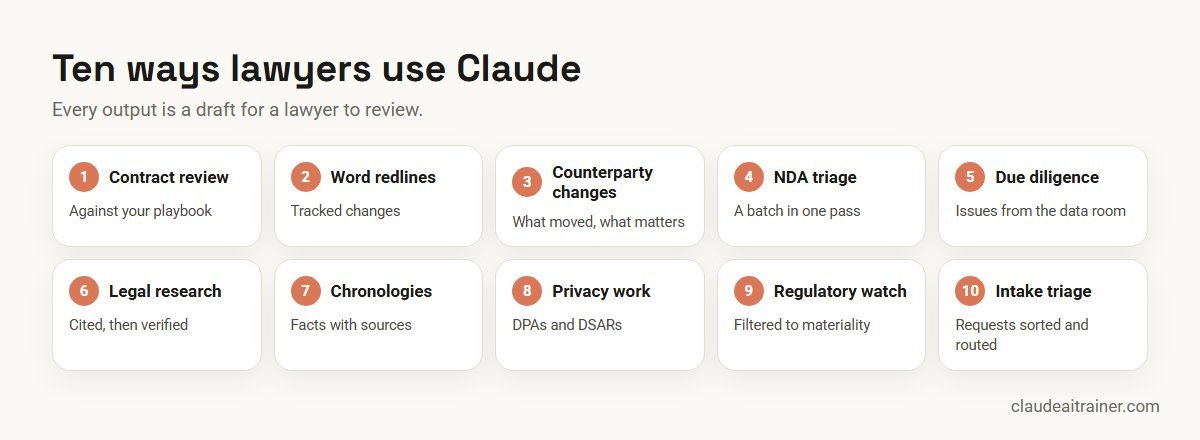
What Anthropic offers lawyers in 2026
On 12 May 2026 Anthropic announced a legal release built on three pieces. In its announcement, Anthropic said legal professionals had become the most engaged Cowork users of any knowledge-work function since its first legal plugin earlier in the year.
- Twelve practice-area plugins. Commercial, Corporate, Employment, Privacy, Product, Regulatory, AI Governance, IP and Litigation, plus Law Student, Legal Clinic and a Legal Builder Hub for finding community skills. They are open source, install in Cowork or Claude Code, and each begins with a setup interview that writes a practice profile: your playbook, escalation chain, risk calibration and house style.
- More than 20 new legal connectors. Examples include Docusign, Ironclad and Definely for contracts; Box and Datasite for deal rooms; iManage and NetDocuments for document management; Everlaw, Relativity and Consilio for e-discovery; Thomson Reuters CoCounsel Legal, Midpage, Trellis, Descrybe and the Free Law Project’s CourtListener for research; and Harvey and Solve Intelligence as legal AI assistants. Some need a subscription with that provider.
- Office add-ins. Claude for Word reads multi-level legal numbering, defined terms and cross-references, edits with tracked changes and summarises counterparty redlines. Claude for Outlook, in beta, triages incoming requests and drafts replies that stay unsent until you send them.
Projects give matter teams a persistent workspace for precedents and prior drafts, and scheduled tasks in Cowork can run recurring sweeps such as a weekly regulatory update. For how plugins, skills and connectors fit together, see our list of Claude skills, plugins and connectors.
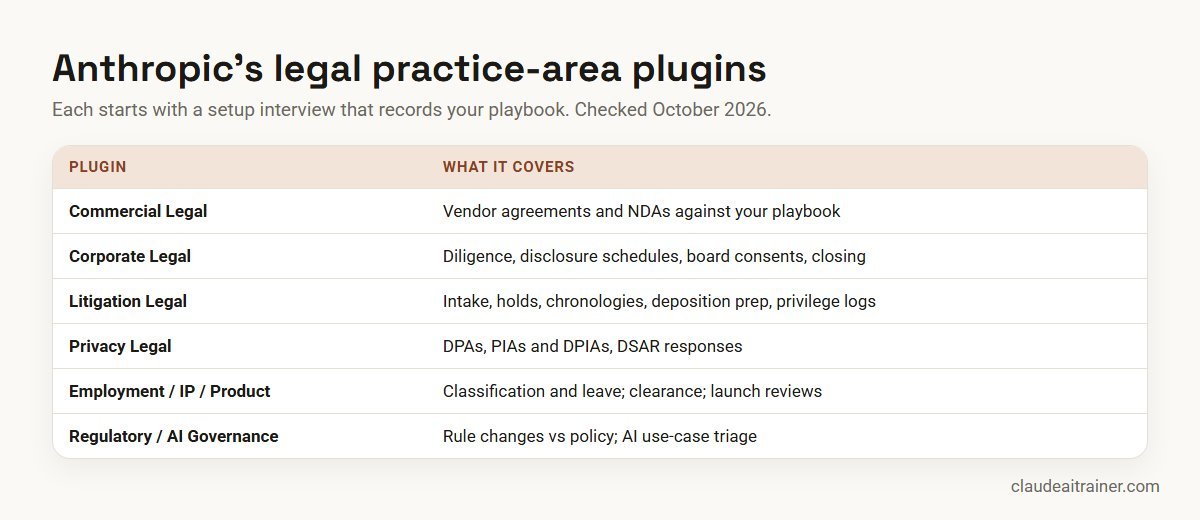
Comparison table
| Use case | Where to run it | Give Claude | Lawyer checks |
|---|---|---|---|
| Contract review | Commercial Legal plugin; Word add-in | Contract plus playbook | Positions and fallbacks |
| Word redlines | Claude for Word | Draft, instructions, standard clauses | Each tracked change |
| Counterparty changes | Claude for Word | Returned draft with tracked changes | Severity calls |
| NDA triage | Cowork with Commercial Legal | Folder of NDAs, NDA playbook | Escalated items |
| Due diligence | Corporate Legal; data room connector | Data room access, issues list | Material findings |
| Legal research | Research connector | Question, jurisdiction, facts | Every citation |
| Chronologies | Litigation Legal; Project | Pleadings, emails, transcripts | Facts against sources |
| Privacy work | Privacy Legal | DPA, policy, request details | Statutory deadlines |
| Regulatory watch | Regulatory Legal; scheduled task | Sources, materiality threshold | Impact assessment |
| Intake triage | Claude for Outlook; Project | Intake rules, routing table | Routing and replies |
The ten use cases in detail
1. First-pass contract review against your playbook
What it does. Reviews a vendor agreement or customer contract against your standard positions and ranks deviations by severity, with a plain-language summary for the business.
Who it’s for. In-house commercial teams and transactional associates.
How to set it up. Install the Commercial Legal plugin, run its setup interview, then use /commercial-legal:review. Without the plugin, a Project holding your playbook and clause library does a similar job. In Word, a prompt such as “flag provisions that deviate from standard market position, ranked by severity” works on the open document.
Check. The playbook is current, and a lawyer confirms each position before anything goes to the counterparty.
2. Redlining in Word with tracked changes
What it does. In tracked changes mode, Claude’s edits land as revisions you accept or reject in Word’s review pane, with new text inheriting the clause’s style and numbering.
Who it’s for. Anyone negotiating documents in Word.
How to set it up. Install Claude for Word from the Claude for Microsoft 365 listing on Microsoft AppSource (Pro, Max, Team or Enterprise plan). Try “rewrite section 4.2 to cap damages at 12 months of fees, and make it mutual”. It can also work through open comment threads, editing the anchored text and replying with what it changed.
Check. Review every revision before accepting. Our guide to Claude for Word use cases covers the add-in in more depth.
3. Summarising counterparty redlines
What it does. Reads the tracked changes in a returned draft and groups them by severity, flagging the ones worth discussing.
Who it’s for. Lawyers who receive marked-up drafts late in the day.
How to set it up. Open the returned document in Word with the add-in and ask “what did the other side change, and which revisions are dealbreakers?”. Asking it to compare against your playbook gives a more useful answer than a neutral summary.
Check. Severity is a judgement; Claude proposes it, the lawyer decides.
4. NDA and vendor agreement triage at volume
What it does. Works through a folder of incoming NDAs or low-value vendor terms, sorts them into sign, negotiate and escalate, and writes a short note for each.
Who it’s for. In-house teams with a steady flow of standard agreements.
How to set it up. In Cowork, point Claude at a copy of the folder with the Commercial Legal plugin installed, and ask for one row per agreement with the issues and a recommendation. Our list of Claude Cowork use cases includes a similar contract folder review.
Check. A lawyer reviews every escalation and samples the “sign” pile until the team trusts it.
5. M&A due diligence issue extraction
What it does. Reviews documents in a data room for change of control, assignment, exclusivity, termination and other issues, and feeds disclosure schedules and the closing checklist.
Who it’s for. Corporate teams on transactions.
How to set it up. The Corporate Legal plugin’s first suggested command is /corporate-legal:diligence-issue-extraction. Connectors such as Datasite or Box let Claude work with the data room under its existing access policies.
Check. Material findings are confirmed in the source documents; coverage gaps are recorded, not assumed away.
For general counsel and practice leads
Want your lawyers using Claude on your own playbook?
The value comes from configuring the plugins with your positions, setting up matter projects and agreeing a review routine. We run hands-on sessions where your team does that on its own templates. Book a short call if that would help.
6. Legal research with verified citations
What it does. Answers research questions through connectors to case law and legal databases, so citations come from a current source rather than the model’s training data.
Who it’s for. Litigators, advisory lawyers and law students.
How to set it up. Connect a research tool. The plugin quick start is blunt about why: without one, every citation is flagged [verify] because it comes from training data, not a current database. CourtListener (US opinions and dockets) is free; Thomson Reuters CoCounsel Legal, Midpage, Trellis and Descrybe are among the other connectors. Coverage is mostly US and EU, so check whether your jurisdiction is covered.
Check. Read every authority you cite. A connector reduces the risk of a made-up case; it does not remove your duty to check.
7. Litigation chronologies and deposition preparation
What it does. Builds a dated chronology from pleadings, correspondence and transcripts, with a source for every fact, and prepares deposition outlines.
Who it’s for. Litigation teams, in-house or at firms.
How to set it up. The Litigation Legal plugin covers matter intake (/litigation-legal:matter-intake), legal holds, demand letters, subpoena triage, chronologies, deposition prep and privilege logs. Keep the matter in a Project so the chronology, key excerpts and themes carry across conversations. E-discovery connectors such as Everlaw and Relativity can supply documents.
Check. Every entry in the chronology points to a document a lawyer has looked at.
8. Privacy work: DPAs and DSAR responses
What it does. Reviews data processing agreements against your playbook, triages privacy and data protection impact assessments, and prepares responses to data subject access requests within statutory timelines.
Who it’s for. Privacy counsel and DPOs.
How to set it up. Install Privacy Legal and start with /privacy-legal:use-case-triage. Configure it for the laws that apply to you, such as GDPR or India’s Digital Personal Data Protection Act, in the setup interview.
Check. Deadlines and exemptions are confirmed by the privacy lead; personal data is handled under your own policy.
9. Regulatory change monitoring
What it does. Watches regulatory sources, filters developments to your materiality threshold, compares new rules with your policy library and tracks comment deadlines.
Who it’s for. Regulatory and compliance counsel.
How to set it up. The Regulatory Legal plugin’s starting command is /regulatory-legal:reg-feed-watcher. Pair it with a weekly scheduled task in Cowork that produces a short memo for the general counsel.
Check. A lawyer decides what is material and what changes in policy; Claude does the reading and first filter.
10. Legal intake and inbox triage
What it does. Sorts incoming legal requests, asks for missing information, routes each request and drafts acknowledgements.
Who it’s for. In-house teams that receive requests by email.
How to set it up. Claude for Outlook (beta, paid plans) triages the inbox into what needs you and what Claude can handle, and drafts replies that land unsent in the compose pane. Put your intake rules and routing table in a Project or skill so triage follows your process.
Check. A lawyer reviews routing rules and every reply before it goes out.
How to choose your first use cases
- Start where the playbook is written down. NDAs and standard vendor terms are easier to automate than bespoke advice.
- Pick volume, not drama. A use case that saves 20 minutes on 50 documents a month beats one that saves a day once a year.
- Choose checkable outputs. Issue lists, chronologies and redlines can be checked line by line.
- Set up research before research use cases. Do not start legal research until a research connector is in place.
Worked example: an in-house team of five starts with two use cases
A five-lawyer in-house team at a software company handles around 60 NDAs and vendor agreements a month.
- Week 1. The head of legal runs the Commercial Legal setup interview with the team’s NDA and vendor playbooks.
- Weeks 2–3. Incoming NDAs go through Cowork triage on a copy of the folder; one lawyer samples every “sign” recommendation.
- Week 4. Vendor agreements are reviewed with the Word add-in in tracked changes mode, with fallback language from the playbook.
- Review. The team compares turnaround times and escalation rates with the previous quarter and decides whether to add Privacy Legal next.
Next step
Give your legal team a safe, practical start
We help legal teams choose two or three first use cases, set up the Word add-in and a research connector, and write the review rules down. Online or on-site.
Security, privilege and professional duties
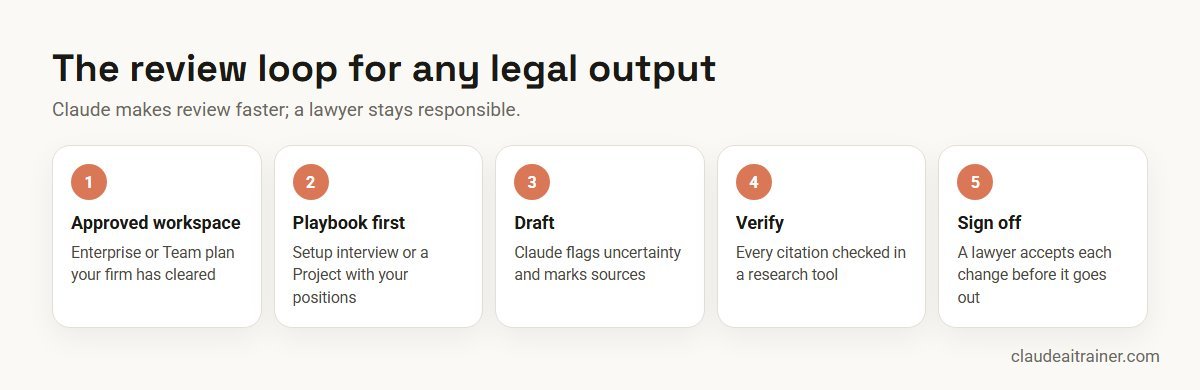
- Approved workspace. Use a Team or Enterprise plan your firm or company has cleared, not personal accounts; see the best Claude plan for business.
- Confidentiality and privilege. Follow your bar council or regulator’s guidance on confidential information and AI tools, and your client engagement terms.
- Add-in data. Anthropic’s Word documentation says chat history is stored locally in the browser, add-ins do not inherit custom retention settings, and their activity is not in Enterprise audit logs but is covered by the Compliance API (public beta). It does not recommend the add-in for privileged or highly sensitive documents without proper controls.
- Prompt injection. Counterparty drafts can hide instructions in text, comments or tracked changes. Anthropic warns about this specifically; review every action Claude asks you to confirm.
- Responsibility. The plugin quick start says every output is a draft for attorney review. A lawyer verifies it and takes responsibility.
Choosing an assistant for the legal team? Our comparison of Claude vs ChatGPT vs Gemini vs Copilot covers the differences that matter for document-heavy work, and Claude use cases for business places legal alongside other departments.
Sources
Checked October 2026: Anthropic’s announcement Claude for the legal industry (12 May 2026), the Claude legal solutions page, the open-source claude-for-legal plugin repository, and the Claude for Word documentation.
Key takeaways
- Anthropic released 12 open-source legal practice-area plugins and 20+ legal connectors in May 2026
- Each plugin starts with a setup interview that records your playbook, escalation chain and house style
- Without a research connector, citations are flagged unverified; connect one and still check every cite
- Claude for Word handles legal numbering, defined terms, tracked changes and counterparty redlines
- Use an approved Team or Enterprise workspace and follow your professional rules on confidentiality
- Every output is a draft; a lawyer reviews it and takes responsibility
FAQ
Claude for lawyers: common questions
Is Claude good for lawyers?
Claude handles long documents, defined terms and playbooks well, which suits contract review, redlining, diligence and chronologies. Every output is a draft that a lawyer must check, especially citations.
What is Claude for Legal?
It is Anthropic’s set of legal tools announced on 12 May 2026: 12 open-source practice-area plugins, more than 20 new legal connectors, and use inside Word, Outlook, Excel and PowerPoint through the Microsoft 365 add-ins.
Which legal plugins does Anthropic offer?
Commercial, Corporate, Employment, Privacy, Product, Regulatory, AI Governance, IP and Litigation Legal, plus Law Student, Legal Clinic and Legal Builder Hub. Each starts with a setup interview that records your playbook.
Will Claude make up case citations?
Without a research connector, citations come from training data and the legal plugins flag them as unverified. Connect a research tool such as CourtListener or CoCounsel Legal and still read every authority you cite.
Can Claude redline contracts in Word?
Yes. Claude for Word can edit in tracked changes mode, work through comment threads and summarise counterparty redlines. It needs a Pro, Max, Team or Enterprise plan.
Is it safe to put client documents into Claude?
Use a Team or Enterprise workspace your organisation has approved, follow your professional rules on confidentiality, and avoid personal accounts. Anthropic advises against using the add-ins on privileged or highly sensitive data without proper controls.
Does Claude connect to iManage or NetDocuments?
Yes. Anthropic lists connectors for iManage and NetDocuments, as well as Docusign, Ironclad, Box, Datasite, Everlaw, Relativity and others. Some require a subscription with the provider.
Can Claude do legal research for Indian law?
Claude can discuss Indian law from its training, but the research connectors Anthropic lists focus mainly on US and EU sources. Verify every Indian authority in a database your firm trusts.
Do the legal plugins work in normal Claude chat?
The legal plugins install in Cowork or Claude Code. In chat, a Project with your playbook and clause library gives a simpler version of the same workflow.
Can Claude replace a junior lawyer?
No. It speeds up first drafts, triage and document review, but judgement, client advice and responsibility stay with lawyers.
Can law students use Claude?
Anthropic’s Law Student plugin offers Socratic drilling, case briefs, IRAC grading and bar preparation. Students should follow their institution’s rules on AI use.
Where can our legal team learn this hands-on?
Our Claude for legal teams training has lawyers configure a playbook, review their own templates in Word and agree a review routine, online or on-site.
Trusted by
Teams we’ve trained
…and 200+ organisations, across 16+ countries.
What participants say
Real feedback from real sessions
Verified feedback collected from participants across corporate sessions — average rating 4.8/5.
“A very productive session for working professionals. A must-do.”
“The session was highly insightful and conducted in a very professional and interactive manner. Learnt about AI and excited to learn more!”
“Highly recommended! Hands-on and directly useful — from making PPTs and strategic plans to building KRAs.”
“I would recommend everyone to go through this session — it clarifies both what to expect from AI and where AI isn’t needed.”
“A nice interactive session with a lot of new insights and the power of AI. This will help me save time in routine activities.”
“A very good training session. AI can do wonders — we’ll implement it to create efficiency and save time.”
Explore more
Keep going with Claude AI training
Work with us
Help your legal team use Claude with confidence
Tell us about your team, your practice areas and the documents you handle every week. We will suggest a short, hands-on format, online or on-site (for example Claude AI training in Delhi NCR or London), and send a fixed proposal, usually within one business day.