Blog · Claude Code & Cowork
Claude Cowork vs Claude Code: Which One Should You Use?
Claude Cowork and Claude Code are both agents: you describe an outcome and Claude plans the steps, uses tools and hands back finished work. Anthropic even describes Cowork as Claude Code’s agentic architecture brought to knowledge work. So the real question is not which is smarter, but which fits the job, the person and the controls you need. This guide compares them using Anthropic’s own docs and pricing, checked in October 2026.
For most of 2025 the line between the two was simple: Claude Code lived in a terminal and Cowork lived in the desktop app. In 2026 that line blurred. Claude Code now runs in the desktop app, on the web and on your phone, and Cowork runs in the cloud, on the web and in a Chrome side panel. On Pro and Max, Anthropic is even folding chat and Cowork into a single Claude experience. People reasonably ask whether they need both.
Usually they do, but not for the same people. This guide sets out what each one is, how to start each, what they cost, how their permissions differ and how a team can split the work. It is based on Anthropic’s help center, the Claude Code documentation and the Claude pricing page, all opened on 28 October 2026.
Quick answer
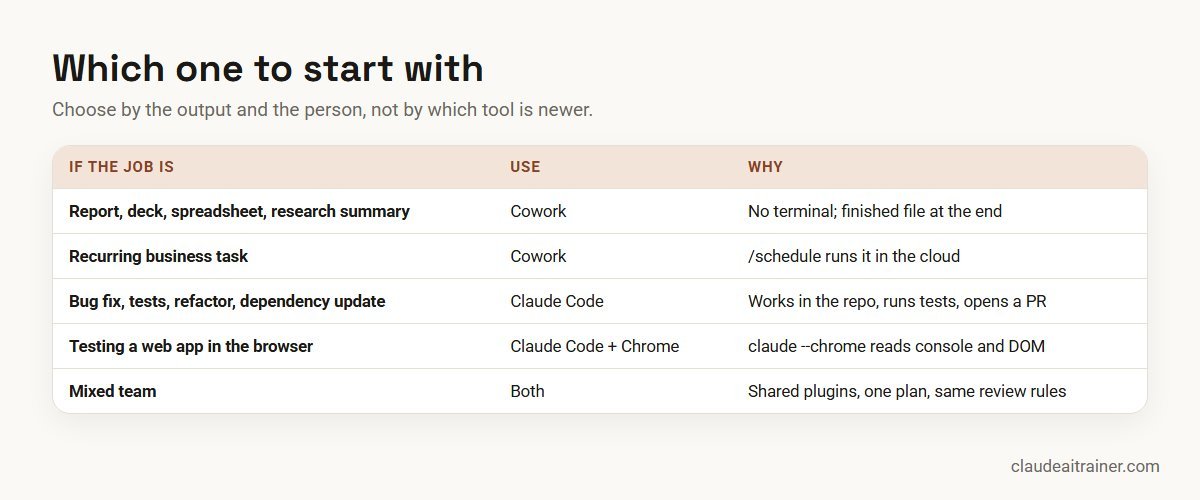
- Use Claude Cowork when the output is a document, spreadsheet, slide deck, research summary, organised folder or recurring business report, and the person doing it does not want a terminal.
- Use Claude Code when the work lives in a code repository: fixing bugs, writing tests, refactoring, updating dependencies, reviewing or opening pull requests.
- Use both in any organisation with engineers and non-engineers. The plans that include one include the other, and plugins work in both.
Anthropic’s own desktop docs draw the same line: tasks that typically go to Code include fixing bugs, updating dependencies, running tests and opening pull requests, while research, document editing and spreadsheet work stay in Cowork.
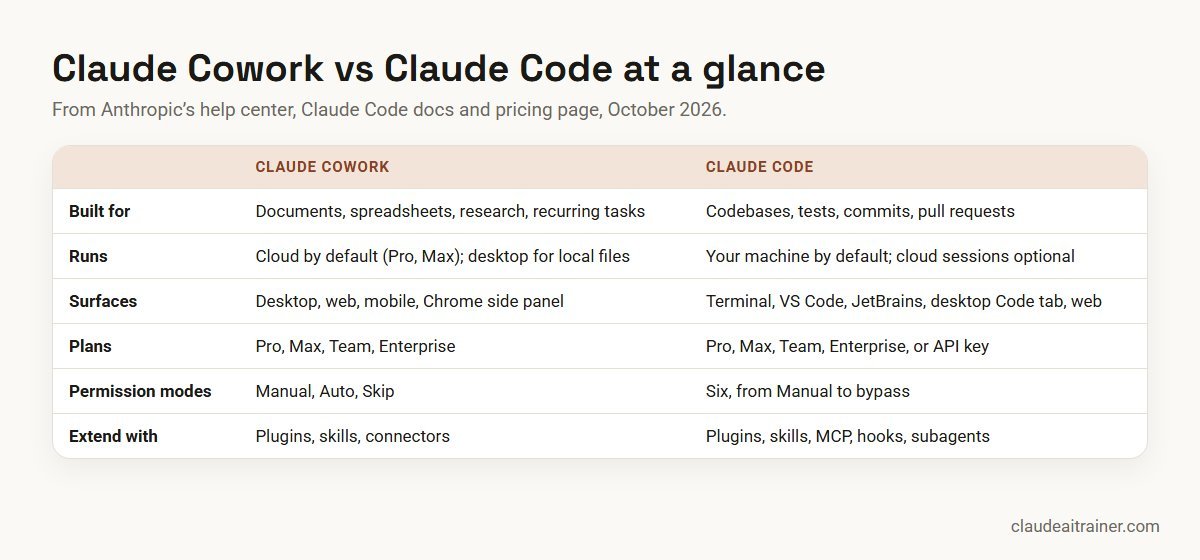
Side-by-side comparison
| Area | Claude Cowork | Claude Code |
|---|---|---|
| Built for | Knowledge work: files, documents, spreadsheets, slides, research, recurring tasks | Software work: codebases, commands, git, tests, pull requests |
| Where it runs | Claude desktop app (macOS, Windows, Linux beta), web and mobile, Chrome side panel | Terminal, VS Code (and Cursor), JetBrains, the desktop app’s Code tab, web (claude.ai/code), mobile, Slack, GitHub Actions |
| Where the work happens | In an isolated cloud environment by default on Pro and Max; local files through the desktop app | On your machine by default; cloud sessions on Anthropic-managed infrastructure when you start one |
| Plans | Pro, Max, Team, Enterprise | Pro, Max, Team, Enterprise, or a Console API key |
| Usage | Draws on your Claude plan; multi-step tasks use more | Shares the same limits as Claude |
| Permission modes | Manual, Auto, Skip | Six: Manual, accept edits, plan, auto, don’t ask, bypass permissions |
| Project instructions | Folder instructions; settings from your Claude account (Customize) | CLAUDE.md (or AGENTS.md), settings files in the repo and your home folder |
| Extend with | Plugins, skills, connectors | Plugins, skills, MCP servers, hooks, subagents, Agent SDK |
| Scheduling | /schedule or Scheduled in the sidebar; runs in the cloud | Cloud scheduled tasks, desktop scheduled tasks, /loop |
| Who it suits | Analysts, operations, finance, HR, marketing, managers | Developers, data engineers, DevOps and platform teams |
Sources: Get started with Cowork, Use Claude Cowork on web, desktop, and mobile, Claude Code overview, permission modes and Claude pricing, all checked October 2026.
What Claude Cowork is
Anthropic describes Cowork as bringing Claude Code’s agentic architecture to knowledge work, with no terminal required. You describe a task such as “turn these twelve supplier quotes into a comparison spreadsheet and a one-page recommendation”, Claude shows its approach, and then it works through the steps: reading files, using connectors, browsing, writing and checking the output.
Three things changed in the second half of 2026 and matter for any comparison you read:
- Cowork moved to the cloud. From 6 October 2026, new Cowork tasks on Pro and Max run in an isolated environment on Anthropic’s servers and are saved to your account, so they keep going if you close your laptop. Reaching files on your own computer, browsing with your own Chrome and computer use still go through the desktop app, which must be open and connected.
- Cowork is merging into Claude. The pricing page now says “Claude Cowork is now just Claude”, rolling out to Pro and Max first. If your message box no longer shows Chat and Cowork options, you already have the combined experience and simply describe the task. On Team (in beta) and Enterprise it appears where the “Chat and Cowork unified” setting is on.
- It reaches more places. Cowork runs on desktop for all paid plans, on web and mobile for Pro and Max, in beta on Team, and on Enterprise when an owner enables it. The Claude in Chrome side panel also starts Cowork sessions.
What Claude Code is
Claude Code is Anthropic’s agentic coding tool. In the docs’ words it reads your codebase, edits files, runs commands and integrates with your development tools. It started as a command-line tool and still feels most at home there, but the same engine now runs in the VS Code extension, the JetBrains plugin, the desktop app’s Code tab and the browser at claude.ai/code. Because every surface uses the same engine, a repository’s CLAUDE.md files, settings and MCP servers carry across all of them.
What makes it a developer tool is not the terminal but the depth of control: six permission modes, an optional operating-system sandbox, hooks that run your own scripts before or after Claude’s actions, subagents, git integration that stages, commits and opens pull requests, and a non-interactive mode for scripts and CI. For a full introduction, see our Claude Code tutorial for beginners.
How to start each one
Start a Cowork task
- Open Claude on the web, in the Claude desktop app or in the mobile app.
- In the message box, select Cowork. If you do not see Chat and Cowork options, you have the combined experience; skip this step.
- Describe the task and the output you want. On desktop, connect a folder if Claude needs local files.
- Review the approach Claude proposes, then let it run. Check the result before you share it.
To repeat a task, type /schedule in the task or click Scheduled in the left sidebar. Scheduled tasks run in the cloud without your device being online. Our step-by-step Cowork guide goes further.
Start a Claude Code session
# macOS, Linux, WSL
curl -fsSL https://claude.ai/install.sh | bash

# Windows PowerShell
irm https://claude.ai/install.ps1 | iex

# then, in a project folder
cd your-project
claude
Claude Code asks you to log in on first use. Prefer not to use a terminal? Install the desktop app, sign in and click the Code tab; it includes Claude Code, so there is nothing else to install. Or open claude.ai/code in a browser to run sessions against a connected GitHub repository.
For mixed teams
Two agents, one set of habits
Developers get the most from Claude Code; analysts, ops and managers get the most from Cowork. We run hands-on sessions for both groups on their own files and repositories, with shared rules for permissions and review. Book a short call if that would help.
Pricing and usage
The two are not sold separately. They come with the same Claude plans (checked October 2026, US dollars before tax):
- Free: neither Claude Code nor Cowork.
- Pro: US$20 a month, or US$17 a month billed annually. Includes Claude Code and Cowork.
- Max: from US$100 a month, with 5x or 20x Pro usage.
- Team: standard seats US$25 a month (US$20 billed annually); premium seats US$125 (US$100 annually) with 5x the usage of standard seats. The Team feature list names both Claude Code and Claude Cowork.
- Enterprise: US$20 per seat per month billed annually, 20-seat minimum, plus usage.
On usage, Anthropic’s article on using Claude Code with Pro or Max says the limits “are shared across Claude and Claude Code”, with a five-hour session limit and a weekly limit. The Cowork help article adds that multi-step tasks use more than quick questions and suggests checking Settings > Usage. In Claude Code, /status shows your remaining allocation. Paid plans can turn on usage credits to keep working at API rates after a limit. In practice, a long agent run in either tool draws on the same pool, so a person who uses both heavily needs a plan sized for both. Developers can also run Claude Code on a pay-as-you-go Console API key instead of a subscription. For a fuller comparison of plans, see the best Claude plan for business.
Permissions and control
Both tools ask before risky actions, but they give you different amounts of control.
Cowork has three modes: Manual (approve each action), Auto (Claude reviews actions for safety and blocks unsafe ones) and Skip (no checks; for fully trusted tasks only). Claude asks for explicit permission before permanently deleting files.
Claude Code has six modes. Manual (setting value default) runs only reads without asking; acceptEdits also allows file edits and common filesystem commands; plan analyses before changing anything; auto runs with background safety checks; dontAsk denies anything not pre-approved, for locked-down automation; and bypassPermissions is for isolated environments only. You switch with Shift+Tab in the terminal or the mode selector in VS Code and the desktop app. Admins can turn auto mode off for an organisation through managed settings.
Where they overlap
The two share more plumbing than most comparisons admit:
- Plugins bundle skills, connectors and sub-agents, are saved to your account, and work in chat, Cowork and Claude Code. See the best Claude skills, plugins and connectors for business picks, and the best Claude Code plugins for developer ones.
- Skills package a repeatable way of working. Our guide on how to create Claude skills covers both tools.
- Dispatch lives in Cowork and can hand a task to a Code session when it decides the task is development work (Pro and Max only, per the desktop docs).
- Browser use: Cowork can work through Claude in Chrome or the desktop app’s built-in browser, and Claude Code can drive the same Chrome extension to test web apps. Our Claude in Chrome guide explains both.
One difference catches people out: Cowork takes its skills, plugins and connectors from the Customize settings in your Claude account, not from the ~/.claude folder that the Claude Code CLI uses. A skill you install for one is not automatically present in the other unless it comes through a plugin or your account.
Worked example: one quarter-end, two tools
Take a 120-person software company preparing its quarterly customer report. Three people are involved.
- The finance analyst uses Cowork. She connects the folder of exported invoices and the usage CSV, and asks for a revenue-by-segment spreadsheet with a chart and a one-page summary of the largest movements. She approves each step in Manual mode the first time, then saves the task with
/schedulefor next quarter. - The customer success lead uses Cowork with Claude in Chrome. He asks Claude to read the open renewal opportunities in the CRM (on the company’s allowlist) and draft a risk list, read-only, for him to check.
- The data engineer uses Claude Code. The usage CSV came from a script with a known bug that double-counts trial accounts. In the repository she asks Claude Code, in plan mode, to find the cause, add a failing test, fix the query and open a pull request. A colleague reviews and merges it before the report is final.
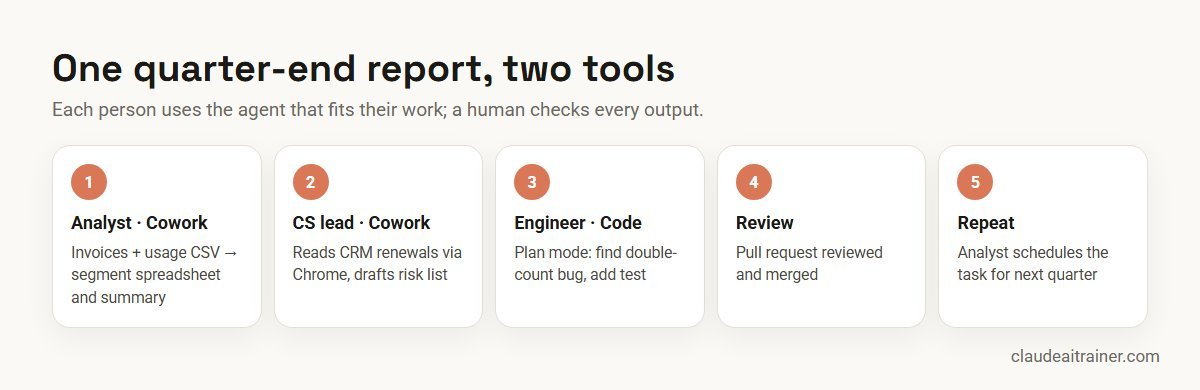
Nobody had to learn the other person’s tool. The shared pieces were a company plugin with the report template and glossary, the same plan’s usage, and the same rule: a human checks every output before it leaves the team.
Security and governance
The governance questions are similar for both tools, but the answers sit in different places.
- Use business plans for company work. Team and Enterprise give admins control over who has which tool, which plugins and connectors are allowed and how data is handled.
- Decide permission modes up front. For Cowork, agree when Skip is acceptable (rarely). For Claude Code, decide whether auto and bypass modes are allowed, and enforce it with managed settings.
- Know where the work runs. Cowork tasks on Pro and Max now run in Anthropic’s cloud by default; Claude Code runs locally unless someone starts a cloud session. Check this against your data policies, especially for regulated data.
- Network controls have gaps. The Cowork help article notes that network egress settings do not cover web fetch, web search, MCP servers or Claude in Chrome. Plan connector and browser allowlists separately.
- Review extensions. Approve plugins, connectors and MCP servers centrally; a plugin can carry skills, connectors and code.
- Keep human review. Cowork outputs need a reader before they are sent; Claude Code changes need a pull request reviewer and your usual CI checks. For the developer side, see Claude Code security best practices.
Next step
Roll out the right agent to the right people
We help teams decide who gets which tool, set permission modes and plugin rules, and train people on real tasks. Online or on-site.
Related reading
How we checked
We read Anthropic’s help center articles Get started with Cowork, Use Claude Cowork on web, desktop, and mobile, and Using Claude Code with your Pro or Max plan, the Claude Code documentation (overview, desktop app and permission modes) and the Claude pricing page on 28 October 2026. Both products changed several times in 2026, so check the linked pages before you decide, and treat plan details as correct for October 2026 only.
Key takeaways
- Cowork is for documents, spreadsheets, research and recurring business tasks; Claude Code is for repositories, tests, commits and pull requests
- Both come with the same paid plans (Pro, Max, Team, Enterprise) and neither is on Free
- Usage comes out of one Claude plan, so heavy agent work in either tool counts against the same limits
- Cowork tasks now run in the cloud by default on Pro and Max; Claude Code runs on your machine unless you start a cloud session
- Plugins work in both, but Cowork takes its setup from your Claude account while Claude Code also reads CLAUDE.md and settings in the repo
- Most organisations need both: Code for engineers, Cowork for everyone else, with shared rules
FAQ
Claude Cowork vs Claude Code: common questions
What is the difference between Claude Cowork and Claude Code?
Both are Claude agents that plan and carry out multi-step tasks. Cowork is built for knowledge work such as documents, spreadsheets, research and recurring reports, without a terminal. Claude Code is built for software work in a code repository: editing code, running commands and tests, and creating commits and pull requests.
Is Cowork just Claude Code with a different interface?
Anthropic describes Cowork as bringing Claude Code’s agentic architecture to knowledge work. They share that foundation, but they are set up differently: Cowork takes its skills and connectors from your Claude account and offers three permission modes, while Claude Code reads repository files such as CLAUDE.md and has six permission modes, hooks and git integration.
Do I need to pay separately for Cowork and Claude Code?
No. Both come with Claude Pro, Max, Team and Enterprise plans (checked October 2026). Neither is included in the Free plan. Developers can also use Claude Code with a pay-as-you-go Console API key.
Do Cowork and Claude Code share usage limits?
Anthropic says Claude and Claude Code share the same limits, with a five-hour session limit and a weekly limit on Pro and Max. Cowork is part of Claude, so heavy agent work in either tool draws on the same plan.
Can a non-developer use Claude Code?
They can, through the desktop app’s Code tab or claude.ai/code, but it is designed around code repositories. For documents, spreadsheets and research, Cowork is the better fit and needs no technical setup.
Can Cowork write or run code?
Cowork produces finished files such as spreadsheets, slides and reports, working through the steps in its own environment. For changes to a real codebase, with tests, commits and pull requests, use Claude Code. Dispatch in Cowork can hand development work to a Code session on Pro and Max.
Does Cowork run on my computer or in the cloud?
Since 6 October 2026, new Cowork tasks on Pro and Max run in an isolated cloud environment and are saved to your account. Access to local files, your own Chrome and computer use goes through the Claude desktop app, which must be open and connected.
Where does Claude Code run?
On your machine by default, in the terminal, VS Code, JetBrains or the desktop app’s Code tab. You can also start cloud sessions on the web or from the desktop app; these run on Anthropic-managed infrastructure and count towards your plan limits.
Can I use the same plugins in both?
Yes. Anthropic’s Cowork article says plugins are saved to your account and work in chat, Cowork and Claude Code. Skills installed only in the Claude Code CLI’s ~/.claude folder are not automatically available in Cowork.
Which is safer?
Neither is safe by default for every task. Cowork offers Manual, Auto and Skip modes and asks before permanent deletions. Claude Code offers finer control, including an optional sandbox and admin-managed settings. In both, keep business plans, careful permission modes and human review.
Which should a company roll out first?
Roll out each to the people it suits. Engineering teams usually start with Claude Code; operations, finance, HR and marketing usually start with Cowork. A small pilot in each group on real tasks shows where the value is before a wider rollout.
Do you offer training on Cowork and Claude Code?
Yes. We run hands-on Cowork sessions for business teams and Claude Code sessions for developers, on their own files and repositories. See our Cowork and Claude Code training pages or book a short call.
Trusted by
Teams we’ve trained
…and 200+ organisations, across 16+ countries.
What participants say
Real feedback from real sessions
Verified feedback collected from participants across corporate sessions — average rating 4.8/5.
“A very productive session for working professionals. A must-do.”
“The session was highly insightful and conducted in a very professional and interactive manner. Learnt about AI and excited to learn more!”
“Highly recommended! Hands-on and directly useful — from making PPTs and strategic plans to building KRAs.”
“I would recommend everyone to go through this session — it clarifies both what to expect from AI and where AI isn’t needed.”
“A nice interactive session with a lot of new insights and the power of AI. This will help me save time in routine activities.”
“A very good training session. AI can do wonders — we’ll implement it to create efficiency and save time.”
Explore more
Keep going with Claude AI training
Work with us
Train your teams on Cowork and Claude Code
Tell us who will use which tool and what work you want to hand to Claude. We will suggest a short, hands-on format for each group, online or on-site (for example Claude Code training in Bengaluru or Noida), and send a fixed proposal, usually within one business day.