Blog · Claude for HR
Claude Prompts for HR: 12 Templates for Hiring, Policy and People Data (2026-27)
HR work mixes careful writing with sensitive data, and a careless prompt gets both wrong. These twelve prompts are written for HR generalists, business partners, recruiters and people-analytics leads. Each one names the file to attach, the place in Claude to run it and the check a person makes before anything reaches a candidate or an employee.
Most HR teams first try Claude with a one-line request such as “write a job description for a sales manager”. The result is fluent and generic: it does not know your grading structure, your benefits, your tone or the law you work under. HR prompts work when they carry the source document, the decision a person still owns, the format the reader expects and an instruction to flag anything Claude assumed.
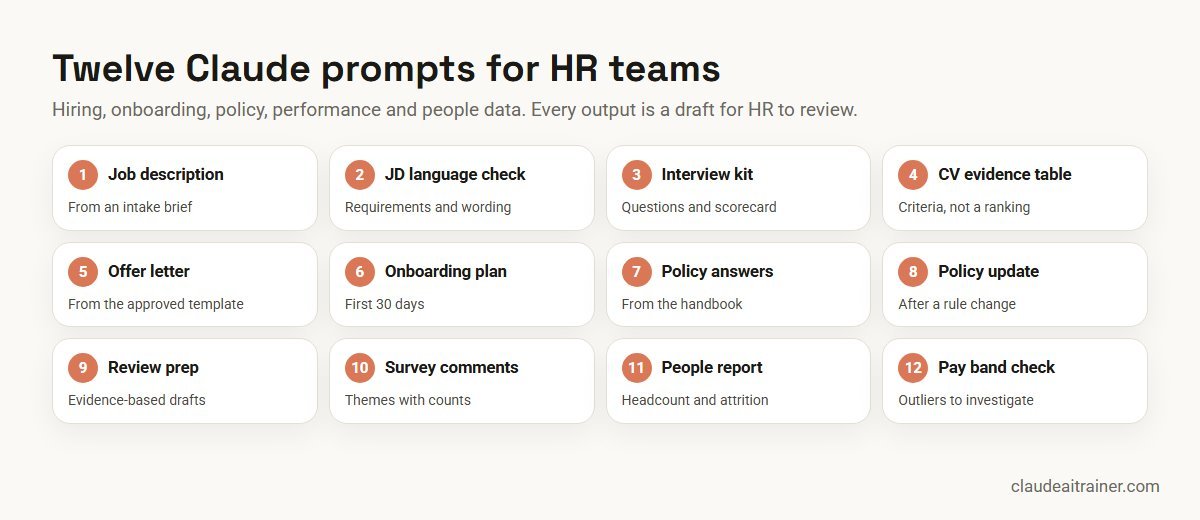
The twelve prompts below follow that pattern. They are grouped in the order of the employee lifecycle: hiring, joining, policy, performance and people data. Product details were checked on Anthropic’s documentation and plugin repository in October 2026. If you want one starter use case per department rather than an HR library, read Claude use cases for business; for the general method behind these templates, see how to prompt Claude.
Quick answer: twelve Claude prompts for HR
- Job description: a complete JD from the hiring manager’s intake notes and your template.
- JD language check: inflated requirements, jargon and exclusionary wording flagged.
- Interview kit: structured questions with scoring anchors and a scorecard.
- CV evidence table: evidence for each must-have criterion, without a ranking.
- Offer letter: the approved template filled from the approved terms.
- Onboarding plan: a 30-day plan with owners and a first-week schedule.
- Policy question: an answer from the handbook with the clause quoted.
- Policy update: tracked changes after a legal or business change.
- Review preparation: a manager’s draft built from goals and recorded evidence.
- Survey comments: themes with counts and anonymised quotes.
- People report: headcount, joiners, leavers and attrition from an HRIS export.
- Pay band check: salaries outside band and gaps worth a closer look.
Where to run HR prompts
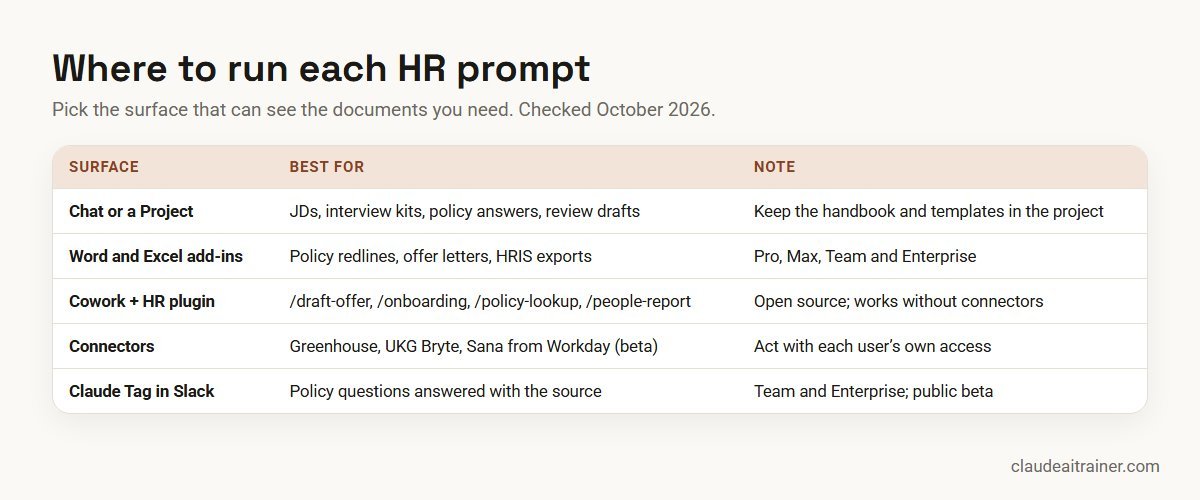
What Claude can see decides how good the answer is, so choose the surface before you write the prompt.
- A chat or a Project. Good for job descriptions, interview kits, policy answers and review drafts. An HR Project that holds the handbook, the JD template, the competency framework and your tone guide means you stop pasting context into every chat. Our Claude Projects examples show how to structure one.
- Claude for Word and Claude for Excel. Add-ins for Pro, Max, Team and Enterprise plans. Word suits policy redlines and offer letters, because edits can come back as tracked changes; Excel suits HRIS exports, trackers and pay data. See Claude for Word use cases and how to use Claude in Excel.
- Cowork with Anthropic’s HR plugin. The open-source
human-resourcesplugin is designed mainly for Cowork and also works in Claude Code. Its commands are/draft-offer,/onboarding,/performance-review,/policy-lookup,/comp-analysisand/people-report, with background skills for recruiting pipelines, interview prep, org planning and people analytics. It works on files you provide and can be extended with HRIS and ATS connectors. - Connectors. The connectors directory lists HR tools such as Greenhouse (verified, with read and write tools for candidates, jobs, interviews and offers), UKG Bryte and Sana from Workday (a beta that needs Workday-side setup). Connectors act with each person’s own access in that system.
- Claude Tag in Slack. On Team and Enterprise plans, and in public beta, Claude can answer policy questions in a Slack channel from connected documents and cite the source, which suits an internal “ask HR” channel.
Comparison table
| Prompt | Attach | Best surface | Reviewer check |
|---|---|---|---|
| Job description | Intake notes, JD template, grade guide | HR Project | Hiring manager confirms scope |
| JD language check | Draft JD | Chat or Word add-in | Requirements still job-related |
| Interview kit | JD, competency framework | HR Project | Every question maps to a criterion |
| CV evidence table | Criteria, anonymised CVs | Chat or Cowork | Recruiter reads every CV |
| Offer letter | Offer template, approved terms | /draft-offer or Word | Terms match the approval |
| Onboarding plan | Role, start date, checklist | /onboarding or Project | Owners and dates confirmed |
| Policy question | Handbook | Project or Claude Tag | Clause quoted and current |
| Policy update | Current policy, change summary | Word add-in | Legal or ER review |
| Review preparation | Goals, notes, feedback | Chat (manager’s own) | Manager owns the rating |
| Survey comments | Anonymised comments file | Chat with code execution | Sample of quotes checked |
| People report | HRIS export | Excel add-in or /people-report | Totals agree to the HRIS |
| Pay band check | Salary file, band table | Excel add-in or /comp-analysis | Reward team investigates |
The twelve prompts in detail
1. Job description prompt
Use it for turning a hiring manager’s rough notes into a complete job description in your house format. Attach: the intake notes, your JD template and the grade or levelling guide.
You are an HR business partner at [company]. Using the attached intake
notes from the hiring manager, our JD template and the levelling guide,
write the job description for [role] at [grade]. Keep the template's
headings. Separate must-have requirements (no more than six) from
nice-to-haves. Describe outcomes for the first year, not just duties.
Use plain English and avoid internal jargon. Mark anything the notes
don't settle (reporting line, location, travel) as [CONFIRM].
Check. The hiring manager confirms scope, grade and the [CONFIRM] items before the role is posted.
2. Job description language check prompt
Use it for a second pass on any JD before it goes live, especially roles that attract few applicants. Attach: the draft JD.
Review this job description before we publish it. List, with the exact
sentence: requirements that look inflated for the grade (for example
years of experience or degrees the work doesn't need), jargon an
outside candidate wouldn't understand, wording that may discourage
qualified people from applying, and any requirement that is not
clearly linked to the job. Suggest a replacement for each. Do not
rewrite the whole JD.
Check. The recruiter accepts changes one by one and keeps each remaining requirement because the job needs it.
3. Structured interview kit prompt
Use it for giving every interviewer the same questions and the same scoring scale. Attach: the final JD and your competency framework.
Build a structured interview kit for [role] from the attached JD and
competency framework. For each of the four most important
competencies: two behavioural questions, two follow-up probes, and a
1-4 scoring anchor that describes what a weak, adequate, strong and
exceptional answer sounds like. Add a one-page scorecard and a debrief
agenda. Every question must relate to the job; avoid questions about
personal circumstances.
Check. Each question maps to a criterion in the JD. The HR plugin’s interview-prep skill follows the same pattern if you run this in Cowork.
4. CV evidence table prompt
Use it for helping a recruiter read a batch of applications against agreed criteria. It lays out evidence; it does not score or rank people. Attach: the must-have criteria and CVs with names, photos, dates of birth and contact details removed.
For each attached CV, build one row in a table with a column per
must-have criterion in the attached list. In each cell, quote the line
from the CV that shows evidence for the criterion, or write "not
stated". Do not score, rank or recommend candidates, and do not infer
age, gender, nationality, health or family status. Add a final column
listing questions the recruiter could ask to fill the gaps.
Check. The recruiter reads every CV and makes every shortlist decision. Using AI in hiring carries specific legal duties in some places, for example New York City’s rules on automated employment decision tools and the EU AI Act, which treats recruitment uses as high-risk; check with your legal team before you use any AI step in selection.
5. Offer letter prompt
Use it for producing an offer quickly once the terms are approved. Attach: the approved offer template and the approval record with salary, grade, start date and benefits.
Fill the attached offer letter template for [candidate reference] using
only the terms in the attached approval: job title, grade, base salary,
variable pay, start date, location, probation period and benefits.
Do not change any clause outside the marked fields. List every field
you filled and its source, and flag any field the approval doesn't
cover instead of guessing it.
Check. A second person compares the letter with the approval before it is sent. The plugin’s /draft-offer command does the same job in Cowork.
6. Onboarding plan prompt
Use it for a consistent first month for every new joiner. Attach: the role profile, start date, team calendar and your onboarding checklist.
Create a 30-day onboarding plan for a new [role] starting on [date],
using our attached onboarding checklist and team calendar. Include:
access and equipment tasks with owners due before day 1, a day-by-day
first week, weekly goals for weeks 2-4, the people they should meet
and why, and three check-in questions for the manager at day 30.
Flag any checklist item that has no owner.
Check. The manager and IT confirm owners and dates. In Cowork, /onboarding produces a similar checklist and first-week plan.
For HR leaders
Want your HR team working from one prompt standard?
Prompts help most when they sit on top of your own templates, a data-handling rule everyone follows and a clear review step. We run hands-on sessions where HR teams build those on their own policies and hiring documents. Book a short call if that would help.
7. Policy question prompt
Use it for answering employee questions on leave, travel, expenses and remote work consistently. Attach: the current handbook, ideally kept in an HR Project.
Answer this employee question using only the attached handbook:
"[question]". Quote the clause you relied on with its section number.
If the handbook doesn't cover the case, or two clauses conflict, say
so and suggest who in HR should decide. Write the answer in plain
English in under 120 words, suitable to send to the employee.
Check. HR confirms the quoted clause is the current version before replying. For a Slack channel, Claude Tag can answer from connected documents and name the source, which makes the same check quick.
8. Policy update prompt
Use it for revising a policy after a change in law, a new benefit or a business decision. Attach: the current policy in Word and a short, approved summary of what has changed.
Update the attached [policy name] to reflect the attached change
summary. Make every edit as a tracked change. Do not touch clauses the
change doesn't affect. Then give me a table of each change: section,
old wording, new wording and the reason from the summary. List any
other sections that may now be inconsistent, and anything you think
needs legal review.
Check. Legal or employee relations reviews the tracked changes before approval. Claude does not know your jurisdiction’s latest rules unless you give them to it.
9. Performance review preparation prompt
Use it for helping a manager write a fair, evidence-based review draft. Attach: the employee’s goals, the manager’s own one-to-one notes and any feedback collected through your process.
Help me prepare the annual review for a [role] on my team using the
attached goals, my one-to-one notes and the feedback received. For each
goal: what was achieved, with the evidence and its date. Then list
strengths and development areas, each with a specific example. Point
out where my notes rely on opinion rather than evidence, and where the
year's early months are thin. Do not suggest a rating.
Check. The manager decides the rating and rewrites the draft in their own voice. The plugin’s /performance-review command helps HR build the self-assessment prompts and calibration pack around this.
10. Engagement survey comments prompt
Use it for making sense of hundreds of free-text survey comments. Attach: the comments file with names, teams smaller than your reporting threshold and other identifying details removed.
Analyse the attached engagement survey comments. Group them into no
more than eight themes. For each theme: a one-line description, the
number of comments, the split by department where the group has at
least [10] respondents, and two short quotes that represent it, with
any detail that could identify a person removed. End with the three
themes leaders should act on and a question to test each one.
Check. Read a sample of comments per theme to confirm the grouping, and keep small-group results out of the report.
11. People report prompt
Use it for the monthly headcount and attrition report. Attach: the HRIS export of joiners, leavers and active employees.
From the attached HRIS export for [month], build a people report:
opening and closing headcount by department, joiners and leavers,
monthly and rolling 12-month attrition (state the formula you use),
regretted versus non-regretted leavers where the field exists, and
open roles. Put the calculations on a separate tab. Write five lines
of commentary and flag any department where attrition has risen for
three months running.
Check. Headcount totals agree to the HRIS. The plugin’s /people-report command and the Excel add-in both suit this job.
12. Pay band check prompt
Use it for spotting salaries that sit outside their band before a pay review. Attach: a salary file keyed by employee ID (no names) and your band table.
Compare each salary in the attached file with the band for its grade
and location in the attached band table. Show: the number of people
below minimum, above maximum and in each quartile by grade; a list of
employee IDs outside band with the gap; and median pay by grade and
gender where each group has at least [5] people. Describe the gaps; do
not explain their causes or recommend individual changes.
Check. The reward team investigates each outlier and decides any action. The plugin’s /comp-analysis command covers band placement and benchmarking in Cowork.
How to adapt these prompts
- Attach, don’t describe. The handbook, templates and frameworks belong in an HR Project, so every prompt draws on the same versions.
- Remove what isn’t needed. Employee IDs instead of names, no dates of birth, no health details. Most HR analysis works perfectly well without them.
- Name the decision owner. Lines such as “do not rank” or “do not suggest a rating” keep Claude in the role of drafting and organising.
- Ask for sources. “Quote the clause” and “list every field and its source” make review fast.
- Save what works. Once a prompt is reliable, package it as a skill (see how to create Claude skills) so every HR colleague gets the same method. Our list of Claude skills, plugins and connectors covers what else is available.
Worked example: one hiring round with five prompts
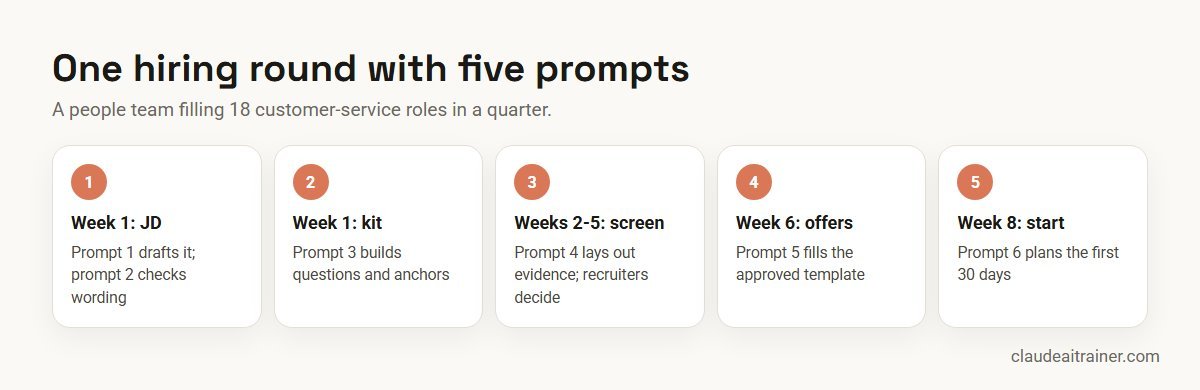
A people team at a 900-person services company needs 18 customer-service hires in a quarter. It uses five of the prompts above:
- Week 1. The HR business partner runs prompt 1 on the hiring manager’s notes and prompt 2 on the draft; the manager signs off the JD.
- Week 1. Prompt 3 builds one interview kit used by all six interviewers.
- Weeks 2 to 5. Recruiters use prompt 4 on anonymised CVs to see the evidence side by side; they read every application and choose the shortlist themselves.
- Week 6. Prompt 5 fills offer letters from approved terms; a second recruiter checks each one.
- Week 8. Prompt 6 produces the onboarding plan, shared with team leads and IT.
The gain is consistency and less time on first drafts. The judgement calls (who is shortlisted, who gets an offer, on what terms) stay with people.
Next step
Turn these templates into an HR playbook
We help people teams adapt these prompts to their handbook and hiring process, save the reliable ones as shared skills and agree what a reviewer checks. Online or on-site.
Security and governance
- Use an approved business workspace. Anthropic’s pricing page states that Team and Enterprise plans do not use your content for model training by default, while on Free, Pro and Max it is a setting the user controls. Keep employee data in the workspace your company has cleared; see the best Claude plan for business.
- Minimise personal data. Follow your data protection law, such as GDPR or India’s Digital Personal Data Protection Act, and your own policy on what employee data may be processed by an AI service.
- Keep people in charge of decisions. Claude can organise evidence and draft documents. Hiring, pay, performance ratings and dismissals are decisions for accountable people.
- Watch connector permissions. HR connectors act with each user’s own access. The Greenhouse connector, for example, includes tools that update, reject or anonymise candidates and deactivate users, so keep write actions behind a confirmation step and give access only to those who need it.
- Know where add-in data sits. Anthropic’s documentation says the Microsoft 365 add-ins keep chat history locally in the browser and that their activity is not in Enterprise audit logs, though it is covered by the Compliance API, which is in public beta.
- Trusted files only. Documents from outside your organisation can carry hidden instructions. Review any action Claude asks you to confirm.
Sources
Checked October 2026: Anthropic’s open-source HR plugin, the Greenhouse connector listing, Claude Tag: find answers in your docs, Claude for Excel documentation and Claude plans and pricing.
Key takeaways
- Attach the real template, handbook or export; an HR prompt without source documents invites invented policy
- Strip names and IDs from data that does not need them before you upload it
- Claude organises evidence and drafts; people make every hiring, pay and performance decision
- Use the Word and Excel add-ins for policy redlines and HRIS exports, and Cowork with the HR plugin for multi-file jobs
- Keep the handbook, templates and tone guide in a Project so prompts stay short
- Use a Team or Enterprise workspace your company has approved for employee data
FAQ
Claude prompts for HR: common questions
What are the best Claude prompts for HR?
Useful HR prompts cover job descriptions, JD language checks, structured interview kits, CV evidence tables, offer letters, onboarding plans, policy answers, policy updates, review preparation, survey comment analysis, people reports and pay band checks. Each works best with the real template or data attached and a clear statement of who makes the decision.
Can Claude screen CVs?
Claude can lay out the evidence in each CV against criteria you set, which helps a recruiter read faster. It should not rank or reject candidates on its own, and some jurisdictions regulate AI in hiring, so check with your legal team first.
Does Anthropic have an HR plugin for Claude?
Yes. Anthropic’s open-source human-resources plugin, designed mainly for Cowork and also usable in Claude Code, includes /draft-offer, /onboarding, /performance-review, /policy-lookup, /comp-analysis and /people-report. It works on files you provide and can connect to HRIS and ATS tools.
Can Claude connect to Workday, Greenhouse or other HR systems?
The connectors directory lists Greenhouse (verified), UKG Bryte and Sana from Workday, which is in beta and needs setup on the Workday side. Connectors act with each user’s own permissions in that system.
Is it safe to put employee data into Claude?
Use a Team or Enterprise workspace your company has approved, which does not use your content for training by default, and share only the data a task needs. Follow your data protection law and internal policy.
Can Claude write job descriptions in our format?
Yes, if you attach your template, levelling guide and the hiring manager’s notes. Ask it to mark anything the notes do not settle so the manager can confirm it.
Can Claude answer employee policy questions?
Yes, when the handbook is attached or held in a Project, and you ask it to quote the clause it used. On Team and Enterprise plans, Claude Tag can answer in a Slack channel from connected documents and cite the source.
Can Claude write performance reviews?
It can help a manager organise evidence and draft the narrative. The manager decides the rating and should rewrite the draft in their own words.
Can Claude analyse engagement survey results?
Yes. Upload anonymised comments and ask for themes with counts and representative quotes. Keep small groups out of the results so individuals cannot be identified.
Which Claude plan does an HR team need?
Chat and Projects work on every plan, the Word and Excel add-ins need Pro, Max, Team or Enterprise, and Claude Tag needs Team or Enterprise. Teams handling employee data usually choose Team or Enterprise for admin controls and default no-training terms.
How do we stop Claude inventing policy?
Attach the current handbook, tell Claude to use only that document and quote the clause, and ask it to say when the handbook does not cover a case. A person then checks the clause before replying.
Should HR prompts be saved as skills?
Yes, once they work reliably. A skill gives every HR colleague the same method and output format, and enabled skills also apply in the Office add-ins.
Where can our HR team learn this hands-on?
Our Claude for HR teams training has HR staff build an HR Project, run these prompts on their own documents and agree a review routine, online or on-site.
Trusted by
Teams we’ve trained
…and 200+ organisations, across 16+ countries.
What participants say
Real feedback from real sessions
Verified feedback collected from participants across corporate sessions — average rating 4.8/5.
“A very productive session for working professionals. A must-do.”
“The session was highly insightful and conducted in a very professional and interactive manner. Learnt about AI and excited to learn more!”
“Highly recommended! Hands-on and directly useful — from making PPTs and strategic plans to building KRAs.”
“I would recommend everyone to go through this session — it clarifies both what to expect from AI and where AI isn’t needed.”
“A nice interactive session with a lot of new insights and the power of AI. This will help me save time in routine activities.”
“A very good training session. AI can do wonders — we’ll implement it to create efficiency and save time.”
Explore more
Keep going with Claude AI training
Work with us
Help your HR team get reliable results from Claude
Tell us about your team, the HR systems you use and the documents you produce most often. We will suggest a short, hands-on format, online or on-site (for example Claude AI training in Bengaluru), and send a fixed proposal, usually within one business day.