Blog · Claude for sales
Claude Prompts for Sales: 10 Templates from Prospecting to Forecast (2026-27)
Sellers do not need another list of clever one-liners. They need prompts that run on the account’s real history: the call notes, the CRM fields, the email thread and the pricing they are allowed to quote. These ten prompts cover a full sales day, from researching a new logo to writing the forecast, with what to attach, where to run each one and what a rep or manager should check.
Ask Claude to “write a cold email to a CFO” and you get something polite, generic and easy to delete. Give it the prospect’s annual report, two notes from a previous call and your three approved proof points, and the same request produces an email worth sending. Sales prompts are only as good as the account context behind them.
The ten prompts below follow a rep’s week: research, calls, follow-up, deals, then pipeline and renewals. Each one says what to attach and what to check. Product details were checked on Anthropic’s documentation and the sales plugin repository in October 2026. For a starter use case in every department, see Claude use cases for business; for marketing, see Claude prompts for marketing; and for the team that looks after customers after the sale, see Claude for customer support.
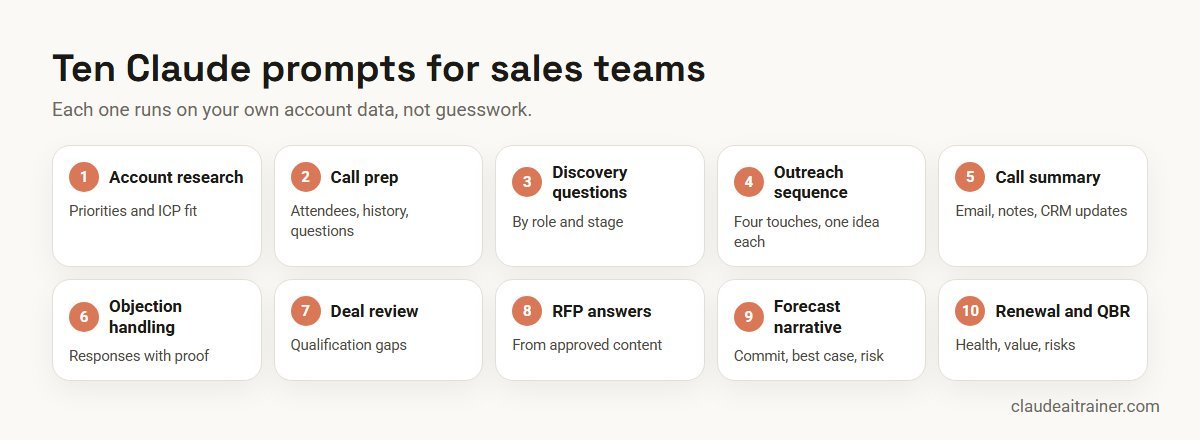
Quick answer: ten Claude prompts for sales
- Account research: priorities, triggers and fit against your ICP.
- Call preparation: a one-page brief before every meeting.
- Discovery questions: tailored to the buyer’s role and deal stage.
- Outreach sequence: four touches, each with one idea.
- Call summary and follow-up: email draft, team notes and CRM updates.
- Objection handling: responses backed by your own proof points.
- Deal review: qualification gaps and the next three actions.
- RFP and security questionnaire: answers from approved content only.
- Pipeline and forecast narrative: commit, best case and risk in plain words.
- Renewal and QBR: health, value delivered and expansion signals.
Set up the context once
Every prompt below gets shorter and better if Claude already knows how you sell.
- A sales Project. Upload your ICP, personas, qualification method, pricing rules, approved case studies and a few great emails. Our Claude Projects examples include a key account deal room you can copy.
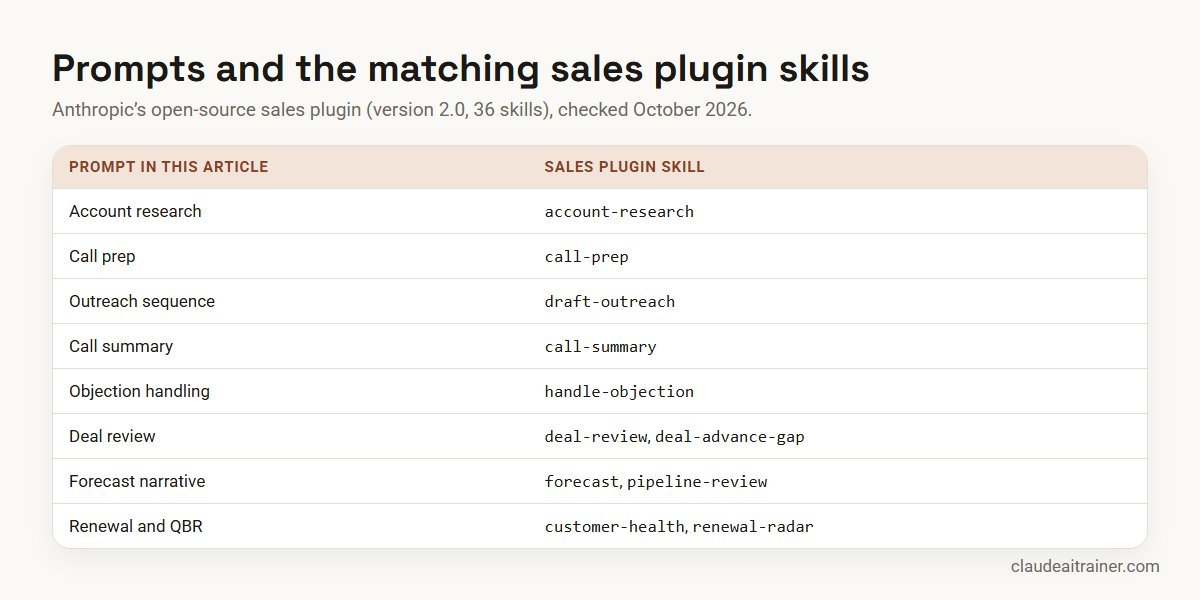
- Anthropic’s sales plugin. An open-source plugin designed mainly for Cowork that also works in Claude Code. Version 2.0 grew from 9 to 36 skills, including
account-research,call-prep,call-summary,draft-outreach,deal-review,forecastandrenewal-radar. It reads your CRM’s own stages and fields, works on Gmail or Outlook and Slack or Teams, and falls back to uploaded files when nothing is connected. - Connectors. The plugin lists CRM (HubSpot, Close, Salesforce), email and calendar, call recorders such as Gong and Fireflies, enrichment tools such as Clay and Apollo, and chat. Salesforce and Microsoft 365 are included, but an admin must enable each one first. Our list of MCP servers for Claude explains how connectors are governed.
- Claude for Outlook. A beta add-in for paid plans that triages the inbox, summarises threads with per-email citations and drafts replies that land unsent in the compose pane. Anthropic states it never sends mail or invites on its own.
Comparison table
| Prompt | Attach or connect | Best place to run it | Check before use |
|---|---|---|---|
| Account research | Annual report, news, CRM history | Chat with web search, or account-research | Facts dated and sourced |
| Call prep | Last notes, open opportunity, attendees | Sales Project or call-prep | Names and roles correct |
| Discovery questions | Persona, stage, method | Sales Project | Fits your method |
| Outreach sequence | Research brief, proof points | Sales Project or draft-outreach | No unapproved claims |
| Call summary | Transcript or notes | call-summary; Outlook add-in | Next steps quoted |
| Objection handling | Objection, win stories | Sales Project | Proof is real and current |
| Deal review | Opportunity record, emails, notes | deal-review | Manager agrees gaps |
| RFP answers | Questionnaire, approved answer library | Project or Cowork | Security and legal sign-off |
| Forecast narrative | Pipeline export | forecast | Numbers match CRM |
| Renewal and QBR | Usage, tickets, contract | customer-health | Value claims verified |
The ten prompts in detail
1. Account research prompt
Use it for a new target account or a meeting with a company you have not spoken to in a year.
Research [company] for a first meeting about [our product category].
Using the attached annual report and web search, give me: what they do
and how they make money in four lines, three priorities leadership has
stated publicly (quote and date each), recent triggers such as funding,
leadership changes, expansion or layoffs, and how they fit our ICP
(attached) on each criterion. End with two hypotheses for why they might
buy now. Label anything you could not source as a guess.
Check. Every fact has a date and a source. Old news presented as new is the most common error.
2. Call preparation prompt
Use it for the ten minutes before any customer call.
Prepare me for my [time] call with [company]. Attendees: [names and
titles]. Use the attached CRM notes, the last email thread and the open
opportunity. Give me a one-page brief: why we're meeting, what happened
last time, what each attendee likely cares about, open questions from
our side, risks in the deal, and a suggested agenda for 30 minutes with
the one outcome I should leave with.
Check. Names, titles and history are right. If your calendar and CRM are connected, the plugin’s call-prep skill gathers this for you.
3. Discovery question prompt
Use it for building a question bank for a persona and stage, rather than improvising.
Write 12 discovery questions for a [role] at a [industry, size] company
in the [stage] of our sales process. Follow our qualification method
(attached). Group them: current situation, pain and impact, decision
process, success criteria. For each, add the follow-up question to ask
if the answer is vague, and mark the three questions that matter most
for qualifying the deal.
Check. Questions fit your method and sound like your reps, not a script.
4. Outreach sequence prompt
Use it for a short, personalised sequence to a named prospect.
Using the attached research brief on [contact] at [company], write a
four-touch outreach sequence over 12 business days: two emails, one
LinkedIn message and a final short email. Each touch carries one idea
only: a trigger, a relevant customer story from the approved list,
a useful insight, and a polite close. Subject lines under 45
characters, emails under 110 words, one clear ask. Use only the proof
points in the attached list.
Check. Every claim and customer name is approved for external use, and sending stays in your email or engagement tool.
5. Call summary and follow-up prompt
Use it for the minutes after a call, when notes go stale fastest.
From the attached call transcript, give me: a five-line summary; the
buyer's stated pain, impact, timeline and decision process, each with a
short quote; agreed next steps with owner and date; a follow-up email
to the buyer under 150 words recapping what they said and the next
step; and the CRM fields I should update (stage, close date, next step,
amount) with the evidence for each change. Don't invent commitments.
Check. Next steps match what the buyer actually said. Anthropic’s plugin documentation notes that with call-summary, nothing is written to the CRM or sent until you say so.
For sales leaders
Want every rep prompting from the same playbook?
Prompt libraries stick when they sit on your ICP, your qualification method and the CRM your team already uses. We run hands-on sessions where reps build them on live accounts. Book a short call if that would help.
6. Objection handling prompt
Use it for preparing for a known objection: price, timing, a competitor, or “we’ll build it ourselves”.
A prospect said: "[objection, verbatim]". Context: [deal stage, buyer
role, competitor if any]. Give me three ways to respond: one that asks
a question to understand it better, one that reframes around the cost
of doing nothing, and one with a proof point from the attached win
stories. Keep each under 60 words, conversational, and don't discount
or promise anything not in our pricing rules.
Check. Proof points are real, current and approved; no discount is offered that a manager has not agreed.
7. Deal review prompt
Use it for a manager’s review of a large or slipping opportunity.
Review this opportunity using our qualification method. Attached: the
CRM record, email threads and call notes. Score each element as
confirmed, partial or missing, with the evidence. Then list what is
needed to move to the next stage and to close, with an owner and date
for each, the top three risks, and a one-paragraph honest view of
whether the close date is realistic.
Check. The manager and rep agree the gaps. The plugin’s deal-review and deal-advance-gap skills do similar work on connected data.
8. RFP and security questionnaire prompt
Use it for long questionnaires where most answers already exist somewhere.
Draft answers to the attached RFP questionnaire using only our approved
answer library and security documentation (attached). For each
question: the answer, the source document and section, and a confidence
level. Where no approved answer exists, write NEEDS SME and suggest who
should answer. Keep answers within any word limits stated in the RFP.
Output as a table I can paste back.
Check. Security, legal and product owners sign off. For very long questionnaires and many source files, Cowork can work through the whole folder.
9. Pipeline and forecast narrative prompt
Use it for the weekly forecast call or a 1:1 with your manager.
From the attached pipeline export for [quarter], write my forecast
narrative: commit, best case and pipeline totals; what changed since
last week (new, moved, slipped, lost) with amounts; the five deals that
decide the quarter with one line on each; and the biggest risk. Then
list deals with close dates in the past or no activity in 21 days.
Use the export's numbers only and show totals.
Check. Totals match the CRM. The plugin’s forecast skill writes the same commit, best case and pipeline story from connected or uploaded data.
10. Renewal and QBR prompt
Use it for account managers preparing a quarterly review or a renewal conversation.
Prepare a QBR for [customer] from the attached usage report, support
tickets, contract and last QBR notes. Include: value delivered against
the goals they set (with numbers from the files only), adoption trends,
open issues and their status, renewal date and risks, and two expansion
ideas with the evidence for each. Then draft a five-slide outline I can
build in PowerPoint.
Check. Value claims are backed by data the customer will recognise. To build the slides on your template, see Claude for PowerPoint use cases.
How to adapt these prompts
- Attach the account, not a description. Notes, transcripts and exports beat a summary from memory.
- Write your method in once. Put your qualification framework and ICP in the Project or a skill.
- Ask for quotes. “Quote the buyer” keeps summaries honest.
- Keep claims approved. A list of cleared proof points stops invented case studies.
- Save winners as skills. See how to create Claude skills.
Five mistakes that make sales prompts fail
- Researching from the company name alone. Without a report, a news link or web search turned on, Claude can only offer general knowledge, which may be out of date. Attach or connect a current source.
- Asking for “a follow-up” without the call. A follow-up written without the transcript repeats your pitch instead of the buyer’s words. Always attach the notes.
- Letting the prompt choose the discount. Pricing logic belongs in your rules file, and any exception belongs with a manager.
- One giant prompt for everything. Research, the email and the CRM update are three jobs. Chain them so you can check each output before the next step.
- Skipping the manager view. Deal reviews and forecasts are where prompts save managers the most time; leaving them out keeps the benefit with individual reps.
Worked example: one account executive’s week
An enterprise AE with 22 open opportunities uses five prompts:
- Monday. Prompt 9 on the pipeline export before the forecast call.
- Tuesday. Prompts 1 and 2 for two first meetings with new logos.
- Wednesday. Prompt 5 after three calls; the AE approves each follow-up and CRM change.
- Thursday. Prompt 7 with the manager on the largest deal, which produces a dated close plan.
- Friday. Prompt 8 for a security questionnaire, with gaps sent to the security team.
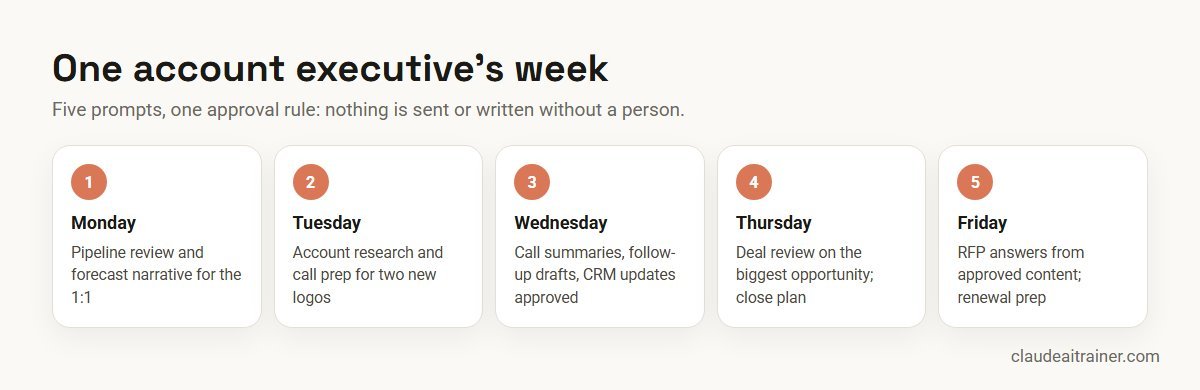
The time saved is in research, notes and admin. Relationships and judgement stay with the seller.
Next step
Make these prompts part of your sales rhythm
We help sales teams adapt the templates to their method, set connector permissions sensibly and build a weekly forecast routine. Online or on-site.
Security and governance
- Approved workspace. Keep customer data in a Team or Enterprise plan your company has approved; see the best Claude plan for business.
- Connector permissions. The sales plugin’s documentation says each connector can allow, ask or block each tool, and recommends setting send, post and write tools to ask for scheduled runs.
- Outside content is data. Emails and transcripts can contain instructions aimed at an AI. Anthropic’s plugin treats them as information and shows you any requested action first; keep that habit in chat too.
- Personal data. Follow your privacy policy and local law before uploading contact lists or call recordings.
- Claims. Pricing, discounts and customer references need approval. Claude drafts; the rep owns what is sent.
Comparing assistants for a revenue team? See Claude vs ChatGPT vs Gemini vs Copilot.
Sources
Checked October 2026: Anthropic’s open-source sales plugin (version 2.0), Claude for Outlook documentation, and plugins overview.
Key takeaways
- Give Claude the account's real history: notes, transcripts, CRM export, not just a company name
- Put your ICP, method and approved proof points in a Project or skill once
- Ask Claude to quote the buyer for every next step and to separate facts from guesses
- Anthropic's sales plugin maps to most of these prompts and works with or without a CRM connected
- Keep send, post and CRM write actions on ask, so a person approves every change
- Use only approved pricing, case studies and claims; Claude drafts, the rep owns the message
FAQ
Claude prompts for sales: common questions
What are the best Claude prompts for sales?
Useful sales prompts cover account research, call preparation, discovery questions, outreach sequences, call summaries, objection handling, deal reviews, RFP answers, forecast narratives and renewal or QBR preparation. Each works best with the account’s notes, transcripts or CRM export attached.
Can Claude write cold emails that don't sound generic?
Yes, if you attach research on the person and company and a list of approved proof points, and limit each email to one idea and one ask. Without context, any assistant writes generic copy.
Does Anthropic have a sales plugin for Claude?
Yes. Anthropic’s open-source sales plugin, designed mainly for Cowork and also usable in Claude Code, has 36 skills in version 2.0, including account-research, call-prep, call-summary, draft-outreach, deal-review and forecast.
Can Claude connect to Salesforce or HubSpot?
The sales plugin lists CRM connectors including Salesforce, HubSpot and Close. An administrator must enable each connector, and for Salesforce that includes setting up the organisation’s Salesforce app.
Will Claude update the CRM or send emails without asking?
The sales plugin acts when you ask, within each connector’s permissions, and shows suggested changes first. Admins can set write and send tools to ask so a person approves every change.
Can Claude summarise sales calls?
Yes. Paste or attach a transcript, or connect a call recorder such as Gong or Fireflies through the plugin, and ask for a summary, follow-up email and proposed CRM updates with quotes. Estate agents will find a property-specific version, with viewing follow-ups and offer comparisons, in Claude for real estate.
Can Claude help with RFPs and security questionnaires?
Yes, when it drafts from your approved answer library and marks gaps for subject experts. Security and legal owners should sign off before submission.
Can Claude write my sales forecast?
Claude can turn a pipeline export or connected CRM data into a commit, best case and pipeline narrative with changes and risks. The numbers should be checked against the CRM.
Can Claude draft replies in Outlook?
Claude for Outlook, a beta add-in on paid plans, drafts replies in your voice that land unsent in the compose pane. Anthropic states it never sends mail or invites on its own.
How do I stop Claude inventing customer stories?
Give it a list of approved proof points and tell it to use only those. Ask it to label anything it could not source.
Is it safe to put customer data into Claude?
Use a business plan your company has approved and follow your privacy policy. Avoid personal accounts for customer information.
Where can our sales team learn this hands-on?
Our Claude for sales and marketing teams training has reps build a sales project and run these prompts on live accounts, online or on-site.
Trusted by
Teams we’ve trained
…and 200+ organisations, across 16+ countries.
What participants say
Real feedback from real sessions
Verified feedback collected from participants across corporate sessions — average rating 4.8/5.
“A very productive session for working professionals. A must-do.”
“The session was highly insightful and conducted in a very professional and interactive manner. Learnt about AI and excited to learn more!”
“Highly recommended! Hands-on and directly useful — from making PPTs and strategic plans to building KRAs.”
“I would recommend everyone to go through this session — it clarifies both what to expect from AI and where AI isn’t needed.”
“A nice interactive session with a lot of new insights and the power of AI. This will help me save time in routine activities.”
“A very good training session. AI can do wonders — we’ll implement it to create efficiency and save time.”
Explore more
Keep going with Claude AI training
Work with us
Help your sales team get more selling time from Claude
Tell us about your team, your CRM and the sales motion you run. We will suggest a short, hands-on format, online or on-site (for example Claude AI training in Bengaluru), and send a fixed proposal, usually within one business day.